# Inventory Management with QR Codes: Setup Steps That Work
Learn how inventory management with QR codes works for resale: label strategy, scanning workflows, software choices and marketplace sync.
_Published: 2026-10-25 · Updated: 2026-10-25 · Source: https://ruit.es/en/blog/inventory-management-with-qr-codes/_
You're looking at a shelf that says one thing and a spreadsheet that says another. A coat sold online last night. Nobody can find it this morning. Someone moved it, cleaned it, or listed it twice, and no record shows which.
That's the normal state in a busy secondhand shop. **Inventory management with QR codes** can fix the finding part. It won't fix a bad record. If your condition grades are guesses, your locations are free text, and two staff members create two records for the same item, scanning just spreads those errors faster.
The work that matters is modeling each used item as a single, changing thing. One scan should update location, status, and custody. It shouldn't overwrite condition, cost, or ownership.
## Table of Contents
- [Decide What the Label Carries and What the Database Holds](#decide-what-the-label-carries-and-what-the-database-holds)
- [The split that holds up](#the-split-that-holds-up)
- [Label Error Correction and Print Choices](#label-error-correction-and-print-choices)
- [Print basics and the test that matters](#print-basics-and-the-test-that-matters)
- [How to Roll Out QR Inventory in Five Steps](#how-to-roll-out-qr-inventory-in-five-steps)
- [The five steps](#the-five-steps)
- [What to measure and what to block](#what-to-measure-and-what-to-block)
- [Scanner Hardware and Software Compared](#scanner-hardware-and-software-compared)
- [Software checks that outweigh the feature list](#software-checks-that-outweigh-the-feature-list)
- [Connecting Scans to Marketplaces, Shop and ERP](#connecting-scans-to-marketplaces-shop-and-erp)
- [Security and Edge Cases for Used Stock](#security-and-edge-cases-for-used-stock)
- [Controls worth setting up](#controls-worth-setting-up)
- [Edge cases that break naive setups](#edge-cases-that-break-naive-setups)
- [Pilot 200 Items Before a Full Rollout](#pilot-200-items-before-a-full-rollout)
- [Frequently Asked Questions](#frequently-asked-questions)
## Decide What the Label Carries and What the Database Holds
A price change should take one record update, not a new label. If a tag carries the listing price, staff have to reprint it each time the price changes. Each reprint creates another chance to attach the tag to the wrong used item.
Put only an **immutable item ID and a short verification value** on the label. Keep changing and sensitive fields in the item record. The QR code is a pointer to the record, not a compact database. A scan should update location, status, or custody while leaving condition, cost, and ownership intact.
### The split that holds up
| Data field | On the label | Where it lives |
| --- | --- | --- |
| Unique item ID | Yes | Item record |
| Short verification value | Yes | Label |
| Listing price | No | Item record, synced to channels |
| Marketplace listing URL | No | Sync layer or item record |
| Condition grade and defects | No | Item record with photos |
| Storage location (site, zone, shelf, bin) | No | Location updated by each scan |
| Acquisition cost and date | No | Private item record |
| Serial number or authentication evidence | No | Access-controlled software only |
> **Practical rule:** Keep a field off the label if it changes often or is private.
For a used camera body, the label needs the ID. The item record can hold its shutter count, accessories, condition, and purchase cost. When the camera moves from intake to a shelf, scan it and update its location. When its price changes, update the record and sync the listing. The original label stays attached, and the change does not overwrite condition or cost.
The ID must stay unique for the item's lifetime, including after sale or return. Reusing an ID can attach a new item's scans and history to an old record. If you are defining an ID format, use this guide to [create a SKU that stays unique per item](https://ruit.es/en/blog/how-to-create-a-sku/) before printing labels.
Keep private details off the QR itself. A label may be visible to customers, delivery staff, or anyone handling a return. Store acquisition cost and authentication evidence in access-controlled software, and let staff see only the fields their role requires.
Start with the tags already in use. List each printed field, then mark whether it changes, is private, or identifies the item. Keep the stable identifier; move the rest into structured record fields. If staff enter locations as free text, standardize site, zone, shelf, and bin values before relying on scans to update them. QR codes make that update faster, but they cannot correct inconsistent records.
## Label Error Correction and Print Choices
Error correction helps a QR code remain readable after physical damage. It cannot confirm that the code belongs to the item carrying it. A torn label may still scan, while a perfectly readable code on the wrong secondhand item sends staff to the wrong record. The database must preserve each item's identity and history; correction levels only address damage to the printed symbol.
The QR Code standard (ISO/IEC 18004), as adopted in GS1's QR specification, defines the **L, M, Q, and H levels**. They recover approximately **7%, 15%, 25%, and 30% of codewords**, respectively. Higher correction needs a larger symbol and leaves less room for encoded data. A **Version 40-L symbol can encode 7,089 numeric or 4,296 alphanumeric characters**, according to the [GS1 specification for maximum QR symbol capacity](https://www.gs1.at/sites/default/files/2021-05/Allgemeine-GS1-Spezifikationen-GS1-QR-Code.pdf). For inventory labels, encode a short, immutable item ID or an HTTPS lookup token, not a full record.
| Level | Recovers about | Use when |
| --- | --- | --- |
| L | 7% of codewords | Clean indoor shelving with little handling |
| M | 15% of codewords | Boxed items and general indoor labels |
| Q | 25% of codewords | Tags that fold, rub or sit in bags |
| H | 30% of codewords | Garments, outdoor sun exposure or laundering |
Use **M for clean indoor labels**. Choose **Q or H** only if inspection shows that your labels regularly face abrasion, folding, sunlight, or laundering. Check the actual tag stock and handling conditions; a garment tag in a protected area may need a different level from one that gets rubbed or washed.
### Print basics and the test that matters
Leave a clear **quiet zone** around the symbol, and print it with strong contrast. Sharp module edges matter, since fuzzy printing can make scans fail, especially under glare. Avoid crowding the code with logos or price text.
Test a sample on the label stock and printer you intend to use. Scan it under the weakest conditions in your shop:
- **Low-cost phones:** Try the oldest device on the team, not just the newest.
- **Glare and curvature:** Scan under shop lighting, on curved garments, and with wrinkled labels.
- **Damaged corners:** Fold, scuff, and tear samples before choosing a print run.
Track **first-attempt scan rate** separately from eventual read rate. If staff need several tries at intake, every later move, sale, or return takes longer. The code may still decode eventually, but repeated failures make staff less likely to scan, leaving location and status updates behind.
## How to Roll Out QR Inventory in Five Steps
A secondhand item can move from intake to listing, repair, sale, and dispatch in a single week. QR codes make those handoffs faster to record, but they do not fix weak master data. If the item record is wrong, each scan carries the mistake to the next location or status. Use this sequence to keep the item's identity stable while its location and workflow status change.
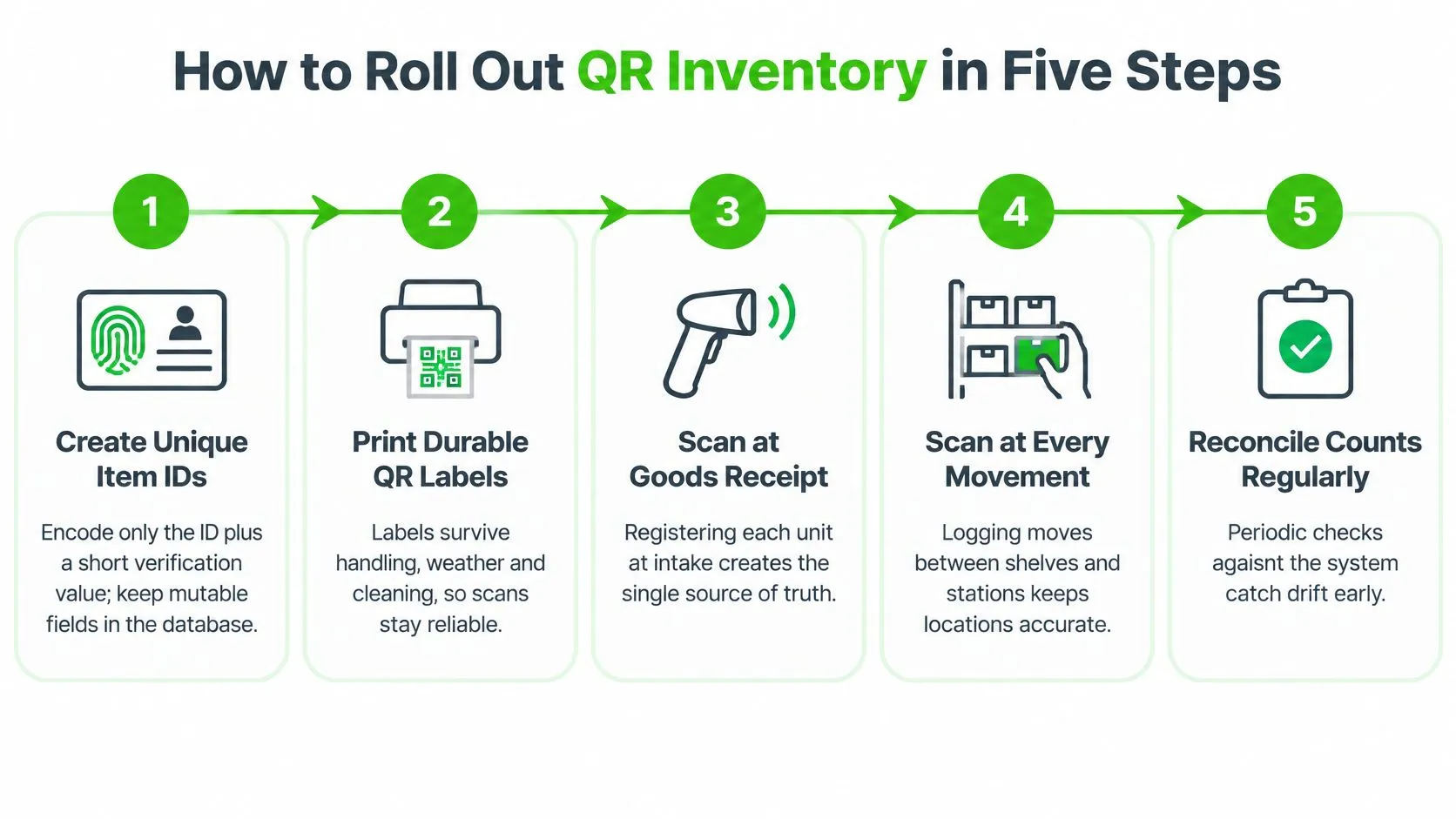
### The five steps
1. **Create a globally unique item ID.** Put only the ID and a short verification value in the code. Store price, location, listing status, condition, cost, and ownership in the database. Those fields can change, and scans should update the relevant field without replacing the item's history.
2. **Print and attach labels at intake.** Photograph the item during the same intake visit. Record condition, brand, size, cost, and acquisition date before it leaves the bench. Otherwise, staff may have to reconstruct details later.
3. **Scan the item into a location hierarchy.** Set locations as site, zone, shelf, and bin. Block free-text entries. “Back room left” can mean a different place to each person on shift.
4. **Require a scan at every custody event.** Record moves, listings, sales, returns, repairs, and dispatch. A move without a scan leaves the recorded location stale.
5. **Reconcile counts against records.** Run weekly cycle counts and review exceptions. Regular checks help staff catch discrepancies before they spread across listings and orders.
### What to measure and what to block
Track **transaction-level traceability**: whether an item's latest scanned location, listing status, and order status agree. Scan volume alone cannot show whether records are trustworthy. A high count of scans can still hide incorrect item data or missed handoffs.
Set three controls before the rollout:
- **Prevent duplicate IDs:** Reject an ID that already exists in the item database.
- **Require scan confirmation before publishing:** Keep a listing offline until the item's ID has been scanned and matched to its record.
- **Block fulfillment on mismatch:** Stop packing when the scanned ID does not match the order record.
Watch for labels attached only to removable packaging. They can leave with the box while the item remains in stock. Free-text locations create inconsistent records, and a successful camera read only confirms that the code was decoded. Staff still need to check that the scanned record belongs to the item in hand.
## Scanner Hardware and Software Compared
Start with volume, not gadgets. How many items do you handle per day, how many locations do you run, how many people scan at once, and do you work offline in a stockroom with no signal? Those four answers pick your hardware for you.
| Setup | Best for | Strengths | Limits |
| --- | --- | --- | --- |
| Phone camera with inventory app | Under a few hundred items, one person | No hardware cost, quick start | Slow in glare, ties scans to one device |
| Handheld 2D Bluetooth scanner | Busy intake desks, daily high volume | Fast reads, works at angles | Hardware cost, pairing and battery care |
| Fixed bench scanner | Receiving or packing station | Hands-free, consistent reads | Fixed to one location |
| Rugged mobile computer | Multi-site teams, warehouses | Integrated, durable, managed fleet | Highest cost, needs device management |
Phones are the cheapest start and the first thing to outgrow. They struggle in glare, they drain personal batteries, and scanning stops when that one phone goes home. A handheld Bluetooth scanner earns its cost at a busy intake desk, where you're reading curved, wrinkled tags at odd angles all morning.
A fixed bench scanner suits one receiving or packing station and nothing else. It's fast and consistent, but it can't walk the shelves for a cycle count. Rugged mobile computers make sense when you've got multiple sites and a managed fleet. They're also the costliest option, and someone has to own updates, spares, and replacements.
### Software checks that outweigh the feature list
Hardware is the easy purchase. Software behavior decides whether staff keep scanning in month three. Check these before you look at dashboards:
- **Batch scanning:** Can you scan a rail of garments without confirming each one?
- **Offline mode:** Do scans queue locally and sync later without loss?
- **Role-based permissions:** Can intake staff create records without seeing acquisition cost?
- **Audit log:** Does every scan record who did it, when, and where?
- **Per-channel listing status:** Can you see live, sold, and delisted states per marketplace on one item?
Look for iOS and Android apps plus web access tied to the same account, so the person scanning on the floor and the person managing listings at a desk see the same record. Team users and API access often depend on the plan, so confirm that before you build a workflow around them. If you're weighing code types as well, [inventory management with barcode scanning](https://ruit.es/en/blog/inventory-management-with-barcode-scanning/) covers where linear codes still make sense.
> Trial any setup live, with your real labels, on your worst-lit shelf, before you buy hardware for the whole team.
## Connecting Scans to Marketplaces, Shop and ERP
Product identity isn't item identity. A reusable model or category code can't separate two used items that differ in wear, accessories, or cost basis. GS1 makes a related point in [its explanation of the transition to next-generation 2D barcodes](https://support.gs1.org/support/solutions/articles/43000743463-why-is-gs1-supporting-industry-to-transition-to-the-next-generation-of-barcodes-), where a code connects an identifier to batch, provenance, and other live data rather than a static SKU. For used stock, that means each scan updates location, status, and custody on the item record. It never overwrites condition or cost.
Two identical cameras on one desk show why this matters.

Follow one sale. At the packing bench, staff scan the item. The system matches the scanned ID to the order, writes the sale to the item record, and removes the other marketplace listings plus the connected WooCommerce or PrestaShop listing at once. That's the core of [inventory management across multiple sales channels](https://ruit.es/en/blog/inventory-management-multi-channel/), and a scheduled relist can later restore visibility for unsold stock.
Your actual integration points are marketplace channels, your own connected store, and an ERP or CRM linked through an API on higher-tier plans. Everything else is decoration.
Two failure modes will find you. Offline scans can reach the server out of order, so a dispatch appears before the move that preceded it. And a physical count will sometimes disagree with channel stock. Apply one rule in both cases. The physical scan wins only after the exception is logged and reviewed. Never overwrite without a record.
A sync fault can oversell you faster than any manual process. Run a daily exception review, and lean on the duplicate-scan controls from your rollout.
## Security and Edge Cases for Used Stock
A peeled sticker can move an item's record to the wrong piece of stock. A customer-facing QR code can also be covered with a lookalike that sends a scan elsewhere. Because codes are easy to copy, print only an identifier that grants no access by itself.
Use a **non-sensitive item ID** that resolves through authenticated software. Keep serial numbers, purchase records, customer details, and authentication evidence in the database, not in a freely readable code. A person with a phone can read the payload, so the system should validate each scan rather than trust whatever the label contains. Public codes can be replaced or redirected, and QR adoption also brings setup, training, compatibility, and label-damage issues, as noted in [this overview of QR inventory and warehouse management](https://omneelab.com/qr-code-for-inventory-and-warehouse-management/).
### Controls worth setting up
- **Tamper-evident labels:** Apply them to high-value items so a tag swap leaves visible damage.
- **Server-validated links:** Check each scan against the inventory system instead of trusting the printed payload.
- **Role-based permissions:** Let floor staff see location and status without exposing cost or seller records.
- **Label replacement log:** Record who reprinted a tag and why.
- **Backup procedure:** Define how intake continues during an outage, before one happens.
An item may carry an old linear barcode, a marketplace label, and your QR tag at the same time. Choose one authoritative identifier and document the rule. Print a human-readable fallback ID beneath the QR code. If a device battery dies, staff can still identify the item and dispatch it.
### Edge cases that break naive setups
Bundles need one consistent record model. Assign one ID to the bundle, or give each component an ID and link them through a parent record. Mixing the two approaches makes it difficult to reconcile partial returns.
A failed sale should return the item to an available status while keeping the failed order in its history. Returns may arrive without their labels. Match them using photos, recorded serial details, and order history, then print a replacement and log the reprint. Repairs change an item's condition, so record the repair as a custody event and append a new condition note. Preserve the original intake grade.
> Track failed scans, damaged labels, and unresolved exceptions as well as successful scans. Counting only successful scans hides record drift.
Keep the fallback ID visible, and replace damaged labels rather than writing over them. Review suspected tampering and unusual scan patterns monthly. If failed scans rise, check label quality and placement before blaming staff. QR codes speed up identification, but they also apply whatever master data the system holds. A wrong location or status can spread quickly if each scan writes over the item record instead of preserving its condition, cost, and ownership history.
## Pilot 200 Items Before a Full Rollout
A scan can record the wrong location faster than a staff member can write it down. Test the workflow with about 200 items in one zone or sales channel for two to four weeks. Include unique item IDs, a required scan at each custody event, and a daily exception review. Check that each scan changes location and status without overwriting condition, cost, or ownership. A partial workflow will not show where bad master data or missed scans break the record.
Set pass criteria before the pilot starts. Choose a traceability threshold and a weekly limit for unresolved exceptions, then record both. That keeps the team from changing the target after seeing the results.
Track **average retrieval time, stock-movement error rate, audit accuracy, and transaction-level traceability**. Use the first week to establish your own baseline. Results from another warehouse may offer context, but they do not predict performance in your layout or with your team.
One location-based case study reported a 58% reduction in retrieval time and a decline in stock-movement errors from 15% to 4% in its measured retrieval and movement results. Use those figures as a reference, not a forecast. The same results depended on layout, scan discipline, label quality, and training.
If the pilot meets your criteria, expand one zone at a time, then add one sales channel at a time. If records drift, pause and find whether the cause is bad item data, a missed scan, or a sync failure before widening the rollout.
For marketplace and shop inventory, [Ruit](https://ruit.es/en/) keeps one item record behind each scan, syncs stock and price changes across channels, and delists sold items. Test it with the pilot stock and review exceptions daily before expanding.
## Frequently Asked Questions
### What should a QR code inventory label contain?
Only an immutable item ID and a short verification value. Keep price, location, condition, cost, and ownership in the item record, so a price change takes one record update instead of a new label.
### Which QR error correction level should I use for inventory labels?
Use M for clean indoor labels; it recovers about 15% of codewords. Choose Q or H only if inspection shows your labels regularly face abrasion, folding, sunlight, or laundering.
### Can a phone replace a dedicated barcode scanner?
For a few hundred items and one person, yes. Phones struggle in glare and tie scans to one device, so a handheld Bluetooth scanner earns its cost at a busy intake desk.
### How should I test QR inventory before a full rollout?
Pilot about 200 items in one zone or sales channel for two to four weeks. Set pass criteria first, then track retrieval time, stock-movement errors, audit accuracy, and transaction-level traceability.