Import Inventory with Ruit Without Recreating Listings


Table of Contents
- Table of Contents
- Why Importing Inventory Correctly Changes Your Daily Operations
- What to Prepare Before You Import Anything
- How to Import Inventory via CSV and Connected Marketplaces
- Mapping Fields Merging Duplicates and Controlling Sellable Stock
- Troubleshooting Import Errors Sync Delays and Oversells
- Make Your Imported Inventory Work Harder Every Hour
- Frequently Asked Questions
You’ve just bought a promising batch of second-hand stock. The listings already exist across Vinted, Wallapop, eBay, or your own WooCommerce store, but your actual availability is scattered across spreadsheets, warehouse shelves, reservations, returns, and marketplace dashboards. Importing everything into one system looks like an upload job. In practice, the difficult part is deciding what each unit really is, where it belongs, and whether it’s safe to sell right now.
A reliable import inventory workflow treats data ingestion as a controlled operational process. The objective isn’t merely to copy listings. It’s to bring products into a central catalog, merge matching records without recreating ads, separate physical stock from sellable stock, and push conservative quantities back to every channel before timing gaps create cancellations.
Table of Contents
- Why Importing Inventory Correctly Changes Your Daily Operations
- What to Prepare Before You Import Anything
- How to Import Inventory via CSV and Connected Marketplaces
- Mapping Fields Merging Duplicates and Controlling Sellable Stock
- Troubleshooting Import Errors Sync Delays and Oversells
- Make Your Imported Inventory Work Harder Every Hour
- Frequently Asked Questions
Why Importing Inventory Correctly Changes Your Daily Operations
A messy import creates work long after the file disappears. A duplicate listing forces you to edit the same item twice. A missing reservation turns an apparently available product into an oversell. A wrong unit of measure distorts cost and stock reports, while a stale marketplace connection leaves buyers looking at availability that no longer exists.
Professional second-hand sellers feel these errors immediately. One item may be listed on Vinted, Wallapop, eBay, and a store, but it still represents one physical unit. The operational question isn’t “How many listings did I import?” It’s “How many sellable units do I control, and how quickly can every channel reflect a change?”
Importing is an operational lever
Ruit centralizes sourcing, inventory, multichannel publishing, and orders in one workspace. Its inventory workflow can import and merge existing listings from connected marketplaces instead of recreating them, while the same catalog can support publishing to Wallapop, Vinted, eBay, WooCommerce, PrestaShop, and Todocolección.
That distinction saves more than manual listing time. It preserves the relationship between a product and its channel versions, so a sale can trigger the right stock update and removal workflow rather than leaving orphaned ads behind. Ruit also supports CSV and Excel-based imports, which makes it suitable for legacy catalogs, supplier files, warehouse exports, and transitional setups where every channel isn’t connected yet.
Practical rule: Import once into a controlled central catalog. Don’t use each marketplace as a separate source of truth.
The market context matters
Imported inventory decisions can be compared with official trade flows rather than judged only against internal warehouse records. The WTO data portal covers official tariff and import data for more than 150 economies, with time series extending back to 1996, while the World Bank’s WITS database provides country, partner-country, and product-level import detail. The ITC’s Trade Map covers over 230 economies and is updated monthly, quarterly, and yearly, as described in this overview of global trade data infrastructure.
Inventory accumulation also affects trade statistics themselves. The World Bank reports that inventory accumulation contributed 4.6% of global trade in 2022, 2.9% in 2021, and 1.6% in 2023, compared with an average of 2.1% during 2015 to 2019. The 2023 figure covered 40 countries representing 50% of global trade, according to the World Bank analysis of inventory accumulation and global trade. For a reseller, the lesson is practical: stock build-up and stock liquidation can alter replenishment patterns, sourcing decisions, and the timing of inbound inventory.
Success means the imported catalog is clean, matched, location-aware, and ready to publish. It also means you can identify why a number changed, which channel owns a reservation, and whether the quantity shown to a buyer is sellable.
What to Prepare Before You Import Anything
Most import failures begin before anyone selects a file. Preparation determines whether Ruit can identify the same product across channels, whether quantities reconcile with the warehouse, and whether the first synchronization publishes safe availability.
Start with an audit of every current source. Export or review active listings from Vinted, Wallapop, eBay, WooCommerce, PrestaShop, and Todocolección. Mark products that are active, sold, reserved, returned, damaged, awaiting inspection, or duplicated. Don’t assume a marketplace’s “active” status means the unit is physically available. It may still be locked by an offer, order, transfer, or internal commitment.
Prepare the product identity
Use one stable SKU for each physical product or controlled stock unit. Marketplace listing IDs can help with matching, but they shouldn’t replace your own internal identity because each channel generates its own identifier.
Check these fields before importing:
- SKU and barcode: Remove spaces, inconsistent punctuation, and accidental changes. If you use EANs, confirm that they belong to the correct product rather than a similar model.
- Titles and conditions: Standardize naming for brands, models, sizes, colors, and condition grades. “Good,” “Very good,” and “Used” shouldn’t represent the same internal condition unless you’ve defined the relationship.
- Units of measure: Decide whether quantities represent individual items, pairs, bundles, boxes, or sets. A unit mismatch can make a mathematically correct import operationally wrong.
- Locations: Use consistent warehouse, shelf, bin, or store names. A missing location is a fulfillment problem waiting to happen.
- Costs and prices: Confirm currency, decimal format, tax treatment, and whether purchase cost belongs at item or batch level.
For CSV files, remove blank rows, merged cells, formulas that haven’t been converted to values, duplicate headers, and hidden columns with unexpected data. Save a clean backup before changing anything. If you’re importing from a connected marketplace, verify that the connection is authorized, the correct account is selected, and the import scope is clear.
Define stock states before quantity mapping
Separate at least these states in your operating rules:
- Physical on-hand: Units you can count or locate.
- Reserved: Units committed to an order, buyer, bundle, or pending transaction.
- Damaged or inspection stock: Units that exist but shouldn’t be offered for sale.
- Allocated or transfer-locked: Units assigned to another location or process.
- Sellable stock: The quantity that can safely be published to a specific channel.
- Channel buffer: Units deliberately withheld to absorb timing uncertainty or operational mistakes.
Check access in Ruit before the import window. Whoever performs the import needs permission to upload, merge, edit stock, and publish. A clean file still fails operationally if the operator can’t review exceptions or confirm a channel update.
How to Import Inventory via CSV and Connected Marketplaces
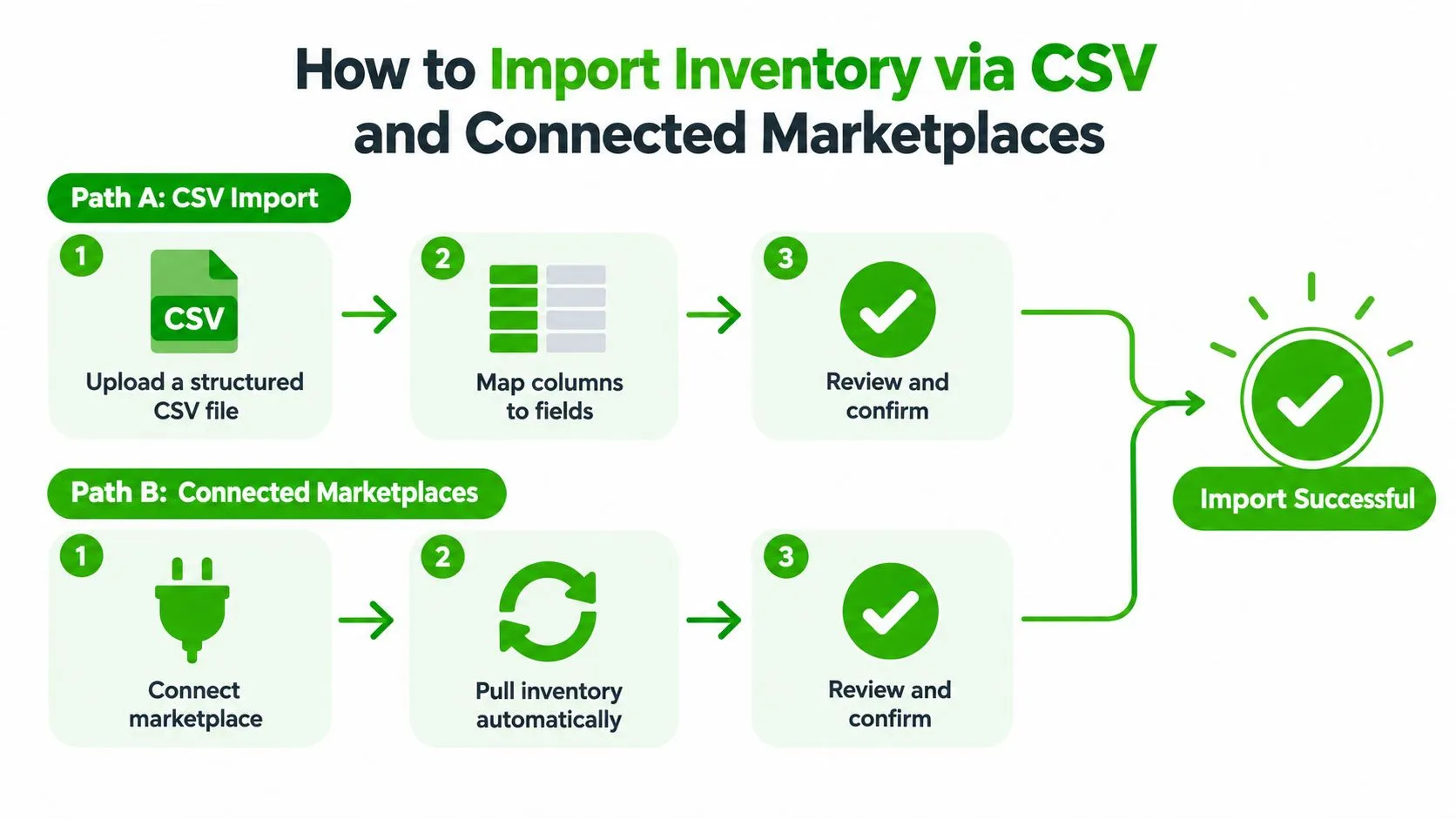
Ruit gives you two practical routes. Use a structured CSV or Excel file when your source is a spreadsheet, warehouse export, legacy catalog, or supplier feed. Use a connected marketplace import when the listings already contain useful titles, descriptions, images, prices, and channel identifiers that you want to bring into the central inventory.
Route one, import a structured file
Begin with a small representative sample, not the entire catalog. Include different conditions, products with images, products with variants, reserved items, and at least one record that needs manual review. A sample exposes field and unit problems before they spread through the whole inventory.
The sequence should be:
- Upload the file in the inventory import area.
- Map columns to product, location, cost, price, condition, identifier, and stock fields.
- Validate the rows for missing required values, malformed quantities, duplicate SKUs, invalid locations, and inconsistent units.
- Review exceptions instead of forcing every row through.
- Confirm the import only after checking the resulting records and stock states.
- Publish or synchronize the approved sellable quantities to connected channels.
If your source is an old Excel workbook, review these examples of migrating Excel workbooks for useful patterns around cleaning, restructuring, and moving spreadsheet data into a controlled system.
Route two, import from connected marketplaces
A connected import is usually more useful when your marketplace records are richer than your spreadsheet. Connect the relevant accounts, select the inventory scope, and pull the records into the central workspace. The goal is to match each incoming listing to an existing product where the identity is reliable, not to create another copy automatically.
A Vinted catalog may contain the best photos and descriptions, while a WooCommerce store may hold better SKUs, costs, and structured attributes. Treat those sources differently. Choose the authoritative field by field, then review products where the sources disagree.
What the ingestion process must protect
Automated ingestion reduces manual correction, but automation doesn’t remove the need for validation. The U.S. trade quality profile reports that less than 9% of automated import records contained an error, while paper-derived records had a much higher error burden, with less than 29% showing an error-free capture path, according to the U.S. Census Bureau trade data quality profile. The useful lesson for resale operations is to prefer structured input, then validate every critical field.
Check:
- SKU and identifier matches
- Quantity signs and decimal handling
- Unit-of-measure consistency
- Location coverage
- Condition mapping
- Reservation and order status
- Image and description ownership
- Price and currency
- Last update time
Don’t run a full marketplace pull during a demand burst if you can avoid it. Import in controlled batches, watch for API limits, and let the first batch complete its merge and synchronization cycle before expanding the scope. A connected import should result in one central product with channel relationships, not a new product for every marketplace appearance.
Mapping Fields Merging Duplicates and Controlling Sellable Stock
Importing the row is only the beginning. The product becomes useful when its fields map correctly, its duplicate relationships are resolved, and its published quantity reflects the stock that buyers can purchase.
Start with identity fields. SKU and EAN are stronger matching signals than title similarity, especially for used goods where sellers describe the same item differently. A title such as “black leather boots, size 42” may match several products. A stable SKU paired with a verified identifier gives you a safer merge decision.
Map fields by operational importance
Map fields that affect fulfillment and margin first:
- Identity: SKU, EAN, marketplace IDs, brand, model, and variant.
- Selling content: Title, description, condition, images, and category.
- Commercial data: Price, purchase cost, currency, and fees where available.
- Fulfillment data: Location, physical quantity, reserved quantity, damaged quantity, and availability rules.
- Channel controls: Marketplace-specific title limits, category requirements, buffers, caps, and publishing status.
Don’t overwrite a clean central description with a lower-quality marketplace version because it arrived later. Keep a field ownership rule. For example, use the warehouse catalog for SKU and cost, the strongest marketplace record for images, and manual review for conflicting condition or variant data.
Use Ruit’s guidance on attributes and templates when channel-specific fields need normalization. Templates help separate the product’s core data from the presentation rules of each marketplace.
Merge only when identity is proven
A duplicate merge is safe when two records clearly represent the same physical unit or the same intentionally pooled stock. Keep records separate when the condition, size, serial number, bundle contents, location, or ownership differs. A false merge is harder to detect than a duplicate because it can combine quantities, prices, and fulfillment history.
| Scenario | Recommended action | Why it protects margin |
|---|---|---|
| Same SKU, same condition, matching images | Merge | Prevents duplicate publishing and split stock |
| Same title, different SKU or serial number | Keep separate | Protects product identity and fulfillment accuracy |
| Same model, different size or color | Keep separate as variants | Prevents shipping the wrong item |
| One marketplace record is sold and another is active | Merge after status review | Stops a sold unit from returning to sellable stock |
| Similar item with different condition grade | Keep separate | Preserves price logic and buyer expectations |
| Bundle listing versus individual items | Keep separate unless bundle rules are explicit | Avoids promising units already committed elsewhere |
Publish the sellable subset
A raw warehouse count isn’t a marketplace quantity. Compute sellable stock from physical on-hand, then exclude open reservations, damaged or inspection stock, transfer locks, bundle commitments, channel buffers, and channel caps. The result should be channel-specific, because a fast-moving marketplace may need a larger protection buffer than a slower channel or your own store.
Inventory inaccuracy is common enough to require a reconciliation step. A retail study found system-to-physical discrepancies in 58.1% of SKUs in the direct Internet channel and 30.7% in brick-and-mortar, as reported by Supply Chain Management Review. The practical response is simple: count or verify the physical unit, reconstruct reservations, then publish only what survives those deductions.
A product can exist in your warehouse and still be unavailable to sell.
Troubleshooting Import Errors Sync Delays and Oversells
Oversells after a successful import usually come from one of two failures. The system has the wrong stock state, or the system has the right state but delivers it too slowly. Fixing only the import file won’t solve either problem.
Diagnose the quantity before touching the connection
Use the symptom to narrow the cause:
- The imported quantity is negative: Check sign conventions, returns, and adjustment columns. One source may record deductions as negative values while another expects a movement type.
- The listing shows stock that staff can’t find: Verify the location field, physical count, transfer status, and whether the record was created from an obsolete marketplace listing.
- A bundle sells individual units twice: Reconstruct bundle commitments and link component stock before republishing.
- A channel shows availability after a sale: Check reservation creation, sale event receipt, queue status, and the last successful propagation time.
- Analytics show strange turnover or margin: Inspect units, currency, cost basis, duplicate records, and whether damaged stock entered the sellable pool.
- Lead times look plausible but cause late dispatches: Replace stale defaults with current operational lead times and validate them during import.
The source profile matters. Automated, structured data generally creates fewer capture problems than paper-derived records, but even clean automation can carry wrong business meaning. A quantity of “12” is useless if one system means individual units and another means cases.
Treat timing as part of availability
A marketplace can receive a sale before the other channels receive the deduction. That short window is enough to create an oversell when demand spikes. The fix is reservation logic first, then propagation. Reserve the unit as soon as the order is accepted, reduce the channel-specific sellable quantity, and push the change to connected channels without waiting for a later batch.
Recent multichannel guidance recommends sync intervals under 5 minutes, with under 60 seconds for fast-moving SKUs, while also recognizing that API rate limits and implementation complexity make hybrid synchronization useful. The relevant guidance on multichannel inventory synchronization explains why near-real-time and hybrid approaches need to be balanced rather than applied blindly.
Use a hybrid recovery plan
Fast movers deserve the shortest practical sync path. Slow or low-risk inventory can use a less frequent schedule, provided the channel buffer reflects that delay. If an API fails, don’t keep publishing the old quantity. Freeze affected listings, log the failed update, retry safely, and reconcile the channel after recovery.
The important control is visibility. Every failed update should show the item, channel, previous quantity, intended quantity, error reason, and next action.
Make Your Imported Inventory Work Harder Every Hour
An import creates value only when it reduces repeated decisions. Once the catalog is clean, prioritize products by velocity, margin, channel fees, fulfillment difficulty, and synchronization risk. Fast-selling, high-margin items deserve tighter monitoring and faster updates. Slow stock may benefit from scheduled publishing, price testing, or a planned auto-relist cycle rather than constant manual attention.
Build the operating loop around five controls:
- Review exceptions daily: Resolve unmatched identifiers, missing locations, stale reservations, and failed channel updates.
- Tune buffers by channel: Protect scarce or fast-moving units without hiding more stock than the risk justifies.
- Schedule publishing: Spread listing activity across suitable times instead of creating manual peaks.
- Automate delisting and relisting: Remove sold items from remaining channels and schedule future visibility where appropriate.
- Read the full-cycle analytics: Compare sourcing cost, listing effort, sales, fees, returns, and accounting outcomes, not just channel counts.
The broader principle is covered in this inventory optimization white paper, which provides additional context on using operational data to improve inventory decisions. For a reseller, optimization means choosing where each unit should appear, how much stock each channel should see, and how much human time the item deserves.
Treat import inventory as controlled ETL. Extract the source records, transform identities and stock states, validate the result, then publish only the approved sellable subset. That discipline turns a one-time migration into a repeatable system for protecting margin and increasing profit per hour.
Frequently Asked Questions
Can I import inventory into Ruit without recreating my listings?
Yes. When the listings already exist on a marketplace, use a connected marketplace import instead of a file. It preserves the relationship between each product and its channel versions, so a sale can trigger the right stock update.
When should I use a CSV file instead of a marketplace connection?
Use a structured CSV or Excel file when your source is a spreadsheet, warehouse export, legacy catalog, or supplier feed. Clean it first: remove blank rows, merged cells, duplicate headers, and formulas that haven’t been converted to values.
When is it safe to merge duplicate records?
Merge only when two records clearly represent the same physical unit or the same intentionally pooled stock. Keep them separate when the condition, size, serial number, bundle contents, or location differs.
Ruit centralizes imported listings, stock states, marketplace publishing, synchronization, and orders so professional resellers can manage the full operating cycle from one workspace. Visit Ruit to connect your channels, import existing inventory without recreating listings, and build a safer stock workflow around sellable availability.