Stop Oversells in 48 Hours: Inventory Management for Resellers


Table of Contents
- Quick action checklist for resellers, first 48 hours and first month
- Inventory systems explained for resellers: spreadsheets, apps, and automation
- How to set up SKUs, condition codes, and a master catalog
- Inventory segmentation and safety stock: applying 80/20 and ABC and XYZ
- Multichannel workflows: preventing oversells and reconciling stock
- When to upgrade: signals you’ve outgrown spreadsheets
- Implementation checklist and common mistakes to avoid
- Author perspective: hands-on lessons from supporting resellers at scale
- How Ruit helps resellers sync inventory and save time
- Select further reading and primary sources
- FAQ
- Recommended
The fastest fix for reseller inventory chaos is picking one master stock file as the single source of truth, then setting a reserved buffer on your best-selling or lowest-stock items so a sale on one platform cannot oversell you on another. Snapshot your current quantities today, flag high-risk SKUs, and reconcile manually until your listing count or hours per week make automation worth the cost.
TL;DR:
- Resellers managing over 150 SKUs across multiple platforms should consider switching from spreadsheets to automation tools to reduce manual workload.
- Setting a reserved buffer for high-value, steady-demand items (AX and AY) minimizes oversells and stockouts during rapid listing changes.
- Daily reconciliation of sales and stock counts, alongside quick updates after each sale, is crucial to prevent overselling across channels.
- Categorizing SKUs with ABC and XYZ segmentation helps focus replenishment and stock control efforts on the most profitable and predictable items.
- Using a single master stock file with clear SKUs and real-time updates is essential for maintaining accurate inventory and avoiding costly errors.
Quick action checklist for resellers, first 48 hours and first month
The first two days matter most because oversells compound fast once you are listing the same item on more than one marketplace.
- Pull a full quantity snapshot across every platform you sell on, including anything sitting in a box unlisted.
- Flag your highest-risk SKUs: items with quantity of one, or anything selling on more than two channels at once.
- Pause or lower visibility on duplicate listings for those flagged items until you confirm real stock.
- Assign a SKU to every item you own, even the ones not yet listed, so nothing gets tracked by memory.
- Build a single master spreadsheet or app entry per SKU with quantity, condition, and location.
- Set a daily five-minute reconciliation habit: check what sold, subtract from the master file, update listings.
By week one, you want SKUs assigned and a first pass at sales velocity, meaning which items actually move versus which sit. By month one, you should have picked a system (spreadsheet, app, or automation tool), written down your own workflow so a second person could follow it, and set a reserved buffer rule for anything you sell in more than one place.
Pro Tip: Keep a “sold but not deducted” column in your tracker for the ten minutes between a sale notification and your next reconciliation pass. It catches the oversells that happen in that gap.
Inventory systems explained for resellers: spreadsheets, apps, and automation
Most resellers start with a spreadsheet, and for a small catalog that is often the right call, not a compromise. A spreadsheet costs nothing, works offline, and gives you full control over columns and formulas. The limit shows up around 100 to 200 active SKUs across multiple platforms: manual updates get slow, and a missed row is how oversells happen.
Entry-level mobile or field apps add barcode scanning, which speeds up counts and cuts data-entry errors compared to typing SKUs by hand. They work well for physical stocktakes and for sellers who source from thrift runs or estate sales and need to log items quickly, but most do not sync live across marketplaces on their own.
Automation, cross-listing, and order management tools solve a different problem: keeping quantities, renewals, and buyer messages consistent across every channel without you touching each listing individually. These tools matter most once you are managing the same items on three or more marketplaces at once.
When choosing a category, weigh:
- How many SKUs and marketplaces you manage today, and where that number is heading in six months.
- How many hours per week you currently spend on manual updates and relisting.
- Whether your main pain is counting stock (favors a scanning app) or syncing stock (favors automation).
- Your budget tolerance for a monthly subscription against the value of the hours it would save.
Guides on inventory software options and on barcode scanning workflows go deeper into the mechanics of each category if you want to compare features before committing.
How to set up SKUs, condition codes, and a master catalog
A SKU only works if it tells you something at a glance. A format like CAT-BRAND-SIZE-COND-### (for example, SHO-NIKE-10-B-014 for a size 10 Nike shoe in “B” condition, item 14) lets you scan a code and know the category, brand, size, and condition without opening a listing.
- Pick a fixed SKU structure and write it down so you apply it the same way every time.
- Define condition codes once (A for like new, B for gently used, C for visible wear, D for parts or repair) and never redefine them mid-catalog.
- Build one master catalog row per SKU with fields for quantity, condition, cost, location, marketplace listing IDs, and photo link.
- Add a “total available” column with a simple subtraction formula: starting stock minus units sold across all channels.
- Tag consistent keywords and reuse photo sets across similar items so relisting takes minutes, not a fresh shoot each time.
Essential fields worth tracking beyond the basics include date acquired, source, and current listing price per platform, since pricing can and should differ by marketplace fees. A step-by-step SKU guide walks through naming conventions in more detail if you are setting this up for the first time, and a small-inventory workflow guide covers adapting the same template to a home or backroom setup.
Pro Tip: Store your master catalog and photos in the same cloud folder structure, named by SKU, so relisting an item after a return takes one copy-paste instead of a search.
Inventory segmentation and safety stock: applying 80/20 and ABC and XYZ
Not every item in your catalog deserves the same attention. The 80/20 principle behind ABC segmentation assumes a small share of your SKUs drive most of your revenue, so ranking items by sales value and grouping them into A (high value), B (medium), and C (low value) tells you where to focus reconciliation time first. Layering XYZ on top, which groups items by how predictable their demand is, X for steady sellers, Y for somewhat variable, Z for erratic, gives you a two-axis map: an AX item (high value, steady demand) needs tight stock control and frequent counts, while a CZ item (low value, erratic demand) barely needs a buffer at all.
To classify a small catalog:
- Rank all SKUs by total sales revenue over the last 90 days and split them roughly into A, B, and C tiers.
- Score each SKU’s demand variability by eyeing how evenly units sold each month, tagging steady sellers X, irregular ones Z.
- Set a reserved buffer only on AX and AY items, the ones combining high value with fairly predictable demand.
- Recheck the classification monthly or quarterly since bestsellers rotate, especially in second-hand categories tied to trends or seasons.
A distribution case study applying ABC and XYZ segmentation with a class-based replenishment model found it reduced total inventory costs significantly and cut stockout incidents substantially while raising service level, according to research on ABC-XYZ inventory optimization. The same research notes the method works best when sellers refresh classifications periodically and pair each class with a matching cycle-count frequency rather than counting every SKU on the same schedule, a lesson that scales down comfortably to a reseller managing a few hundred items instead of a warehouse.
Multichannel workflows: preventing oversells and reconciling stock
Oversells almost always trace back to one root cause: two platforms both believing they hold the last unit of something. Fixing that starts with treating one file, whether a spreadsheet or a synced dashboard, as the canonical record every other listing defers to.
- Update your master file the moment an item sells, before moving on to anything else that day.
- Run a five-to-ten-minute reconciliation twice daily if you sell on three or more platforms, checking each channel’s sold items against your master quantity.
- Investigate any mismatch immediately rather than at week’s end, since a stale listing compounds into a bad buyer experience fast.
- Lower listed quantity to zero or pause a listing the instant a SKU’s true stock hits zero, on every channel at once.
The most common root causes are forgetting to update a channel after a sale, listing the same physical item with slightly different titles on two platforms, and not accounting for items reserved during a pending sale. Automation removes the manual half of this loop: instead of you checking each platform, a sync tool pushes a quantity change to every connected marketplace the moment one sale registers, which is the specific gap that turns a daily chore into a background process.
Pro Tip: When a sale comes in, update your master file before you package the item. It takes ten seconds and it is the step most often skipped under pressure.

When to upgrade: signals you’ve outgrown spreadsheets
Spreadsheets work until the coordination cost outweighs the flexibility. Watch for these signals:
- You are managing more than roughly 150 to 200 active SKUs across three or more marketplaces at once.
- Manual reconciliation and relisting now eat more than five to seven hours of your week.
- You have had more than one oversell in the past month despite following your reconciliation routine.
- You are turning down sourcing opportunities because you cannot keep up with listing and tracking new stock.
Weigh a subscription’s monthly cost against the hours it would free up: if a tool saves you five hours a week and your time is worth even a modest hourly rate, the math tends to favor automation quickly. A low-risk way to test the shift is a pilot migration: move your ten highest-volume SKUs into a syncing tool first, run it alongside your spreadsheet for two weeks, and confirm the sync matches your manual counts before retiring the spreadsheet entirely. A guide to order management systems walks through what a full migration typically involves.
Implementation checklist and common mistakes to avoid
Before locking in any system, run through this short list:
- Back up your current stock counts before migrating to a new tool or template.
- Assign SKUs to every item, including unlisted stock, before you start tracking anything else.
- Verify your master file against a physical count once a week during the first month.
The most common mistakes are skipping the reconciliation habit once things feel stable, reusing a SKU for two different items, and trusting a marketplace’s own stock count instead of your master file. Catching these early saves far more time than fixing an oversell after a buyer complaint.
Author perspective: hands-on lessons from supporting resellers at scale
Most reseller inventory problems are not tooling problems, they are habit problems. I have seen sellers with excellent spreadsheets still oversell because the update happened an hour after the sale instead of immediately. The single biggest efficiency win is almost always closing that gap between a sale and a quantity update, whether that means a stricter personal routine or handing the sync to software.
- Luis
How Ruit helps resellers sync inventory and save time
If daily reconciliation across platforms has become the part of your week you dread most, that is the specific gap Ruit is built to close. Ruit lets you upload your catalog once and publish it across marketplaces including Wallapop, Vinted, and eBay, syncing quantities automatically instead of leaving you to check each channel by hand.
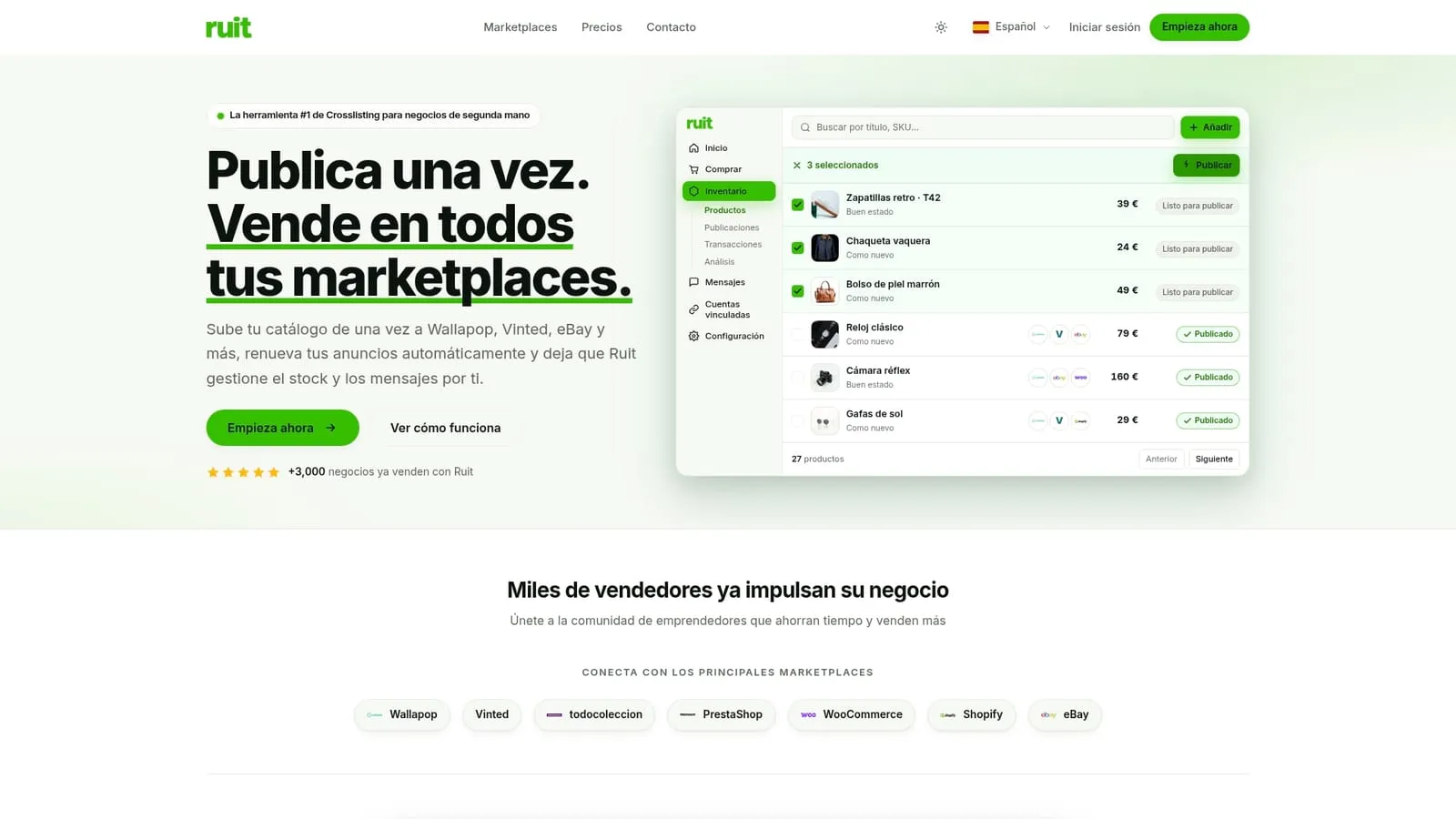
- Automated quantity sync removes the manual reconciliation step this guide walks through above.
- AI-assisted listing generation cuts the time spent writing and photographing each item individually.
- Unified messaging keeps buyer questions from three platforms in one place instead of three apps.
Many businesses currently use various platforms to manage second-hand sales across channels. Subscription plans are available for different seller needs, with pricing details provided on the provider’s pricing page. Check Ruit’s pricing page to see which plan fits your current SKU count, or visit Ruit to see how the cross-listing workflow fits your marketplaces.
Select further reading and primary sources
The ABC-XYZ inventory optimization study covers the segmentation math in full. For storage-specific workflows, see this guide to organizing bedding inventory, and for automated tagging ideas, this piece on AI-assisted merchandising.
FAQ
What is the 80/20 rule in inventory management?
The 80/20 rule assumes a small share of your SKUs generate most of your sales revenue, which is the logic behind ranking items into A, B, and C value tiers. For resellers, it means focusing daily reconciliation and safety stock on your top-tier items rather than treating every SKU with equal attention.
What is the best inventory spreadsheet for resellers?
There is no single best template, but an effective one tracks SKU, condition, quantity, cost, marketplace listing ID, and a photo link in one row per item. Adding a “total available” column with a subtraction formula for units sold keeps the count accurate without extra software.
What is the SKU system for resellers?
A reseller SKU system assigns each item a unique code that encodes details like category, brand, size, and condition, such as SHO-NIKE-10-B-014. This lets you identify an item’s key details at a glance instead of opening its listing, which speeds both relisting and stock counts.
Where can resellers source inventory to sell?
Common sources include thrift stores, estate sales, liquidation lots, and personal decluttering, though the right source depends on the category you resell. Whatever the source, assigning a SKU and logging condition at the point of acquisition keeps new stock from getting lost in an unlisted pile.
When should a reseller switch from spreadsheets to automated syncing?
A common signal is managing more than roughly 150 to 200 active SKUs across three or more marketplaces, or spending over five hours a week on manual reconciliation. At that point, tools that sync quantities and renewals automatically, like Ruit, typically save more time than they cost.