Inventory Management with Barcode Scanning: A 2026 Guide

Table of Contents
- Table of Contents
- Moving from Inventory Chaos to Control
- Why Barcodes Are Essential for Multi-Marketplace Selling
- Selecting the Right Barcode Hardware and Labels
- Setting Up Your Barcode System for Success
- Key Barcode Workflows for Professional Resellers
- Avoiding Common Barcode Implementation Mistakes
If you’re selling the same jacket on Vinted, eBay, and Wallapop, the chaos usually starts small. One item gets photographed, another gets relisted, a return lands on the desk, and suddenly nobody’s sure which stock is live, which stock is promised, and which stock already sold somewhere else. Inventory management with barcode scanning is what turns that mess into a system you can trust.
The reason barcode scanning matters so much for resellers is simple. Manual stock control is fine when you have a few clean, uniform products, but second-hand operations are messy by nature, with one-off items, missing labels, mixed conditions, and constant movement between channels. Barcode-based inventory gives you a single item identity that can travel from sourcing to listing to packing, which is what multi-marketplace sellers need if they want fewer mistakes and less time spent reconciling spreadsheets. For a broader view of stock organization, it also helps to think in terms of a complete inventory structure for store operations, not just a pile of labeled products.
Table of Contents
- Moving from Inventory Chaos to Control
- Why Barcodes Are Essential for Multi-Marketplace Selling
- Selecting the Right Barcode Hardware and Labels
- Setting Up Your Barcode System for Success
- Key Barcode Workflows for Professional Resellers
- Avoiding Common Barcode Implementation Mistakes
Moving from Inventory Chaos to Control
A reseller’s worst day usually isn’t a dramatic failure. It’s a dozen small misses that stack up fast. A pair of boots gets listed twice, a coat ends up in the wrong tote, a buyer pays on one marketplace after the same item was already marked available on another, and the person shipping orders spends half the afternoon hunting shelves. That is not a people problem, it is an inventory control problem.
Why the old way breaks first
Paper notes and memory only work while volume stays low and the catalog stays simple. Once a reseller starts handling used, one-off, or sourced-from-everywhere stock, every handoff creates another chance for a mismatch. Returns need to be checked again, items move between a home office, a storage room, and a packing table, and listings on different marketplaces all need to point to the same physical item. Barcode scanning replaces that fragile chain with a repeatable item identity, so every scan updates the same record instead of creating another version of the truth. For a practical overview of how inventory setup supports that kind of control, see this guide to inventory for store operations.
That change shows up in the daily work. Barcode systems are reported to push inventory accuracy into the 98% to 99.9% range, compared with roughly 85% to 95% in manual processes, and they can reduce inventory errors by up to 67% while making counting tasks up to 70% faster, according to the RSIS study in the verified data. Those gains are not abstract. They mean fewer oversells, fewer “where did we put that?” moments, and less time spent untangling mismatches between marketplaces and the shelf.
What control looks like in a resale business
Control does not mean perfection. It means that when a product arrives, gets listed, sells, returns, or moves to a different channel, the system reflects it fast enough that the team can trust what it sees. That is a major shift barcode scanning creates for resellers, because it moves inventory management from periodic cleanup to continuous operation.
Practical rule: if an item can be sold on more than one channel, it needs a barcode before it becomes “live” stock.
The first goal is not fancy automation. It is getting one item identity attached to one physical item, then keeping that identity attached as the item moves through intake, storage, listing, sale, and return. That matters even more with used or one-of-one stock, where two jackets may look close enough on a shelf but are not interchangeable once they hit different marketplaces. A barcode gives the team a fast check at every touchpoint, so the right item is the one that gets picked, packed, and removed from sale.
That basic discipline is why barcode use is so widespread in retail operations. A GS1-based estimate says about 10 billion barcodes are scanned every day, and more than 2 million companies globally use GS1 standards for barcode identification, while 95% of retail stores in the U.S. use barcodes for inventory management (world metrics on barcode industry adoption). That does not mean every reseller needs enterprise software, but it does mean the operating model is proven.
Why Barcodes Are Essential for Multi-Marketplace Selling
A single-channel seller can sometimes survive with loose processes. A multi-marketplace reseller can’t, because every channel adds another place where inventory can drift. If the same vintage jacket is live on Vinted and eBay, a delayed stock update can turn into an oversell, a cancellation, a poor rating, and extra support work that drags the whole account down.
Accuracy is the business case, not just the technical feature
Barcode scanning is valuable because it replaces guesswork with a controlled item check. The RSIS data shows barcode-based accuracy at 98% to 99.9%, compared with 85% to 95% for manual warehouse processes, and it says scan-based systems can cut inventory errors by up to 67% and speed up counting by as much as 70% (RSIS barcode inventory accuracy study). For a reseller, that means fewer mismatches between what the listing says and what the shelf holds.
That accuracy matters most with one-of-one stock. If a unique leather jacket, camera, or collectible gets sold on one marketplace, the barcode record can remove it everywhere else immediately, instead of waiting for a human to remember to edit three channels. That’s where barcode scanning stops being a back-office convenience and becomes a profit-protection tool.
Speed compounds across the whole week
Scans are reported to be 5 to 10 times faster than manual entry, and inventory count times can be cut by as much as 70% in the verified data from the same RSIS source. For a seller who processes receiving, listing, and packing every day, that speed shows up in shorter admin windows and more time for sourcing, photography, and customer service.
A useful way to think about it is this. Manual handling asks your team to keep re-reading, re-typing, and re-checking the same item. Barcode handling asks them to confirm once, then lets the system carry that truth forward across every marketplace connected to the item.
Multi-channel operations need one item truth
The main pain point isn’t only stock counting. It’s keeping the same item synchronized across channels, returns, relists, and local stock moves without creating duplicate work. Generic barcode guides often stop at setup and scanning basics, but resellers need a workflow that protects cross-channel inventory truth, especially when a sale on one marketplace has to trigger a removal elsewhere.
A barcode system works best when it answers one question fast, “Is this exact item still available somewhere else?”
For sellers who connect channels like Shopify, Wallapop, Vinted, and eBay, the benefit is consistency. Not every product needs complex tracking, but every item that can move between listings, returns, or marketplaces needs a record that updates cleanly the moment it’s scanned.
Selecting the Right Barcode Hardware and Labels
The right setup depends on how your business moves. A seller who inspects stock at home and ships from one desk has different needs from a reseller who sources on the road, checks items in a warehouse, and packs in a separate room. Hardware choice should follow that reality, not the other way around.
Dedicated scanners, mobile devices, and camera apps
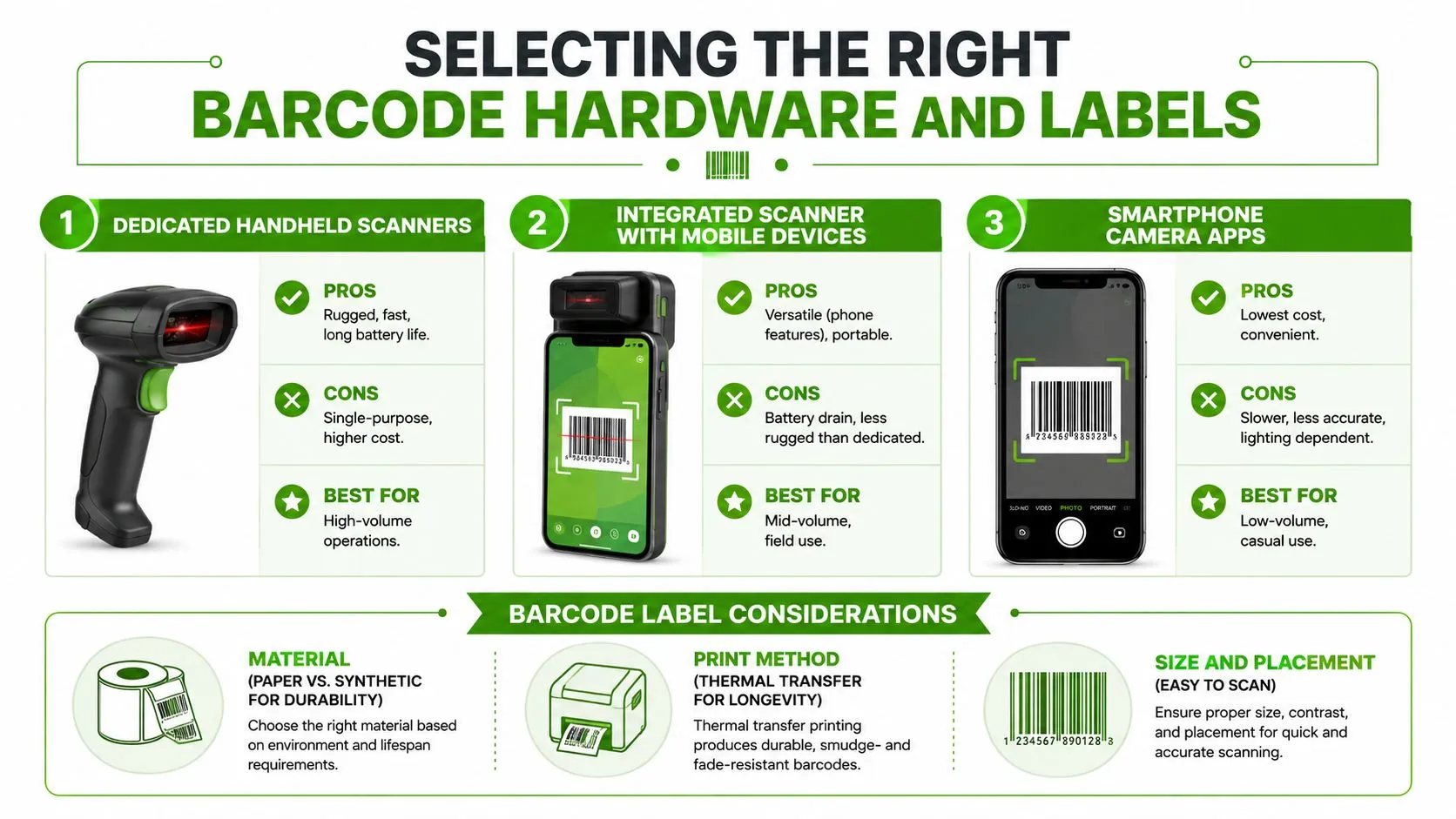
Dedicated handheld scanners make sense when volume is high and speed matters more than flexibility. They’re rugged, quick, and built for repeated use, which is why they fit busy receiving tables and packing stations. Their weakness is obvious, they only do one job.
Integrated mobile scanning is the middle ground. A smartphone with scanner support gives you portability for sourcing trips and floor work, while still keeping photos, notes, and channel tools close at hand. The trade-off is battery drain and less durability than a true handheld unit.
Smartphone camera apps are the lowest-friction option. They’re fine for casual or low-volume use, but they’re usually slower and more dependent on lighting and camera angle, which becomes annoying fast when you’re processing used goods by the crate.
1D barcodes or QR codes
For used-goods resellers, QR codes often make more sense than traditional 1D barcodes. The verified data says QR codes can hold more information, such as item condition or sourcing notes, and can still be scanned even when up to 30% of the code is damaged (Packem WMS on QR code inventory management). That’s a real advantage when labels get bent, scuffed, or partially covered in a resale workflow.
1D barcodes still work well for simple SKU identification, especially when the item already has a clean manufacturer code. The decision comes down to what you need the code to carry. If you only need a quick item lookup, 1D is enough. If you need condition, lot, or seller-specific data, QR gives you more room to work with.
Labels matter as much as hardware
A weak label system undermines good scanning equipment. Paper labels can be fine for short-lived stock, but synthetic labels are a better fit when items move through multiple touchpoints or sit in storage for a while. Print method matters too, because thermal transfer is the safer choice when longevity is important.
- Material choice: paper is cheaper, synthetic holds up better on items that get handled often.
- Print method: thermal transfer is better when you need labels to last.
- Placement choice: label the item where a scan is easy, not where it looks neat.
That’s the basic rule. Scanning works best when the code is visible, flat enough to read, and paired with a device your team will use every day.
Setting Up Your Barcode System for Success
A barcode rollout only works if the item record is clean before the first label goes on. If the code points to the wrong title, condition, or variant, scanning just makes the mistake move faster through every marketplace you sell on. That is a real risk for resellers handling used goods, one-off finds, and mixed lots, because the inventory has to stay accurate even when no two items are exactly alike.

Start with what already has a manufacturer code
Start by sorting your SKUs into two groups, items that already carry a manufacturer barcode and items that do not. Import the existing codes into your inventory system first, then assign internal barcodes to the rest in a consistent way so each code maps to one exact item, not a loose category or a near match. The rollout guidance from ELO ERP barcode scanning inventory setup follows that same order, audit the SKU base, bring in existing codes, assign internal barcodes to untagged items, and test the scan-to-database flow with a sample of 20 to 30 varied products before go-live.
That test protects you from the mistake that hurts resellers most, a barcode that scans correctly but lands on the wrong record. Use items that reflect the way your business works, because clothing, accessories, books, and bundled lots often need different data fields even inside the same warehouse or back room. A setup that survives mixed inventory is the one that holds up once the orders start moving across marketplaces.
Build one source of truth before you scale
The inventory system has to hold the current version of the truth. If stock changes live in a spreadsheet, a marketplace dashboard, and a separate label file, the team will eventually lose track of which version is current and which one is stale. A central platform keeps labels, item records, and channel availability tied to the same scan event.
Use one naming convention across every item type. Keep condition notes structured instead of freeform. Make location data plain and consistent so anyone on the team can find the item without guessing. Those choices do not look dramatic on paper, but they keep barcode scanning from becoming another layer of admin work on top of the chaos you already have.
Validate the setup before live volume
Run a short pre-launch check in the places where work happens. Scan items on the receiving table, the packing bench, and the shelf, not only on a clean desk. Make sure the label prints clearly, the code reads quickly, and the system updates the correct record every time.
The best test is simple. If a scan does not move the right item in the right record immediately, do not launch yet.
For resellers who want cloud-based order handling tied to inventory movement, value comes from connecting the scan event to the order and stock record at the same time, as outlined in cloud-based order management tied to inventory movement. That keeps the business from splitting into disconnected tools and partial truths.
Key Barcode Workflows for Professional Resellers
A barcode system only works if it fits daily work. For resellers, the important moments are sourcing, listing, packing, and returns, because those are the points where one bad keystroke can ripple across multiple marketplaces. The workflow has to be fast enough for real operations and strict enough to stop errors before they spread.
Sourcing and receiving
The cleanest receiving process starts with the document, then the item, then the location. Scan the purchase order or ASN first, then the item barcode, then the quantity, and finally the bin or packing station. That closed-loop check reduces miscounts and mis-picks because the system confirms each step before the item is considered received, which is the exact control logic described in the verified Leanafy guidance (barcode scanning inventory accuracy workflow).
For a reseller, that means a box from a wholesaler, estate sale, or liquidation lot gets logged before it gets buried in a back room. If a mismatch appears during receiving, it gets caught while the item is still in hand, not three weeks later when the order is already live.
Listing and kitting
Listing is where scanning saves time and prevents duplicate work. When an item is picked for photography and listing, scanning the barcode should pull up the exact product record, condition notes, and location, so the seller isn’t recreating the same item from scratch every time. That matters even more when kits or bundles are involved, because the components need to be tied back to stock in a way the system can reverse later.
A bundle should never feel like a mystery box to your inventory software. If the components aren’t tracked cleanly, returns and partial sales become hard to reconcile. Scanning each component as it’s grouped is the easiest way to keep the bundle from distorting stock counts across channels.
Picking, packing, and returns
Picking should be a confirmation exercise, not a memory test. The packer scans the order, scans the shelf or bin, scans the item, and verifies the packed unit before printing the label. That sequence prevents the wrong size, color, or variation from leaving the building, which is where a lot of reseller damage happens.
Returns need the same discipline. If an item comes back, scan it before it goes back on the shelf so the system knows whether it’s immediately sellable, needs rework, or belongs in a different condition bucket. The faster that return is reintroduced, the less time it spends as invisible stock.
Avoiding Common Barcode Implementation Mistakes
The biggest barcode mistake is assuming the scanner will fix bad inventory habits on its own. It won’t. If item data is inconsistent, labels are hard to read, or the team uses different naming conventions, barcode scanning just gives you faster wrong answers.
A reseller selling used, one-off, or bundled items feels that problem faster than a store moving identical new units. The same SKU logic that works for standard retail breaks down when one listing might be a single jacket, the next a lot of three camera lenses, and the third a returned item with a note attached to the condition field. Barcode scanning helps only when the underlying process is disciplined enough to support it.
Don’t confuse standardization with complexity
Barcode systems work because they impose a common language. That is the point of standardization, and it is also why barcode use is so widespread across retail operations. As noted earlier, barcodes are scanned at enormous scale and GS1 standards are widely used, which shows how central standardized identification has become to everyday inventory work. If your process does not match that level of discipline, it becomes harder to share clean data across tools and channels.
The practical lesson is not to overbuild. A reseller does not need a code structure that only one person can decode six months later. A simple, repeatable naming and scanning system is usually stronger than a clever one that falls apart when staff changes or volume rises. For multi-marketplace sellers, the safest rule is to keep the product record consistent even when the item itself is unique.
Train for behavior, not just buttons
Teams often get shown how to scan, but not why a specific sequence matters. That is a mistake. Staff need to know when to scan, what happens if they do not, and which step is required during receiving, packing, and returns.
Low-quality labels and inconsistent placement create another common failure. A code that peels off a jacket tag or will not scan on a curved object creates friction every day, and friction turns into workarounds. Good training includes where to place labels, how to inspect scan quality, and how to flag items that need a new code. That matters even more for resale inventory, where the item may already be worn, repackaged, or missing a clean flat surface.
Make real-time sync a requirement
A barcode system that does not update stock everywhere at once leaves the business exposed. If one channel still shows the item as live after it sold elsewhere, the operation is back where it started, except now it has more software and the same oversell risk. Choose tools that sync inventory changes in real time across all active channels, because delayed sync is just manual stock control with better packaging.
The same logic applies to returns and relists. If a returned item sits in a holding state too long, it is effectively dead stock. The best operations treat each scan as a live inventory event, not as a note to update later. That is especially important for one-off resale items, where a single missed status change can make the same product appear available on the wrong marketplace.
Keep your exceptions visible
The hardest barcode failures usually come from edge cases, not the happy path. A damaged label, a swapped tag, a bundle that was split after sale, or an item that comes back in worse condition can all break a clean inventory record if the exception never gets logged. The fix is to create a clear rule for odd items so they do not disappear into manual notes, private messages, or someone’s memory.
Resellers who handle used goods need a short exception process that works the same way every time. Scan the item, mark the condition change, and route it to the right holding area before it is relisted. That keeps your marketplace listings, shelf counts, and returns record aligned, which is the ultimate test of a barcode system in a multi-channel business.