eBay Pricing Strategy: Fee Aware Floor, Automate at 100 SKUs

Table of Contents
- Auction Vs Fixed-Price: Which Format Actually Fits Your Item?
- How Do You Calculate Your Break-Even Price On eBay?
- How Do You Use Sold Listings To Set Your Price?
- Pricing Tactics That Improve Conversion Without Cutting Margin
- When Should You Adjust Or Relist An eBay Listing?
- What Extra Costs Should International Sellers Price For?
- Do Promoted Listings Actually Pay For Themselves?
- How Should Pricing Differ For New, Used, And Refurbished Items?
- Does Timing Really Change What You Should Charge?
- Should You Use Automated Repricing Tools On eBay?
- How Do You Handle Best Offer And Price Negotiations?
- Luis’s Take: Pricing Is Maintenance, Not A Decision
- Scale Your Pricing Maintenance With Ruit
- Sources
- FAQ
- Recommended
The simplest eBay pricing strategy is a fee-aware floor: calculate your break-even price after eBay’s fees and shipping, set your market position using actual sold comps (not competitor asking prices), and revisit both on a fixed schedule. Everything else, auction versus fixed-price, promoted listings, international fees, are variations on that floor. Fee calculators from TallyCrunch and ResellAIO make the math checkable in minutes, and tools like Ruit can automate the maintenance once your catalog outgrows spreadsheets.
TL;DR:
- Sellers should base their minimum acceptable price on a fee-aware floor calculation that accounts for all costs and eBay’s final value and flat fees.
- Using sold listings rather than asking prices ensures pricing is grounded in what buyers actually pay, especially in fast-moving categories.
- Automated tools like Ruit become essential when managing more than a hundred SKUs or frequent supplier cost changes to maintain accurate pricing floors effortlessly.
- Timing factors, such as seasonality and day of week, influence demand and bidding activity more than the actual price, suggesting strategic adjustments rather than frequent price changes.
- Promoted listings only justify their cost if they significantly increase sales volume beyond organic visibility, and prices should incorporate promotion fees into the break-even math.
Auction Vs Fixed-Price: Which Format Actually Fits Your Item?
eBay’s own guidance on pricing your items frames the format choice as the first pricing decision you make, before you ever type a number. Get this wrong and no amount of clever pricing math saves the listing.
Auction format works when demand is genuinely uncertain or scarce: vintage collectibles, rare sneakers, one-off estate finds, anything where two bidders competing can push the price above what you’d have guessed. Set your starting bid at or near your break-even floor, never below it, and use a reserve if the item’s true value is hard to predict. A reserve protects you from a slow auction day; a low starting bid with no reserve is a gamble.
Fixed-price, often called Buy It Now, fits everything with predictable demand: branded clothing, electronics accessories, anything you can find ten sold comps for in the last 30 days. It gives you control over margin and lets buyers purchase instantly instead of waiting out a week-long auction.
A few format rules worth following:
- Enable Best Offer on fixed-price listings for items sitting longer than two weeks; it invites negotiation without you lowering the sticker price.
- Reserve auctions for genuinely scarce or hype-driven categories, not routine inventory.
- Buyers browsing fixed-price listings expect instant purchase; a slow-loading auction page for a common item just costs you views.
How Do You Calculate Your Break-Even Price On eBay?
Every pricing decision starts with a floor: the lowest price you can accept without losing money once fees are subtracted. The formula is straightforward:
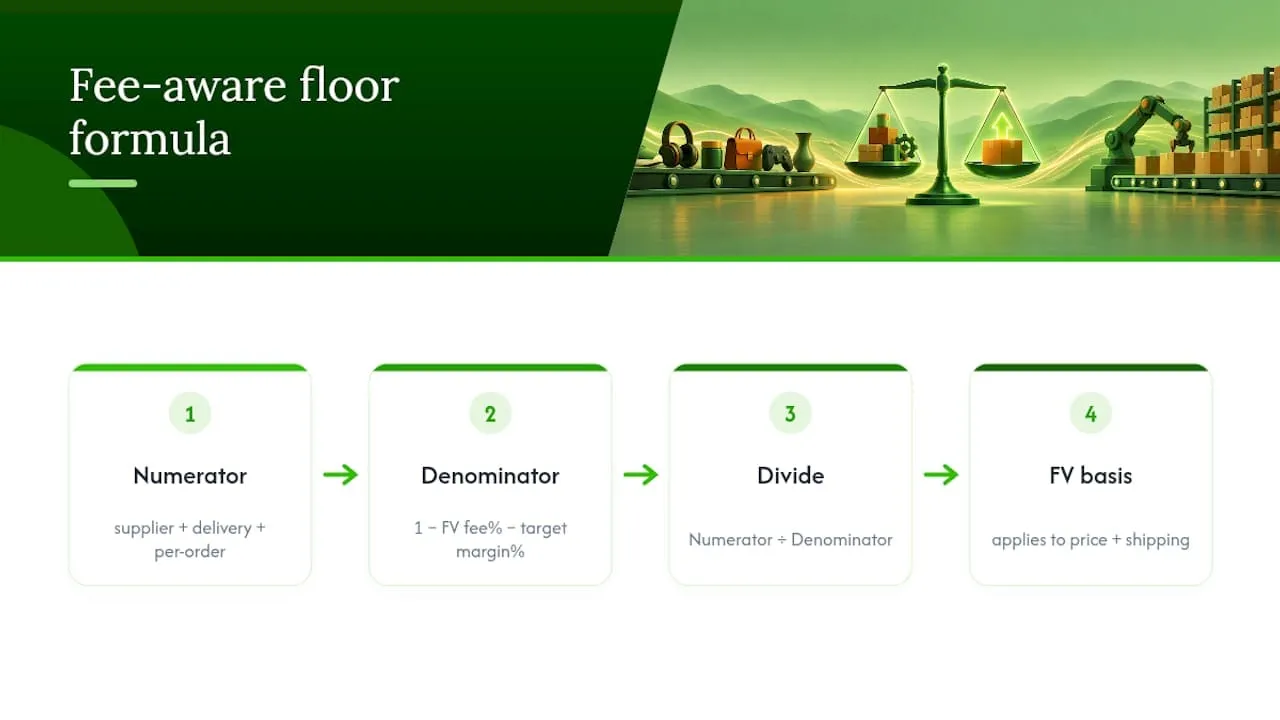
Floor price = (Supplier cost + delivery cost + per-order fee) ÷ (1 − final value fee % − target margin %)
Each term matters. Supplier cost and delivery are what you actually spent getting the item ready to ship. The per-order fee is eBay’s flat fee per transaction, and it hits low-ticket items disproportionately hard because it doesn’t scale with price. The final value fee, meanwhile, applies to your item price plus shipping, not just the item, which surprises sellers who quote shipping separately and forget eBay still takes its cut on that portion.
Worked examples from TallyCrunch’s fee calculator show why this matters in practice:
On a $100 sale, that same math produces a final value fee close to $13.60 plus the per-order flat fee, a detail confirmed by Fees.tools’ tiered fee breakdown, which also notes that fees can shift depending on store subscription level.
Low-ticket inventory needs a wider markup cushion than mid-priced items, not the same flat percentage.
How Do You Use Sold Listings To Set Your Price?
Active listings tell you what people are asking. Sold listings tell you what people actually paid. Only one of those numbers should set your price.
- Filter your eBay search to “Sold Items” only, not “Completed Items,” which includes unsold listings that skew the picture.
- Pull a sample from the last 30 to 60 days; anything older reflects a different market, especially in electronics or fashion where trends move fast.
- Exclude obvious outliers, a single sale at double the median usually reflects a bidding war or a bundle, not the going rate.
- Calculate the median (not the average) sold price from your remaining sample, since a couple of high or low sales can distort an average badly.
- If comps are thin, under five or six sales, widen your date range or pull comps from closely related SKUs, or refresh your own listing using Sell Similar to generate fresh signal.
- Compare the median sold price to your floor. If the median sits comfortably above your floor, you have room to price competitively or even at a slight premium. If the median sits below your floor, you have a sourcing problem, not a pricing problem, consider bundling the item or finding cheaper supply before listing at a loss.
Sellbrite’s pricing guide makes the same point: research sold comps and fees together, before you commit to a number, not after a listing has already sat stale for a week.
Pricing Tactics That Improve Conversion Without Cutting Margin
Small presentation choices move conversion more than most sellers expect, and none of them require lowering your actual price.
- Show a crossed-out “was” price next to your current price when you have genuine sold history to back it; unsupported markdowns look inauthentic and buyers notice.
- Offer free shipping where your category supports it. It converts better than itemized shipping because eBay’s search algorithm and buyer psychology both favor listings that look like one clean number, but fund it by building the shipping cost into your item price rather than absorbing it from margin.
- Bundle two or three related items or offer multi-quantity discounts. This raises your average order value and spreads the fixed per-order fee across a larger sale, lowering its effective percentage impact.
- Test price changes in small 5 to 10% increments rather than big cuts. Watch conversion rate against impressions for a week before deciding a price didn’t work, a sudden traffic dip is often a visibility problem, not a price problem.
Pro Tip: Before you cut a price, check your view count first. If views are healthy but sales aren’t following, the price is the friction. If views themselves are low, no price change will fix a title or photo problem.
When Should You Adjust Or Relist An eBay Listing?
Pricing isn’t a decision you make once and forget. It’s closer to inventory management: something you check on a schedule, the same way you’d check stock levels.
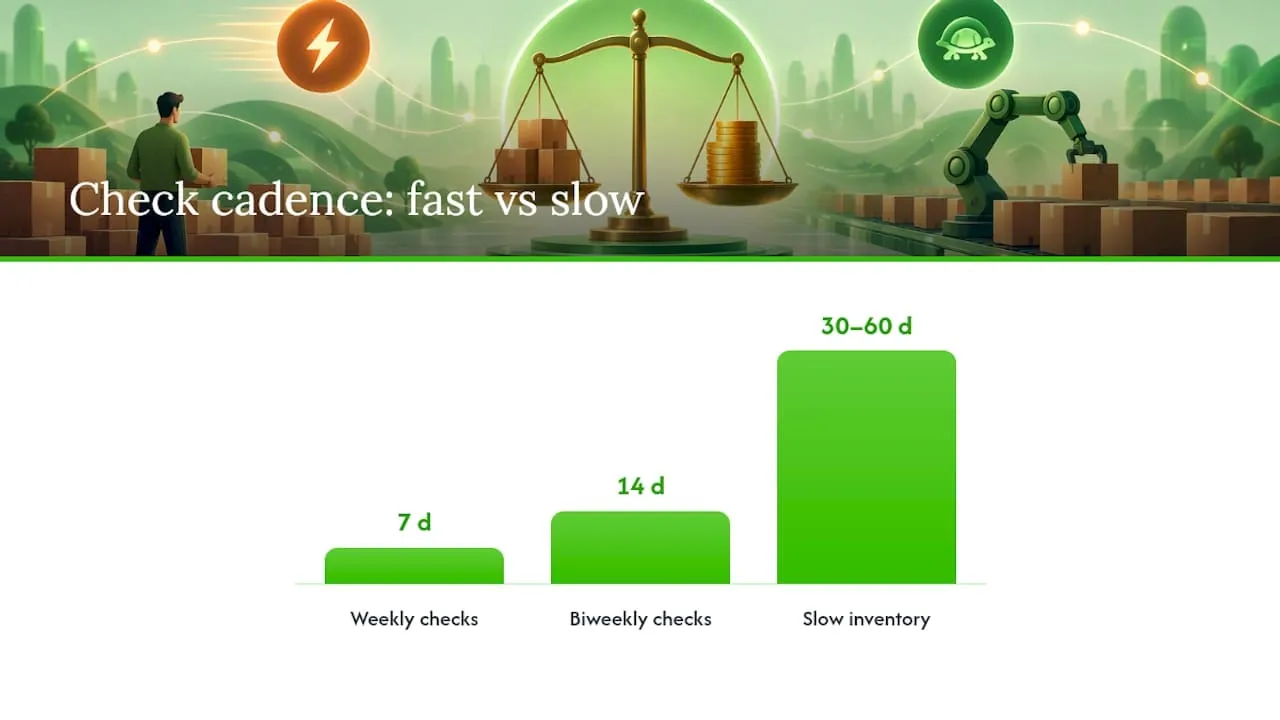
Fast-moving SKUs deserve a weekly or biweekly glance at sold comps and current position. Slower categories, furniture, niche collectibles, anything with long consideration cycles, can run on a 30 to 60 day check instead. The key operational rule is simple: a listing with views but no sales points to price friction, while a listing with almost no views points to a visibility problem that no price cut will solve, fix the title, category, or photos first.
- Weekly or biweekly checks for fast sellers; monthly checks for slow-moving inventory.
- Relist through Sell Similar when a listing has aged out of relevance rather than editing the same stale listing repeatedly.
- Reserve a price drop for items with confirmed traffic and confirmed non-conversion, not as a default response to slow sales.
- Consider a repricer or scheduled relist workflow once you’re managing this cadence across more than a handful of active listings.
Pro Tip: Track your timing patterns alongside price. A listing that looks underpriced on a Tuesday afternoon might just be poorly timed, not poorly priced.
Cross-listing automation becomes worth considering once you’re running this same cadence across multiple marketplaces simultaneously, since manually rechecking comps on eBay, Vinted, and Wallapop separately eats hours fast.
What Extra Costs Should International Sellers Price For?
Selling across borders adds a layer most domestic-only sellers never budget for. eBay applies an international fee, often around 1.65% in many published fee schedules according to Fees.tools, on top of the standard final value fee, and that difference needs to sit inside your floor calculation, not get absorbed after the fact.
- Decide upfront whether you charge shipping separately (clearer for customs value) or build it into the item price (cleaner presentation, easier conversion) and test which converts better for your specific category.
- Price in your default currency and monitor exchange rate movement rather than adjusting per sale. Webinterpret’s guidance for international sellers recommends pricing conservatively in categories where currency swings are common, so a bad exchange week doesn’t quietly erase your margin.
- Use combined shipping and multi-item discounts on international orders specifically, since the flat per-order fee hurts proportionally more on cross-border sales where shipping costs are already higher.
Do Promoted Listings Actually Pay For Themselves?
Promoted Listings work like a bidding auction for placement, you set an ad rate as a percentage of the sale price, and eBay boosts your listing’s visibility in search results in exchange. That ad rate comes directly out of your margin, on top of the final value fee and per-order fee already baked into your floor.
The math only works if the extra visibility converts into sales you wouldn’t have gotten otherwise. Run the numbers before committing: if your floor already assumes a roughly 13.6% final value fee plus a per-order fee, adding a 5% ad rate on top means your total fee load can approach 20% or more of the sale price. That’s fine for a slow-moving SKU sitting on page three of search results with almost no organic visibility. It’s a bad trade for an item that’s already selling steadily on its own.
Treat promoted ad rate as a separate line in your floor formula rather than an afterthought. If you plan to promote a listing regularly, build that percentage into your break-even calculation from the start instead of discovering after the sale that your “profitable” price wasn’t actually profitable once the ad fee posted. Start with a conservative ad rate, in the low single digits, on new or underperforming listings, and raise it only if you can track a clear lift in sales that offsets the extra cost. Turn promotion off for anything already converting well organically; you’re just paying eBay for sales that would have happened anyway.
How Should Pricing Differ For New, Used, And Refurbished Items?
Condition changes buyer expectations and your evidence base for pricing, so a single floor formula applied identically across conditions usually misprices something.
New, sealed items are the easiest to price because sold comps are plentiful and consistent, buyers expect retail-adjacent pricing minus a modest discount for the secondhand marketplace itself. Your floor calculation is straightforward here since sourcing cost is typically known and stable.
Used items carry far more variance. Two “used, good condition” listings for the same product can sell $15 apart depending on photos, description honesty, and included accessories. Pull sold comps specifically filtered to comparable condition descriptions, not just the product name, or you’ll anchor to a price band that doesn’t match what you’re actually selling.
Refurbished items sit in between and need their own comp set entirely. Buyers pay a premium over plain “used” for a refurbished label, but only when the listing clearly states what was done, battery replaced, screen tested, factory reset, since an unsupported “refurbished” claim converts no better than “used” and sometimes worse due to buyer skepticism. If you’re sourcing items to resell, category selection itself affects how forgiving your margin ceiling is; guides on what sells well for resale are worth checking before you commit shelf space to a condition category with thin margins.
Does Timing Really Change What You Should Charge?
Timing affects visibility and buyer volume more than it changes your actual floor price, but the two interact in ways worth planning around.
Seasonality is the biggest lever. Categories tied to gift-giving, electronics, toys, apparel, see sold prices climb in the weeks before major holidays simply because demand outpaces supply temporarily. That’s a legitimate window to price at the top of your comp range rather than the median, since buyers are less price-sensitive when they’re shopping under a deadline. The flip side matters just as much: post-holiday months typically see softer demand and lower sold prices in the same categories, which is the wrong time to hold firm on premium pricing.
Day of week and time of day mostly affect when listings end and how much bidding activity an auction attracts, rather than what a fixed-price item is worth. Auctions ending during evening hours in your primary buyer time zone tend to see more competitive bidding simply because more people are actively browsing. For fixed-price listings, timing matters less for the price itself and more for initial visibility in search, which indirectly affects how quickly you accumulate the sales history that then feeds your next round of comp research.
Should You Use Automated Repricing Tools On eBay?
Dynamic pricing tools, often called repricers, automatically adjust your listed price based on rules you set: competitor price changes, time-on-market, or performance thresholds. They solve a real problem: manually rechecking comps across dozens or hundreds of SKUs simply doesn’t scale past a certain catalog size.
The tools work best when your floor is already correctly calculated, since a repricer optimizing toward the wrong break-even number just automates a mistake faster. Set your floor first using the fee-aware formula, then let automation handle the day-to-day adjustment within that boundary rather than trusting a tool to discover your margin limits on its own.
Common rule types include: match the lowest comparable sold price but never go below your floor, drop price incrementally after a set number of days with no sale, or raise price automatically during confirmed high-demand windows like pre-holiday weeks. The decision point for adopting a repricer is usually less about wanting automation and more about hitting a practical wall, once your catalog crosses roughly 100 active SKUs or your supplier costs shift frequently enough that manual recalculation eats real time, automation stops being a convenience and starts being a necessity.
How Do You Handle Best Offer And Price Negotiations?
Best Offer turns a fixed-price listing into a negotiation without you having to manually respond to every message asking “would you take less?” Set it up correctly and it filters out lowball offers automatically while still capturing sales from buyers who just wanted a small discount to commit.
eBay lets you set an automatic minimum offer, below which offers get auto-declined, and an automatic accept threshold, above which offers get auto-accepted. Set your minimum at or slightly above your break-even floor, never below it, since an auto-accepted lowball offer is exactly the margin leak the floor formula was built to prevent. Set the auto-accept threshold a modest amount below your listed price, enough to close a hesitant buyer without you needing to manually approve every reasonable offer.
Manual negotiation matters most on higher-ticket items where a few dollars of flexibility can close a sale that would otherwise sit unsold. A polite counteroffer, splitting the difference between the buyer’s number and your listed price, converts far more often than a flat rejection. The one rule worth holding firm on: never counter below your calculated floor just to close a sale faster. A quick sale at a loss isn’t a win, it’s a transaction that would have been better left unlisted.
Luis’s Take: Pricing Is Maintenance, Not A Decision
Most sellers treat pricing as something you set once and revisit only when sales stall. That’s backwards. The sellers who protect margin best treat it like inventory: checked on a schedule, adjusted on triggers, not gut feeling. My shortcut list is short on purpose: build shipping into your price, pull sold comps weekly for anything fast-moving, and never let your floor drift below break-even just to chase a sale.
Automation earns its place once your catalog passes roughly 100 SKUs or your supplier costs shift often enough that manual recalculation stops being realistic.
- Luis
Scale Your Pricing Maintenance With Ruit
Manually rechecking sold comps, refreshing stale listings, and syncing inventory across eBay, Vinted, and Wallapop works fine at ten listings. It stops working at a hundred. Some cross-listing tools automate inventory syncing to help prevent overselling the same item on multiple marketplaces, handle scheduled relisting, and surface price suggestions to keep your pricing floor current without using spreadsheets.
Ruit’s cross-listing and inventory sync come with its paid plans, priced excluding VAT, and an Enterprise plan is available for sellers who need more, priced on request. If you’re spending more hours checking prices than actually sourcing inventory, that’s the trigger to look at Ruit’s product page and see whether automated cross-listing fits your catalog size.
Sources
Check your own numbers directly: eBay’s official pricing guidance, the TallyCrunch fee calculator, and the ResellAIO calculator for tiered rates. For strategy depth, see Ecomli’s pricing guide and Ruit’s post on tracking sold prices.
- How to price your items
- eBay Fee Calculator 2026 - Fees & Profit Per Sale
- eBay Fee Calculator USA 2026, Calculate US Selling Fees Free | ResellAIO
FAQ
How much does eBay take from a $100 sale?
On a $100 sale, eBay typically takes a final value fee of about 13.6% plus a per-order fee of $0.30 to $0.40, based on worked examples from TallyCrunch’s calculator. The total fee amount varies depending on store subscription level and category.
How much does eBay take from a $2,500 sale?
Fee schedules from Fees.tools show the final value fee rate applies up to a threshold typically above average sale prices, so mid-range sales are taxed at the usual tiered rate plus the flat per-order fee. High-ticket sales don’t always get a lower percentage rate; however, the per-order fee becomes less significant proportionally.
Why are sellers leaving eBay?
Rising and layered fees, final value fees, per-order fees, and promoted listing costs stacking together, are a common complaint among sellers frustrated with shrinking margins. Sellers who calculate a proper fee-aware floor before listing tend to avoid the worst of this squeeze because they’re pricing with fees already accounted for rather than discovering the gap after a sale.
What is the slowest month for eBay sellers?
Sales activity in many gift-oriented categories typically softens in the weeks right after major winter holidays, as buyer demand that spiked before the holidays tapers off. This is a reasonable window to hold firmer on price rather than discounting into a naturally quiet period.
What is a floor-anchored pricing strategy on eBay?
A floor-anchored pricing strategy means calculating your break-even price, covering supplier cost, shipping, and eBay fees, before you set a market position based on sold comps. Tools like Ruit can help maintain that floor across multiple marketplaces once your catalog grows large enough that manual tracking becomes impractical.