See What Actually Sells on eBay

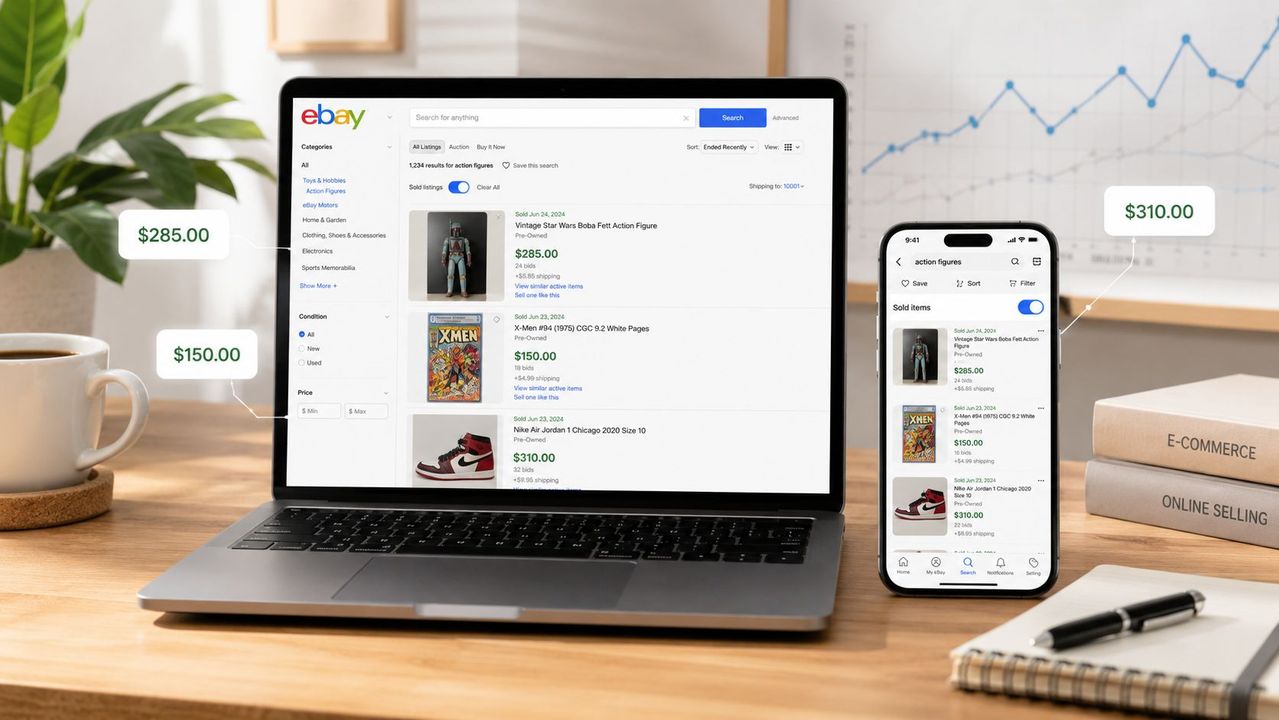
Table of Contents
- Table of Contents
- Why Sold Items Matter Before You List or Buy
- Finding Sold Listings on eBay Desktop Search
- Viewing Sold Items in the eBay Mobile App
- Checking Your Own Sold Items in Seller Hub
- Deeper Sales Data with eBay Product Research
- Turning Sold Data Into a Pricing Decision
- A Quick Workflow for Pricing and Sourcing
- Frequently Asked Questions
You’ve found an item that looks profitable, but the active listings are telling you very little. Sellers can ask almost anything, and a page full of expensive listings doesn’t prove buyers are paying those prices. The useful question is simpler: what sold, in what condition, and with which shipping terms?
The eBay view sold items feature turns that question into a pricing process. You can use the public search filter for recent market evidence, your own Seller Hub history for operational results, and Product Research for broader trend and sell-through analysis. Each view has a different time window and purpose, so mixing them carelessly can lead to an inflated list price or an unnecessary buy.
Table of Contents
- Why Sold Items Matter Before You List or Buy
- Finding Sold Listings on eBay Desktop Search
- Viewing Sold Items in the eBay Mobile App
- Checking Your Own Sold Items in Seller Hub
- Deeper Sales Data with eBay Product Research
- Turning Sold Data Into a Pricing Decision
- A Quick Workflow for Pricing and Sourcing
- Frequently Asked Questions
Why Sold Items Matter Before You List or Buy
Active listings show seller expectations. Sold listings show completed transactions, which makes them the stronger starting point for deciding whether an item is worth buying or listing. A high asking price may represent a slow-moving product, an unusually complete bundle, or an optimistic seller. Until you inspect completed sales, you don’t know which explanation applies.
Start with a specific search rather than a broad category. Include the brand, model, size, color, edition, or compatible accessory that affects value. A search for a generic camera lens, for example, can combine different mounts and conditions, producing a price range that isn’t useful for the item in your hand.
Three eBay data surfaces answer different questions:
- Public sold-items search: What have comparable items sold for recently? eBay’s standard search view limits sold-item results to the last 90 days. eBay’s sold-item search guidance confirms the available filters and the separate seller-history window.
- Seller Hub or My eBay history: What happened to your own completed orders, including payment, shipping, and payout details? Sellers can access their own sold-order history for the last 2 years through these areas, as described by eBay’s help documentation.
- Product Research: How does the item behave across a wider period? The tool provides up to 3 years of sales data for millions of items, while its sell-through rate is limited to items sold within the most recent 90 days. eBay Product Research details explain the distinction.
The practical outcome is a defensible list price, not a screenshot. You’ll be able to validate demand, separate comparable conditions, account for shipping and fees, and decide whether the inventory deserves your cash.
Finding Sold Listings on eBay Desktop Search
Desktop search gives you the clearest workspace for building a current price baseline. Start with a product-specific query, then submit it on eBay. In the results, open the left filter rail, find Show only, and select Sold items. eBay may show the option as a standalone checkbox or group it with completed-item filters, depending on the layout.
The results will refresh with completed transactions rather than active offers. Public sold search covers only the last 90 days, so a sale outside that window may be absent even when the item has sold steadily for years. Use this screen to judge current pricing, not long-term seasonality.
Refine the search after applying the sold filter. Set the category and condition, then compare auction and Buy It Now results separately. Check price range and shipping settings as well. A used Nintendo console with accessories is a different comp from a bare console, and an auction result should not automatically set the price for a fixed-price listing.
The sort order that helps most
Start with Price + Shipping: highest first. The upper results show premium outcomes and give you clues about bundles, condition, rarity, or presentation that supported those prices. Then review the lower-priced sales and sort by ending time when recency matters.
The top result is a lead, not a list price. Read the title, inspect the photographs, and compare condition notes, included parts, defects, and shipping charges. A high sale may be sealed, bundled, or an unusual variant, making it a poor benchmark for your inventory.
Use the 90-day search view as recent evidence. It cannot show whether demand was stronger earlier or changed with the season, so keep it separate from the longer 2-year seller history and 3-year Product Research view. Those broader windows support a pricing decision, while this screen helps anchor the number to current buyers.
If you need a visual walkthrough while comparing results, this video shows the search workflow:
Viewing Sold Items in the eBay Mobile App
At a shop, estate sale, or collection pickup, the eBay app can turn a quick scan into a pricing check. Open eBay on iOS or Android, enter a product-specific query, and submit it. On the results page, tap Filter, then look under Show only or Search results for Sold items.
Turn on the switch and apply the filter. The results should reload with completed transactions rather than active listings. Mobile search shows recent sold evidence within the 90-day sold-results limit, so use it to judge current demand, not to replace the 2-year seller history or 3-year Product Research view used for broader pricing analysis.
What changes on mobile
The app usually places condition chips above the results instead of in a desktop side rail. Sort choices sit inside one dropdown, and advanced controls may be less visible. If Sold items is missing, scroll through the full filter list, expand Show more, and check that the app is updated before assuming the option was removed.
Saved searches can retain the Sold items setting, which helps when checking the same product repeatedly. Review the active filters every time, though. A saved category or condition choice can remove relevant comps and produce a misleading price range.
Use the phone to establish whether comparable items are selling and to avoid overpaying at the source. For the final list price, compare several results in a larger search view, checking titles, shipping, condition, included parts, and outliers. The mobile app starts the pricing decision. It rarely provides enough room for the full comparison.
Checking Your Own Sold Items in Seller Hub
Public sold listings show the market’s recorded prices. Your own completed-order history shows what your operation achieved. Open Seller Hub, go to Orders, then choose the completed or sold order view. The older My eBay Sold route remains useful when you need a simpler record of personal sales.
Seller Hub usually starts with a recent date range. Set the date picker to an earlier period when reviewing older transactions. Seller history can cover up to 2 years, but older orders may eventually leave the accessible view. Keep a spreadsheet or export routine if you use past sales to guide buying and pricing.
Your order record contains details that public sold search does not show for your transactions:
- Payment status: Whether the buyer paid and the order is ready for fulfillment.
- Shipping details: The service selected, tracking activity, and order-level delivery information.
- Buyer details: The information required to process the completed order within eBay’s rules.
- Financial outcome: The gross sale price, withheld final value fee, and payout net shown in the seller record.
Exporting your operating evidence
Use the export or download control in the order-management view and save a CSV when available. A spreadsheet lets you compare your realized net with public sold comps instead of relying on memory. Add sourcing cost, packaging, shipping, returns, and other direct expenses that the marketplace screen may not fully capture.
This record turns sold-item research into a pricing check. Public comps suggest the market range, while your own net results show whether a similar list price leaves room after fulfillment. Sellers working across multiple channels can also consult this guide to crosslisting for organizing listings across marketplaces. Use both records before repeating a purchase or setting a new price.
Deeper Sales Data with eBay Product Research
Product Research is the analytics layer for decisions that a normal sold-items search can’t support. Open it through Seller Hub, enter the product or category, and inspect the available sales history rather than relying on one visible transaction. eBay says the tool can expose up to 3 years of sales data for millions of items, including average sold price, sold-price range, average shipping cost, the share of listings with free shipping, seller count, and selling format. eBay’s Product Research documentation also explains that sell-through rate is available only for searches covering items sold within the latest 90 days.
That time-window split matters. The longer view can reveal seasonality and long-tail behavior, while the recent sell-through figure describes current demand. Don’t combine a multi-year price trend with a recent sell-through result as though both measure the same period.
Product Research Metrics at a Glance
| Metric | What It Shows | How to Use It |
|---|---|---|
| Average sold price | The typical reported sale level across the selected results | Use it as a reference point, not as an automatic list price |
| Sold-price range | The spread between lower and higher transactions | Investigate why condition, bundles, or variants create the spread |
| Average shipping cost | The shipping amount associated with comparable sales | Compare delivered cost, not just item price |
| Free-shipping share | The portion of listings using free shipping | Decide whether your offer needs shipping built into the price |
| Sell-through rate | Recent sold demand relative to available listings | Use it to judge velocity, remembering that the measure is limited to recent sold searches |
| Seller count | How many sellers sold the item | Treat high competition as a reason to improve condition, price, or presentation |
| Selling format | The mix of auction and fixed-price activity | Compare like with like before using a result as a comp |
Product Research also helps segment results by condition. A combined average for New, Used, parts-only, and refurbished inventory can make a perfectly good item look underpriced or overpriced. Separate the condition groups before deciding where your listing belongs.
Product Research remains the eBay-specific source for market behavior, while your own records provide the necessary verification.
Turning Sold Data Into a Pricing Decision
A sold screenshot isn’t a pricing strategy. The useful workflow starts by building a clean comparison set from recent results, then adjusting that evidence for condition, shipping, fees, and acquisition cost.
Begin with the 90-day sold search. Use the exact model and variant, then collect a group of recent sales in the same condition. eBay reseller guidance recommends sampling 10 to 20 recent sold comps, removing the highest and lowest outliers, and pricing around the middle cluster rather than trusting an anomalous transaction. This eBay seller-insight article discusses that comp-sampling approach and the importance of evaluating costs beyond the screenshot price.
Clean the comparison set
Condition is the first filter. Separate New from Used, complete from incomplete, and working from parts-only. A Used item with cosmetic wear shouldn’t inherit the average of sealed examples just because the keyword is identical.
Next, inspect the ends of the range. The highest result may include rare accessories or an unusually strong presentation. The lowest may have a defect, poor photos, missing parts, or a rushed auction. Keep unusual transactions in a separate note rather than allowing them to pull your working price away from the main cluster.
Practical rule: Price against the comparable middle, then explain any move toward the top or bottom with a specific difference in condition, completeness, shipping, or timing.
Convert revenue into margin
The apparent sale price isn’t your profit. Seller guidance notes that eBay and payment fees commonly absorb roughly 13% to 15% plus a small per-order fee in many categories, before shipping. The same eBay seller resource warns that ignoring fees and fulfillment can erase an apparent gross-margin gain.
A practical estimate is to reduce the expected sale price by the applicable fee burden, then subtract sourcing cost, shipping, packaging, returns allowance, and other direct expenses. Check the actual fee structure for your category and account rather than treating the common range as a universal rule.
Choose the listing position
When comparable volume is healthy and the item is ordinary, the middle of the recent distribution is usually the safest starting point. A scarce item in excellent condition may justify a position toward the upper end, provided the higher comps match your inventory.
If the fee-adjusted result leaves little room above your sourcing cost, don’t rescue the deal with wishful pricing. This guide to finding a selling price is useful as a complementary pricing reference, but the buy decision still depends on your actual costs and the quality of your comps.
A Quick Workflow for Pricing and Sourcing
Use each eBay data surface for a specific decision. A sold search validates the market, Seller Hub shows how your own listings performed, and Product Research helps frame price and timing.
Validate the comp first. Run the exact query in desktop or mobile sold search. Match model, condition, completeness, size, and format, then inspect the strongest and weakest comparable listings. If the results mix unrelated variants or conditions, refine the query before buying. A bad comp set can make a plausible price look reliable.
Set a working price. Use the cleaned recent cluster rather than a single outlier. Compare its middle range with Product Research’s average and range, then review your own completed sales in Seller Hub or My eBay. Your history may show that buyers respond differently to your condition descriptions, shipping setup, photos, or presentation.
Separate price from timing
A price supported by old sales may still be difficult to achieve now. Use the broader Product Research history to identify recurring seasonal or long-tail patterns, then treat those patterns as timing guidance. A basketball jersey may attract more attention around the season, while a winter coat and a summer dress have different useful selling windows. Keep the conclusion qualitative unless the current data supports a precise one.
Prioritize recent sell-through when deciding whether to buy inventory that must move quickly. Prioritize historical trend data when you can hold stock and the item has a plausible seasonal cycle. Weak recent movement should outweigh an attractive long-term average, especially when your cash is tied up in a narrow or uncertain market.
Buy/no-buy test: If the fee-adjusted middle of comparable sales leaves too little room above sourcing and fulfillment costs, walk away rather than forcing the list price higher.
Keep the workflow consistent:
- Validate the comp: Use the recent sold filter and match the item’s key attributes.
- Set the price: Start with the middle of cleaned comps, then compare Product Research and your completed sales.
- Choose timing: Use broader history to assess seasonality, holding time, and long-tail demand.
- Protect the margin: Include marketplace fees, payment costs, shipping, packaging, returns, and sourcing.
- Record the result: Save the query, evidence, expected net, and final outcome for later buying decisions.
For sellers managing eBay with other channels, Ruit connects an eBay account for centralized listing workflows and synchronizes inventory status across connected marketplaces. That places sold-item research alongside sourcing, inventory, and orders.
Use the sold-items filter on one product you are considering. Compare the result with your Seller Hub history, write down the fee-adjusted target price, and decide whether the evidence supports listing or buying.
Frequently Asked Questions
How far back do eBay sold listings go?
Search-side sold data is a recent window, not a full history. That is enough to price against current demand, which is what you want, a comparable from a year ago describes a market that may no longer exist.
Why do sold and completed listings show different things?
Completed includes everything that ended, sold or not. Sold is only what changed hands. Pricing against completed listings mixes in every item nobody bought, which is how sellers talk themselves into a number the market already rejected.
Can I see sold prices on the mobile app?
Yes. The filter panel carries a Sold items toggle alongside Completed items, so you can check a comparable while you are standing in front of the item you might buy.
What if there are no sold comparables at all?
That is information, not a gap. Either the item is genuinely rare, or your search terms match how you describe it rather than how buyers do. Try the second explanation first.