Multi Channel Support That Stops Oversells for Second Hand Sellers


Table of Contents
- Quick capability checklist: 6 must-have features to evaluate tools fast
- How a unified inbox works for marketplaces
- Inventory sync and preventing oversells across marketplaces
- Marketplace SLA tracking, templates, and compliance
- Automation and AI for routine tickets: safe automation and human handoffs
- Implementation checklist: integrations, mapping, testing, and pricing signals
- Measure success: the KPIs to track after go-live
- Authoritative proof and Ruit brand signals: how Ruit supports multi-marketplace sellers
- Overview of common multi-channel customer support platforms and tools
- Best practices for integrating channels such as email, phone, chat, and messaging apps
- Training and managing support teams across multiple channels
- Handling channel-specific customer expectations and communication styles
- Data privacy and compliance considerations in multi-channel support
- Strategies for maintaining consistent brand voice and messaging across channels
- Author perspective: practical trade-offs for small sellers and quick prioritization
- Ruit as an option: short, honest closing CTA with product links and next steps
- Sources
- FAQ
- Recommended
Multi channel customer support for second-hand sellers means managing buyer messages, order questions, and returns across every marketplace you list on, from a single place. The capability to prioritize first is a unified, order-aware inbox paired with real-time inventory sync and marketplace-aware automation. Tools like Ruit build toward exactly this combination for sellers listing across Wallapop, Vinted, and eBay.
TL;DR:
- Inventory sync must update all marketplaces within minutes after a sale to prevent overselling, especially for single-quantity items.
- Marketplace-specific SLA tracking and templated responses are essential to maintain compliance and protect seller visibility on each platform.
- Automated responses should handle routine inquiries, but tickets with negative sentiment or high value must be routed to a human to avoid poor customer experience.
- Testing during setup should include real purchase, cancellation, and return scenarios to ensure stock and messaging react correctly across channels.
Quick capability checklist: 6 must-have features to evaluate tools fast
Before you demo anything, screen it against a short list. Most tools claim “multichannel support,” but far fewer handle the details that actually protect your seller metrics.
- A unified inbox that shows order details, tracking, and status next to every message, with collision detection so two agents don’t answer the same buyer twice.
- Real-time inventory sync with allocation rules that stop a sold item from appearing available on another marketplace.
- Marketplace-specific SLA tracking with templated replies built for each platform’s rules.
- Smart routing that sorts tickets by marketplace, language, and product type.
- Automation for repetitive tickets like order status, shipping updates, and return requests.
- Reporting that tracks SLA compliance and response times by channel, not just in aggregate.
Skip any tool missing more than one of these. A gap in inventory sync or SLA tracking tends to cause the most damage to your account standing.
How a unified inbox works for marketplaces
An order-aware inbox pulls the buyer’s order, the item, tracking status, and prior messages into the same screen as the conversation. That context matters because a support reply written blind, without knowing whether the item shipped or the return window is still open, tends to be wrong or slow. Consolidating marketplace messages into a unified inbox with order context reduces missed messages and helps protect seller metrics, since a missed reply on one platform can quietly damage the account rating there.
Collision detection stops two people (or you and an automated rule) from replying to the same buyer at the same time, which looks disorganized and can violate platform expectations. A unified customer history also means a buyer who messages about a Vinted order and later buys from you on eBay is recognized as the same person, not treated as a stranger twice.
Consider a practical case: a buyer asks “where’s my order” on eBay and a near-identical question on Wallapop. eBay expects tracking-linked, transactional replies; Wallapop conversations run more casually. A generic template used on both risks sounding wrong on one platform even when it is accurate.
Inventory sync and preventing oversells across marketplaces
Oversells are the most damaging operational failure for anyone listing the same item across several marketplaces, and they are largely preventable with the right sync setup. Real-time inventory sync prevents overselling by updating all channels immediately after a sale and supports safety buffers and conflict routing to reduce manual firefighting. Sub-minute sync matters most for single-quantity items, which is the norm for second-hand goods: once an item sells, every other listing needs to come down before a second buyer can commit.
Safety buffers help when quantities are shared across near-identical listings, and SKU allocation rules let you reserve stock for a specific channel during high-traffic periods. Event-driven updates, triggered by a completed sale, a cancellation, or a return, keep every marketplace accurate without waiting on a scheduled refresh.
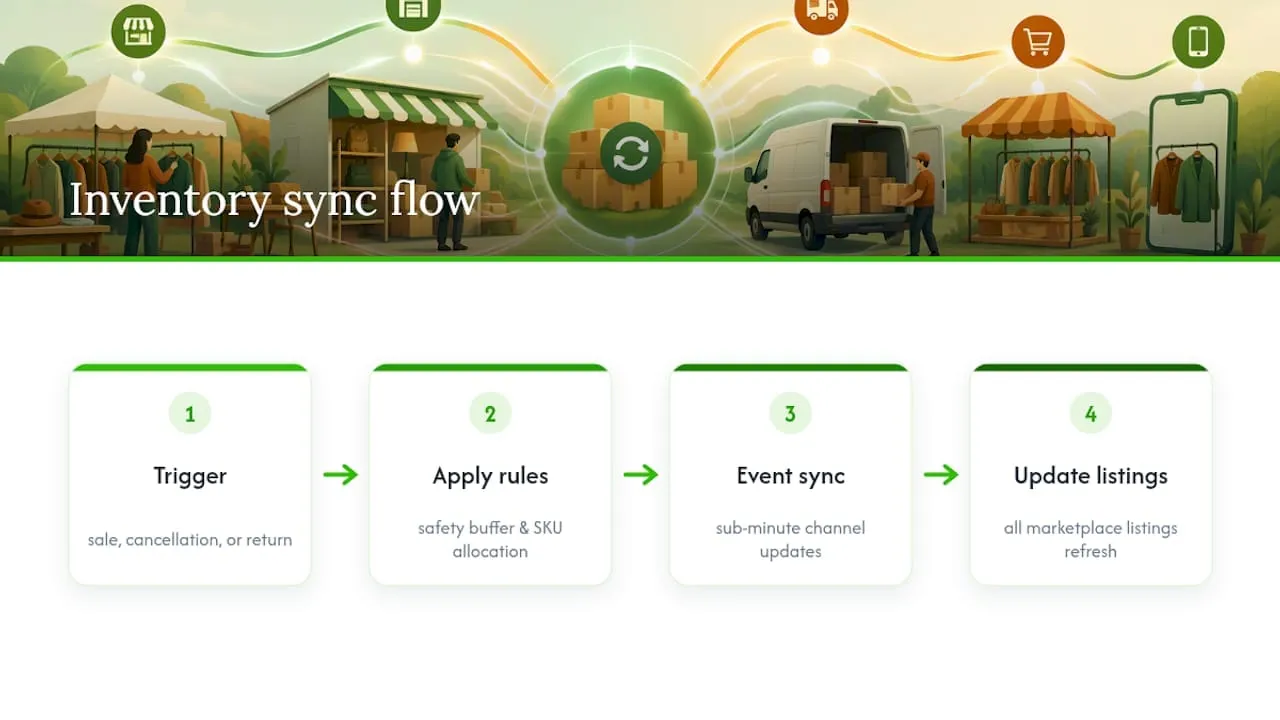
During setup, run a few basic checks: complete a real purchase and confirm the listing drops everywhere within your tool’s stated window, then simulate a cancellation and a return to confirm stock reappears correctly. Our guide on managing eBay inventory across channels walks through similar validation steps in more detail.
Marketplace SLA tracking, templates, and compliance
Every marketplace runs its own service-level expectations, and missing them can cost you visibility or standing on that platform. Marketplace policies differ in allowed message content and response expectations, and using marketplace-specific templates prevents policy violations; a template written for casual peer-to-peer chat on Vinted can break eBay’s more transactional messaging rules.
To stay compliant across channels:
- Configure separate SLA timers per marketplace, since response windows and what counts as a breach vary by platform.
- Set real-time alerts as a ticket approaches its SLA deadline, not after it’s already missed.
- Maintain a template library tagged by marketplace so replies stay within each platform’s accepted phrasing.
- Add escalation triggers for negative sentiment or a ticket nearing its SLA limit, routing it to a human before it breaches.
Smart routing by marketplace and SLA priority is what makes this manageable at volume rather than a manual checklist.
Automation and AI for routine tickets: safe automation and human handoffs
Automation earns its keep on repetitive, low-risk tickets: order status checks, shipping updates, and standard return requests. These are questions with a factual answer sitting in your order data, so a bot can pull the tracking number or return window and reply accurately without a human typing it out each time.
The line to hold is escalation. Any ticket showing negative sentiment, a high-value order, or a request outside the standard return policy should route to a person automatically rather than get a templated reply. Keep an audit log of what automation sent and when, so you can review edge cases and catch a bad auto-reply before it repeats. A periodic human review of automated tickets, even a sample, catches drift before it becomes a pattern of complaints.

Implementation checklist: integrations, mapping, testing, and pricing signals
Moving from a demo to daily use goes smoother with a defined order of operations, rather than connecting everything at once and hoping it reconciles.
- Connect each marketplace account and import your historical orders so the tool has a full picture from day one.
- Map product attributes, shipping profiles, and return workflows so listings behave consistently across channels.
- Run test purchases, cancellations, and partial-fulfillment scenarios to confirm inventory and messaging both react correctly, following a structured test plan for purchase, cancellation, and concurrency scenarios.
- Confirm SLA alerts fire correctly during your test orders before going fully live.
On cost, most multichannel management software uses tiered SaaS pricing based on connected channels, monthly order volume, or active SKUs, so expect your monthly bill to move with how many marketplaces and how much volume you run through the tool.
Measure success: the KPIs to track after go-live
Once the setup is live, a handful of metrics tell you whether it’s actually working. Track response time by marketplace against each platform’s own SLA, since a single blended average can hide a channel that’s quietly underperforming.
Watch ticket volume alongside first-response rate and resolution rate: rising volume with falling resolution rate usually signals a routing or template problem, not a staffing one. Oversell incidents and inventory sync latency are your clearest signal that the sync configuration needs attention rather than more manual checking.
Finally, track how much volume automation handles successfully versus how often those tickets get escalated back to a human. That ratio tells you whether your automation rules are tuned correctly or need narrowing.
Authoritative proof and Ruit brand signals: how Ruit supports multi-marketplace sellers
Some cross-listing and messaging tools are designed for second-hand sellers working across multiple marketplaces.
- They publish a single product catalog across marketplaces from one upload.
- They automate inventory management, ad renewals, and buyer messaging to reduce manual work.
- Some tools use AI to help optimize listings and reduce stock discrepancies across connected channels.
For more on centralizing orders, see our piece on cloud-based order management and our guide on connecting Shopify with Wallapop, Vinted, and eBay.
Overview of common multi-channel customer support platforms and tools
The market for multi-marketplace support tools splits roughly into three categories. Cross-listing platforms, built specifically for second-hand and reseller marketplaces, combine listing automation with a shared inbox for buyer messages across Wallapop, Vinted, and eBay. General e-commerce helpdesks, often built around email and web-store tickets, sometimes bolt on marketplace connectors but were not designed around per-platform SLA rules. Marketplace integration suites focus more heavily on inventory and order sync, with messaging as a secondary feature.
Marketplace integration software consolidates orders from multiple marketplaces into one queue, syncs inventory to prevent overselling, and reconciles payouts, which is the core job any tool in this space needs to do well before anything else matters. When comparing options, confirm native support for the specific marketplaces you sell on rather than assuming broad “multichannel” coverage includes your platforms.
For resellers, the practical difference between these categories often comes down to whether the tool understands that a Wallapop conversation and an eBay ticket carry different rules, timers, and buyer expectations. A general helpdesk retrofit tends to treat every channel the same, which creates the template and SLA problems described earlier. Our overview of ERP systems for e-commerce covers how these broader platforms differ from marketplace-native connectors, useful context if you’re evaluating both types side by side.
Best practices for integrating channels such as email, phone, chat, and messaging apps
Second-hand sellers rarely need phone support, but email, in-marketplace chat, and messaging apps like WhatsApp all show up as buyer touchpoints once a business grows past a single platform. The first rule is picking one system of record: every channel should feed the same inbox and the same order history, rather than living in separate inboxes that require you to check four places to answer one buyer.
Second, match response expectations to the channel. Marketplace chat, whether on Vinted or eBay, tends to carry an implicit expectation of a same-day reply, while email can tolerate a slightly longer window if you set that expectation up front. Messaging apps sit closer to chat in urgency, so route them with similar priority.
Third, avoid duplicating effort across channels for the same buyer. If someone messages you on Vinted and then emails a follow-up, your system should recognize it as the same conversation, not treat it as a new, unrelated ticket. This is where a shared customer history across channels earns its keep, cutting down on repeated questions and contradictory answers.
Finally, keep channel-specific formatting in mind. A reply built for marketplace chat is usually short and conversational, while an email reply can carry more detail, like a full return policy explanation. Copying one format into the other channel often reads oddly to the buyer on the receiving end.
Training and managing support teams across multiple channels
Once more than one person handles support, consistency becomes the hard part. Start by documenting response guidelines per marketplace: what tone fits Vinted’s more casual buyer base, what phrasing eBay’s policies require, and what counts as an acceptable resolution on each platform. Without that reference, two agents will handle the same situation differently, and buyers notice.
Assign ownership by channel or by marketplace during busy periods, rather than letting everyone answer everything. A team member who specializes in eBay’s return process, for instance, will resolve those tickets faster and more consistently than someone switching contexts every few minutes.
Review a sample of resolved tickets regularly, across agents and across channels, to catch drift in tone or accuracy before it becomes a pattern. This matters even more where automation is involved, since a bad automated reply can repeat dozens of times before anyone notices without a review habit in place.
Finally, keep escalation paths simple. Every team member should know exactly when a ticket needs to go to a manager, whether that’s a high-value order, a policy dispute, or a buyer showing frustration. A clear rule beats a judgment call made under pressure.
Handling channel-specific customer expectations and communication styles
Buyers show up with different expectations depending on where they found you. A Vinted buyer often expects a conversational, quick back-and-forth, closer to texting a friend about a secondhand item than a formal customer service exchange. An eBay buyer, by contrast, tends to expect a more structured, transactional tone, partly because eBay’s own policies push toward that style of communication.
Wallapop sits closer to Vinted in tone, given its peer-to-peer roots, but local pickup logistics often add a layer of practical, in-person coordination that other marketplaces don’t require. Matching your reply style to the platform, rather than sending the same generic message everywhere, reduces friction and the odds of a buyer feeling like they got a form-letter response.
This is also where marketplace-specific templates pay off twice: once for compliance, since marketplace policies differ in allowed message content, and once for tone, since a technically compliant reply that reads coldly on a casual platform still costs you goodwill. Building a small set of templates per marketplace, reviewed occasionally for tone drift, covers most of this without requiring agents to reinvent phrasing on every ticket.
Data privacy and compliance considerations in multi-channel support
Centralizing buyer messages and order data in one tool means that tool now holds a meaningful amount of personal information: names, addresses, order histories, and sometimes payment-adjacent details depending on the marketplace. Treat access to that data the same way you would treat access to your own bank account: limited to people who need it, with clear rules on what gets shared outside the tool.
Each marketplace carries its own data-handling rules for seller-side tools, so confirm that any support platform you connect is built to respect those terms rather than pulling data in ways that violate a marketplace’s developer agreement. This matters more as you add channels, since each new connection is another point where buyer data could be mishandled or exposed.
Keep a habit of reviewing who has access to your unified inbox, particularly if you bring on seasonal help or outsource support during busy periods. Removing access promptly when someone stops working with you is a basic step that’s easy to forget once a system is running smoothly.
Strategies for maintaining consistent brand voice and messaging across channels
Second-hand sellers often build a following based on how they communicate, not just what they sell, so a consistent voice across marketplaces matters more than it might for a larger retailer. Start with a short style reference: a few sentences describing how formal or casual your replies should sound, plus a handful of example messages for common situations like a delayed shipment or a return request.
Apply that voice through your templates rather than leaving it to each agent’s judgment, since templates are what scale a consistent tone across a growing ticket volume. Review those templates every few months, since buyer expectations and marketplace norms shift, and a template that sounded right a year ago can start to feel outdated or overly stiff.
Where automation handles a ticket, make sure the automated reply matches the same voice as your human responses. A buyer who gets a warm, personal-sounding human reply on one ticket and a stiff, robotic auto-reply on the next notices the inconsistency, even if both technically solved their problem.
Author perspective: practical trade-offs for small sellers and quick prioritization
A one-person seller gains the most from inventory sync first: oversells cost trust fast, while a slow reply rarely does. A small team should add SLA tracking next. The shortcut most sellers skip is running a cancellation test before go-live, which catches sync gaps a purchase test alone misses.
- Luis
Ruit as an option: short, honest closing CTA with product links and next steps
If you’re managing listings across Wallapop, Vinted, and eBay by hand, Ruit’s cross-listing tool publishes your catalog to all three from a single upload and automates inventory updates behind it. On Vinted and Wallapop, it also handles ad renewals and buyer messages.
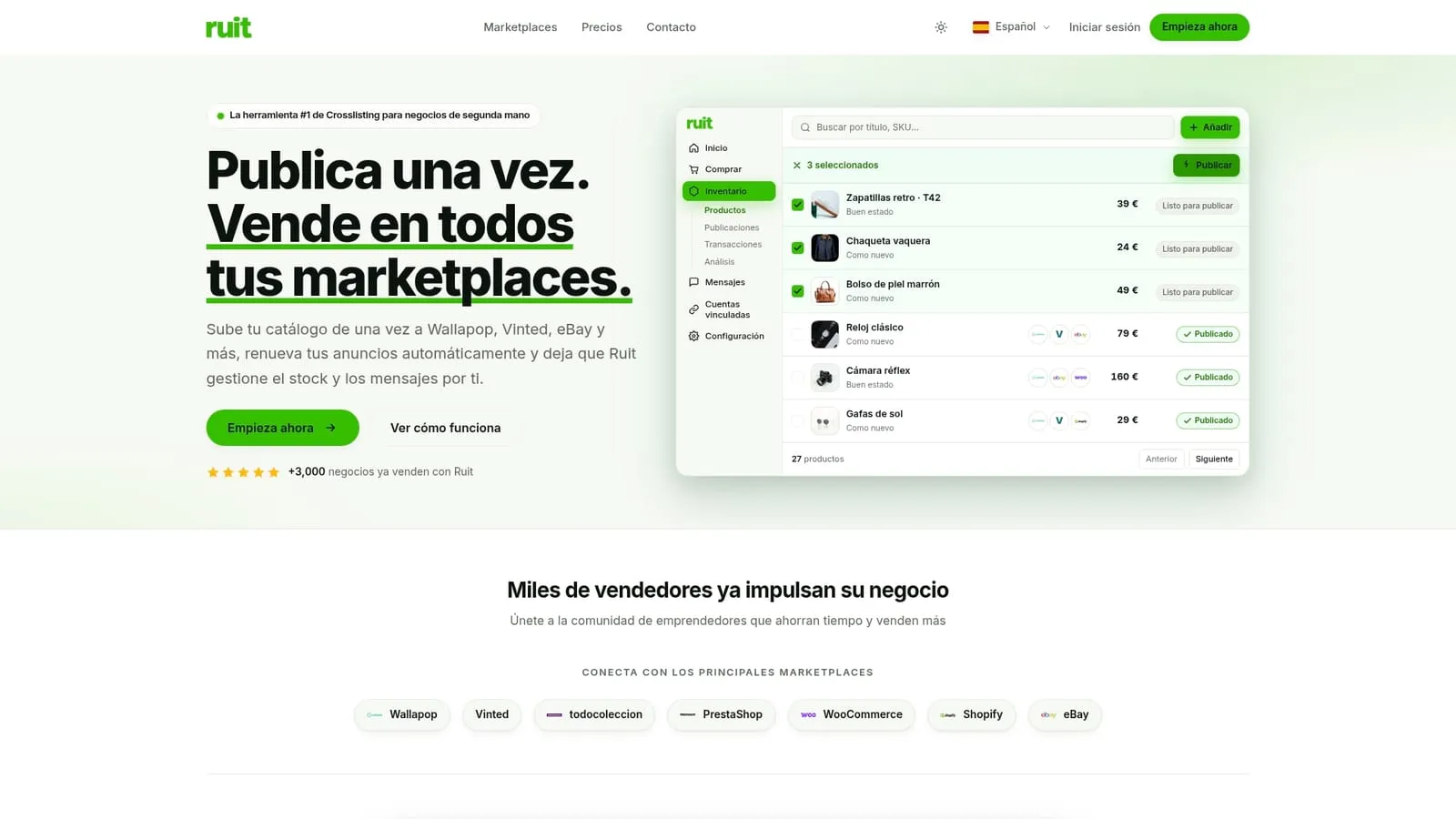
Paid plans start with Starter, with higher plans for more integrations and automation. Visit the Ruit product page to see the full feature set or check the pricing page to compare plans before signing up.
Sources
- How to Manage Customer Queries Across Multiple Marketplaces in 2026
- Marketplace Integration Software (2026) | ERP Research
- Inventory sync across marketplaces
FAQ
What does multi channel customer support mean for marketplace sellers?
It means managing buyer messages, order questions, and returns across every marketplace you sell on, such as Wallapop, Vinted, and eBay, from one unified inbox rather than checking each platform separately. The strongest setups pair that inbox with real-time inventory sync and marketplace-aware automation.
How does real-time inventory sync prevent oversells?
Real-time inventory sync updates every connected marketplace immediately after a sale, so an item sold on one platform stops appearing available elsewhere within moments. Safety buffers and allocation rules add another layer of protection for high-demand items.
What should I test before going live with a new support tool?
Run a real purchase to confirm inventory drops across all channels, then simulate a cancellation and a partial return to check stock and messaging both react correctly, following a structured test plan. Confirm SLA alerts fire correctly during these tests too.
What determines the cost of a multichannel support tool?
Pricing typically depends on the number of connected channels, active SKUs, and monthly order volume, structured as tiered SaaS plans. Ruit’s own paid plans run from Starter to Business, with a separate Enterprise plan priced on request.
Which tickets are safe to automate first?
Order status checks, shipping updates, and standard return requests are the safest starting point, since the answer sits directly in your order data. Anything involving negative sentiment, a high-value order, or a policy exception should route to a human instead.