AI Background Removal: A Complete Reseller Guide for 2026


Table of Contents
- Table of Contents
- The Photo Stack Every Reseller Knows Too Well
- How AI Background Removal Works
- Where AI Background Removal Helps and Where It Breaks
- How AI Background Removal Fits into a Reseller Workflow
- Which Listings Benefit Most From Background Removal
- Types of AI Background Removal Tools Resellers Can Choose
- Best Practices That Cut Down Manual Rework
- When AI Background Removal Is Worth It for Your Business
- Frequently Asked Questions
You’ve just finished a sourcing run, and your phone is full of product photos that were never meant to become a catalog. One item sits on a kitchen counter, another on a wrinkled blanket, and a third was photographed on a retail back-room table with a family member partly visible behind it. A few shots look clean. Others have harsh overhead shadows, cluttered edges, or a background that makes the product almost disappear.
That stack is where AI background removal becomes useful, but it’s also where the marketing demos stop being helpful. A clean studio image is easy to process. A scratched handbag photographed beside a pile of clothes, reflective shoes on a dark floor, or vintage glassware against patterned wallpaper creates a different operational problem. The question isn’t whether software can remove a background. It’s whether the result saves enough work to improve your listings, throughput, and profit per hour.
I’ve tested enough editing tools to know that the first automatic cutout is only one part of the job. The true test is what happens across a batch of imperfect resale photos, how often you need to repair edges, and whether the final images look consistent on every channel.
Table of Contents
- The Photo Stack Every Reseller Knows Too Well
- How AI Background Removal Works
- Where AI Background Removal Helps and Where It Breaks
- How AI Background Removal Fits into a Reseller Workflow
- Which Listings Benefit Most From Background Removal
- Types of AI Background Removal Tools Resellers Can Choose
- Best Practices That Cut Down Manual Rework
- When AI Background Removal Is Worth It for Your Business
- Frequently Asked Questions
The Photo Stack Every Reseller Knows Too Well
At the end of a busy sourcing day, the editing queue usually reflects the inventory, not a photography plan. There might be a jacket photographed on a sofa, a pair of trainers on a wooden floor, and a boxed appliance against a wall covered with shelves. Someone walked through one frame. A charging cable crosses another. The overhead light creates a dark shadow under a third item.
That’s manageable when you have one listing to prepare. It feels very different when the queue contains dozens of products and every listing needs several images. Manually tracing each item in Photoshop can turn a quick listing task into a long sequence of selections, layer masks, edge corrections, and exports. The work becomes especially repetitive when the desired result is a clean white background for a marketplace image.
The bottleneck isn’t always photography
Many resellers already know how to take a usable product photo. The bottleneck appears later, when inconsistent backgrounds make a catalog look untidy or force the seller to edit every image individually. A background remover can isolate the product, replace the original scene with white or transparency, and create a repeatable starting point.
That doesn’t mean every original background should disappear. A lifestyle photo can show scale, fit, or use, while a clean cutout can make the primary listing image easier to scan. The practical approach is to decide which images need a neutral presentation and which ones communicate useful context.
Practical rule: Use automation to remove repetitive editing, not to erase information buyers need.
A photo-led workflow, such as the one described in Ruit’s guide to selling by photo, works best when the seller treats images as part of the listing process rather than as a separate design project. Capture the item, select the usable frame, create a clean version, and keep the original available for inspection.
The rest of this guide focuses on that distinction. AI background removal should reduce editing friction, but it shouldn’t create a new inspection queue so large that the time savings disappear.
How AI Background Removal Works
A reseller processing a mixed batch may have a sneaker on a patterned rug, a jacket against a sofa, and a glass item beside packing materials. The tool does not “erase the background.” It makes a series of predictions about which parts belong to the product, then builds an image mask around those predictions.
Segmentation finds the subject
Image segmentation assigns pixels to meaningful regions. In a resale photo, the model estimates which pixels belong to the shoe, book, jacket, or appliance, and which belong to the counter, wall, floor, or nearby objects. The task resembles tracing one item in a crowded photograph, except the model predicts the outline automatically.
A hard foreground and background label works well for a solid box or book. Edges become less certain around hair, mesh, lace, or transparent plastic. Production tools therefore often combine segmentation with a refinement stage instead of stopping at a simple binary mask.
Alpha matting softens difficult edges
Alpha matting gives each pixel a transparency value, represented as α ∈ [0,1]. A fully opaque product pixel remains visible, a background pixel disappears, and a boundary pixel can stay partly transparent. That partial value preserves soft transitions instead of forcing every pixel into an unnatural yes-or-no choice.
For a reseller, the difference shows up in details buyers inspect. Hair should retain believable strands, a knitted edge should not become a smooth plastic outline, and a translucent component should not turn into a solid grey shape. The result may be a transparent PNG or a product placed on a white canvas, but the boundary determines whether the listing image looks credible.
Models learn these patterns from large image datasets, allowing them to work across product categories without requiring the seller to define every item manually. Their foundation remains segmentation and matting, so the source photo still sets the limit. Glare, deep shadow, blur, or nearly identical product and background colors can hide information the model cannot reconstruct.
The process also involves confidence estimates. The model is usually more certain about the middle of a bright sneaker than the narrow gap between its laces and the surrounding surface. Those uncertain areas deserve human review, especially when construction details or condition affect the selling value.
In batch work, this distinction matters. A clean demo cutout may look finished, while a real inventory queue still contains edges that need inspection.
Where AI Background Removal Helps and Where It Breaks
AI background removal performs best when the product has a clear silhouette and the image gives the model enough visual separation. A shoebox on a pale table, a black tool on a light surface, or a book photographed against a plain wall usually presents a straightforward boundary. Hard edges also make errors easier to spot and repair.
The difficult images are the ones that resemble ordinary resale inventory. A beige sweater on a beige sofa, a chrome object under a bright lamp, or a glass bowl surrounded by reflections can confuse the model. Patterned fabric and crowded tables add competing shapes, while heavy shadows can look like part of the product or part of the background.
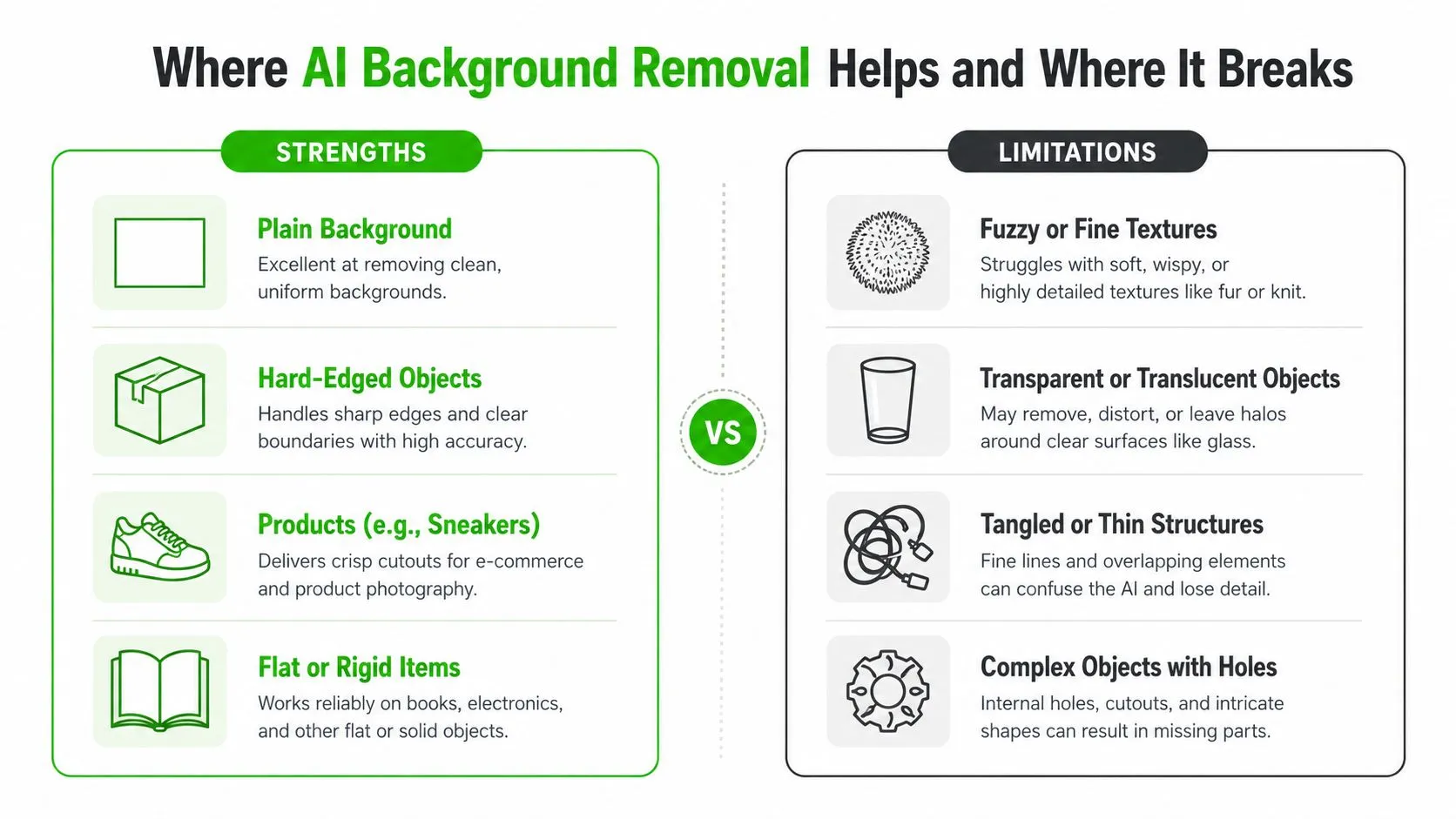
Common failure modes in resale photos
The errors aren’t always dramatic. A tool may remove a small strap, smooth away a thin chain, clip the corner of packaging, or leave a faint halo around a dark garment. Reflective products can pick up a rim of the original background color. Fine mesh may become a solid shape because the algorithm decides that the small openings aren’t important enough to preserve.
Research on image matting supports the importance of this edge detail. One comparative benchmark reported BiRefNet at SAD 35.2, MSE 0.71, gradient error 12.7, connectivity 18.9, and hair IoU 0.89, compared with MODNet at SAD 42.1, MSE 1.30, gradient error 18.3, connectivity 24.8, and hair IoU 0.78 in the cited comparison of matting models and edge-quality metrics. The lower error values and higher hair intersection-over-union indicate stronger preservation of fine boundary detail, although benchmark performance doesn’t guarantee a perfect result on a damaged marketplace photo.
A clean demo image tests the model. A messy inventory tests the workflow.
A separate academic evaluation found that Adobe’s background-removal system often produced incomplete removals or partial object loss, while another system separated 9 of 12 test objects more successfully, as reported in the evaluation PDF. That comparison matters because a cutout that removes part of a product isn’t merely unattractive. It can hide a defect, alter the shape, or misrepresent what the buyer will receive.
The sensible expectation is automatic first pass, human approval. The more complex the edge, the less useful a speed claim becomes unless you also account for cleanup.
How AI Background Removal Fits into a Reseller Workflow
A reliable workflow starts before the upload button. When new inventory arrives, shoot products on the cleanest practical surface available, keep the item fully visible, and avoid placing similar colors directly behind it. You don’t need a professional studio, but you do need enough contrast for the model to distinguish the subject.
After the shoot, cull the weak frames. Remove duplicates, blurry photos, shots with accidental people or unrelated objects, and images where the item is partly outside the frame. AI can isolate a subject, but it can’t turn a poor photograph into a trustworthy condition image.
The cutout belongs between selection and retouching
The most useful position for background removal is after culling and before final retouching:
- Capture: Photograph the item from the angles buyers need, including condition details.
- Cull: Keep the sharpest and most informative frames.
- Remove: Upload a batch to the selected AI tool and generate transparent or white-background versions.
- Review: Inspect edges, shadows, labels, dust, scratches, and reflective areas.
- Export: Resize, compress, name, and attach the approved assets to the listing.
A tool such as Remove.bg can suit a quick isolated cutout. Photoroom can make sense when you want to place the product into a designed canvas. A desktop editor may be preferable when source files stay on a local drive. Ruit’s cloud-based order management workflow addresses a different part of the process, where fewer disconnected steps make it easier to keep inventory and listing information aligned.
Review before the file reaches a buyer
The AI may treat a dust mark as part of the silhouette. It may also remove a loose thread that proves a garment’s construction, or preserve label glare that makes a brand name unreadable. Human review should therefore cover both the boundary and the product itself.
Keep the original image beside the edited version. If the cutout hides a flaw or changes the appearance of a reflective surface, you can restore the original for that view instead of trying to reconstruct detail from the processed file.
Which Listings Benefit Most From Background Removal
The strongest candidates have a defined outline, limited transparency, and a business reason for using a consistent presentation. Shoes, boxed goods, electronics, sealed cosmetics, books, and many small accessories fit that pattern. A seller can usually identify the subject quickly, inspect the edge, and move the approved image into a listing template.
Fashion items require more judgment. A structured coat can cut out cleanly, while a vintage knit with loose fibers may need closer inspection. Jewelry and glassware are even less predictable because reflections and transparent sections blur the distinction between product and background.
Research adds a useful warning against treating removal as a universal conversion tactic. A 2023 study found that removing backgrounds improved neural-network classification accuracy by up to 5% on the FashionStyle14 dataset when models were trained from scratch, as documented in this study discussion and market research reference. The result shows that background removal can help visual systems focus on the subject, but it doesn’t prove that every marketplace image will sell better after editing.
Match the edit to the listing purpose
A high-volume catalog of standard-shaped products may benefit from a repeatable neutral image. A rare collectible may deserve a carefully controlled manual edit that preserves context, scale, and texture. Peer-to-peer listings can also benefit from lifestyle images, especially for furniture, clothing fit, or items where the surrounding scene helps establish size.
| Product Categories and AI Cutout Reliability | ||
|---|---|---|
| Category | AI Cutout Reliability | Likely Manual Fixes |
| Shoes and trainers | Often strong when the sole and laces contrast with the surface | Restore thin laces, check sole gaps, remove halos |
| Boxes, books, and packaged goods | Often strong because the silhouette is firm | Correct clipped corners and label edges |
| Electronics | Usually workable, but cables and glossy screens need review | Repair cable sections, reflections, and dark edges |
| Apparel | Variable, depending on fabric, folds, and color contrast | Recover loose fibers, sleeves, hems, and shadows |
| Jewelry and chrome items | More difficult because reflections merge with the background | Refine metal edges and preserve small links |
| Glassware and translucent goods | Frequently requires close inspection | Restore transparent sections and highlights |
| Patterned or cluttered scenes | Less dependable than clean tabletop photos | Remove leftover objects and rebuild complex boundaries |
The benchmark evidence points in the same direction. A recent comparison scored one leading tool at 42 clean cutouts out of 45, while two alternatives scored 24 out of 45 and 7 out of 45 on the tested product image set, according to the academic benchmark report. Tool choice matters, but the category and source photo matter just as much.
Types of AI Background Removal Tools Resellers Can Choose
The right format depends less on the feature list than on where your photos begin and where the finished files need to go. A seller editing occasional listings may prefer a browser workflow. A team processing a large catalog needs batch handling, predictable exports, and a review queue.
| AI Background Removal Tool Formats Compared | ||
|---|---|---|
| Tool Format | Best For | Limitations |
| Browser-based tools | Occasional jobs and quick tests | Upload friction, browser dependence, and limited batch control |
| Desktop applications | Large local folders and repeatable batch work | Installation, device storage, and less convenient field use |
| Mobile apps | Sourcing trips and immediate edits from a phone | Smaller review screen and less precise edge correction |
| API integrations | Automated studios, catalogs, and multichannel systems | Setup effort, monitoring, and dependency on the connected workflow |
Browser tools keep the decision simple
A browser tool is useful when you want to upload a few images, inspect the result, and download a PNG without changing your wider process. It suits a seller who processes a modest weekly queue or wants to compare output before committing to a larger workflow. The trade-off is that repeated downloading, renaming, and re-uploading becomes tedious as volume grows.
Desktop software makes more sense when your source photos already live in organized folders. Batch processing can reduce repetitive handling, and local files may be easier to archive. You’ll still need to check how the application handles exports, background replacement, and edge corrections.
Mobile and API workflows solve different problems
Mobile apps are valuable when the product is photographed during sourcing. You can create a usable cutout before the item reaches the warehouse, but a phone screen isn’t ideal for inspecting fine hair, mesh, or reflective edges.
APIs matter when a photo pipeline already connects to a catalog, studio, repricing platform, or multichannel system. They can remove manual transfers, but they also require clear rules for failed images and uncertain results. The same principle applies to AI listing description generation, where automation is useful only when a person can review the output before publication.
Don’t choose the format because it promises the fastest single image. Choose it based on volume, review effort, offline reliability, export control, and how many handoffs your current camera-to-listing process contains.
Best Practices That Cut Down Manual Rework
The cleanest AI output usually starts with a better input. A neutral sweep, tabletop, or simple wall gives the model fewer competing shapes than a patterned blanket or crowded desk. Leave enough space around the product so the subject isn’t clipped at the frame edge.
Process similar photos together. A batch of shoes shot in the same setup is easier to review than a mixed folder containing glassware, clothing, cables, and dark electronics. Consistent framing also makes it easier to spot an unusual result because the approved images share a recognizable visual baseline.
Build review into the process
Treat the generated cutout as a draft. Use a repeatable inspection path:
- Start with the silhouette: Check corners, handles, straps, sleeves, soles, and openings.
- Zoom into difficult edges: Inspect hair, fringe, mesh, chains, laces, and thin cables.
- Check surfaces: Look for missing texture, false transparency, halos, or color spill.
- Compare with the original: Confirm that the edit hasn’t hidden scratches, dents, stains, or label information.
- Route exceptions: Send uncertain files to manual editing instead of forcing them into the approved folder.
Quality threshold: A fast cutout isn’t finished until it represents the product accurately at the size buyers will see.
Keep the original and processed file together with a consistent naming pattern. Non-destructive storage lets you return to the source when a marketplace needs a different crop or when a buyer-facing image must show the original environment.
Finally, sort by confidence rather than file name. Easy images can move forward quickly. Borderline images should receive attention while the product context is still fresh, not after they have been mixed into a large export folder.
When AI Background Removal Is Worth It for Your Business
The decision comes down to time saved after review, not time saved by the first click. If an AI tool produces a usable cutout and you only need a quick visual check, it can make standard inventory much easier to publish. If every image needs edge repair, the automation may move the labor from masking to cleanup.
Start by grouping your catalog. Standard-shaped products photographed on neutral surfaces are strong candidates, especially when the target channel favors a clean product presentation. Cluttered lifestyle photos, reflective metal, glass, transparent packaging, and small items with delicate edges deserve a trial batch before you commit.
The market context shows why sellers are paying attention. One 2025 industry report estimated the global AI background-removal market at $412.8 million and projected it to reach $2,184.6 million by 2034, implying a 20.2% compound annual growth rate, while the same report estimated cloud deployment at $296.4 million, or 71.8% of total revenue, in 2025, as reported by Dataintelo’s AI background-removal market report. Those figures describe software-market growth, not guaranteed savings for an individual reseller. Your own catalog still determines whether the tool pays off.
Compare the two approaches by listing type
| AI vs Manual Background Removal: When Each Pays Off | ||
|---|---|---|
| Listing Type | Recommended Method | Why It Works |
| Standard shoes, books, and boxed goods | AI first pass with review | Defined edges make approval relatively quick |
| Repeated catalog items | Batch AI processing | Consistent framing and output reduce repetitive work |
| Reflective jewelry and glassware | Manual or AI plus careful retouching | Transparency and reflections create uncertain boundaries |
| Premium one-off collectibles | Manual editing, or a hybrid approach | Controlled presentation can matter more than throughput |
| Lifestyle-led clothing and furniture | Keep selected original scenes | Context may communicate fit, scale, or use better than a cutout |
| Mixed, damaged, or cluttered inventory | Pilot AI on a small group | The seller can measure rework before expanding automation |
To estimate value, compare the minutes saved per approved photo with the tool cost and the time spent correcting failures. Track that by category, not just across the entire business. A tool can be worthwhile for boxed electronics and unhelpful for vintage textiles in the same catalog.
If you process a large, repeatable inventory, AI background removal is likely to earn its place as a controlled production step. If your catalog is small or presentation is highly curated, manual editing may give you more control with less review overhead. Start with one category, preserve the originals, and expand only when the approved output improves your profit per hour rather than merely increasing the number of processed files.
Frequently Asked Questions
Does background removal actually increase sales?
It removes a reason to scroll past, which is not the same as adding a reason to buy. The measurable effect is on consistency: a catalogue where every thumbnail reads the same way is easier to browse, and browsing is where most listings are lost.
Where does automatic removal still fail?
On the edges models find hard, hair, lace, mesh, transparent materials and thin straps. Those need a manual pass. A clean silhouette against a plain background is where automation is effectively free.
White background or transparent?
Transparent if the image will be reused in different compositions, white if it goes straight to a marketplace that expects it. Exporting both from one master costs nothing and saves reshooting later.
Do I need a paid tool?
Only once volume makes manual work the bottleneck. Below a few dozen images a month the free tiers are enough; past that, what you are buying is batch processing and predictable output, not a better cut-out.
Ruit combines inventory, multichannel listing, and order workflows for professional second-hand sellers. Visit Ruit to see whether centralizing those steps fits the way you process messy inventory at volume.