How to Do Scheduling for Multichannel Resale Success


Table of Contents
- Table of Contents
- The Multichannel Scheduling Challenge
- Why Manual Scheduling Fails Multichannel Operations
- Building Your Scheduling Foundation
- Strategic Timing and Automation Workflows
- Choosing the Right Scheduling Tools
- Implementing Automation with Ruit
- Measuring Success and Optimizing Further
- Frequently Asked Questions
Manual scheduling becomes painful the moment your resale operation moves beyond a few listings. You’re copying the same product into Wallapop, Vinted, eBay, and your own store, checking whether an item has sold elsewhere, deciding when to publish the next batch, and trying not to flood one marketplace while another sits quiet. By the end of the day, you’ve been busy, but your revenue per hour hasn’t improved.
The practical answer to how to do scheduling isn’t just choosing a posting time. It’s building a repeatable system that connects inventory, publication cadence, relisting, pricing, and marketplace rules. The right workflow keeps your catalog active without forcing you to stay online all day.
Table of Contents
- The Multichannel Scheduling Challenge
- Why Manual Scheduling Fails Multichannel Operations
- Building Your Scheduling Foundation
- Strategic Timing and Automation Workflows
- Choosing the Right Scheduling Tools
- Implementing Automation with Ruit
- Measuring Success and Optimizing Further
The Multichannel Scheduling Challenge
A typical reseller starts with good intentions. New stock arrives, photos are taken, and listings are prepared for several marketplaces. Then the interruptions begin. One item sells on Vinted before it’s removed from eBay, a Wallapop listing goes live at the same time as a large batch of similar products, and a promising product remains unpublished because the seller ran out of time.

That pattern creates three separate problems:
- Operational friction: The seller repeats the same listing work across several dashboards.
- Visibility gaps: New inventory appears in irregular bursts, followed by long periods with no fresh activity.
- Stock risk: Delayed updates leave sold items visible on other channels, creating avoidable customer conversations and cancellations.
A professional schedule separates preparation from publication. You can photograph and enrich a group of products in one work block, queue listings for different marketplaces, and reserve time for exception handling rather than repetitive data entry. That distinction matters because the aim isn’t to publish as often as possible. The aim is to publish at a sustainable pace that keeps valuable stock visible without creating marketplace saturation.
Timing is part of inventory strategy
A vintage jacket, a replacement component, and a low-cost household item won’t necessarily attract buyers at the same moment or through the same channel. Treating every product as identical produces a neat calendar but a weak commercial result.
Start by tracking when views, messages, saves, and sales occur for each marketplace and product group. Use those observations to create separate scheduling windows instead of one universal timetable. Sellers who also distribute promotional content can use a resource such as the PostPulse social media scheduling guide to coordinate supporting social activity without confusing it with the marketplace listing schedule.
Your catalog also needs a single operational reference point. A useful starting point is Ruit’s guide to multichannel inventory management, particularly if stock currently lives across spreadsheets, marketplace accounts, and separate photo folders.
The result is a schedule built around profit per hour, not visible activity. Each publishing decision should reduce idle inventory, protect availability accuracy, or increase the chance that a prepared item reaches the right buyer.
Why Manual Scheduling Fails Multichannel Operations
A batch of listings is ready, but publishing it still requires a series of decisions. The seller must choose a channel and release time, confirm stock, copy product details, upload photos, check marketplace restrictions, and remember when to renew or remove each listing. Repeat that process across eBay, Vinted, Wallapop, WooCommerce, or other channels, and routine publishing becomes a source of errors.
Employee scheduling research puts the cost of manual schedule repair at roughly 163 hours per year for a small manager working 3.14 hours per week, according to Turnozo’s employee scheduling statistics. Resale workflows differ, so this is an illustrative benchmark rather than a measurement of reseller productivity. The pattern still applies: repeated coordination consumes hours that could go to sourcing, photography, negotiation, packing, or margin review.
Practical rule: If a task repeats and follows a clear decision rule, put it in a workflow instead of relying on memory.
Manual batch publishing also creates an uneven catalog. A seller may release twelve similar items as soon as they are ready, then leave the account quiet for several days. That produces gaps in marketplace activity and makes the seller’s own listings compete for attention during one release window. Auto-relisting can create a similar problem if every expired item returns at once without checking current stock, demand, or channel limits.
The hidden cost appears after the sale
Scheduling continues after a listing goes live. An item can sell on one marketplace while remaining active elsewhere, leaving the seller to find duplicate listings, remove them, correct stock, answer messages, and handle a second buyer who has already committed.
A workable scheduling layer must connect with inventory synchronization, automatic delisting, price updates, and relisting rules. Ruit can support a controlled workflow in which a stock change triggers the related marketplace actions instead of leaving each correction to manual follow-up. Otherwise, automation speeds up publication while the expensive exceptions remain unresolved.
Buyers browse and act outside your working hours. A system that only publishes, relists, or updates stock when you are available will miss opportunities and extend the time that sold or outdated listings remain visible.
Each additional marketplace introduces another timing pattern, stock dependency, renewal process, and failure point. At higher volume, manual coordination becomes a constraint on consistency. Automation gives batch publishing, auto-relisting, and cross-channel corrections defined rules, so the operation can grow without turning every listing into a separate memory task.
Building Your Scheduling Foundation
A reliable scheduling system starts with clean inventory, not a calendar. Before deciding when to publish, create one record for each item with a stable identifier, condition, cost, target price, location, measurements, category, and channel eligibility. Attach the final photos and the approved title and description to that record.
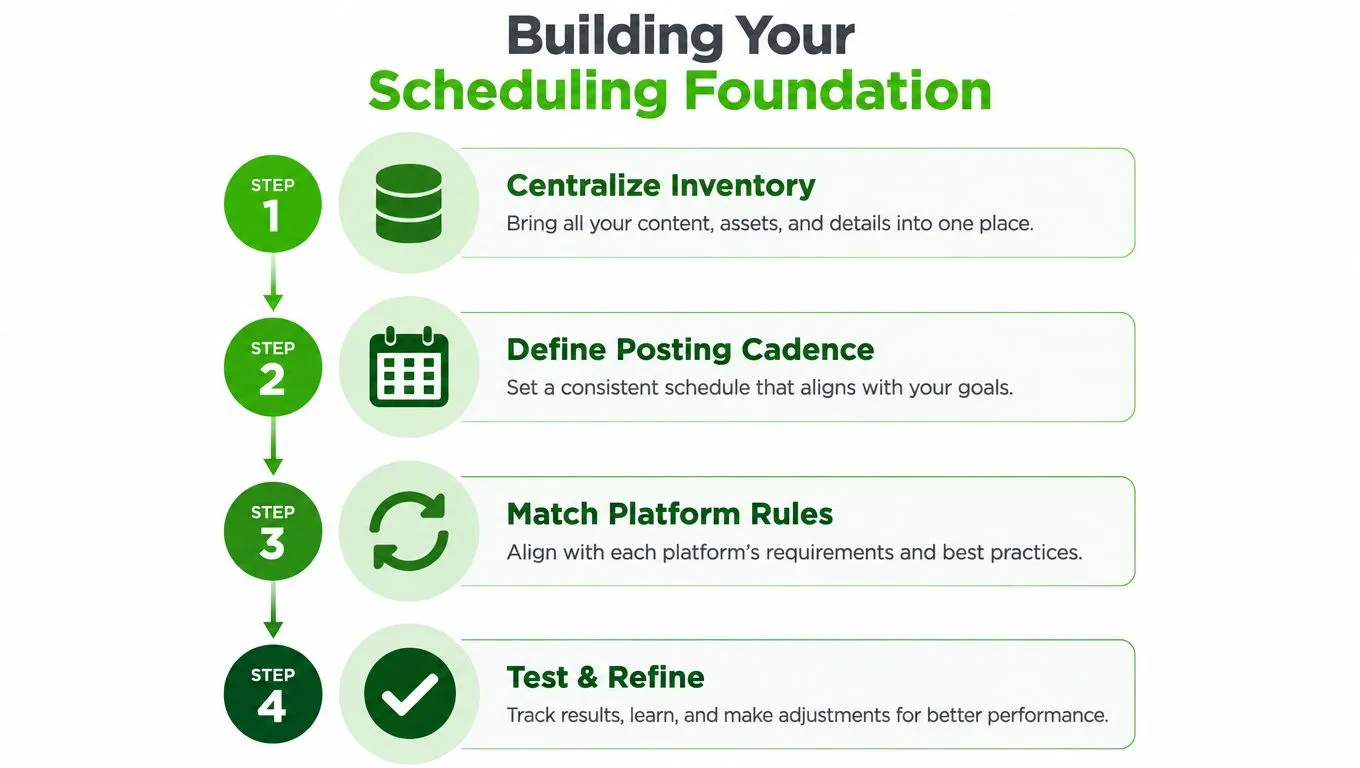
Four decisions to make before publishing
-
Centralize the source record. Decide which system holds the authoritative stock status. Every marketplace listing should point back to that record, so a sale, return, or correction has one place to update first.
-
Separate products into scheduling groups. Use practical categories such as high-demand stock, seasonal items, long-tail inventory, bulky goods, and products requiring extra verification. Each group can have a different cadence and channel priority.
-
Map platform rules. Check title limits, image requirements, prohibited categories, shipping settings, and relisting behavior for Wallapop, Vinted, eBay, WooCommerce, PrestaShop, or any other active channel. A bulk workflow is useful only when it respects the differences between platforms.
-
Test a small batch. Publish a controlled group, inspect the live listings, confirm stock synchronization, and verify that the scheduled times match the intended local time. Correcting a template before a large batch is safer than repairing many live listings.
Batch publishing should distribute inventory rather than dump it. If you have a prepared group of similar products, split it by category, price band, or buyer intent. Schedule the strongest items when your records indicate higher browsing activity, then release supporting products in separate windows. This creates a steadier flow and reduces the risk of your own listings competing for attention.
Auto-relisting needs equally careful rules. A relist should apply only when the item is still available, the price remains valid, the listing hasn’t been flagged, and the product hasn’t already appeared too recently on that channel. A sold item must be removed from every connected marketplace before any relisting rule runs.
For planning the people involved in photography, checking, packing, and customer support, Fluidwave’s guide to planning a team schedule provides a useful reference. The same principle applies to a resale team: assign ownership for each operational step, rather than assuming the person who creates a listing will also catch every later exception.
Strategic Timing and Automation Workflows
The strongest scheduling workflow combines three calendars. The first is the inventory calendar, which shows what is ready, incomplete, reserved, sold, or awaiting quality control. The second is the marketplace calendar, which controls publication and renewal windows. The third is the operations calendar, which reserves capacity for messages, packing, returns, and price reviews.
Without those connections, a seller can schedule more listings than the team can inspect or ship. A full queue looks productive until customer response times slow down and errors increase.
Use a release pattern, not a posting pile
Start with a baseline cadence for each channel, then adjust it using your own observations. Record views, saves, messages, offers, time to sale, and cancellations by product group. Don’t assume that a time that works for eBay will work for Vinted or Wallapop, and don’t treat an international marketplace as if every buyer shares your local time zone.
A practical release sequence might look like this:
- Preparation window: Validate stock, finish photos, generate or edit listing copy, and check the target channel.
- Primary release: Publish a small group of high-confidence products during the channel’s observed browsing window.
- Secondary release: Publish related or lower-priority products later, avoiding a single concentrated burst.
- Maintenance window: Review unsold inventory, update prices where justified, and approve eligible relists.
This structure protects against marketplace saturation. More listings can increase presence, but excessive repetition can make your catalog less distinctive and consume buyer attention without improving sell-through. Use spacing to create a steady stream, especially when products share keywords, colors, brands, or use cases.
Connect the actions around publication
The most useful automation doesn’t stop at the scheduled timestamp. A listing can trigger stock synchronization, channel-specific pricing, an inventory status update, and a follow-up review date. If a sale occurs, the system should remove or pause the same item elsewhere. If an item remains unsold, it can enter a review queue instead of being blindly republished.
For eBay-specific timing considerations, consult Ruit’s guide to the best time to list on eBay. Use that guidance as a starting hypothesis, then validate it against your category, audience, and selling history. Timing advice is useful only when it informs a testable workflow.
International sellers should store all schedules with an explicit time zone and distinguish the seller’s operating time from the buyer’s local time. A release planned for a European audience shouldn’t shift accidentally when a device, account, or team member uses a different regional setting.
Choosing the Right Scheduling Tools
A basic calendar is adequate when one person manages a small catalog and publishes manually. It gives visibility into planned tasks, but it doesn’t know whether an item sold elsewhere, whether a listing complies with a channel’s rules, or whether a duplicate is already live.
A standalone scheduler adds queue management and batch publication. That can suit a reseller who already has dependable inventory software and only needs to control release times. The trade-off is fragmentation. Stock, pricing, messages, and relisting may remain in separate systems, so the seller still has to maintain connections between tools.
An all-in-one resale platform links scheduling to the operational record. Ruit, for example, supports multichannel publication, batch scheduling, inventory and price synchronization, automatic delisting, scheduled relisting, AI-assisted listing content, order workflows, and analytics. It’s a broader choice, so setup and process discipline matter more than they would with a simple calendar.
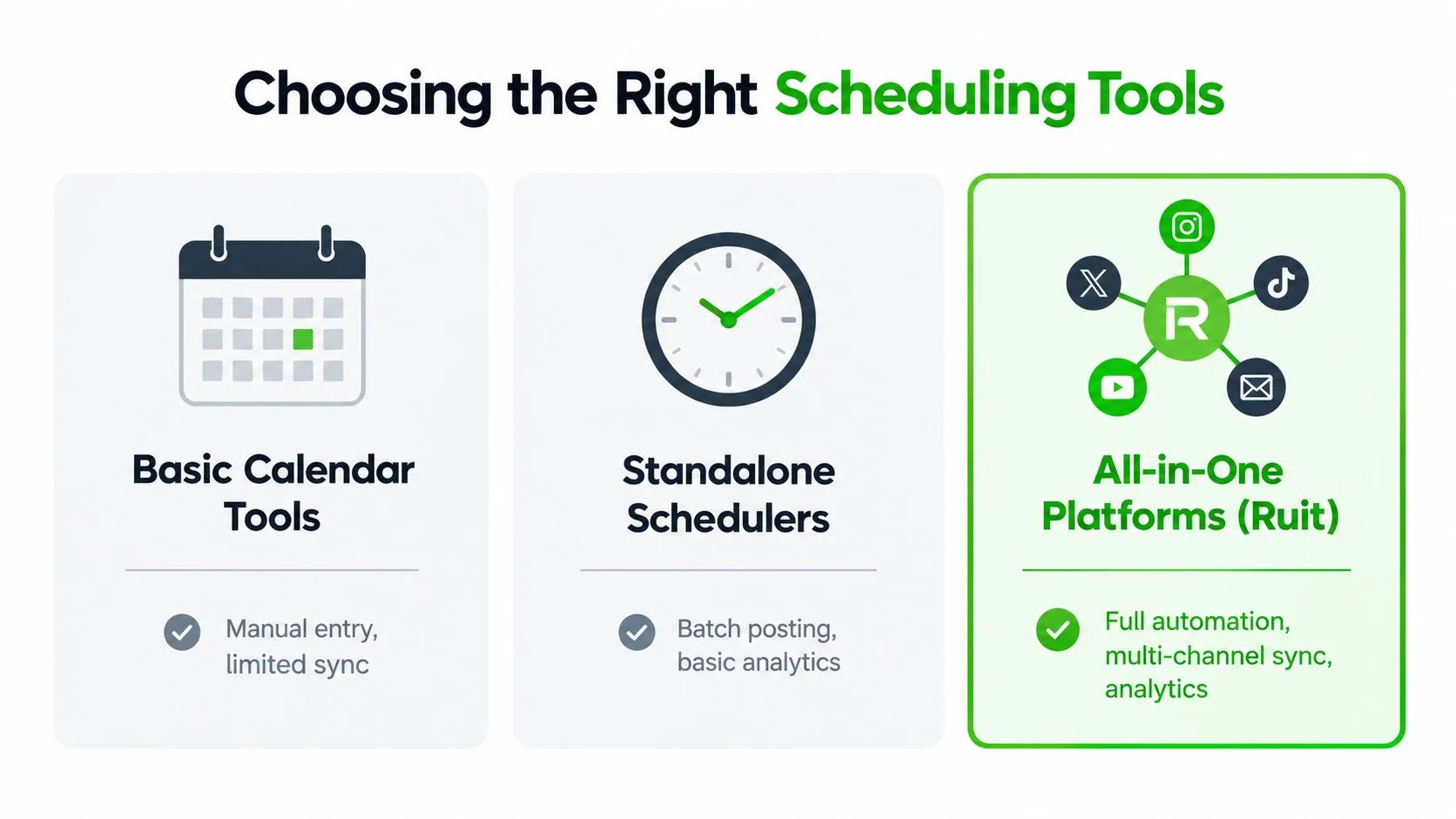
Match the tool to the operating problem
| Approach | Works well when | Main limitation |
|---|---|---|
| Basic calendar | One channel and a small number of manual tasks are involved | No reliable stock or relisting automation |
| Standalone scheduler | Publication queues and batch releases are the main need | Other operational data stays fragmented |
| All-in-one platform | Several channels share inventory and the team needs connected workflows | Requires structured setup and consistent data |
The market direction supports this shift. Appointment scheduling software was projected to reach $1,518.4 million by 2032, with a projected 15.7% compound annual growth rate, according to World Metrics’ appointment scheduling statistics. That figure concerns appointment software rather than resale operations, but it reflects broader demand for automated scheduling across business processes.
You can also evaluate a focused scheduling experiment with ContextFlow AgentScheduler. Whatever tool you choose, confirm that it supports your actual requirements: multi-platform publishing, batch processing, inventory safeguards, relisting controls, channel-specific templates, and reporting that connects activity to sales.
Implementing Automation with Ruit
Set up automation in stages. Trying to schedule every marketplace, category, and exception on the first day makes it difficult to identify which rule caused a problem. Ruit can be configured as the operating layer for this workflow, but the quality of the result depends on the inventory data and rules you provide.
Configure the catalog first
Connect the marketplaces and stores you actively use, then import and reconcile existing inventory. Review duplicate records, missing photos, inconsistent conditions, and products with unclear identifiers. Do not schedule a listing until the item has a confirmed location, price, status, and channel destination.
Next, create channel-specific templates. Keep the product facts consistent, but adapt titles, descriptions, shipping information, and pricing to each marketplace. AI-generated copy can speed up first drafts, while a human check should confirm measurements, condition notes, brand details, and any defects.
A workable batch process looks like this:
- Move completed items into a ready-to-publish status.
- Group them by marketplace, category, and priority.
- Assign staggered publication windows rather than one release burst.
- Preview the batch and check images, prices, and channel-specific fields.
- Publish the approved queue and monitor the first live results.
- Route unsold items into a review or relisting queue.
For exact mechanics, follow the Ruit documentation for scheduling a bulk publication. The important operational choice is spacing. If a group contains closely related products, distribute them across the schedule so buyers see variety rather than a wall of near-identical listings.

Add safeguards around relisting
Create relisting conditions instead of using an unconditional timer. Check that the item remains unsold, available, correctly priced, and compliant with the marketplace. Set a review point for products that have had repeated exposure without meaningful engagement. Those products may need better photos, a clearer title, a different price, or a new channel, not another identical publication.
Use automatic delisting when a sale is confirmed, then inspect synchronization logs for exceptions. Keep a small manual review queue for returns, reservations, damaged stock, and listings with conflicting status information.
Finally, use the analytics dashboard to compare scheduled groups by channel and product type. Look for changes in impressions, saves, messages, time to sale, and margin. Adjust one variable at a time, such as release spacing or channel priority, so the data remains interpretable.
Measuring Success and Optimizing Further
A schedule is working when it improves the economics of the operation, not merely when the calendar looks full. Track listing velocity, time to sale, placement consistency, stock accuracy, and revenue per scheduled post. Add labor time to the review so you can see whether a particular workflow creates profit or only creates more activity.
Review performance by product category and channel. A batch of branded clothing may generate strong saves but require a different cadence from technical equipment with fewer, higher-value buyers. If a category receives attention without offers, inspect price and listing quality before increasing publication volume.
Run a regular operating review
Use a simple review cycle:
- Check execution: Did scheduled listings publish correctly, with the intended price, images, and timing?
- Check demand: Which groups received views, saves, messages, or offers?
- Check conversion: Which groups sold, and how long did they remain active?
- Check workload: How much manual correction did the batch require?
- Change one rule: Adjust spacing, channel selection, copy, price, or relisting criteria, then observe the next batch.
Don’t optimize for maximum listing count. A smaller, cleaner release can outperform a crowded queue if it reduces duplicate exposure, protects response quality, and sends buyers to accurate listings. The advantage comes from connecting publication with inventory control and decision-making.
Once the process is stable, scheduling becomes a capacity tool. You can prepare stock in focused blocks, release it according to buyer behavior, and reserve human attention for sourcing, negotiation, fulfillment, and exceptions. That is how a reseller turns a publishing calendar into a more disciplined multichannel operation.
Frequently Asked Questions
What should be in place before scheduling multichannel listings?
Clean inventory comes first: one record per item with a stable identifier, condition, cost, target price, measurements, category, channel eligibility, final photos and approved copy. Then decide which system holds the authoritative stock status, group products by cadence, map each platform’s rules and test a small batch.
How should a batch of similar listings be released?
Distribute it rather than dump it. Split the group by category, price band or buyer intent, publish the strongest items during the channel’s observed browsing window, and release supporting products in separate windows so your own listings don’t compete for attention.
When is it safe to auto-relist an item?
Only when the item is still available, the price is still valid, the listing hasn’t been flagged and the product hasn’t appeared too recently on that channel. A sold item must be removed from every connected marketplace before any relisting rule runs.
Ruit centralizes multichannel inventory, scheduled bulk publishing, automatic delisting and relisting, AI-assisted listing creation, orders, messages, and analytics in one resale workflow. Visit Ruit to organize your publication schedule around accurate stock and higher-value operational work.