Managing eBay Inventory Without Losing Your Mind


Table of Contents
- Table of Contents
- When Managing eBay Inventory Starts Going Wrong
- Building a Single Source of Truth for Your Stock
- Why Sync Speed Decides Whether You Oversell
- Relisting and Renewing Without Living in Seller Hub
- What to Automate First and What to Keep Manual
- Inventory Accuracy as a Seller Performance Metric
- Your Weekly Inventory Operating Rhythm
- Frequently Asked Questions
Tuesday starts with three inventory counts and none of them agree.
Amazon has just sold the last unit of a bundle SKU. The same eBay listing is still live, and a wholesale purchase order in your inbox confirms another 40 units are on the way. Your spreadsheet says two are available, the warehouse shelf says one is damaged, and a return from last week is sitting in the unpacking pile. By lunchtime, you’re choosing between cancelling an order, apologising to a buyer, or spending the afternoon reconstructing what happened.
That’s the point at which managing eBay inventory stops being a listing task. It becomes coordination between channels, people, warehouses, suppliers, returns, payments, and seller-performance rules. The system that works is rarely the most complicated one. It’s the one that gives every sale, reservation, return, and incoming purchase order a clear place to go.
Table of Contents
- When Managing eBay Inventory Starts Going Wrong
- Building a Single Source of Truth for Your Stock
- Why Sync Speed Decides Whether You Oversell
- Relisting and Renewing Without Living in Seller Hub
- What to Automate First and What to Keep Manual
- Inventory Accuracy as a Seller Performance Metric
- Your Weekly Inventory Operating Rhythm
- Frequently Asked Questions
When Managing eBay Inventory Starts Going Wrong
The first problem usually isn’t a dramatic software failure. It’s a small timing mismatch. Amazon decrements its own counter, eBay keeps displaying yesterday’s quantity, and someone manually edits a spreadsheet after packing the order. Each system is behaving according to its own information, but none of them owns the complete truth.
The second problem is human intervention at the worst possible time. A seller notices the mismatch late at night, copies quantities between tabs, forgets one variation, and assumes the return can be dealt with tomorrow. That process might survive a quiet week. It falls apart when auctions end, bundles share components, or two buyers check out close together.
The three sources of chaos
- Independent platform counters: eBay, Amazon, Shopify, and a physical shop may each maintain a separate quantity.
- Manual updates: Copy-pasting after a sale creates a gap between the transaction and the stock adjustment.
- Drifting spreadsheets: A spreadsheet can’t reliably reflect a return, damaged item, reserved order, and incoming purchase order unless somebody updates every dependent field.
eBay’s own seller tools reflect how much inventory work has moved beyond single-listing management. The ActiveInventoryReport returns price and quantity information for all active listings for a specific seller, while Seller Hub and My eBay let sellers view sold items and completed listings for up to the last 2 years. That combination matters because replenishment decisions depend on recent sell-through, not just the quantity currently visible on a listing.
Practical rule: A marketplace listing is an output of your inventory system, not the inventory system itself.
The costs arrive in several forms. An oversell can force a cancellation, create buyer-service work, and contribute to seller-performance problems. A late shipment can consume the same afternoon you needed for purchasing or listing. Reconciliation steals time repeatedly because every correction requires checking the warehouse, the order history, the listing, and the spreadsheet.
The durable fix is to treat eBay inventory as a cross-channel coordination problem first. Once one record controls stock, every marketplace becomes a destination for updates rather than another place where quantities are independently maintained.
Building a Single Source of Truth for Your Stock
Start with one authoritative record for each SKU. It can live in a shared spreadsheet when the catalogue is manageable, or in a dedicated tool such as Inventory Planner or Sellbrite when multiple channels and users make manual coordination too fragile. The choice matters less than the operating rule: every channel must read from the same stock position.
Use inventory states, not one quantity
“On hand” and “available” aren’t interchangeable. On-hand stock is what physically exists. Available stock is what you can safely sell after subtracting units already committed to paid or accepted orders, plus anything damaged, missing, or held for inspection.
A useful source record contains these fields:
| Field | What it stores | Example |
|---|---|---|
| SKU | The unique identifier used across channels | SHOE-5432-BLK-10 |
| On-hand | Physical units currently located | 8 |
| Committed | Units assigned to open orders | 2 |
| Available | On-hand minus committed and unavailable units | 6 |
| Inbound | Confirmed units on purchase orders | 40 |
| Reorder point | Stock level that triggers purchasing | 12 |
| Supplier lead time | Expected time from order to receipt | 14 days |
The example values in the table are illustrative operating fields, not marketplace benchmarks. The important distinction is structural. If an order is committed but still waiting to ship, the quantity must leave available stock immediately. Otherwise, another channel can sell a unit that already belongs to someone else.
For replenishable products, use this formula:
Reorder point = average daily sales × supplier lead time in days + safety stock
Independent seller guidance recommends cycling fast movers weekly and long-tail stock monthly, with a 7 to 14 day safety-stock buffer for faster-moving SKUs where lead-time variation and demand spikes create extra risk. The eBay inventory-management guidance from 3Dsellers also identifies stale counts, missing bin labels, and treating all physical stock as sellable as common failure points.
Choose the lightest system you can enforce
A spreadsheet works when one person owns updates and the catalogue doesn’t change faster than the seller can reconcile it. A dedicated inventory application becomes more useful when several people handle purchasing, fulfilment, returns, or listing edits. API-connected systems can push quantity and price changes to eBay and other channels without requiring a seller to edit each listing separately.
For professional second-hand sellers, one-off items need a slightly different treatment. The SKU still matters, but the source record may contain one available unit, a storage location, acquisition cost, condition notes, and a decision about whether the item is reserved for another listing or bundle.
Use the cloud-based order-management guide as a reference when deciding whether orders, stock, and channel updates should sit in one operational workspace rather than in disconnected tabs.
Every event should touch the source record first:
- Receive stock and record its location.
- Create or update the SKU.
- Publish the available quantity to each channel.
- Decrement stock when an order is accepted.
- Add units back only after a return has been inspected and cleared for sale.
- Add inbound units only when the purchase order is confirmed, not when you’re merely considering a purchase.
That sequence prevents the most common mistake in multichannel selling, treating inbound, reserved, and physically sellable stock as the same thing.
Why Sync Speed Decides Whether You Oversell
Sync latency creates a measurable collision window. Suppose three orders arrive across eBay and another channel within 4 minutes, while your inventory system checks and publishes changes every 15 minutes. All three sales can occur before the next quantity update reaches the other channel, even if the first transaction has already reduced stock in its original marketplace.
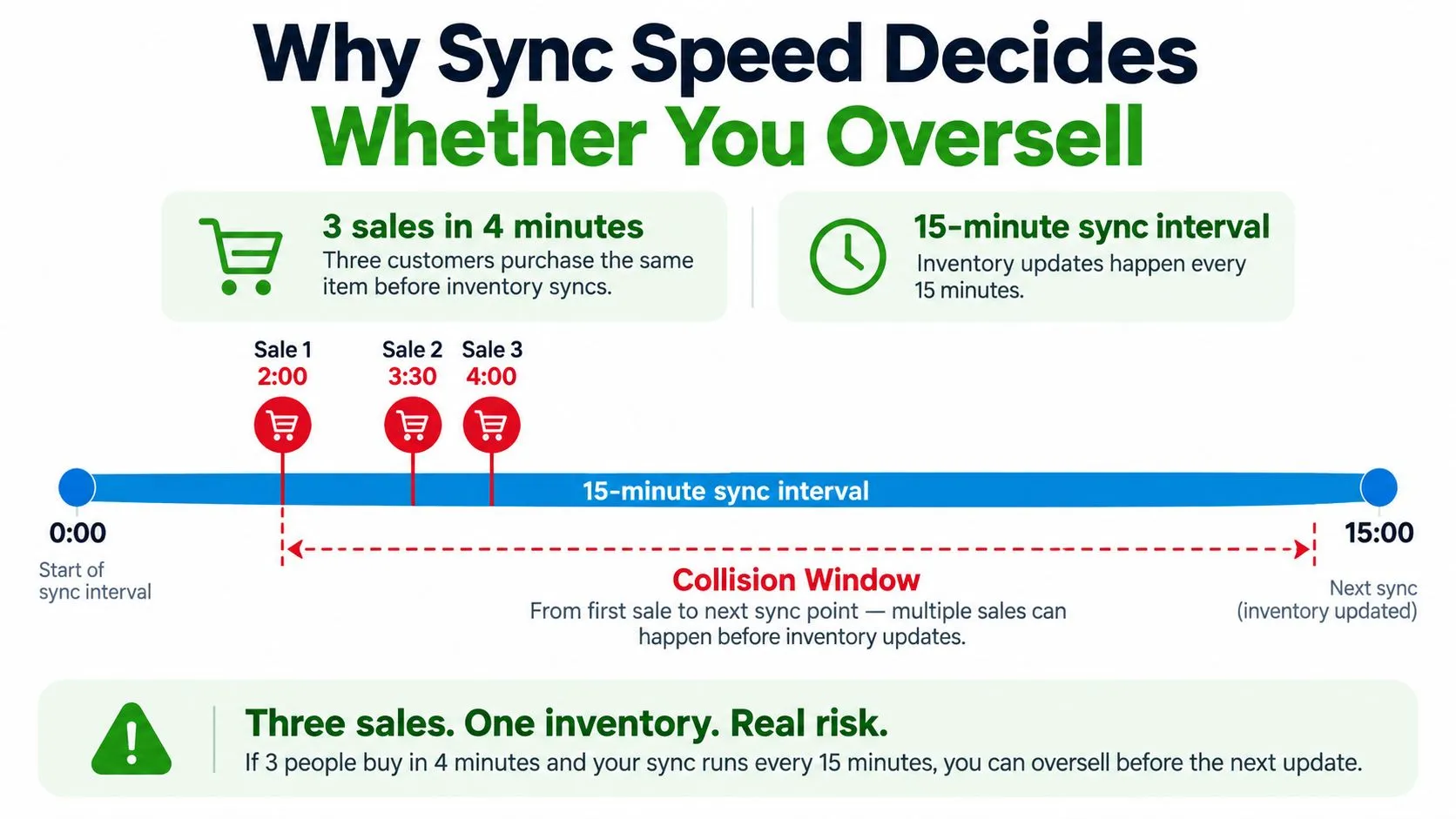
The important figure isn’t the number of channels alone. It’s the time during which buyers can purchase against stale availability. Independent guidance recommends updating inventory within 15 to 30 minutes at minimum, while also recommending real-time synchronisation where possible. A separate operational benchmark recommends sub-5-minute sync and a 10 to 20% buffer for fast-moving SKUs, showing why a shorter interval is safer when the final units are exposed across channels. See the multichannel inventory coordination analysis for that operational framing.
Match the cadence to the product
Daily batch updates are unsuitable for hot, low-stock SKUs. Hourly polling may be adequate for slow-moving long-tail items, but it leaves a wide opening during a sale event or a sudden demand spike. Webhook-driven updates can react immediately to order events, while polling checks systems at regular intervals and is often easier to operate.
Neither approach fixes an incorrect starting count. If the shelf contains one unit but the source record says two, faster synchronisation will distribute the wrong answer more quickly. That’s why a small available-quantity buffer is more dependable than trying to predict every purchase burst.
Pay special attention to:
- Quantity Available versus physical count: eBay’s displayed quantity should come from sellable stock, not total stock.
- Auction listings: A bid, reserve arrangement, or pending fulfilment decision can change what you can safely offer.
- Time Away settings: Pausing or adjusting fulfilment availability must be reflected in the operational workflow, not treated as a substitute for stock control.
- Bundles: A bundle sale must decrement every component that contributes to it.
The practical rule is straightforward. Use the fastest reliable sync your tools support, hold back a defined buffer on vulnerable SKUs, and investigate every exception instead of automatically correcting the final number.
Relisting and Renewing Without Living in Seller Hub
Relisting should be a scheduled commercial decision, not a reflex. A listing that hasn’t sold may need a different price, category, title, photo set, or item-specific strategy. Republishing the same weak offer creates more administrative activity around an unchanged problem.
Start with three queues:
- Stale GTC listings: Review listings older than 30 days with no watchers.
- Proven sellers: Revisit ended listings that sold well during the past 90 days.
- Seasonal stock: Bring relevant items back when demand returns, rather than keeping every seasonal product permanently active.
The commercial filter is more important than the relist button. Relist only when the fee-to-margin ratio stays below 15% and the expected minimum net is at least $8. Those figures come from the operating brief’s relist framework, so treat them as a decision rule for the workflow, not as a universal eBay fee schedule.
Give the work a fixed appointment
A focused 45-minute Sunday block is enough to keep the queue from becoming a daily interruption:
- Review price, watchers, impressions, and recent comparable listings.
- End and relist suitable items from mobile when the offer is still sound.
- Use Seller Hub’s active-inventory filters for bulk edits.
- Move uncertain listings into a review queue rather than renewing them automatically.
- Record why each item was repriced, relisted, or removed.
End a listing before relisting when its photos, description, condition notes, or item specifics need substantial work. Editing a live listing may preserve its history, but it can also leave you repeatedly promoting an offer that no longer matches the product or buyer intent. For unique second-hand items, a better description and accurate condition details often matter more than another renewal cycle.
Sell-through is the final check. If a product remains under 40% sell-through, the problem is usually price, category, demand, or listing quality rather than relist cadence. Don’t keep increasing the frequency of a process that’s attached to the wrong offer.
What to Automate First and What to Keep Manual
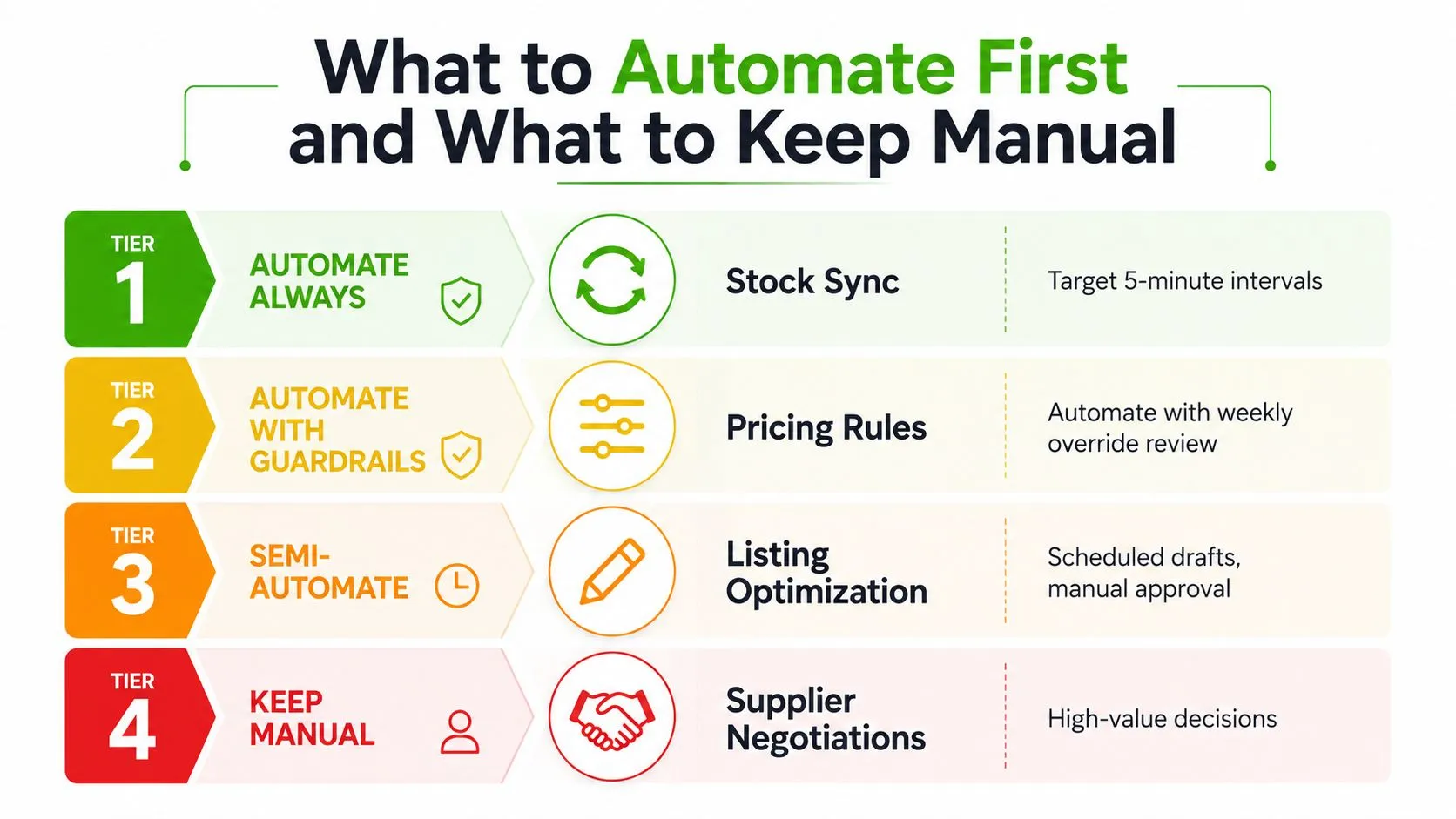
Automation should follow the cost of mistakes, not the novelty of the software. If an action happens more than 3 times weekly and a mistake takes more than 30 minutes of human time to repair, it deserves automation first. That rule points directly to stock movement, not photo styling or supplier judgement.
The four useful tiers
Stock sync belongs in the first tier. Every sale should decrement the source record and push a new available quantity to eBay and the other channels. Aim for 5-minute intervals where real-time updates aren’t available, with buffers on fast-moving stock. This is repetitive, consequential work, and manual edits are the least reliable place to spend attention.
Pricing rules fit the second tier. Automate guardrails such as minimum margin, age-based markdowns, or a maximum discount. Review overrides weekly because condition, scarcity, and recent comparable sales can make a rigid rule unprofitable.
Relisting and listing optimisation sit in the middle. Schedule drafts and low-value repeat items, but keep manual approval for hero SKUs, rare pieces, bundles, and products where one wrong item-specific value can undermine the listing.
Supplier negotiations stay manual. So do photo editing, new-category item specifics, dispute responses, and decisions involving condition or authenticity. These tasks require context that an automation rule can’t reliably infer.
For sellers comparing platforms, eBay inventory-management software guidance can help frame the decision around stock, listing, and order workflows rather than isolated crosslisting features.
Don’t overbuild the connection
Real-time integrations can be valuable, but API rate limits, failed callbacks, expired permissions, and incomplete product mapping still require monitoring. A dependable 15-minute polling process is often preferable to a fragile real-time setup for slower-moving stock. The system should show the last successful sync, failed updates, unmapped SKUs, and quantities changed manually outside the workflow.
Automation reduces repetitive labour. It doesn’t remove ownership. Keep an exception queue that a person checks every day, especially for returns, bundles, cancellations, and items with a quantity of one.
Inventory Accuracy as a Seller Performance Metric
A stock mismatch can become a seller-performance event. If eBay accepts an order for an item you can’t ship, the resulting cancellation can affect the buyer experience and the account metrics that evaluate defects, cases, and fulfilment.
eBay’s global seller-performance policy evaluates sellers monthly. On eBay.com, the stated thresholds include no more than 2 cases closed without seller resolution or 0.3% of transactions, and a transaction defect rate no higher than 2% of transactions. eBay measures performance over the recent 3 or 12 months, depending on transaction volume, so one inaccurate quantity can remain relevant after the immediate customer-service work is finished.
Audit the states that create defects
A weekly audit should compare:
- Active listings and their displayed quantities.
- Sold and completed listings.
- Orders on hold or awaiting fulfilment.
- The last successful sync timestamp.
- Manual quantity edits made outside the inventory tool.
- Physical shelf counts for items with recent discrepancies.
Barcode scanning can make this process less dependent on memory. The barcode-scanning inventory workflow is especially useful when several people receive, pick, return, and relocate stock.
The following table illustrates the logic behind defect monitoring. It uses the brief’s example scenario, not a general eBay calculation.
| Monthly sales | Oversell rate | Defects triggered | Top Rated impact |
|---|---|---|---|
| 300 | 2% | 6 | Could threaten the relevant status depending on the account’s other metrics |
That example should change how you interpret inventory accuracy. It’s a leading indicator of account health, not a housekeeping score. A clean-looking spreadsheet has no value if the physical count, listing quantity, and fulfilment state disagree when an order arrives.
Your Weekly Inventory Operating Rhythm
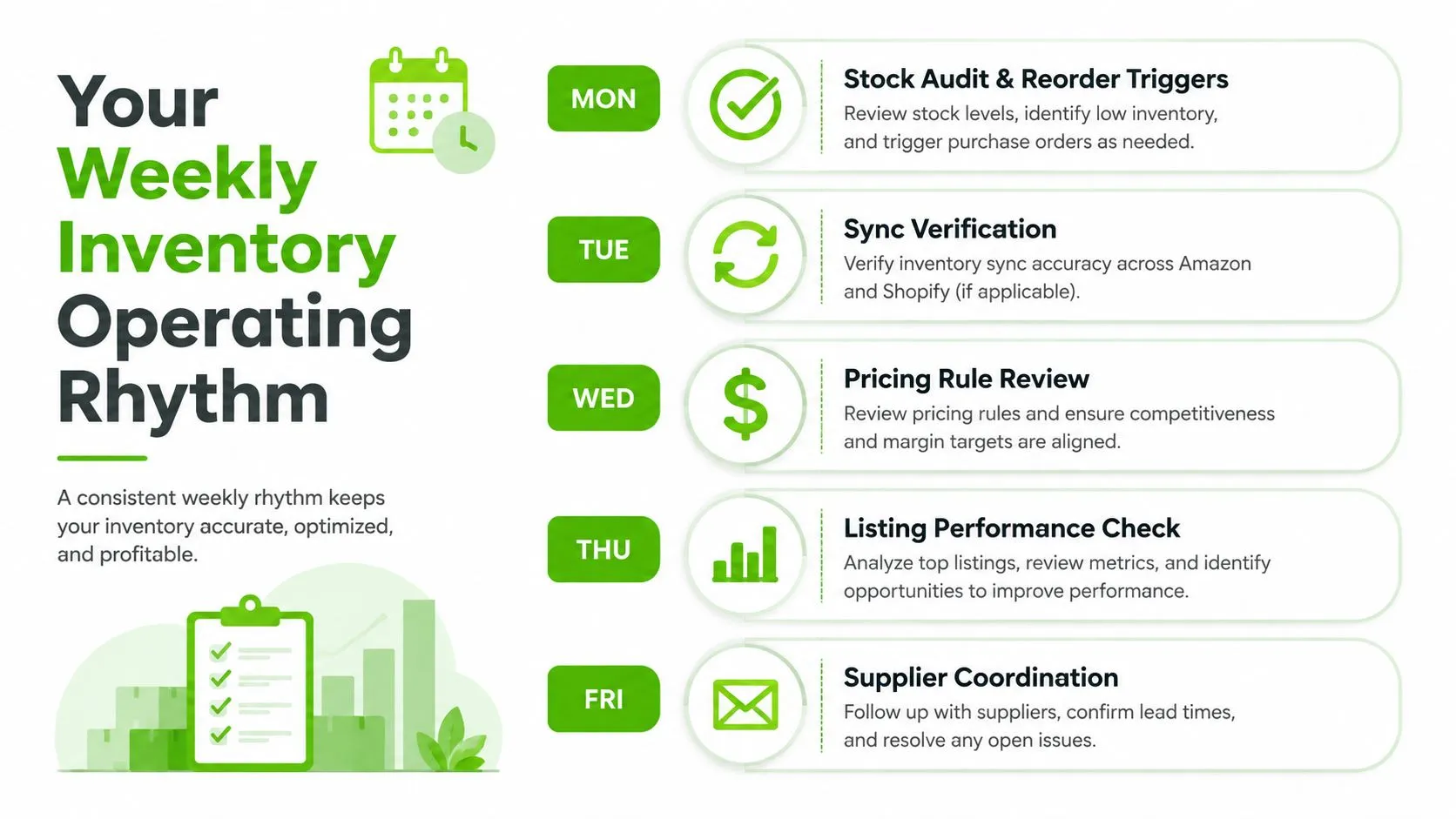
A reliable rhythm prevents inventory management from becoming a series of emergency corrections. Each day has a narrow purpose, and each check should produce an action when a threshold is crossed.
Monday starts with stock, not listings
Count priority SKUs and compare the source record with the shelf. Check active quantity, sold quantity, reserved quantity, and incoming purchase orders. Trigger a reorder when available stock reaches the defined reorder point, and move any discrepancy into an exception queue immediately.
Tuesday is for sync verification. Compare eBay with Amazon and Shopify where applicable, then inspect failed updates and the last successful sync time. If a fast-moving SKU exceeds the permitted sync lag or its physical count changes unexpectedly, temporarily reduce its channel availability while you investigate.
Wednesday is the listing-health sweep. Review active versus ended items, watchers, missing item specifics, price rules, and condition notes. A listing with poor sell-through should enter a pricing or category review, not an automatic renewal loop.
Thursday focuses on the relist queue. Separate GTC items from ended listings, identify products that need new photos or descriptions, and apply the fee-to-margin and minimum-net rules before spending time on republication. A 30-day ageing trigger can turn into a clear decision instead of another reminder.
Friday closes the loop. Review the prior week’s cancellations, late shipments, returns, and manual quantity edits. For each incident, identify whether the cause was a bad physical count, a missing SKU mapping, sync latency, an unprocessed return, or an unavailable supplier.
Keep the final review short
Use a 15-minute end-of-week review with three measures:
- Accuracy: Which SKUs failed to match between the source record and physical stock?
- Sync lag: Which channel updates were delayed or failed?
- Relist queue: Which listings need a price, category, content, or seasonal decision?
The sequence becomes muscle memory when every check has an owner and a response. Count stock before publishing it, commit it before promising it, and remove it from every channel when it sells.
Frequently Asked Questions
How quickly does eBay inventory need to sync to avoid overselling?
Independent guidance puts the minimum at 15 to 30 minutes, while a separate operational benchmark recommends sub-5-minute sync with a 10 to 20% buffer on fast-moving SKUs. The figure that decides the outcome is the collision window: if three orders land across channels within 4 minutes and your system publishes changes every 15 minutes, all three can sell against the same stale quantity. Faster sync does not repair an incorrect starting count, so hold a defined buffer on vulnerable SKUs as well.
What is the difference between on-hand and available stock?
On-hand stock is what physically exists. Available stock is what you can safely sell after subtracting units already committed to paid or accepted orders, plus anything damaged, missing, or held for inspection. If an order is committed but still waiting to ship, those units must leave available stock immediately, otherwise another channel can sell a unit that already belongs to someone else.
How do I set a reorder point for eBay stock?
Take average daily sales, multiply by supplier lead time in days, then add safety stock. Independent seller guidance recommends a 7 to 14 day safety-stock buffer for faster-moving SKUs, where lead-time variation and demand spikes create extra risk. Cycle fast movers weekly and long-tail stock monthly instead of counting the whole catalogue on one schedule.
When is relisting actually worth the time?
Relist only when the fee-to-margin ratio stays below 15% and the expected minimum net is at least $8. Those figures are a decision rule for the workflow rather than a universal eBay fee schedule. If a product stays under 40% sell-through, the problem is usually price, category, demand, or listing quality, so republishing the same weak offer only adds administrative activity around an unchanged problem.
Can an inventory error affect my eBay seller performance?
Yes. A cancellation caused by stock you cannot ship feeds the account metrics that evaluate defects, cases, and fulfilment. eBay’s global seller-performance policy evaluates sellers monthly, and on eBay.com the stated thresholds include no more than 2 cases closed without seller resolution or 0.3% of transactions, plus a transaction defect rate no higher than 2%. Performance is measured over the recent 3 or 12 months depending on transaction volume, so one inaccurate quantity can stay relevant after the customer-service work is finished.
Ruit gives professional resellers one workspace to import and merge marketplace inventory, publish listings across connected channels, and synchronise stock and prices so a sale can remove the item elsewhere instead of creating another reconciliation crisis. Visit Ruit to connect your eBay workflow and replace scattered stock updates with a coordinated operating system.