Cloud Based Inventory: What It Is and How to Choose


Table of Contents
- Table of Contents
- What a Cloud Based Inventory System Does and How It Works
- Cloud Based Versus On-Premise Inventory Compared
- Key Features to Check Before You Buy
- Which Sellers Gain Most From Cloud Inventory
- How to Evaluate Cloud Inventory Providers
- Migrate Stock Data and Run a 30-Day Pilot
- Frequently Asked Questions
You’re looking at three versions of the same stock list. One lives in a spreadsheet on your laptop, one is the set of live listings on Vinted and eBay, and one is what’s on the shelf. A buyer pays for an item you sold yesterday, you refund them, and you spend the evening checking every channel by hand. That’s not a selling problem. It’s a stock record problem, and it’s the point where a cloud based inventory system stops being optional software and becomes the one place your stock lives.
Table of Contents
- What a Cloud Based Inventory System Does and How It Works
- Cloud Based Versus On-Premise Inventory Compared
- Key Features to Check Before You Buy
- Which Sellers Gain Most From Cloud Inventory
- How to Evaluate Cloud Inventory Providers
- Migrate Stock Data and Run a 30-Day Pilot
- Frequently Asked Questions
What a Cloud Based Inventory System Does and How It Works
Say a seller lists the same vintage jacket on Vinted and eBay. It sells on Vinted at lunchtime, but the spreadsheet isn’t updated until evening, so it sells again on eBay. One jacket, two buyers, one refund. The jacket didn’t move. The record failed to move with it.
Think of cloud based inventory like a shared bank account. Several people can check and change one balance from any branch or phone, and the bank keeps the master record. Nobody carries a private copy that drifts out of date. A cloud inventory system does the same for stock. Your stock records, prices, orders and photos live on remote servers run by the provider, and you reach them through a browser or mobile app.

What makes it cloud, in plain terms
The NIST definition of cloud computing names five characteristics, on-demand self-service, broad network access, resource pooling, rapid elasticity and measured service. Two matter most day to day. Rapid elasticity means capacity grows during a bulk import of several hundred listings or an AI photo batch, then shrinks again, so you don’t buy servers for your busiest hour. Measured service means storage, processing and active users are metered, so you pay for what you use and can see cost per processed listing.
That metering matters more than it sounds. If you can see synchronisation latency, failed API calls and cost per listing, you can tell whether automation is raising profit per labour hour or just moving cost into software. Remote access alone isn’t the benefit. Elastic capacity that matches your catalogue size and channel count is.
One item, start to finish
- Record it once: Create the item with its SKU, condition, size, purchase cost and photos. That’s the master record.
- Publish from that record: Send the listing to each connected channel, adjusting fields each marketplace requires.
- Let the sale close the loop: When it sells on one channel, the system marks it sold and removes it everywhere else.
That final step is where stock meets orders, which is why it helps to understand how cloud based order management handles the sale after stock changes. Expect one stock record, many channels, and updates without manual copying.
Cloud Based Versus On-Premise Inventory Compared
The verdict first. If you sell on two or more channels, cloud wins on access, sync and updates. On-premise wins only when your connection is unreliable or your data must stay on site for regulatory reasons. That shift is already the market direction. Local Express valued the global cloud-based inventory-management market at approximately $3.9 billion in 2024.
Cost is where sellers compare badly. Cloud looks like a never-ending subscription, while on-premise looks like a one-off purchase. In practice, on-premise cost moves into licences, server hardware, backups and an IT person’s time for updates and failures. Cloud bundles hosting, updates and backup routines into the subscription. You’re not avoiding those costs with a local server. You’re paying them yourself, in cash and in hours.
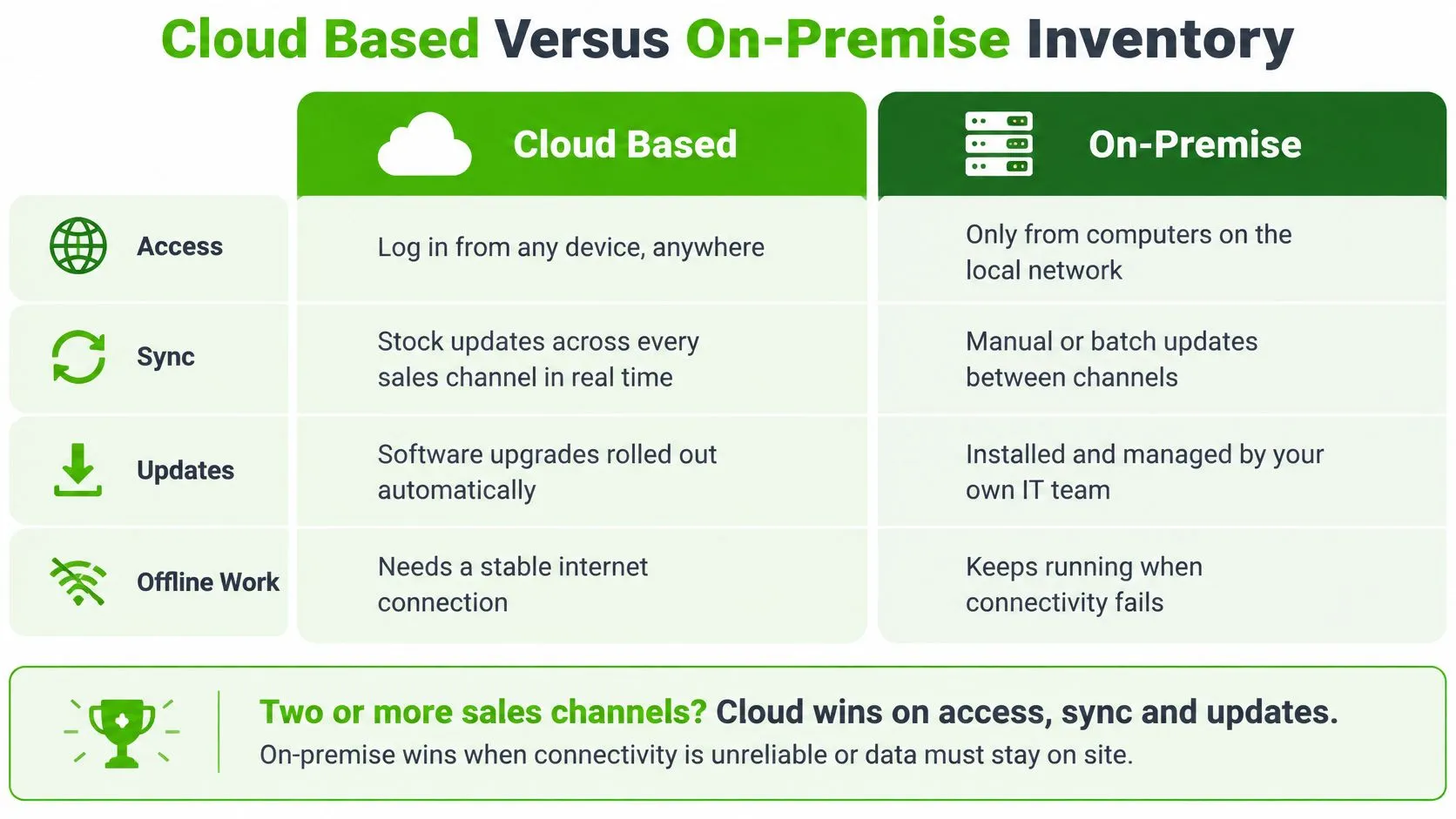
Cloud based versus on-premise inventory at a glance
| Criterion | Cloud based inventory | On-premise inventory |
|---|---|---|
| Upfront cost | Low, mostly a recurring monthly subscription | High, licences and server hardware bought in advance |
| Access | Any browser, phone or tablet with internet | Usually the office network or a VPN |
| Updates | Automatic and managed by the vendor | Installed manually or on an IT schedule |
| Multi-channel sync | Built around marketplace connections | Often needs custom connectors or manual imports |
| Backup and recovery | Vendor-managed; check stated recovery targets | Your own backup routine and storage |
| Scaling during spikes | Capacity added on demand | Hardware bought ahead of peak load |
| Outage exposure | Depends on internet access and vendor uptime | Depends on local power, server and network |
| Data control | Vendor-hosted; export rights decide control | Full local control of the data |
Two rows deserve a pause. Outage exposure doesn’t disappear on-premise, it changes shape. A cloud system stops when your internet or the vendor fails. A local system stops when your server, power or office network fails, and you’re the support team. Data control is similar. Holding the hard drive feels like control, but if your backups are untested, control is theoretical. With cloud, control depends on whether you can export everything in a usable format.
Decision rule: If the same stock can sell in more than one place, make cloud your default and require a specific reason to choose local servers.
On-premise still fits a narrow case, a single warehouse with weak internet, no marketplace integrations, and staff who never need access from elsewhere. Some firms also split the difference, and this overview of cloud or hybrid for East Midlands SMEs is a useful way to think through that middle option. For most multi-channel resellers, though, hybrid adds complexity without solving the sync problem that caused the oversell.
Key Features to Check Before You Buy
A feature list tells you what a system does on a quiet day. Your checks need to show how it behaves on your busiest one, because cloud software tends to expose gaps in your stock records before it fixes them.
Start with the feature behind most oversells, real-time sync. A healthy system updates stock on every channel within minutes of a sale. Ask the vendor to state its synchronisation latency in writing, with a typical and a worst-case time. “Fast” in a demo is not an answer. A named worst case tells you the size of your oversell window during a sales spike.
Sync also needs a safety net. A sale should mark the item unavailable at once and trigger delisting, while a scheduled reconciliation job compares your records against each marketplace and flags mismatches. Underneath that, look for two properties. Each item should have one canonical identity, and the system should keep an event log covering acquisition, listing, reservation, sale, cancellation, return and relisting. That log works like a ledger for every item. Replaying the same marketplace event must never create duplicate stock or reduce quantity twice.
Feature checklist with tests and red flags
| Feature | What to verify | Red flag |
|---|---|---|
| Real-time sync | Stock drops on all channels within minutes of a sale | Sync runs once a day or needs a manual refresh |
| Multi-channel publishing | One listing creates offers on each channel with channel-specific fields | Copy-paste per channel or missing condition fields |
| Auto-delist and relist | Sold items are removed elsewhere automatically; relisting follows a schedule | Sold items stay live and cause oversells |
| Mobile apps | iOS and Android apps handle photos, stock counts and messages | Browser only, unusable on a phone |
| Analytics | Profit per item and per labour hour, with purchase costs entered | Revenue charts with no cost data |
| Security | Role-based access, audit logs, encrypted transmission, documented backups with a stated recovery target | Shared logins and no audit trail |
| Data export | Full export of listings, sales history and item records in a usable format | Export limited to summaries or gated behind support tickets |
| Messaging inbox | Conversations from every channel in one place | A separate app for each marketplace |
Test each feature in one hour
Don’t watch a demo with the vendor’s sample data. Run your own checks.
- Sell a test item: List it on two channels, buy it on one, and time its removal from the other with a stopwatch.
- Publish an awkward item: Pick something with condition flaws, size and brand fields, and check each marketplace receives the right values.
- Count from your phone: Photograph, create and locate ten items using only the mobile app on the shop floor.
- Force a mismatch: Edit a quantity by hand, then confirm the reconciliation job catches the disagreement instead of copying the error across channels.
- Ask for profit, not revenue: Enter purchase costs and confirm the dashboard shows profit per item and per labour hour.
- Check the audit trail: Change a price as a second user and confirm the log names who did it and when.
Expect the first weeks to surface problems. Run cycle counts on high-value or frequently mismatched items, and daily gap scans for items shown as available but missing from the shelf. Track oversell incidents per 1,000 orders, duplicate listings and inventory accuracy by channel. A rising mismatch count early on usually means the system is reporting disorder that was already there. The question is whether it gives you the tools to close each gap, or only a chart of how bad things are.
A feature only counts if you can verify it during the trial with your own stock, your own channels and your own phone.
Which Sellers Gain Most From Cloud Inventory
Different sellers lose money in different places. Match the tool to your most expensive problem first, not to the longest feature list.
Seller profiles, main problems and the features that solve them
| Seller profile | Main problem | Must-have capability |
|---|---|---|
| Solo reseller on Vinted and eBay | The same item sells twice | Multi-channel publishing with auto-delisting |
| Local second-hand shop | Stock lives in a notebook and a till | Mobile app with a single stock record for in-store and online |
| Online store on WooCommerce or PrestaShop with used stock | Double sales between the site and marketplaces | Native e-commerce connector with real-time stock sync |
| Marketplace team or company with an ERP | Manual data entry across tools | API, CRM or ERP integration and team user roles |
A solo reseller usually doesn’t lack effort. They lack a guardrail. Every extra channel multiplies the chance that one unique item sells twice, and each refund costs fees, time and account health. Auto-delisting pays for itself by removing that single failure.
A local second-hand shop has a different bottleneck. Stock arrives at the counter, gets priced on paper, and only reaches online channels if someone retypes it later. A mobile app that creates the record at intake, with photos and shelf location, means the till sale and the online listing draw from the same quantity from day one.
An online store adding used stock to WooCommerce or PrestaShop needs its own shop and the marketplaces to agree. A native connector matters because a file export twice a day leaves a window where both places can sell the last unit. A marketplace team with an ERP needs something else again, an API, user roles so staff only see their tasks, and clean handovers to accounting so nobody rekeys orders.
Say a seller runs 300 active listings across three channels. Manually, every sale triggers three checks and two deletions. At ten sales a day, that’s the bottleneck, not sourcing or photography. Move that work into the system and the seller’s hours shift to finding and pricing stock, which is where margin is made.
One profile sits outside stock tools. Bargain-hunting buyers need price history and alerts across platforms to spot underpriced items, not inventory control. Don’t buy a stock system to solve a sourcing problem, and don’t expect a sourcing alert tool to stop oversells. The same platform rarely fits every profile equally, so name your profile before you score features.
How to Evaluate Cloud Inventory Providers
Price and feature lists hide the two moments that hurt most, an outage during trading and the day you want to leave. Judge providers on portability, recovery and resilience as well as features. A cheap tool you can’t exit, or that stops your shop floor when the Wi-Fi drops, isn’t cheap.
There’s also a wider context you’re buying into. A European Commission document on data centres states that European data centres consumed approximately 70 TWh of electricity in 2024, and the EU is introducing sustainability reporting for data centres above 500 kW, including energy use and water consumption. That doesn’t make cloud the wrong choice. It means you should ask providers what they report, and weigh it against the duplicated shipping, unsold stock and manual rework that poor inventory control creates in your own business.
Provider evaluation scorecard
| Criterion | What to verify | Red flag |
|---|---|---|
| Portability | Full catalogue, order history and photos exportable in open formats | Export only as a locked file |
| Uptime and recovery | Written uptime, recovery time and recovery point targets | No stated targets |
| Offline procedure | Staff can finish a shop-floor count when the connection drops | Work stops without internet |
| Data location and GDPR | Storage location and responsibility for customer records are named | Location and responsibility unstated |
| API and integration limits | Stated calls per minute and ERP or CRM connectors | Undocumented limits |
| Pricing | Monthly prices shown without VAT and flexible cancellation | Hidden fees or long lock-in |
| Support | Email and chat, with priority support on advanced plans | Support only by ticket |
| Sustainability | Reported energy and water use | No environmental reporting |
Score each row before you look at price. Portability comes first because it decides every future negotiation. Run an export during the trial and open the files. Can you rebuild your catalogue elsewhere, with photos and order history intact?
Next, ask for recovery time and recovery point targets in writing. Recovery time is how long the system may be down. Recovery point is how much recent data you could lose. Vague answers here mean you’ll learn the actual numbers during your worst week. Do the same for data location. You remain responsible for customer records under GDPR even when a vendor stores them, so the contract should name where records sit and who does what after an incident.
If you’re building a shortlist, it helps to compare ecommerce inventory management software against the same scorecard rows rather than each vendor’s marketing categories. For sellers whose main shop runs online, this guide to inventory management software for e-commerce covers the connector side in more detail.
As one full-cycle option, Ruit covers sourcing, inventory, multi-channel publishing on Wallapop, Vinted, eBay, WooCommerce, PrestaShop and Todocolección, real-time stock sync, auto-delist, a unified inbox, accounting and analytics on web, iOS and Android, with Basic, Premium and Enterprise plans. The honest trade-off is scope. If you only need crosslisting and your labour isn’t the bottleneck, a narrower tool may cost less. If listing, messaging, stock and accounting each eat hours, one system for the whole cycle is the point.
Migrate Stock Data and Run a 30-Day Pilot
Cloud software exposes operational disorder before it fixes it. If your brands are spelled three ways and the same coat exists twice under different names, centralising that data makes the mess visible at scale. That visibility is useful, but only if you clean before you import. Many small sellers start from a low base: Eurostat cloud computing statistics show that only 46% of European SMEs used cloud services in 2025, compared with 78% of large enterprises. Low adoption usually points to fragmented records rather than careless owners.
The direction of travel is still clear. Mordor Intelligence’s inventory management market report estimates that cloud-based suites held 61.20% of market share in 2025, with small and medium-sized businesses projected to grow at a 12.85% CAGR through 2031. Smaller sellers are moving, and they need a staged migration rather than a big-bang import. For the wider move, this walkthrough on building a practical data migration strategy helps you sequence ownership and validation. For the stock-specific side, follow the steps for how to import inventory without recreating listings.

Clean and migrate in six steps
- Audit where stock lives: List every spreadsheet, marketplace dashboard, phone photo folder and paper notebook that holds stock truth today.
- Define a minimum data model: Require SKU, brand, model, condition grade, size, purchase cost, storage location and status for every item. Nothing imports without them.
- Standardise fields: Fix condition and brand values against a short approved list, so “very good”, “VG” and “great” become one grade.
- Deduplicate: Match records by SKU and photo, then merge duplicates into one record per physical item.
- Assign one owner: Name one person who settles disputes about stock data. Shared ownership means nobody fixes mismatches.
- Keep a rollback point: Export and store the old data untouched, so a failed import costs you hours, not your catalogue.
Run the 30-day pilot on 50 items
Skip the full migration. Pilot about 50 items across two or three channels, including one high-value item and one fast seller, because edge cases teach you more than easy stock.
- Connect and publish: Connect the channels, publish the batch, and time how long each listing takes from record to live.
- Force a cross-channel sale: Sell one item on one channel and time its removal from the others.
- Count physically: Count the pilot stock on the shelf, compare it with the system, and record your accuracy percentage.
- Log failures and labour: Record oversells, failed syncs and labour hours per listing every day, not from memory at the end.
- Score and compare: Score the provider on the resilience scorecard and run the same pilot checks against at least two alternatives.
Set pass thresholds before you start, while you can still walk away. Sensible ones are zero oversells, sync within minutes, and a clear drop in hours per listing. Measure time from sourcing to listing and gross profit per labour hour too, since more items online can hide worse economics underneath.
Pilot principle: If the system can’t handle 50 items cleanly, 5,000 items won’t fix it. Scale only what already works.
A pilot is low-risk only if the contract lets you cancel without a long lock-in, so check the billing terms before you start and be ready to stop if your thresholds aren’t met. Judge the result on measured accuracy and hours saved. A tidy dashboard proves neither.
Frequently Asked Questions
What is a cloud based inventory system?
It is a stock system whose records, prices, orders and photos live on remote servers run by the provider, and you reach them through a browser or mobile app. Every channel and device works from one master record instead of private copies that drift out of date.
Is cloud based inventory better than on-premise?
If you sell on two or more channels, cloud wins on access, sync and updates. On-premise fits a narrow case: a single warehouse with weak internet, no marketplace integrations, or data that must stay on site for regulatory reasons.
How fast should stock sync after a sale?
A healthy system updates stock on every channel within minutes of a sale. Ask the vendor to state its synchronisation latency in writing, with a typical and a worst-case time, because the worst case is the size of your oversell window.
How do I test a provider before migrating all my stock?
Run a 30-day pilot on about 50 items across two or three channels. Set pass thresholds first, such as zero oversells, sync within minutes and a clear drop in hours per listing, and check that you can export everything and cancel without a long lock-in.
Start your own 50-item pilot with Ruit, where sourcing, cloud based inventory, multi-channel publishing, auto-delisting and accounting run in one system on web, iOS and Android. Connect two channels, set your pass thresholds for sync time and oversells, and measure your profit per labour hour before you migrate the rest of your stock.