Ecommerce Automation Software for Resale Businesses


Table of Contents
- Table of Contents
- Why Resale Sellers Are Drowning in Manual Work
- What Ecommerce Automation Software Actually Is
- The Workflows You Can Automate Today
- The ROI Case in Real Numbers
- Why Tool Sprawl Kills Your Automation ROI
- Your Implementation Checklist
- How to Choose the Right Platform for a Resale Business
- Frequently Asked Questions
You’re probably living inside the same mess right now. One person copies the same product into Vinted, Wallapop, eBay, and a WooCommerce store, another person answers buyer messages from five inboxes, and somebody else tries to reconcile the day’s sales in a spreadsheet after dinner. That setup doesn’t scale, it just traps your business inside the number of hands and hours you can throw at it.
Ecommerce automation software is the way out when you run a resale business and the bottleneck is coordination, not demand. The point is not to “do marketing faster.” The point is to remove repetitive work from sourcing, listings, messaging, orders, pricing, and accounting so your team can spend time on the stock and decisions that make money.
Table of Contents
- Why Resale Sellers Are Drowning in Manual Work
- What Ecommerce Automation Software Actually Is
- The Workflows You Can Automate Today
- The ROI Case in Real Numbers
- Why Tool Sprawl Kills Your Automation ROI
- Your Implementation Checklist
- How to Choose the Right Platform for a Resale Business
Why Resale Sellers Are Drowning in Manual Work
A professional reseller’s day usually starts with a phone, a stack of unsorted stock, and too many tabs. You find a jacket on one marketplace, check comps on another, write the listing once, paste it three more times, then keep one eye on incoming messages because a buyer wants extra photos and another wants a bundle price. By the time the last order lands, you’re still updating stock by hand and wondering which channel sold first.
That is the wrong operating model for resale. Manual work doesn’t just slow you down, it sets a hard ceiling on profit per hour because every repeated action still needs a human to push it through. The more marketplaces you use, the more that ceiling matters.
The hidden cost is not effort, it’s coordination
Resale businesses don’t fail because one task is hard. They bog down because the same item has to move through sourcing, listing, pricing, messaging, fulfillment, and bookkeeping without falling out of sync. If one of those steps lives in a spreadsheet and another lives in a marketplace inbox, the whole process becomes fragile.
Practical rule: if the same SKU exists in more than one place, your real job is keeping those places aligned.
That’s why automation matters here. A resale seller doesn’t need more busywork hidden behind software. They need a system that reduces duplicate typing, prevents stale stock, and keeps the operation moving when sales happen at odd hours.
The market has clearly moved in that direction. One 2026 industry summary says 58% of global enterprises had adopted ecommerce automation platforms by the end of 2025, up nearly 10 percentage points from the year before, while 90% of global retailers planned to increase AI investment in the next 12 to 24 months. The same source says 70% reported that data-capture processes were mostly or completely automated, which shows automation is no longer a side project. It’s infrastructure now. Industry summary on ecommerce automation adoption
What Ecommerce Automation Software Actually Is
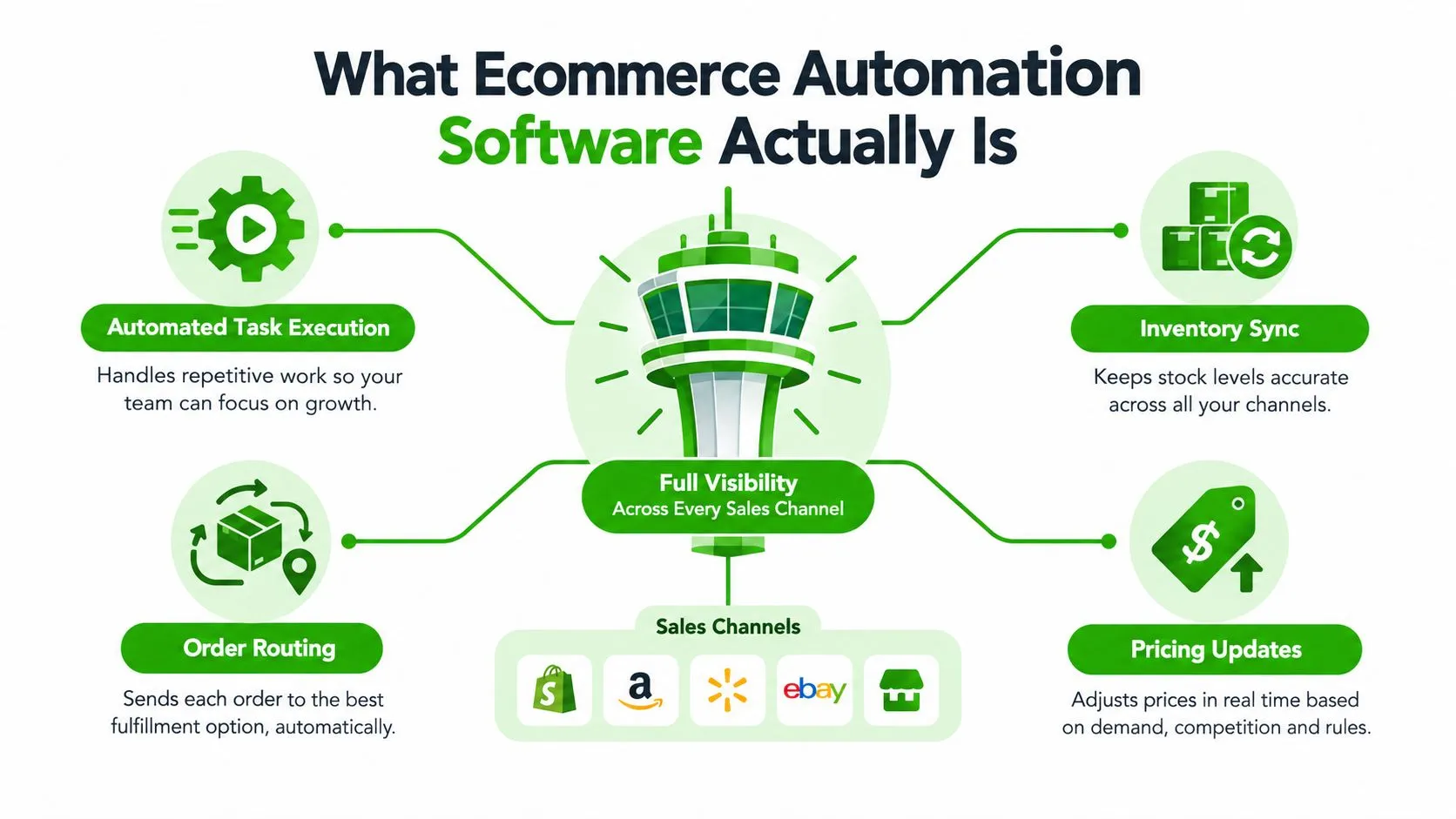
Think of ecommerce automation software as a control tower for your business. It watches every channel, every listing, every order, and every stock movement, then executes rules without making your team retype the same decisions all day. In resale, that matters because your business isn’t one storefront, it’s a web of marketplaces, a warehouse or back room, buyer conversations, and accounting files.
Triggers, rules, and actions
The simplest version is plain logic. A trigger happens, a rule checks the situation, and an action fires. If an item sells on one channel, the stock drops everywhere else. If a message arrives asking for measurements, a saved reply can surface instantly. If a product sits too long, the system can relist it or refresh visibility.
That’s the difference between point tools and real operational software. A crosslisting app helps you publish in more places. A repricer changes prices. An inbox tool centralizes messages. Useful, sure, but still fragmentary. End-to-end ecommerce automation software connects those pieces so stock, orders, support, and accounting don’t each become separate chores.
The economics reflect that shift. One 2026 report places retail automation at $31.21 billion and marketing automation software for ecommerce at $8.14 billion, while customer service automation is estimated at $6.68 billion in 2026 and logistics automation at $90.72 billion. Those figures show a stack of specialized systems, not a single category. Another estimate puts AI-enabled ecommerce solutions at $7.25 billion in 2024, $8.65 billion in 2026, and $64.03 billion by 2034, with roughly 24% CAGR. Ecommerce automation tools adoption statistics
Why modern systems feel different
The newer layer adds judgment, not just speed. It can suggest listing titles, generate descriptions from product attributes, detect buying opportunities from price patterns, and help draft replies in a way that’s useful for used goods where condition, defects, and provenance matter. That doesn’t replace the operator. It removes the junk work around the operator.
If you want a practical example of how marketers frame these workflows, the practical automation playbook from YipSMS Inc. is worth a look because it connects triggers, customer messaging, and timing in a clean way. The important lesson for resale isn’t the marketing angle, it’s the discipline: one event should drive one reliable action.
The Workflows You Can Automate Today
The quickest wins in resale are not abstract. They’re the jobs that repeat every day and punish you when they slip.
Start with sourcing and listings
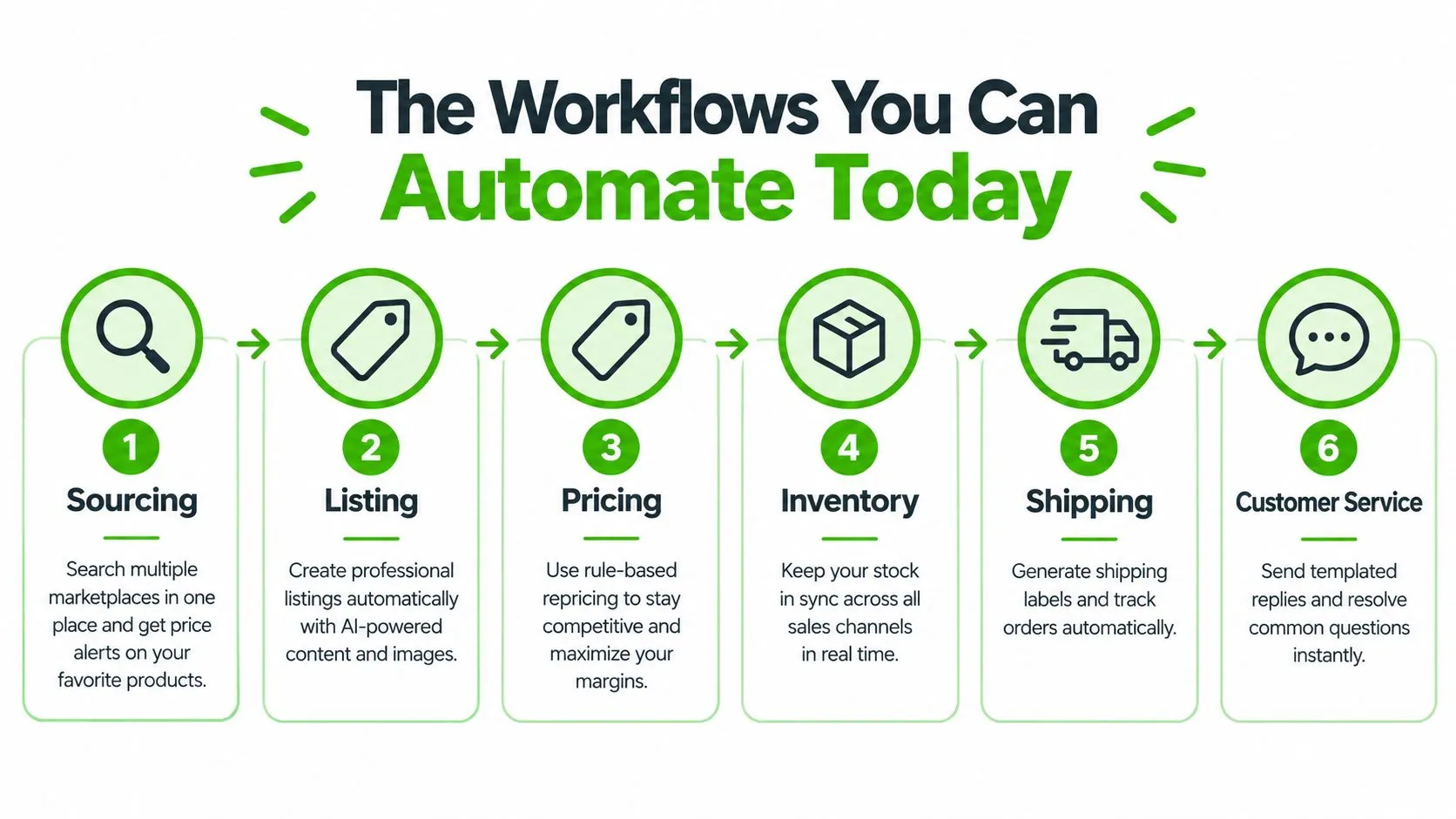
Sourcing is where you stop guessing. Instead of jumping between marketplaces and hunting manually, you use unified search, price history, and alerts to flag opportunities the moment they appear. That means less time scrolling and more time buying items with margin.
Listings are the next obvious target. One draft should be enough to publish across channels, with titles and descriptions generated from the item data and photos cleaned up before upload. If you still retype each listing from scratch, you’re wasting your best hours on copy-paste labor.
Then tighten stock, messaging, and orders
Pricing and inventory sync matter because resale is full of one-off items. When one channel sells an item, the rest should delist immediately. The point is not just speed, it’s protecting you from double-selling the last unit and then spending an hour apologizing.
Messaging belongs in one inbox. Buyer questions pile up fast, especially on condition, sizing, shipping, and bundle requests. Unified inboxes with suggested replies keep your response time sane without forcing you to write the same answer five times. That’s also where orders should land, not in separate marketplace tabs that force manual reconciliation.
Accounting is the last piece people ignore until it hurts. Automatic export of sales, fees, and order data turns a late-night spreadsheet session into a normal review process. If your finance file still depends on memory, you’re already behind.
For teams that want a multichannel publishing reference point, the internal guide on a multichannel listing tool is a useful comparison because it shows how distribution gets simplified once the listing exists in one place.
Useful filter: if a workflow can be described as “do the same thing again, but on another channel,” it’s probably automatable.
The ROI Case in Real Numbers
A resale operator doesn’t need vague talk about efficiency. You need to know where the return comes from, and whether the software is making the business cleaner or just fancier.
Accuracy is the first lever
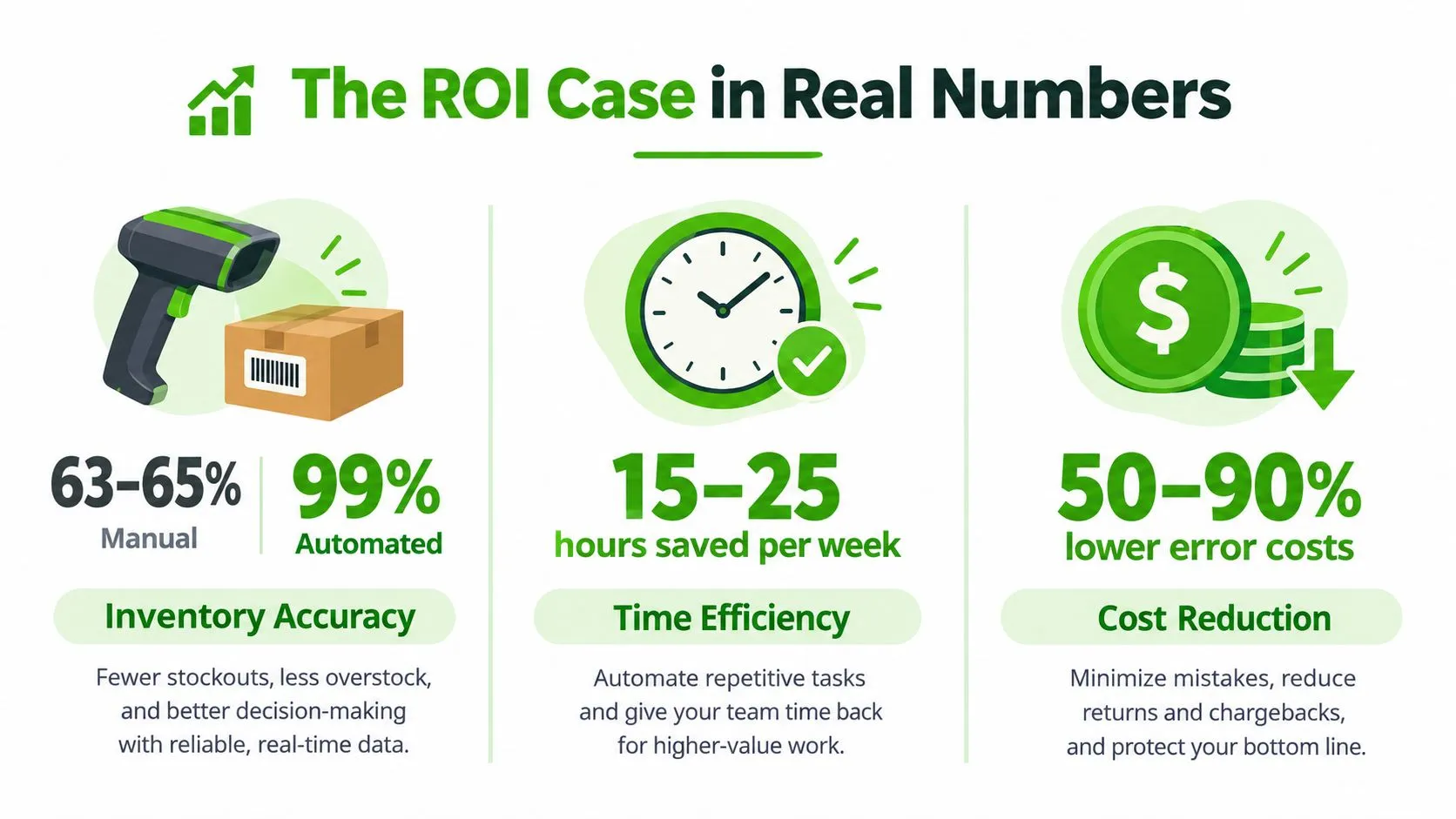
One widely cited benchmark shows manual, barcode-based inventory systems at roughly 63-65% accuracy, while automated tracking reaches 98-99% accuracy. That gap is not cosmetic. It changes whether your stock ledger is trustworthy enough to drive replenishment, delisting, and channel allocation. BigCommerce’s ecommerce automation article
If your counts are off, every downstream decision gets worse. You stock too much of the wrong item, miss the last available unit, and create avoidable cancellations. Automated tracking fixes the source of the error instead of just helping you apologize faster.
Time savings only matter when they remove repetitive work
The same source reports efficiency gains of around 73% for automating manual counts and routine stock tasks. That’s the kind of number that matters in resale because your team’s time is the inventory. The less of that time spent counting, checking, and rechecking, the more of it goes into sourcing and selling.
Order handling and stock updates are where the returns compound. A platform that keeps the ledger current helps prevent oversells, and the operational logic is simple: when propagation is slow, two channels can both think they own the last unit. Listicler’s overselling guidance makes the sync issue clear. A delay of even five minutes is enough to create a mess.
What to measure in your own business
Before buying anything, list the tasks that still eat real hours.
- Stock checks: Count how many minutes go into manual reconciliation each day.
- Listing creation: Track how long one item takes from photo to live post.
- Message handling: Measure how many buyer questions repeat the same answer.
- Order cleanup: Note how much time you spend moving data into finance or spreadsheets.
If the software doesn’t reduce those categories, it isn’t improving ROI. It’s just moving work around.
The other payoff is market control. Real-time sync, near-real-time delisting, and cleaner inventory data mean fewer cancellations, fewer refund conversations, and less time spent repairing avoidable mistakes. That’s where profit per hour improves.
For a process-focused reference on the back end, the internal guide on cloud-based order management is relevant because order flow and stock flow need to act like one system, not two.
Why Tool Sprawl Kills Your Automation ROI
More tools does not mean more automation. In resale, too many disconnected apps usually mean more logins, more duplicated data, and more places for stock to drift out of sync.

The market is already moving toward consolidation. One recent guide says retailers are consolidating from 6-8 standalone tools to 2-3 integrated platforms, because fragmented systems create friction that eats the benefit of automation. Another says the market is shifting toward unified systems that share data across inventory, pricing, and fulfillment. AI ecommerce automation tools guide
Sync latency is the quiet killer
Here’s where people get burned. If stock updates lag by even 5 minutes, two channels can both sell the last unit before the master count propagates. That’s not a theoretical problem, it’s how overselling happens in a busy resale operation. Overselling prevention guidance
The same theme shows up in visibility data. Only about one-third of retailers report excellent cross-channel inventory visibility, even as 84% prioritize real-time sync. Those two facts tell you everything you need to know: many want the outcome, but lack the data foundation to pull it off. AI ecommerce automation tools guide
If your tools don’t share one source of truth for stock, orders, and messages, every extra app adds complexity before it adds value.
Here’s the test I’d use. If a new tool can’t pull from the same inventory record, push updates back to every channel, and keep support messages tied to the order, don’t buy it yet. Tool count is not the KPI. Clean handoffs are.
The best systems reduce the number of places a human can make a mistake. The worst ones automate one corner of the operation and leave the rest of the business to spreadsheet glue.
Your Implementation Checklist
Start small and boring. The fastest way to wreck an automation project is to rebuild everything at once and then spend a month untangling your own rules.
Build the baseline first
Audit every manual workflow and time it. Not roughly, precisely enough that you know where the hours go. If you don’t know how long listing, stock updates, and message handling take today, you won’t know whether the new system helped.
Then connect your marketplaces and storefronts and import existing inventory instead of recreating listings by hand. That saves time immediately and gives the platform something real to work with. The goal is one clean inventory source, not a fresh pile of duplicated entries.
Automate in this order
- Listing creation and distribution. Get one item into the system once, then publish it everywhere you need.
- Stock and price sync. Test auto-delist behavior with a live sale or a controlled test.
- Messaging. Turn on unified inbox views and suggested replies for the repetitive questions.
- Order management and accounting exports. Push order data into the finance flow only after the stock logic is stable.
- Analytics. Compare every new result against the baseline you captured at the start.
That order matters. If you start with accounting before inventory is clean, you’ll just produce prettier errors.
Implementation rule: run manual and automated processes in parallel only long enough to trust the sync, then cut over. Forever-dual process is how teams create confusion.
Team onboarding needs to be direct. Show staff where one item is created, where stock changes, and where exceptions live. Keep the exception path obvious, because automation should reduce noise, not hide failure.
The internal guide on best inventory management software is useful here because inventory discipline decides whether automation works or turns into a mess of near-matches and stale records.
How to Choose the Right Platform for a Resale Business
Resale sellers need a different shortlist than generic ecommerce brands. You’re not choosing software for one curated catalog. You’re choosing the operating layer that has to keep used goods moving across channels, devices, and people without creating new admin.
| Criterion | Why It Matters for Resellers | What to Verify |
|---|---|---|
| Full-cycle coverage | Sourcing, listings, orders, messaging, and accounting should live in one workflow, not five tools | Check that the platform handles the whole loop, not just crosslisting |
| Near-real-time sync | Used goods are often one-off items, so stale stock causes immediate errors | Verify how quickly stock delists after a sale |
| Multi-marketplace support | Resale businesses often sell on local and global channels at once | Confirm support for the marketplaces you actually use |
| AI listing tools | Used items need clear titles, descriptions, and better photos | Test title generation, description drafting, and background removal |
| Unified messaging | Buyers ask condition, sizing, and shipping questions across channels | Make sure one inbox covers all connected channels |
| Team access | Growing shops need roles, permissions, and shared workflows | Verify user management and permissions |
| Mobile support | Sourcing and listing often happen away from a desk | Check whether the app is usable on-site and in transit |
| Store integrations | Some sellers also run WooCommerce or PrestaShop stores | Confirm native integrations, not fragile workarounds |
Ruit is one example of a platform built around that full-cycle model, with multichannel publishing, inventory sync, messaging, order handling, and accounting in one system.
The company says it supports more than 3,000 active businesses and has had more than a million listings published, which tells you it’s been used at real operational volume. Ruit’s inventory management guide
The decision framework is simple. If you only need crosslisting, buy a narrow tool. If your real problem is coordination across sourcing, stock, messaging, orders, and accounting, choose the platform that removes the most manual handoffs and gives you one source of truth.
Frequently Asked Questions
What does ecommerce automation software actually do?
It runs triggers, rules and actions across your channels. When an item sells on one channel, stock drops everywhere else; when a buyer asks for measurements, a saved reply surfaces; when a product sits too long, the system can relist it or refresh its visibility.
Where does the return on automation come from?
Accuracy first. One widely cited benchmark puts manual, barcode-based inventory at roughly 63-65% accuracy against 98-99% for automated tracking. Time savings follow, but they only matter when they remove repetitive work like counting, checking and rechecking stock.
Why can more tools make automation worse?
Disconnected apps mean more logins, duplicated data and more places for stock to drift. If stock updates lag by even 5 minutes, two channels can both sell the last unit before the master count propagates.
If you’re running resale at any real volume, stop patching the gaps with spreadsheets and disconnected apps. Ruit brings sourcing, multichannel publishing, stock control, messaging, orders, and accounting into one operating flow for second-hand businesses, so you can spend less time reconciling and more time turning inventory into profit. Visit it, compare it against your current stack, and judge it by one metric only, profit per hour.