Keep eBay Stock Accurate When You Sell on More Than One Channel


Table of Contents
- Table of Contents
- Why Inventory Management Is a Coordination Problem
- How Stock Errors Damage Your eBay Account Health
- Building a Restocking Workflow That Prevents Mispicks
- Setting Up Real-Time Multi-Channel Synchronization
- The Hidden Cost of Abandoned Drafts and Stale Listings
- Connecting Inventory to Sourcing and Analytics
- Frequently Asked Questions
You’ve sold an item on eBay, then discovered it’s sitting in an unmarked box behind newer stock. While you search, another buyer purchases the same item on a different marketplace. The spreadsheet says it’s available, eBay still shows the listing, and your shipping tool is waiting for an order you can’t fulfill.
That’s how inventory work expands from a quick stock check into hours of relisting, reconciliation, message handling, and draft maintenance. To manage eBay inventory reliably, you need more than an accurate count. You need a workflow that moves every item from purchase to storage, publication, sale, shipment, and accounting without losing its location or status along the way.
Table of Contents
- Why Inventory Management Is a Coordination Problem
- How Stock Errors Damage Your eBay Account Health
- Building a Restocking Workflow That Prevents Mispicks
- Setting Up Real-Time Multi-Channel Synchronization
- The Hidden Cost of Abandoned Drafts and Stale Listings
- Connecting Inventory to Sourcing and Analytics
Why Inventory Management Is a Coordination Problem
A reseller can start with eBay Seller Hub, a spreadsheet, and a shipping application. Each tool appears manageable on its own. The spreadsheet tracks purchase costs and locations, eBay holds active listings and orders, and the shipping tool creates labels. The trouble starts when one item changes status and somebody has to update every other system manually.
A product may be purchased but not photographed, photographed but still sitting in drafts, published on eBay but not on another marketplace, or sold while its physical location remains unclear. Those are different operational states, yet many sellers record only one question: available or sold.

The work hidden behind every listing
Manual inventory control includes much more than counting units:
- Relisting: Finding ended listings, checking condition and price, then publishing them again.
- Reconciliation: Comparing physical stock with eBay, spreadsheets, and other channels.
- Picking: Locating the exact item after a sale, especially when similar products share a shelf.
- Draft management: Checking whether purchased items have been photographed, described, and published.
- Status updates: Removing or reducing listings after a sale, return, damage discovery, or channel change.
At low volume, these actions feel like ordinary admin. As the catalog grows, they interrupt sourcing, packing, customer service, and purchasing. Independent guidance on eBay inventory management software and operational labor identifies this coordination burden as a central problem, because sellers often split inventory, shipping, accounting, and price checks across separate systems.
The practical fix is to give each item a stable identity and a predictable path. Assign a SKU, record its physical location, separate newly sourced stock from ready-to-sell inventory, and use explicit states such as purchased, to photograph, draft, active, sold, returned, and archived.
Treat inventory as a pipeline
Crosslisting can distribute a listing across marketplaces, but publication is only one part of the operation. A crosslisting workflow works properly only when the seller knows which physical item the listing represents and what should happen after a sale.
A useful daily question isn’t, “How many items do I have?” Ask instead:
Where is each item in the source-to-sale process, and what action moves it forward?
That question exposes the labor that ordinary stock counts hide. If drafts keep aging, the bottleneck is photography or listing preparation. If active items are hard to pick, the storage system is failing. If sold listings remain live elsewhere, synchronization is the issue. Scaling comes from removing those bottlenecks, not from making the spreadsheet more elaborate.
How Stock Errors Damage Your eBay Account Health
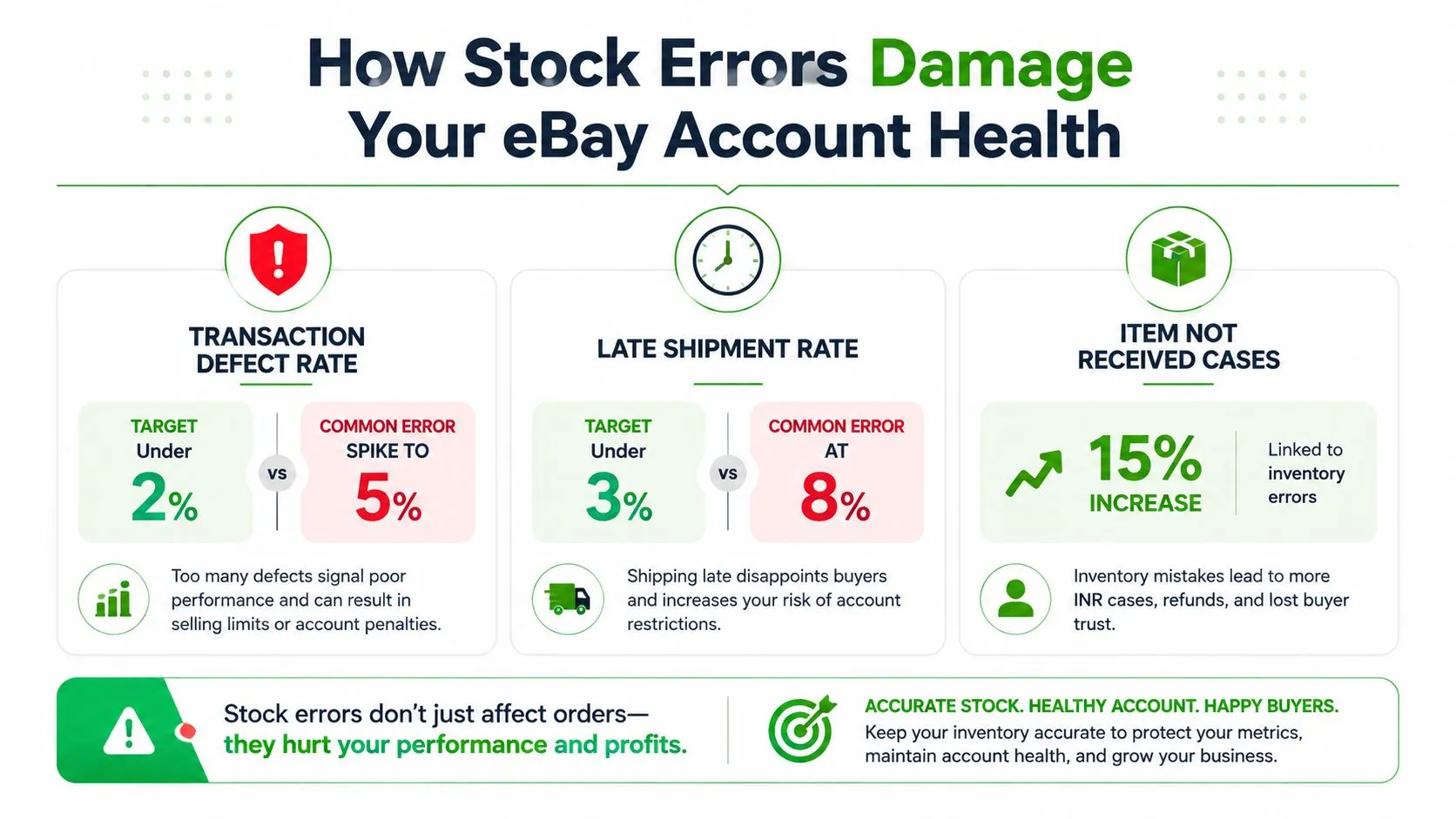
An inventory mistake can become a buyer complaint and an account-performance problem within the same order. eBay evaluates sellers through measures including transaction defect rate and late shipment rate. An inaccurate quantity, location, or condition record can force cancellation, delay dispatch, or send the wrong variation. eBay’s performance requirements and the operational consequences of stock mistakes are summarized in independent guidance on managing eBay inventory.
A missing item creates more than a refund task. Someone must search storage, check other channels, message the buyer, cancel the order, and often relist the product later. A long search can produce late shipment, while a wrong variation can create a defect even when the parcel leaves on time. At volume, these exceptions also consume hours that should go to sourcing, listing, and fulfillment.
Why a small error margin matters
Independent seller guidance notes that a seller processing 500 transactions per month may need to keep cancellations below approximately 2 to 3 per month to maintain Top Rated status over a 12-month evaluation period. It also states that a defect rate below 0.5% is required for Top Rated Seller status, while 2% or higher can place an account Below Standard. Those thresholds leave little room for repeated mistakes.
A single cancellation does not automatically create a severe penalty. Repeated avoidable errors can affect buyer satisfaction, shipping performance, search visibility, and selling privileges together. The hidden cost is operational as well. Every mismatch can trigger manual reconciliation, a delayed relist, or a draft that sits aging while the seller reconstructs what happened.
Build controls around the failure point
Identify the source of each error before adding more software:
- Quantity mismatch: A sale on one channel does not reduce availability elsewhere.
- Location mismatch: The SKU exists, but its bin record is wrong or too vague.
- Condition change: Damage or missing parts are not reflected in the listing.
- Draft mismatch: The description identifies one item while the photos show another.
- Return mismatch: A returned unit goes back into stock without inspection.
Scheduled reconciliation helps sellers find ended listings and align marketplace records with actual stock. Automation can perform these checks, but it still needs an exception queue. The queue should show the SKU, affected channel, last change, and required action, so the seller investigates discrepancies instead of searching through messages and spreadsheets.
Check high-risk listings first. Prioritize single-quantity items, products published on several channels, expensive stock, and anything recently moved. A short audit that runs daily prevents more lost time than an elaborate process nobody follows.
Building a Restocking Workflow That Prevents Mispicks
A reliable warehouse process begins with a restocking point, not with a larger pile of storage containers. eBay export guidance recommends the formula average daily orders × supply time + safety stock as a basis for deciding when replenishment should begin. The same discipline is discussed in this practical eBay inventory workflow.
The formula isn’t a prediction machine. It’s a trigger that turns replenishment from an anxious guess into a repeatable decision. Use the order history you trust, define how long sourcing or supplier fulfillment usually takes, and add safety stock for uncertainty. Review the result when demand changes instead of treating it as permanent.
Turn the formula into physical controls
The calculation only helps if the warehouse reflects it. Use a location structure that a new team member can understand without asking for directions.
- Assign a bin-level location. “Shelf 4” is better than “back room,” but a precise bin or shelf position is safer. Put the location in the SKU record and on the physical container.
- Keep item logs at bin level. Record the SKU, quantity, condition, and any variation details. The log should support picking, not merely storage.
- Separate stock states. Keep ready-to-list, active, returned, damaged, and newly sourced items in distinct zones.
- Prepack difficult items. Fragile and oversize products should have suitable packaging prepared before the order arrives, with the package or storage position tied to the SKU.
- Audit the exceptions. Investigate empty locations, duplicate labels, unexpected quantities, and items that have remained in a “to restock” area too long.
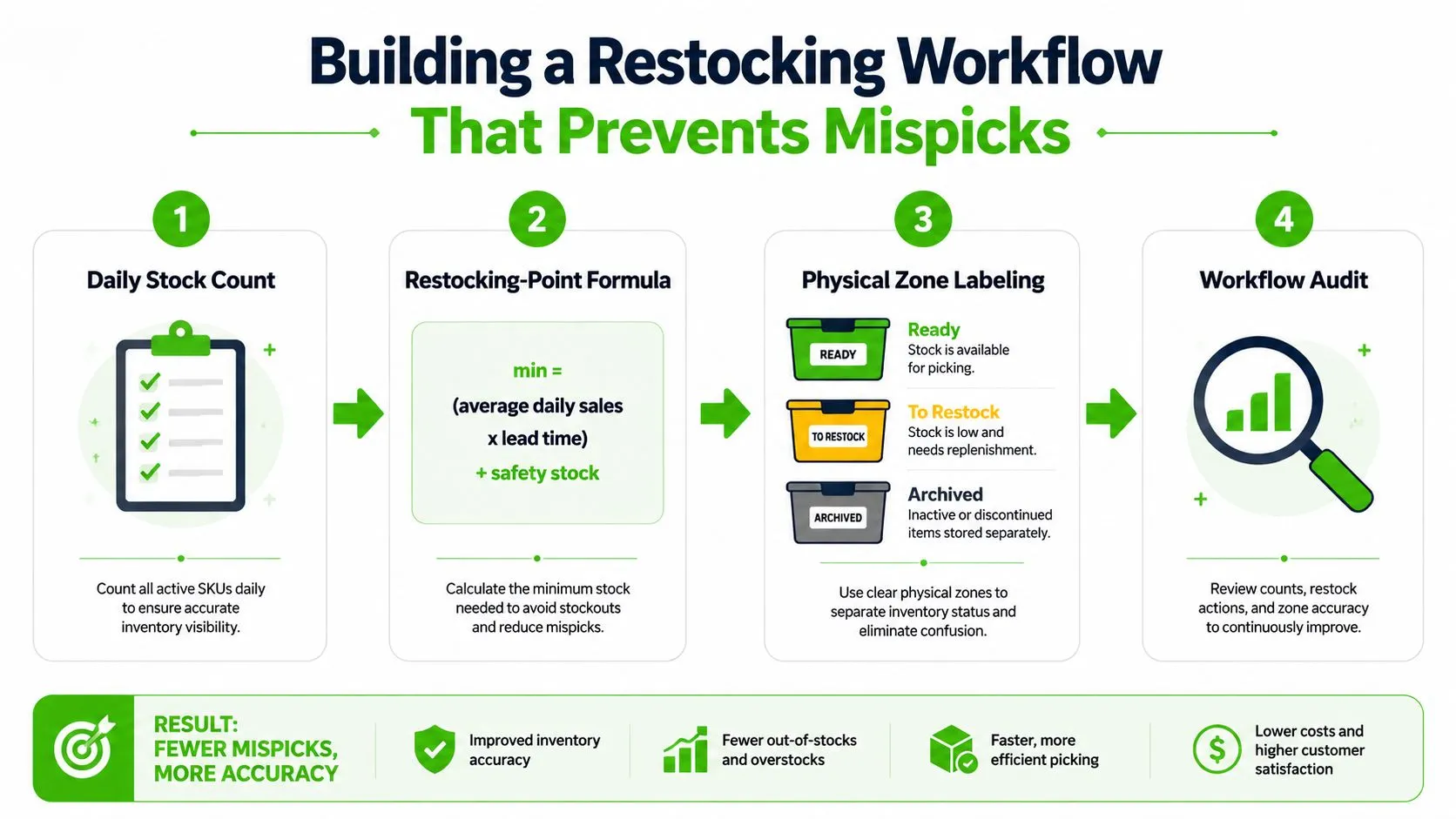
Never mix newly sourced stock with active inventory. A recently purchased item may have a different condition, missing accessories, or an unverified cost. Mixing it into a live bin makes it easy to photograph the wrong unit, ship an untested item, or assume that stock is ready when it still needs work.
Reduce picking decisions
The best layout minimizes judgment at the moment of fulfillment. A picker should scan or read the SKU, go to one location, confirm the item, and place it in the dispatch area. They shouldn’t compare several unlabeled boxes or search through unsorted sourcing bags.
Barcode scanning can strengthen this process when the catalog becomes difficult to manage manually. A barcode scanning inventory workflow can connect the physical movement of an item with its digital record, helping sellers reduce location ambiguity and capture changes closer to the moment they happen.
Use the accompanying video as a practical visual reference for organizing the workflow:
Setting Up Real-Time Multi-Channel Synchronization
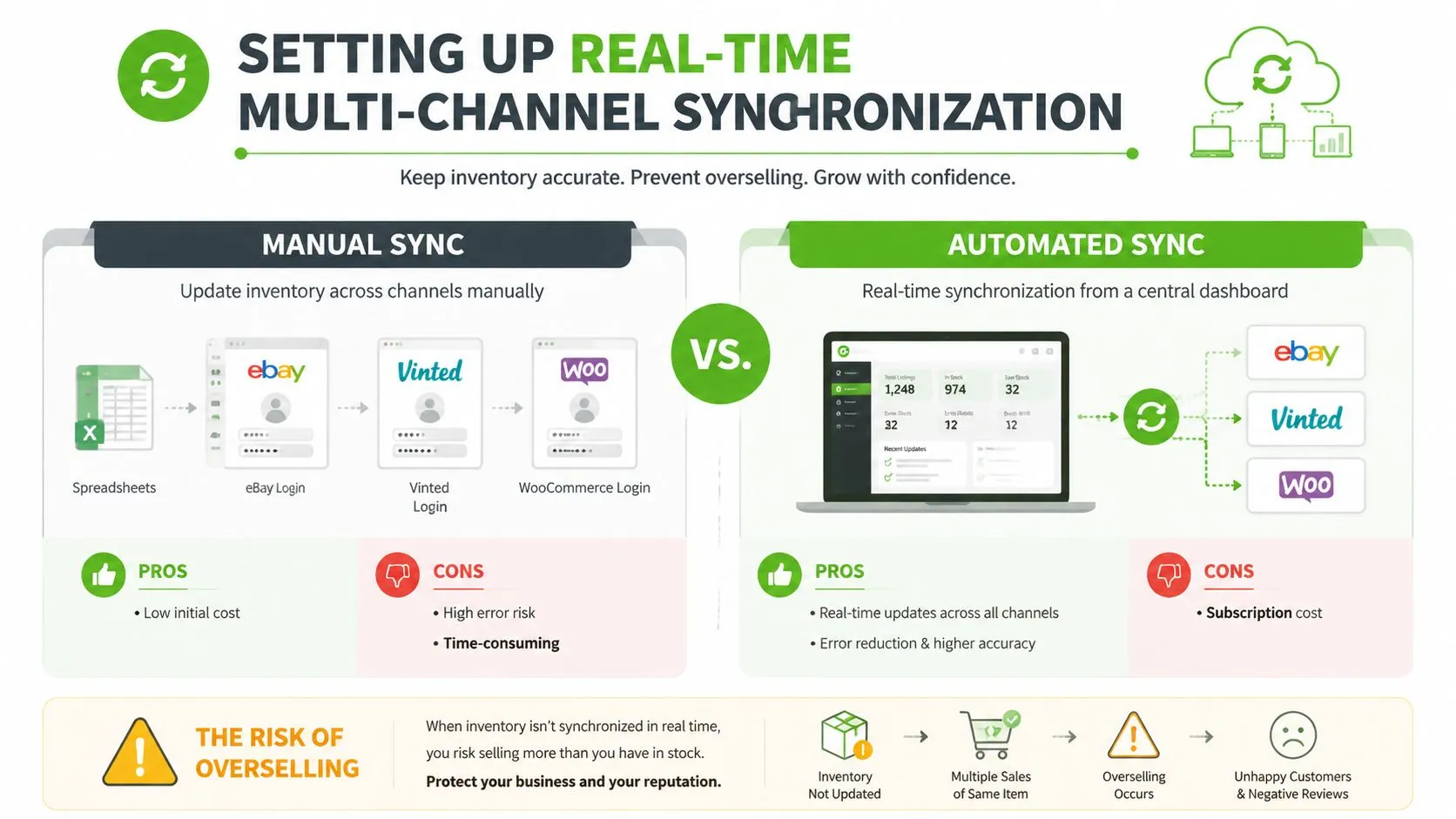
Selling the same inventory on eBay, Vinted, Wallapop, WooCommerce, or another storefront creates a shared-stock problem. A quantity change on one channel must reach the others before another buyer can purchase the same item. Periodic updates leave a window in which every channel displays an outdated reality.
Industry guidance reports that overselling can reach about 2% of total orders without strong synchronization. It also describes event-driven updates across channels in under 5 seconds, configurable eBay safety buffers of roughly 10%, and combined systems that reduce overselling to below 0.01% of total orders when they use real-time sync, buffers, and atomic inventory updates. These figures are documented in multi-channel eBay inventory synchronization guidance.
Configure the system around events
A professional setup should respond to events rather than wait for a scheduled batch:
- Sale event: Decrease the central available quantity immediately.
- Channel update: Push the new quantity to every connected marketplace.
- Reservation event: Temporarily reserve stock while an order is being confirmed or processed.
- Return event: Hold the returned item outside available stock until inspection.
- Damage event: Remove the unit from sale across all channels.
Atomic updates matter because two orders can arrive before separate systems finish writing their changes. The inventory service should treat the quantity adjustment as one transaction, preventing two channels from claiming the same final unit.
The central catalog also needs reliable product mapping. The eBay listing, marketplace listing, and physical item must share a consistent SKU or product identifier. Similar titles aren’t enough. A variation, color, size, condition, or bundle must map to the correct stock record.
Use buffers with judgment
A safety buffer protects against synchronization latency, damaged goods, counting errors, and simultaneous purchase attempts. The roughly 10% eBay buffer described in the industry guidance is a configuration reference, not a universal rule for every catalog. Applying the same buffer to every item can hide sellable stock, while applying no buffer to scarce shared inventory increases risk.
Use larger protection for:
- Single-quantity items: One mistake can create a cancellation.
- Shared listings: Several channels draw from the same physical unit.
- Fast-moving products: Demand can consume available stock before updates settle.
- Unstable stock: Items are frequently moved, inspected, or returned.
Monitor failed sync events, delayed updates, and manual overrides. A dashboard that shows only current quantities can conceal the process failures that created them. For broader order visibility, a cloud-based order management workflow can provide a central operating view instead of forcing staff to switch between channel logins.
The Hidden Cost of Abandoned Drafts and Stale Listings
Overselling gets attention because it produces an immediate customer complaint. Abandoned drafts and stale listings are quieter, but they can consume just as much operational capacity. A purchased item may sit unphotographed, a completed draft may never be published, or an old listing may remain active even though the item has moved, changed condition, or become difficult to locate.
Independent coverage of the source-to-list pipeline describes abandoned drafts and unphotographed inventory as capital trapped before it can generate revenue. The discussion of eBay inventory throughput and draft aging is useful because it shifts the question from “Is the item in stock?” to “How quickly does stock become sellable and then convert into cash?”
Track states, not just quantities
Create a pipeline with explicit transitions:
Purchased → received → inspected → photographed → draft → published → sold → picked → shipped → accounted for
Each state needs an owner and a next action. “Draft” should mean the content is nearly ready for publication, not that the item has disappeared into a folder. “Received” should trigger inspection and location assignment. “Sold” should trigger reservation and delisting on connected channels.
Set an aging review for each state. The review doesn’t need an arbitrary universal deadline. It needs a clear escalation rule. If a draft remains untouched through the next working cycle, assign it for completion. If an item remains unphotographed while newer stock is published, check whether its expected margin or condition makes the work worthwhile.
Throughput rule: Every item should either move to the next state, return to sourcing review, or be deliberately marked as paused.
Measure labor at the bottleneck
Time studies don’t need complex software. For a working week, record how long the team spends on:
- locating sold items;
- correcting quantity discrepancies;
- recreating or relisting ended listings;
- preparing and publishing drafts;
- checking whether stock is listed on every channel;
- reconciling orders with accounting records.
The purpose is not to create another report. It’s to find work that repeats because the system loses information. If staff repeatedly search for locations, improve bin records. If they repeatedly rebuild listings, preserve reusable catalog data. If they repeatedly check inactive drafts, add status-based queues and scheduled publishing.
Scheduled relisting can help maintain active visibility, but only when the item record remains accurate. Relisting a stale record with an outdated condition or missing accessory recreates the original problem. Review the physical item and its listing data together before automation republishes it.
Connecting Inventory to Sourcing and Analytics
Inventory decisions improve when purchasing, sales velocity, shipping costs, and working time share the same record. eBay Seller Hub’s Product Research gives sellers access to up to 3 years of sales data for millions of items. It includes sales trends, average sales price, sold price range, average shipping costs, total sellers, and sell-through rate for items sold within the last 90 days or less, as described in eBay’s Product Research documentation.
That information gives a seller more than a price suggestion. It provides a historical benchmark for deciding what to source, how quickly comparable items move, and when replenishment deserves attention. Compare active supply with sold demand, then connect the result to your own purchase cost, preparation time, storage burden, and expected selling price.
Build a complete item economics record
A useful inventory record should connect:
- Sourcing: Purchase cost, source, acquisition date, and condition.
- Preparation: Cleaning, repair, photography, packaging, and listing effort.
- Publication: Channels, SKU, listing status, price, and revision history.
- Sales: Sale channel, realized price, shipping cost, returns, and fulfillment time.
- Finance: Fees, accounting category, payout, and contribution margin.
This view reveals why an item appears profitable while consuming too much labor. It also shows which categories deserve more sourcing attention. A product with strong sell-through may still be unattractive if inspection and packing take too long. Another item may sell less frequently but require almost no preparation and produce a better return on working time.
eBay also identifies Sourcing Insights as available to Basic-or-above Store subscribers, showing how inventory research and purchasing decisions are increasingly connected to subscription tools within Seller Hub. Treat the feature as part of a broader process, not as a substitute for your own cost records.
Use analytics to change operations
Review the pipeline on a regular cadence. Look for listings that sell quickly, items that age in drafts, locations that create repeated mispicks, and channels that generate disproportionate customer-service work. Then make one operational change at a time, such as improving labels, changing the publish queue, adjusting a buffer, or stopping a sourcing category that ties up too much effort.
Ruit can serve as one option for sellers who want a unified workflow. It supports importing and merging inventory, publishing to eBay and other marketplaces, automatic stock and price synchronization, sold-status updates, scheduled relisting, unified messages, order management, accounting exports, and analytics from a central dashboard.
The core principle is simple: manage eBay inventory as the operating system for the resale business, not as a spreadsheet task attached to listing. When every item has a location, state, channel relationship, and financial record, you can see where stock moves smoothly and where labor leaks away.
Frequently Asked Questions
Why does eBay stock drift even when nothing was oversold?
Because drift rarely starts at the sale. It starts at the restock, the return that never went back on the shelf, or the draft that was never finished. By the time a listing shows the wrong number, the mistake is usually several steps upstream of eBay.
Does a stock error actually affect account health?
Yes, and that is the part sellers underestimate. A cancellation caused by missing stock is recorded against the seller, not against the mistake, so a coordination problem shows up as a performance problem.
How many channels can share one inventory before it breaks?
The count matters far less than the delay. Two channels with slow reconciliation break sooner than five with fast propagation, because what causes an oversale is the window between a sale and the withdrawal of its twin.
Are abandoned drafts and stale listings worth cleaning up?
They cost more than they look. An unphotographed draft holds a unit that the rest of the operation believes is available, so the catalogue reports stock the warehouse cannot ship.
If your eBay operation is losing time to manual relisting, scattered messages, stale drafts, or cross-channel stock corrections, visit Ruit to centralize inventory, publishing, orders, synchronization, and analytics in one workflow. Start by mapping your current source-to-sale process, then use Ruit to replace the most repetitive coordination work with a system built for professional resale.