Test 5-10 Listings Before Migrating Shopify to Vinted for Sellers


Table of Contents
- Connectors, CSV converters, or manual listing: which fits you?
- Setting up a reliable Shopify-to-Vinted sync, step by step
- Turning Shopify product data into Vinted-ready listings
- Why listings get hidden and how to keep shipments moving
- How Ruit handles the Shopify-to-Vinted workflow
- How long does a full migration actually take
- What migrating to Vinted actually costs
- Staying compliant once you’re selling on both platforms
- When automation earns its keep
- Try Ruit for your Shopify-to-Vinted workflow
- FAQ
- Recommended
Three practical paths exist for moving your Shopify catalog to Vinted: a dedicated connector app, a CSV export and converter, or manual listing. For most sellers with more than a handful of SKUs, a connector that preserves variant-level inventory and supports Vinted-specific mappings is the safer bet. Shipping mapping and Vinted’s catalogue rules cause most failed listings; so, treat those as requirements, not afterthoughts.
TL;DR:
- A marketplace connector is ideal for sellers with frequent inventory updates and multiple variants, providing real-time sync and avoiding overselling.
- CSV exports suit static catalogs or infrequent listings but require reformatting for each upload, while manual listing is only practical for very low volumes or high-value items.
- Connecting to Vinted involves careful mapping of categories, conditions, and shipping options, with testing recommended before full deployment to prevent hidden violations and canceled orders.
- Using a dedicated tool like Ruit automates inventory management and message consolidation across platforms, which benefits sellers managing larger, complex catalogs, especially with multiple locations.
- Expect setup and testing to take several days or weeks, and consider the ongoing costs of subscriptions versus manual methods, factoring in time spent fixing violations and re-mapping fields.
Connectors, CSV converters, or manual listing: which fits you?
The right method depends less on how many products you have and more on how often your inventory changes and how many variants each product carries.
A connector app links your Shopify store to Vinted through an ongoing sync. It handles near-real-time inventory updates, gives you a mapping interface for categories and conditions, and usually runs on a subscription. Most connector apps offer a trial or demo period before you commit, which matters because mapping accuracy varies by tool. This route suits professional resellers and multi-store merchants who add or update stock weekly.
A CSV export and converter is a one-time or occasional job: you pull a product export from Shopify, run it through a transformation template that reshapes fields into something Vinted-compatible, then upload. It costs less upfront but requires you to rebuild the transformation rules every time you export, and it does nothing for live inventory sync between the two platforms. This works for sellers migrating a static catalog once, or for small batches that do not change often.
Manual listing means typing each item into Vinted by hand, copying details from your Shopify admin. It is slow and prone to typos or missed fields, but it is free and gives you full control over each listing’s wording and photos. This only makes sense for very low-volume sellers or for one-off, high-value items where getting the description exactly right matters more than speed.
- Connector/app: best for ongoing sync, multiple variants, and sellers who list weekly or more.
- CSV converter: best for a single migration or infrequent small-batch uploads.
- Manual listing: best for a handful of unique items or testing the market before automating.
Part-time flippers with under 20 items a month often do fine with CSV or manual work. Once you are managing multiple locations, variants, or a catalog that changes daily, the ongoing cost of a connector pays for itself in avoided oversells and lost sales, especially when using tools like ReList for inventory synchronization.
Setting up a reliable Shopify-to-Vinted sync, step by step
Before touching any tool, confirm two things: your Vinted account type and whether Vinted Pro applies to you. Vinted Pro is available in several markets for professional sellers and comes with its own registration and catalogue terms that affect how you should structure an automated workflow. Gather your SKUs or barcodes ahead of time, and decide upfront which system, Shopify or the connector, will act as the single inventory authority.
- Confirm account eligibility. Check whether you qualify for Vinted Pro and register as a business seller if required, since Pro terms can change which fields and policies apply to your listings.
- Install and authorize the connector. Grant the Shopify API scopes it needs for product, variant, and inventory access, then link your Vinted account through the app’s authorization flow.
- Map your fields. Match Shopify’s title, brand, condition, size, photos, and shipping fields to Vinted’s equivalents, and set pricing rules and publication filters so only approved products go live.
- Set inventory rules. Use SKU or barcode as the mapping key, name a single location as the authority, and turn on oversell safeguards such as a reserve buffer during sync windows.
- Test with representative listings. Publish a small batch that reflects your real catalog, including at least one item with multiple variants, and run through the shipping and checkout flow end to end.
- Monitor and scale. Watch sync logs and your Vinted inbox for errors during the first batch, then expand the rollout in stages rather than pushing the full catalog at once.
Pro Tip: Run your first test batch with five to ten listings that cover your most common variant types, size, color, and condition, so you catch mapping errors before they multiply across hundreds of items.
Sellers with location-based inventory in Shopify often forget to specify which location feeds the Vinted sync, and stock quantities on the marketplace end up out of date within days. Locking in the authority location during preflight avoids that entirely.
Turning Shopify product data into Vinted-ready listings
Shopify’s Admin GraphQL API exposes the fields you need for a clean export: titles, descriptions, SKUs, variant options, prices, inventory quantities by location, media, metafields, and publication state. These are the building blocks of every listing you push to Vinted, so any connector or CSV template should be pulling from this same set.
Vinted, on the other hand, expects specific target fields filled in correctly: category, condition, brand, size, shipping options, and whether an item is part of a bundle. A mismatch between Shopify’s loose product structure and Vinted’s stricter category tree is where most listings break.
- Variant handling: decide early whether each Shopify variant becomes its own Vinted listing or whether similar variants get combined into one listing with size options, since Vinted’s model favors single-item listings more than Shopify’s variant grid.
- Stable mapping keys: use SKU or barcode, not product title, to link a Shopify item to its Vinted counterpart, since titles can change but a well-managed SKU should not.
- Metafields for Vinted-specific data: store condition notes, authenticity details, or brand verification info in Shopify metafields or tags so they survive the export instead of getting lost in translation.
- Price adjustments: build in Vinted’s buyer expectations and your shipping costs when setting prices, since a price copied straight from Shopify rarely accounts for marketplace fees or how buyers there expect items to be priced.
Getting this mapping right the first time saves you from re-editing dozens of listings after a batch upload flags category errors.
Why listings get hidden and how to keep shipments moving
Vinted’s catalogue rules are specific about what a valid listing looks like, and non-compliant listings get hidden or removed. Common triggers include picking the wrong category, missing required photos, absent authenticity proof for certain brands, prohibited items, and external links in the description.
Shipping causes a separate set of headaches. Vinted’s shipping guidance explains that once a buyer selects an integrated prepaid label, that choice cannot be changed after purchase, so sellers need to confirm their chosen carrier and package size actually work for the buyer’s location before publishing. Using the wrong label or ignoring package size limits is a common reason orders get canceled after the fact.
- Category mismatch: double check that your Shopify product type maps to a valid, specific Vinted category rather than a generic catch-all.
- Missing required details: photos, brand, condition, and size need to be present and accurate before publishing, not added after the fact.
- Shipping combos untested: confirm your integrated shipping options are available for the sizes and weights you actually sell.
- Inventory race conditions: without a single inventory authority and a reasonable sync frequency, two channels can sell the same item within minutes of each other.
A listing hidden for a catalogue violation must be edited and republished, and Vinted warns that repeated violations can lead to account suspension, according to Vinted’s own guidance on hidden or removed listings. Run a small test batch, simulate a checkout on each listing type, and verify that label generation actually completes before scaling to your full catalog.
How Ruit handles the Shopify-to-Vinted workflow
Ruit is a cross-listing tool built for second-hand sellers that publishes a single catalog across Vinted, Wallapop, and eBay from one upload. It uses AI to help generate and optimize listing content, syncs inventory across connected marketplaces, handles ad renewals automatically, and consolidates buyer messages into one inbox. These features map directly onto the pain points above: inventory authority, listing upkeep, and message tracking across platforms rather than one at a time.
If you trial a connector, whether Ruit or another tool, check three things: how accurately it maps your Shopify categories and conditions to Vinted’s, how it behaves when inventory changes on one channel, and how it handles shipping label selection. Ask about support response times before committing to a paid tier.
How long does a full migration actually take
For a catalog of moderate size, expect the work to break into distinct phases rather than a single upload event. Preflight, confirming your Vinted account type, gathering SKUs, and choosing your inventory authority, typically takes the longest for sellers who have never audited their Shopify data before, since messy or duplicate SKUs need cleanup first.
Connector setup and field mapping usually move faster once preflight is done, since most of the configuration is a one-time template you build and reuse. Testing is the phase sellers tend to rush, and it is the one worth protecting: running representative listings through actual checkout and shipping label generation catches errors that a dry mapping review misses.
Scaling the rollout in batches, rather than pushing the entire catalog at once, spreads risk across the first week or two of going live, giving you time to catch category rejections or oversells before they compound. A CSV migration for a small, static catalog can move faster overall since there is no ongoing sync to configure, but it trades that speed for having to repeat the transformation work on every future export.
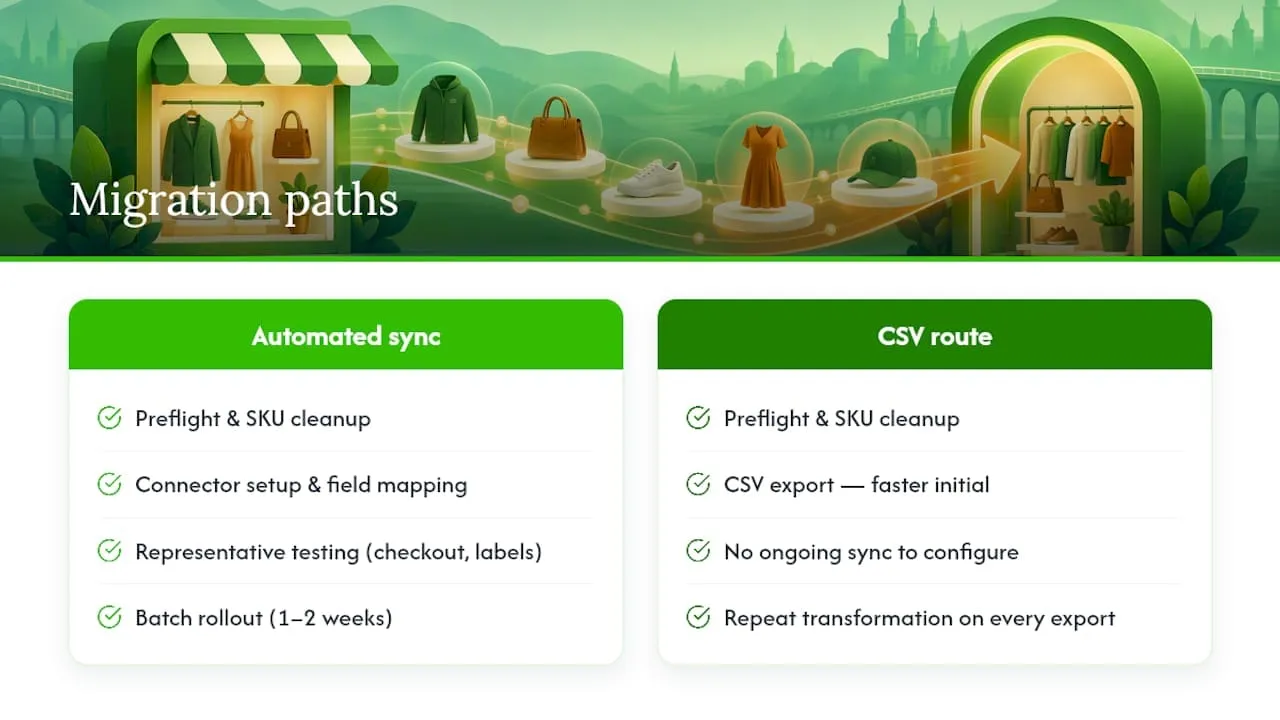
Sellers who skip testing and publish their full catalog on day one tend to spend more time afterward fixing hidden listings than they saved by moving fast.
What migrating to Vinted actually costs
The sticker price of a connector subscription is only part of the bill. Ruit’s paid plans run from Starter to Business, with a Plan Enterprise available at custom pricing for larger operations. Layer that against Shopify’s own subscription cost, since you are maintaining two systems rather than replacing one.
Vinted itself takes a share of each sale through its buyer protection fee structure, which varies by item price and is charged to the buyer rather than deducted from your payout in most cases, so check current terms for your market before pricing items. Shipping costs depend on which integrated label option a buyer selects, and mismatched package sizes can trigger extra charges or canceled orders.
Hidden costs tend to show up in time spent, not just money: re-editing listings hidden for catalogue violations, chasing down oversold items across two channels, and re-mapping fields when Shopify’s product structure changes. A connector with strong inventory authority and mapping accuracy reduces these indirect costs, even when its subscription fee looks higher than a one-time CSV tool.
Budgeting for a trial period before committing to an annual plan lets you measure actual time saved against the subscription cost for your specific catalog size.
Staying compliant once you’re selling on both platforms
Selling on Vinted after building your business on Shopify means operating under two different rule sets at once. Vinted Pro is available in several markets for sellers who meet its professional criteria, and registering as a Pro seller comes with additional terms and mandatory item information that a casual account does not require, according to Vinted’s Pro service page. Confirm whether your sales volume or business status requires Pro registration before you scale up listings.
Tax treatment for marketplace sales depends on your country and your status as a private seller versus a registered business, and the rules differ from what applies to your Shopify storefront. Rather than guessing, check the tax guidance Vinted publishes for your specific market and confirm your obligations with a local accountant or tax authority if your volume is meaningful.
Platform policy compliance matters just as much as tax compliance. Vinted’s catalogue rules govern what you can list and how, and violations can result in hidden listings or, for repeat offenses, account suspension. Running the same product through Shopify’s own policies and Vinted’s catalogue rules before publishing catches most conflicts early, particularly around prohibited items or required authenticity documentation for certain brands.
Keep records of what you list, when, and any listing removals, since that history matters if you need to appeal a decision or prove compliance during a Pro registration review.
When automation earns its keep
If you are listing more than 20 items a month, or your variants and inventory locations are genuinely complex, a connector pays for itself quickly. Below that, CSV exports or manual listing remain reasonable. Start by testing five representative listings, validating your shipping options, and locking in SKU authority before comparing a connector trial. Whatever you choose, pilot it and watch closely for the first 30 days.
, Luis
Try Ruit for your Shopify-to-Vinted workflow
If the mapping and inventory steps above sound like more manual work than you want to take on every week, that is exactly what a connector is meant to remove. Ruit lets you publish your catalog to Vinted, Wallapop, and eBay from a single upload, with inventory sync and message handling built in rather than managed by hand across three tabs.
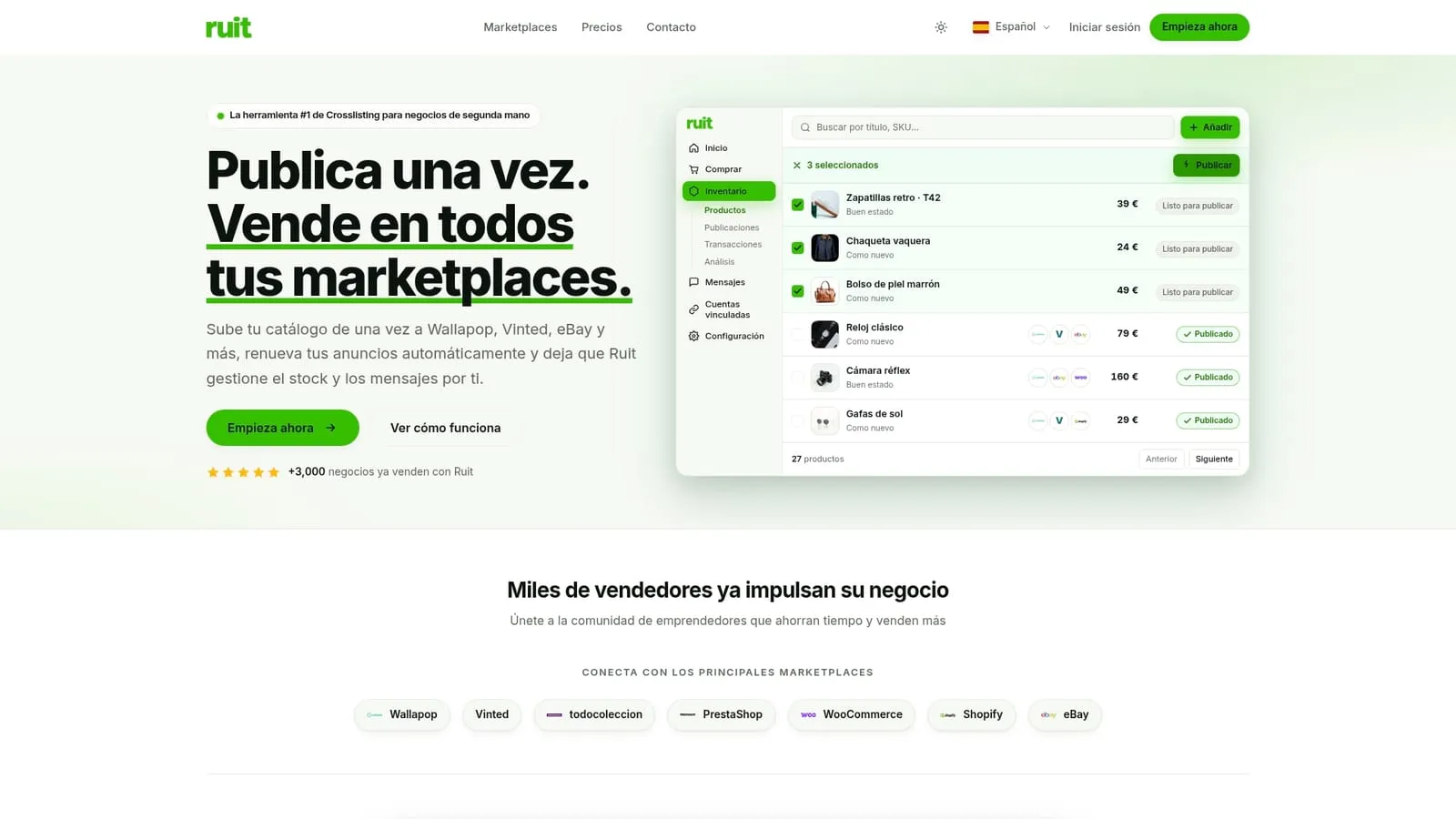
CSV converters and manual listing still have their place for small or one-off catalogs, and nothing here changes that. What Ruit adds is the ongoing sync and auto-renewal layer that a static export cannot offer, so your stock counts stay accurate across platforms without a second manual pass.
- The Starter plan is an entry-level option for sellers starting to cross-list.
- The Plus, Pro and Business plans offer additional features suited for higher volume sellers.
- Plan Enterprise pricing is available on request for larger catalogs.
During a trial, check mapping accuracy against your actual Vinted categories, watch how inventory updates propagate, and confirm shipping label handling works for your typical package sizes. Visit Ruit’s pricing page to compare tiers or start a trial today.
FAQ
How do I connect my Shopify store to Vinted?
You connect the two through a connector app that links via Shopify’s API and your Vinted account login, mapping product fields between the platforms. Tools like Ruit handle this connection along with inventory sync, or you can export a CSV and reformat it manually for smaller catalogs.
How much does Shopify take from a $20 sale?
Shopify’s own transaction fees depend on your specific plan and payment processor, and vary by country and card type, so there is no single flat figure that applies to every seller. Check your Shopify billing settings for the exact rate tied to your plan.
What is better, Vinted or Shopify?
They serve different purposes rather than competing directly: Shopify is a storefront you fully control, while Vinted is a marketplace with its own audience, catalogue rules, and fee structure. Many sellers use both, treating Vinted as an additional sales channel synced from their existing Shopify catalog rather than a replacement for it.
Is Shopify still worth it in 2026?
Shopify remains a common choice for sellers who want a fully branded storefront they control, separate from marketplace rules and audiences. Whether it is worth it depends on whether you need that independent storefront alongside marketplace channels like Vinted, or whether marketplace-only selling fits your business better.