6 Steps to Marketplace Automation for Second‑Hand Sellers


Table of Contents
- What automation actually does for your listings and operations
- Benefits and expected ROI for second-hand sellers
- How to evaluate and choose the right automation tool
- Implementation checklist: 6 practical steps to start automating marketplaces
- Handling payments and transaction processing automation
- Automated pricing strategies and dynamic repricing techniques
- Managing returns and refunds through automation
- Scalability and customization options of automation tools
- Compliance and security considerations in marketplace automation
- What we have learned building for second-hand sellers
- Ruit: a practical option worth trying
- FAQ
- Recommended
Marketplace automation replaces the manual grind of cross-listing, restocking and buyer replies with software that publishes once and syncs everywhere, cutting the hours sellers spend on repetitive tasks and the stock errors that come with juggling multiple apps. Tools like Ruit already handle this for resellers working across Wallapop, Vinted and eBay. If you list on more than one platform, the fastest next step is a small pilot with 10 to 20 items before committing to a full catalog migration.
TL;DR:
- Automating cross-listing and inventory sync reduces manual work and stock errors, enabling more efficient management across marketplaces like Wallapop, Vinted, and eBay.
- Real-time inventory synchronization prevents overselling and stock discrepancies, ensuring buyer trust and smoother operations during high-volume sales periods.
- Testing a small pilot batch of 10 to 50 items helps verify sync accuracy, messaging automation, and workflow stability before full catalog migration.
- Connecting to marketplaces via direct API improves reliability, and a secure automation tool should allow data export and clear support options, avoiding vague answers.
- Price suggestions and dynamic repricing help optimize listings based on current market trends, while automated returns and refunds streamline post-sale operations.
What automation actually does for your listings and operations
Automation software takes the parts of selling that eat your evening, republishing, replying, restocking, and runs them on a schedule instead of your memory. Once you understand the moving parts, it is easier to judge whether a tool fits your catalog size and the marketplaces you already use.
The core functions worth expecting from any serious tool:
- Cross-listing and bulk upload: publish one catalog to Wallapop, Vinted, eBay and other channels from a single upload instead of retyping each listing.
- Inventory sync: two-way stock updates that pull an item off every other marketplace the moment it sells, preventing the oversell that damages buyer trust.
- Auto-renewals and scheduled posting: listings that refresh on a timer so older items do not sink to the bottom of search results, plus price suggestions based on how similar items are selling.
- Unified messaging: a single inbox for buyer questions across platforms, with templates and auto-replies for the questions you get every day (still available, exact size, will you ship).
- AI listing generation and analytics: draft titles and descriptions from a photo, then track which listings actually convert so you know what to relist and what to drop.
A tool like Ruit bundles most of these into one dashboard, which matters more as your catalog grows past what you can track in a spreadsheet.
Benefits and expected ROI for second-hand sellers
The time savings are the easiest benefit to see. A seller manually cross-listing an item to three marketplaces, then answering the same buyer question three separate times, is doing work that automation collapses into a single action. Multiply that by a weekly restock and the hours add up fast.
According to OfferUp’s 2025 Recommerce Report, most Americans bought a secondhand item in the prior year, and a significant portion also sold one. That level of demand means the sellers who list fastest across the most channels are the ones capturing the sale before a buyer moves on.
Beyond speed, the practical gains are:
- Wider exposure: listing on multiple marketplaces simultaneously puts an item in front of more buyers in the first hours it is live, when interest is highest.
- Fewer stock discrepancies: real-time sync means you are not apologizing to a buyer because an item sold on a different app an hour earlier.
- Less buyer friction: centralized messaging means faster replies, and faster replies close more sales.
How to evaluate and choose the right automation tool
Not every tool covers the same ground, so it helps to walk into a demo with a specific list of questions rather than judging on price alone.
- Check marketplace coverage first: confirm the tool connects to the exact platforms you sell on, and ask whether that connection is a direct API or a CSV workaround, since API connections tend to sync faster and more reliably.
- Test the inventory sync behavior: ask if sync is real-time or on a delay, and whether the tool includes reconciliation tools for catching mismatches before they become customer complaints.
- Review messaging automation: look for templated replies, auto-responses for common questions, and a single inbox rather than five separate apps.
- Understand the pricing model: check listing limits, marketplace limits, and whether upgrading unlocks integrations with your existing shop platform or ERP.
- Ask about data ownership and exports: you should be able to export your catalog and messaging history if you ever switch tools.
- Ask about support and service levels: a tool with a support delay of days is a problem the moment your sync breaks during a busy week.
Watch for red flags: vague answers about sync frequency, no clear export option, or a sales team that will not let you run a small trial before signing an annual contract.
Pro Tip: Run any shortlisted tool through a 2-week pilot with a fixed, small batch of listings before migrating your full catalog, so a sync error costs you an afternoon instead of your whole inventory.
Implementation checklist: 6 practical steps to start automating marketplaces
Rolling out automation works best as a staged process rather than an overnight switch.
- Prepare your catalog: clean up SKUs, photos, categories and pricing so the data you feed the tool is consistent from day one.
- Choose your integration route: decide between a CSV-based pilot, which is slower but requires no setup, or a direct connector or API, which takes more configuration but syncs faster.
- Test two-way inventory sync: confirm that a sale on one marketplace actually removes the item everywhere else before you trust the system with your full stock.
- Set up messaging templates: build automated replies for your five most common buyer questions so the unified inbox starts saving time immediately.
- Run a small pilot: push 10 to 50 SKUs live, watch how renewals, sync and messaging behave for a week, and reconcile the results against your manual records.
- Scale and turn on analytics: once the pilot checks out, expand to your full catalog and enable price suggestions and performance tracking to guide what you relist.
Guidance on managing eBay inventory across channels is a useful reference for the reconciliation step, since eBay’s own stock rules are stricter than most casual marketplaces.
Handling payments and transaction processing automation
Payment handling is one part of the workflow that automation tools generally do not take over directly, since each marketplace, Wallapop, Vinted, eBay, processes its own payments and holds its own buyer protection rules. What automation software does is remove the manual tracking around it: matching a sale notification to the right listing, updating stock the instant a payment clears, and logging the transaction so you are not cross-referencing three separate apps at tax time.
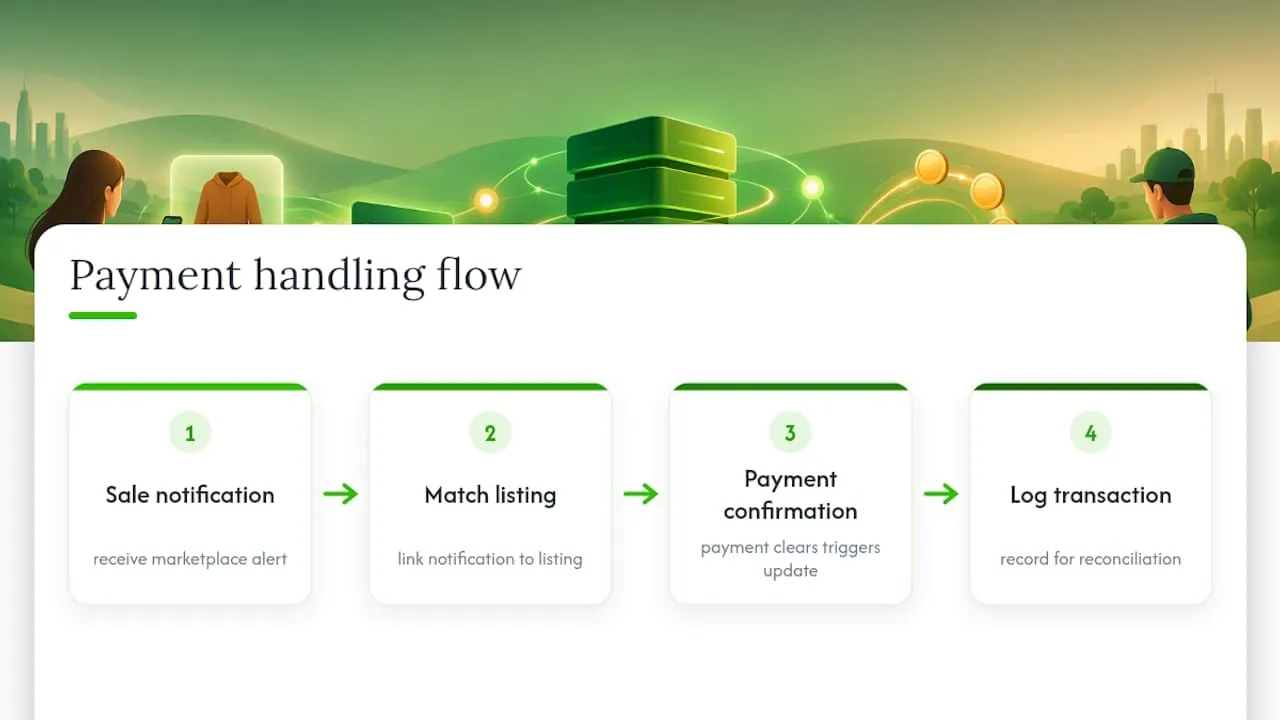
For sellers running higher volume, this matters more than it first appears. A missed sync between a paid order and your stock count is how double sales happen, and double sales are the fastest way to damage a buyer relationship. The practical takeaway: pick a tool that treats payment confirmation as the trigger for inventory updates, not a separate step you have to check manually. Fees, payout timing and buyer protection remain governed by each marketplace directly, so those terms are worth confirming on the platform itself rather than assuming your automation tool changes them.
Automated pricing strategies and dynamic repricing techniques
Price suggestions are one of the more visible upgrades automation brings to second-hand selling. Instead of guessing what a used item is worth, tools that include this feature compare your listing against similar items currently selling across connected marketplaces and suggest a starting price or a markdown schedule.
The practical use case is straightforward: an item that has sat unsold for a couple of weeks is a signal, and automated repricing can nudge the price down on a schedule instead of you remembering to check it manually every few days. Some sellers use this aggressively, dropping price on a fixed cadence until an item moves. Others use it only as a reference point, adjusting manually but with better data than a single marketplace search would give them. Either way, the value is in removing the guesswork, not in fully outsourcing pricing decisions, since condition, brand and seasonal demand still require a human judgment call that software does not fully replace.
Managing returns and refunds through automation
Returns on second-hand marketplaces work differently than new retail, since most consumer marketplaces put the return policy and buyer protection process in the platform’s own hands rather than the seller’s. What automation can reasonably help with is the operational side: flagging a return request the moment it comes in through the unified messaging inbox, updating stock status if an item comes back into your possession, and keeping a record of the exchange alongside the original sale.
For sellers who also run their own shop, on Shopify or WooCommerce for instance, the return workflow matters more directly, since you are the one processing the refund and restocking the item. In that case, a tool that syncs stock back into inventory automatically once a return is logged saves a step that is otherwise easy to forget, and forgetting it is how an item that is actually back in stock never gets relisted.
Scalability and customization options of automation tools
A tool that works for 20 listings a week does not automatically work for 200. Scalability shows up in a few concrete places: how many marketplaces you can connect at once, whether listing limits scale with your plan, and whether the messaging inbox stays usable once buyer volume triples.
Customization matters just as much for sellers with a specific catalog shape. A reseller focused on clothing needs different fields (size, condition, brand) than someone selling electronics or furniture, and a tool that lets you customize listing templates by category saves time compared to one with a single rigid format. Integration options also widen as you grow: sellers who start on marketplaces alone often add a Shopify, WooCommerce or PrestaShop storefront later, and a tool built to connect to those platforms from the start avoids a second migration down the line. When you are evaluating options, ask specifically how the tool’s plans scale in listing volume and marketplace count, since these are usually where the real cost differences between tiers show up.
Compliance and security considerations in marketplace automation
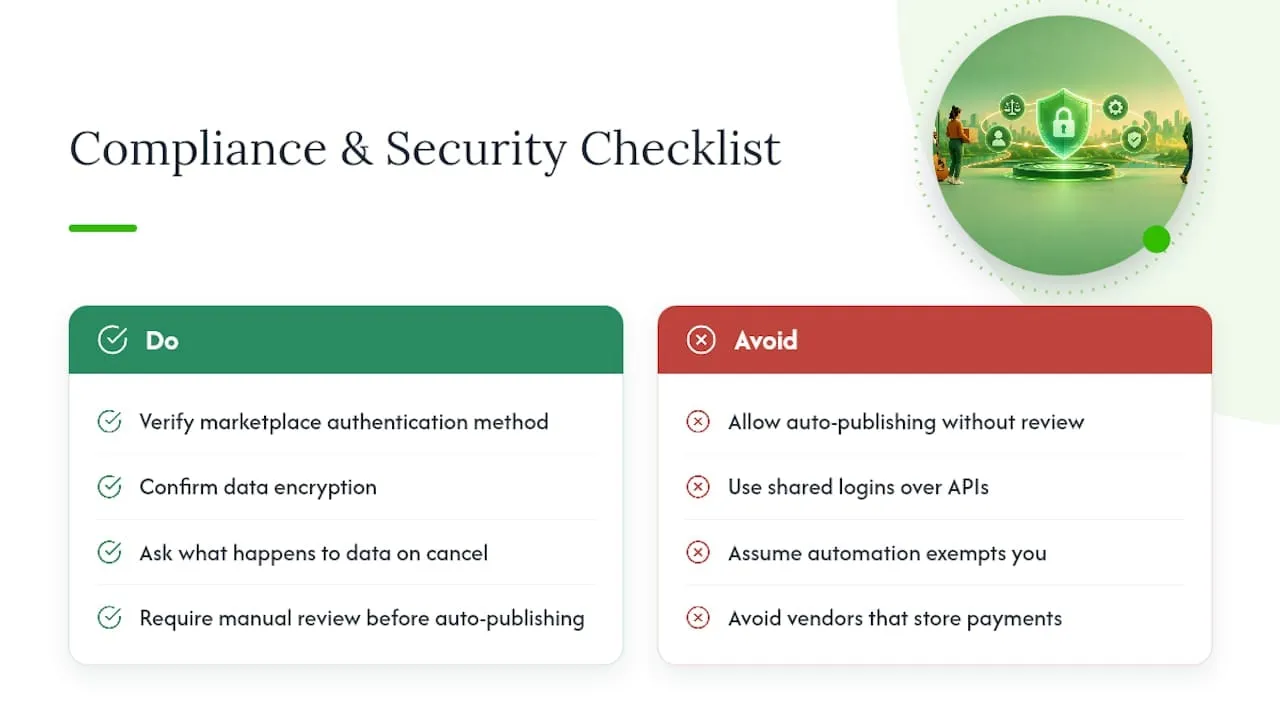
Handing a third-party tool access to your marketplace accounts means trusting it with your listings, your messages and often your payment notifications, so security practices are worth checking before you connect anything. At minimum, confirm how the tool authenticates with each marketplace (direct API connections are generally more secure than shared logins), whether your data is encrypted, and what happens to your catalog and message history if you cancel.
Compliance is largely marketplace-specific rather than automation-specific. Each platform, Wallapop, Vinted, eBay, has its own rules about listing content, prohibited items and seller conduct, and automation does not exempt you from any of them. A tool that auto-generates listing descriptions or auto-renews posts should still leave you able to review content before it goes live, since a mislabeled or non-compliant listing published automatically is still your account that gets flagged. Ask any vendor directly how they handle account credentials and whether they store payment information at all, since the honest answer for most cross-listing tools should be that they do not.
What we have learned building for second-hand sellers
Most sellers assume the biggest time cost is writing listings, and it is not. The bigger cost is the constant low-grade attention of checking whether something sold somewhere else before you answer a buyer question or ship the wrong item. Automation’s real value is not the hours it saves on data entry, it is the mental load it removes from tracking five apps at once.
Ruit has grown past 3,000 businesses using its cross-listing and inventory tools, built specifically for the second-hand seller workflow rather than adapted from general e-commerce software. Sellers researching implementation details can find practical background in posts like OMS Software for Resellers: Sync Stock and Orders and Cloud Based Order Management: Streamline Multichannel Sales, both written from direct experience with the order management side of reselling.
- Luis
Ruit: a practical option worth trying
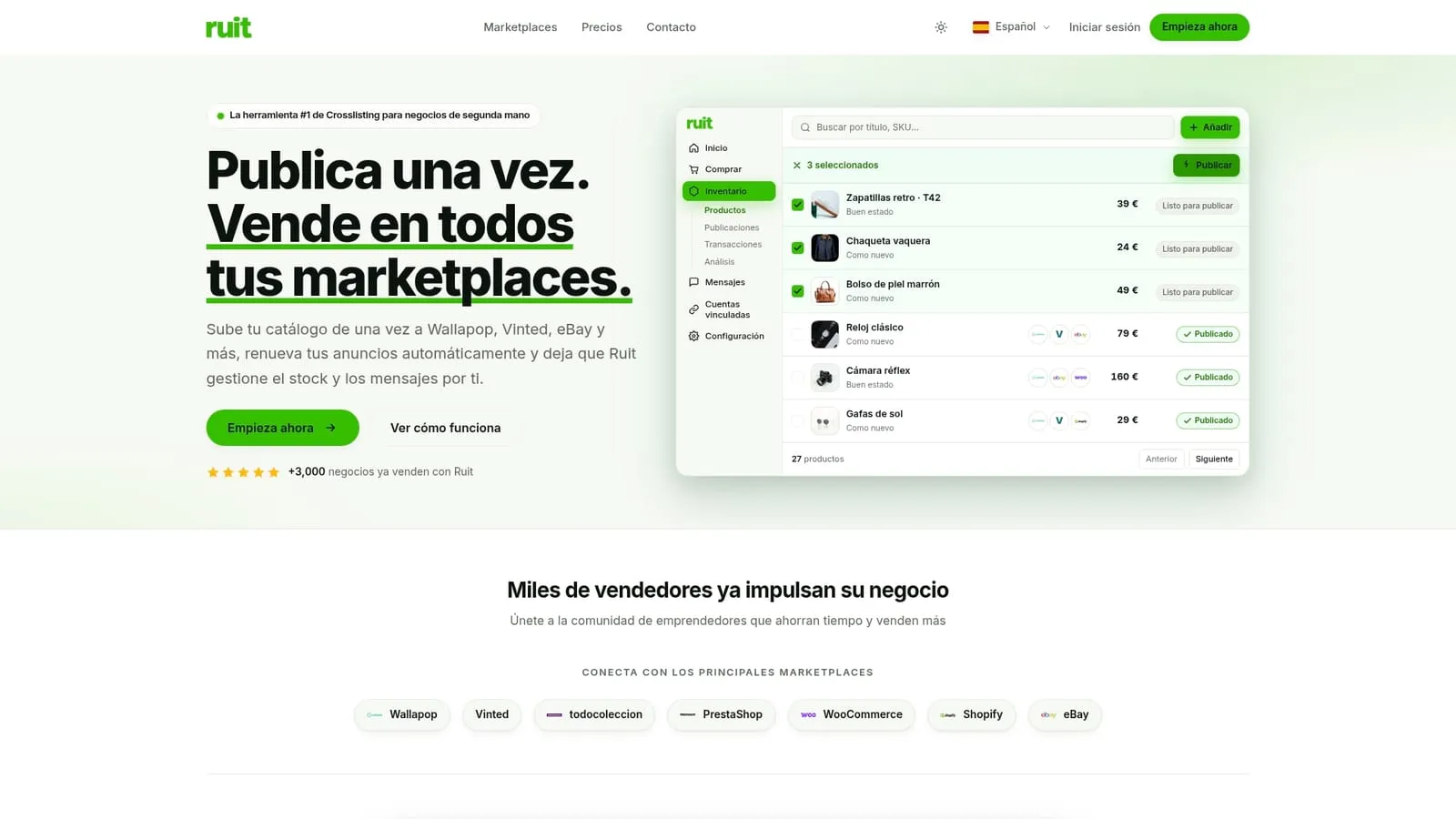
If the checklist above sounds like more coordination than you want to manage by hand, Ruit was built around exactly this workflow: one upload publishes your catalog to Wallapop, Vinted and eBay, stock stays synced across all of them, listings renew on schedule, and buyer messages land in a single inbox instead of three apps.
For sellers deciding where to start:
- An enterprise-level plan is available for larger operations, with pricing details provided upon inquiry.
FAQ
What is marketplace automation for second-hand sellers?
Marketplace automation is software that publishes your listings across multiple platforms at once, keeps stock synced so items do not oversell, and centralizes buyer messages into a single inbox. It replaces the manual work of managing each marketplace separately.
Does automating my listings actually save time?
Yes, since a single upload replaces retyping the same listing on each marketplace, and centralized messaging cuts down on answering the same buyer question multiple times. The exact time saved depends on how many marketplaces and listings you manage, but the effect compounds as your catalog grows.
Which marketplaces can I connect with a cross-listing tool?
Most cross-listing tools, including Ruit, connect to marketplaces like Wallapop, Vinted and eBay, with some also supporting storefronts like Shopify, WooCommerce and PrestaShop. Coverage varies by tool, so confirm your specific platforms are supported before signing up.
Is it safe to connect my marketplace accounts to an automation tool?
Reputable tools use direct API connections rather than shared logins and should let you review AI-generated content before it publishes. Ask any vendor how they handle your credentials and whether they store payment information, since a trustworthy tool generally will not.
How much does marketplace automation software cost?
Pricing varies by provider and plan. Ruit, for example, offers Starter, Plus, Pro and Business plans, with an Enterprise plan available on request for larger operations.