Category Mapping Between Vinted and eBay: UK Seller Guide


Table of Contents
- TL;DR
- What category mapping between Vinted and eBay actually means
- Why the wrong category costs you sales
- How Vinted’s categories line up with eBay UK
- Condition: translate it, do not copy it
- Item specifics: the part Vinted never asked for
- Sizes and colours: where UK sellers get caught
- Items that fit more than one category
- Build your mapping sheet in four steps
- Fees and listing limits that shape which items go where
- Avoiding the double sale
- Our point of view
- Listing once, selling on both
- Common category mistakes to avoid
- Frequently Asked Questions
- Sources
- Recommended
Category mapping between Vinted and eBay means matching each Vinted category, condition and size to the closest eBay category and item specifics, because the two platforms do not share a taxonomy and a category cannot simply be copied across. Do it once per product type, keep a small mapping sheet, and you can list the same item on both sites without wrong-category listings, mismatched sizes or double sales.
This guide is for UK sellers who list on Vinted and eBay at the same time: private sellers clearing wardrobes, Vinted Pro sellers and small resale businesses, and vintage or second-hand clothing resellers.
TL;DR
- Vinted uses a simple catalogue with one category per item. eBay uses a deep hierarchy where every category has its own required and optional item specifics.
- Map by product type, not by item: build one table (Vinted category, eBay category, condition, size, specifics) and reuse it.
- Condition wording differs. eBay UK has dedicated pre-loved clothing conditions, so translate Vinted’s condition rather than copy it.
- Fill eBay item specifics fully. Buyers filter by them and an item without the matching specifics can be missed.
- Mapping is only half the job. Stock also has to stay in sync so one garment is never sold twice.
What category mapping between Vinted and eBay actually means
When you list a jumper on Vinted, you choose from a short path of categories, a brand, a size, a condition and a price. When you list the same jumper on eBay, you are placing it in a much larger tree and answering a different set of questions.
eBay organises categories hierarchically, from top-level groupings such as Fashion and Electronics down to leaf categories. Each category has a unique ID, and every item must be listed in a primary category. Vinted, by contrast, asks for one listing per item under its corresponding category, with bundles as the exception.
So “mapping” is the decision you make once: which eBay leaf category is the equivalent of this Vinted category, and which extra details does eBay want that Vinted never asked for. That is why a straight copy and paste so often goes wrong.
Why the wrong category costs you sales
eBay’s developer documentation warns that choosing the wrong category can severely restrict your ability to sell. The same page describes a Taxonomy API for finding the right category and its required and optional descriptive aspects before you list. The point for a seller is simple: category decides which filters, which item specifics and which buyers your listing meets.
On Vinted the stakes are a little different. Buyers browse the catalogue and search by listing text, so a wrong category makes your item harder to find in the right browse path, and Vinted’s rules expect an item to sit under its corresponding category. In both cases the fix is the same: pick the closest honest match, every time.
How Vinted’s categories line up with eBay UK
Vinted’s catalogue rules allow women’s, men’s and children’s clothing, footwear and accessories, plus toys, furniture, home and kitchenware, electronics, entertainment, hobbies and collectables, sports equipment and new cosmetics. Vinted is best known for clothing, but the catalogue is wider than that. For a look at the retail product categories accepted beyond clothing, see these categories Vinted accepts beyond clothing.
The table below is a starting point for your own mapping sheet. The eBay column names the closest area to search in, not an exact leaf category: always confirm the leaf in eBay’s category suggestion when you create the listing, because eBay’s tree is large and changes.
| Vinted category | Closest eBay UK area | What to add on eBay |
|---|---|---|
| Women’s clothing | Women’s Clothing, then dresses, tops, coats and so on | Size type, colour, style, brand, dress length |
| Men’s clothing | Men’s Clothing, then the garment type | Size, colour, brand, inseam for trousers |
| Women’s shoes and boots | Women’s Shoes, then boots, trainers and so on | UK size, heel height, upper material |
| Children’s clothing | Kids’ Clothing, then age or size band | Age or size range, gender, brand |
| Vintage and retro pieces | Vintage Clothing (where the item suits it) | Era or decade, material, true condition |
| Home and kitchenware | Home, Furniture and DIY areas | Material, dimensions, type |
| Electronics | Electronics areas by device type | Model, storage, working condition |
| Hobbies and collectables | Collectables areas by subject | Era, maker, edition, rarity |
Do not treat a row as final. If an item could sit in two eBay categories, choose the one where a buyer would look first, and let the item specifics carry the rest of the detail.
Condition: translate it, do not copy it
Vinted asks you to select the true condition, and its help page tells sellers to choose a suitable category, the brand (or No brand) and the real condition. eBay’s wording is not identical.
In January 2025 the eBay UK Seller Centre announced new pre-loved clothing conditions: Pre-owned Excellent, Pre-owned Good and Pre-owned Fair, with “New with imperfections” replacing “New with defects”. They were set to apply across categories including Women’s, Men’s and Kids’ Clothing, Vintage Clothing, Fancy Dress and Period Costume, Wedding and Formal Occasion, and World and Traditional Clothing.
A practical way to map them is to build a condition column in your sheet and decide your own rule once. For example, an item you would have called “very good” on Vinted becomes one fixed eBay condition every time. Consistency matters more than the exact choice, because it keeps your descriptions honest and your returns low. Whatever you pick, describe flaws in the text and show them in the photos.
Item specifics: the part Vinted never asked for
This is where most mismatched listings come from. eBay’s Seller Centre explains that item specifics such as brand, size, length, type, colour and style help buyers find items. Buyers filter searches by them, and an item appears only if the matching specifics are added.
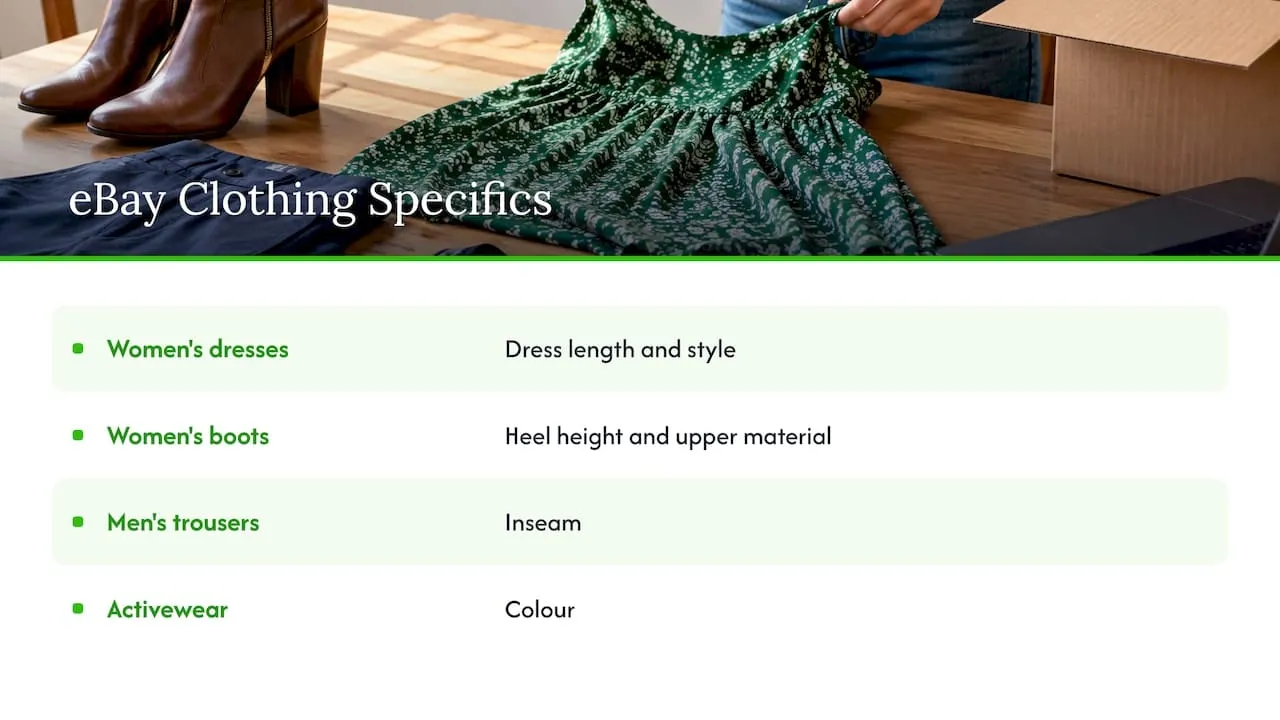
eBay’s own fashion item-specifics reference shows how they change by category. Women’s dresses ask for dress length and style, women’s boots for heel height and upper material, men’s trousers for inseam, and activewear for colour. So the same “black, size 12” you typed on Vinted turns into several separate fields on eBay.
If you want a deeper walk through this, our guide to eBay item specifics for resellers goes field by field.
A worked example: a vintage wool coat
Say you have a 1980s camel wool coat, label size 14, small mark on one cuff.
| Field | On Vinted | On eBay UK |
|---|---|---|
| Category | Women’s clothing, then coats | Women’s Clothing, then coats and jackets, or Vintage Clothing if it fits |
| Size | 14 (stated label size) | Size type regular, UK size 14 |
| Brand | Brand name, or No brand | Brand item specific, or Unbranded |
| Condition | Good | One fixed pre-owned option from your sheet |
| Colour | Camel or beige, closest match | Colour item specific, plus style and material |
| Flaws | In the description | In the description and a close-up photo |
The information is the same. The structure is different, and that is exactly what a mapping sheet captures.
Sizes and colours: where UK sellers get caught
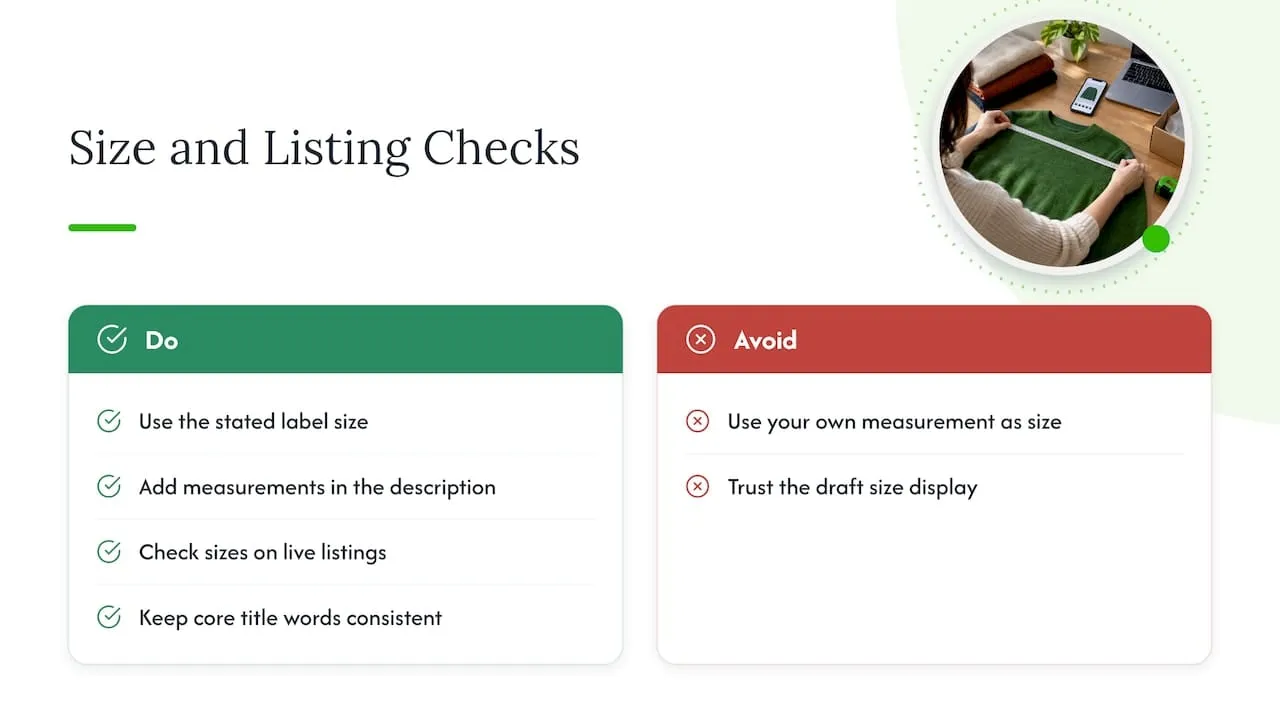
Sizing deserves its own line in your mapping sheet. Always use the stated label size, not your own measurement, and add measurements in the description for buyers who want them. Seller Profit’s UK guide recommends precise subcategories, the label size and the closest colour match, since buyers on Vinted filter by size and colour and search uses the listing text.
One trap is that platform changes can alter how sizes display. Sellers in a Vinted UK community thread described a sizing update that changed how some of their plus-size items appeared. If you list on both sites, check how each size shows on the live listing, not only in your draft.
For the title, keep the same core words on both sites: brand, item type, colour and a key detail. Our Vinted title optimisation guide covers how to word it for Vinted search, and you can reuse the same structure on eBay.
Items that fit more than one category
Some items genuinely sit between categories: a vintage band T-shirt, a retro sports jacket, a collectable children’s toy, a piece of workwear used as streetwear. Use this order of checks:
- Ask where a buyer would look first. Choose that category as the primary one.
- Check the item specifics offered. The category whose fields describe your item best is usually the better home.
- Check the condition options. If eBay offers a specific condition scale in one category and not the other, that can settle it.
- Record the decision. Add the item type to your mapping sheet so you never decide twice.
On Vinted, remember the rule of one item per listing. Bundles are the exception, and bundle descriptions should state the total price and that items in a bundle cannot be listed separately. If you sell a bundle on Vinted and the pieces individually on eBay, you have created a stock problem, so decide the route per item up front.
Build your mapping sheet in four steps
You do not need software for the mapping itself. You need a repeatable routine.
- List your top product types. Most resellers sell eight to fifteen types of item regularly: dresses, jeans, trainers, coats, handbags, and so on.
- Find the eBay leaf category for each. Start a draft on eBay, use the category suggestion and note the full path.
- Record the required specifics. Write down which item specifics eBay asks for in that category and how they differ from Vinted’s fields.
- Add a condition and size rule. Decide how your Vinted condition maps to eBay’s, and how you will write size and colour.
Review the sheet when a platform announces a change, such as the condition update above. When you list in volume, our bulk upload guide for Vinted shows how to keep batches consistent.
Fees and listing limits that shape which items go where
Mapping tells you where an item belongs. Fees help you decide whether it belongs on both sites. Which? reported on 5 December 2025 that UK sellers pay no fee on Vinted, while buyers pay a Buyer Protection fee, and that eBay allows up to 300 free listings per month and then charges 35p per extra listing.
| Vinted UK | eBay UK | |
|---|---|---|
| Seller fee on listing | None, per Which? | Up to 300 free listings per month, then 35p each, per Which? |
| Buyer pays | Buyer Protection fee | Item price and postage |
| Category system | Simple catalogue, one category per item | Deep hierarchy with item specifics |
These terms can change, so check the platform’s own fees page before you plan. If you sell as a business, read our guide to eBay fees and the HMRC threshold, and our Vinted Pro guide if you use a Vinted Pro account.
Avoiding the double sale
Correct categories get the item found on both sites. That is also the moment the risk of a double sale begins: the same coat is now live in two places, and two buyers can pay within minutes of each other.
The fix is a single source of truth for stock. Each item needs one identifier that appears on both listings, so you can tell at a glance that a Vinted listing and an eBay listing are the same physical item. Our guide to SKU mapping across Vinted and eBay UK explains how to set that up. Then, when one listing sells, the other must come down straight away. Doing that by hand works for a few items and stops working once you list several a day.
Our point of view
Category mapping looks like a one-off chore, and it should be. The work is in deciding, once, that a Vinted women’s coat is an eBay women’s coat with a particular set of specifics, and then not thinking about it again.
The mistakes we see described by sellers are rarely about one big error. They are small mismatches repeated across hundreds of listings: a size written differently, a condition that means one thing on one site, a colour that is not the filter value. Those are the habits worth fixing first.
This is why we built Ruit around listing once. You write the item up one time, publish it on Vinted, eBay, Wallapop, todocoleccion, Shopify, WooCommerce and PrestaShop, and when it sells on one channel the stock updates and the listing is removed from the others, so you never sell the same item twice. AI can draft the title and description for you, which gives you a clean starting point to check against your mapping sheet.
Do the mapping once, keep the sheet, and let the repetitive part run in the background.
Luis
Listing once, selling on both
If you already sell on Vinted and eBay, Ruit lets you list an item once and publish it on both, plus Wallapop, todocoleccion, Shopify, WooCommerce and PrestaShop. Stock syncs, so a sold item is removed from the other channels. Ruit also relists automatically on Vinted and Wallapop, brings Vinted and Wallapop buyer messages into one inbox, and drafts listings with AI. You can read how multichannel inventory management works in one place, then check each draft against your mapping sheet before it goes live.
Common category mistakes to avoid
- Copying Vinted’s category name into eBay search and picking the first result. Check the full path and the item specifics instead.
- Leaving item specifics blank. On eBay, missing specifics mean your item can fall out of filtered searches.
- Using hashtags of unrelated brands in the description. Vinted’s help page warns against this, and it misleads buyers on any platform.
- Writing different sizes on each site. Use the label size on both.
- Mixing bundles and single items across platforms. Decide the route first, so stock stays clear.
Frequently Asked Questions
Can you list something on eBay and Vinted at the same time?
Yes. Nothing stops a UK seller from listing the same item on both sites. The risk is selling it twice, so use one identifier for the item and remove the other listing as soon as one sells.
What are the categories on Vinted?
Vinted’s catalogue rules cover women’s, men’s and children’s clothing, footwear and accessories, as well as toys, furniture, home and kitchenware, electronics, entertainment, hobbies and collectables, sports equipment and new cosmetics. Each item goes under its own corresponding category, except bundles.
Does eBay use the same categories as Vinted?
No. eBay uses a deeper hierarchy where every category has an ID and its own item specifics, and an item must sit in a primary category. That is why you map Vinted categories to the closest eBay category instead of copying them.
How do I choose the right eBay category for a Vinted item?
Start a draft on eBay, look at the suggested category path, and check which item specifics it asks for. Choose the category where a buyer would look first and where the specifics describe your item best, then save the choice in your mapping sheet.
What is the most profitable category on eBay?
There is no single answer that holds for every seller, because it depends on what you can source and at what cost. Track your own sales by product type and compare margins after fees, which is easier once your categories are mapped consistently.
Sources
- eBay categories, eBay Developers Program
- Finding categories for a listing, eBay Developers Program
- Catalogue Rules, Vinted UK
- Uploading step by step, Vinted help
- New conditions for Fashion, eBay UK Seller Centre, 2025
- Fashion item specifics, eBay
- Selling clothes, eBay Seller Center
- How to Sell on Vinted UK, Seller Profit
- 11 expert tips for buying and selling on Vinted, Which?, 5 December 2025
- Categories Vinted accepts beyond clothing
Ready to list once and sell on both? See how Ruit works.