Unified Inbox for Marketplaces: A UK Seller's Guide


Table of Contents
- TL;DR
- What a unified inbox means for Vinted and eBay sellers
- Why the built-in inboxes pile up
- What Ruit’s inbox covers
- Keeping eBay conversations under control
- What happens to threads and history
- Account types and rules to check first
- A checklist before you connect your messages
- A reply routine that fits a working day
- When a marketplace is not in your inbox
- Our perspective
- Try it on your own listings
- Frequently Asked Questions
- Sources
- Recommended
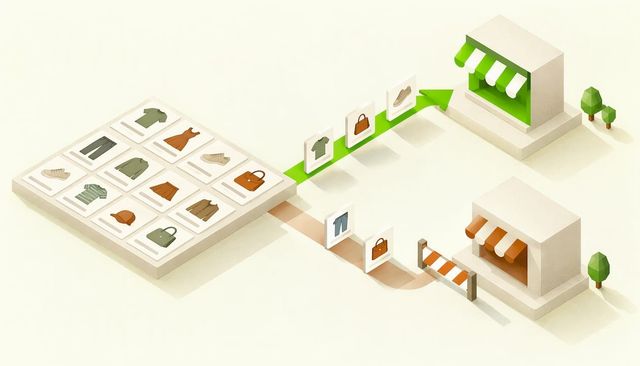
A unified inbox for marketplaces puts buyer messages from several selling sites into one place, so you reply in one screen instead of opening each app. For UK sellers on Vinted and eBay the picture is split: Ruit brings your Vinted and Wallapop messages into one inbox, while eBay messages stay in eBay Messages, where you handle them with eBay’s own tools.
That split matters, because the right routine depends on knowing exactly what is combined and what is not. This guide explains what a unified inbox means in practice, what happens to threads and history, which account rules apply to private and business sellers, and how to build a reply routine that works when one marketplace sits outside the inbox.
TL;DR
- A unified inbox collects buyer conversations from different marketplaces into one list, so nothing waits unanswered in an app you forgot to open.
- Ruit combines Vinted and Wallapop buyer messages in one inbox. eBay messages stay inside eBay Messages.
- Keep eBay conversations on eBay: its policy does not allow moving transaction-related communication outside the platform.
- Check your account type first. Vinted and eBay both expect sellers who resell bought items to use a business or Pro account.
- Pair the inbox with stock sync, so a sold item disappears from the other channels while you are still replying.
What a unified inbox means for Vinted and eBay sellers
In most software guides, a unified inbox merges email, chat widgets and social messages into one dashboard. Marketplace selling is narrower and more practical. Each marketplace has its own message system, and a buyer’s question about a jacket on Vinted never appears next to a question about a coat on eBay. A unified inbox for marketplaces is the layer that lists those conversations together.
For a reseller, three things make it worth having:
- Speed. Buyers often message several sellers at once. The first useful reply tends to win the sale.
- No lost chats. One list means fewer conversations hiding in a notification you swiped away.
- Fewer clashes. If you answer “yes, still available” on one site while the item has sold on another, you create a problem for yourself. A shared view of messages, combined with synced stock, reduces that risk.
If you want the wider ecommerce picture, we cover it in our guide to a unified inbox for ecommerce sellers.
Why the built-in inboxes pile up
Each platform designed its inbox for casual use first. That is fine with five listings and painful with five hundred.
Vinted
Vinted has no basket, so deals happen through conversation. UX writer Daria Po describes Vinted’s setup in a June 2025 article on Medium: the inbox is split into Messages and Notifications, and conversations sit in one linear list with no way to filter, sort, label or archive by deal status. That is one writer’s view, but it matches what busy sellers describe: an offer, a question about measurements and a postage query all look identical in the list.
eBay UK
eBay’s approach is more structured. Its new messaging experience, announced for UK sellers in 2022, groups messages by buyer or listing and shows both sides of a conversation in chronological order on one screen. Old messages and folders are kept, and messages are held for one year before automatic deletion. So eBay already gives you a tidy thread per buyer. The problem is not eBay’s inbox in isolation, it is that it is a separate place from everything else.
| Feature | Vinted | eBay UK |
|---|---|---|
| Where messages live | Messages section of the app and site | eBay Messages |
| Conversation layout | One linear list | Grouped by buyer or listing |
| Filtering by deal status | Not available, per the 2025 Medium analysis | Folders carried over from the older system |
| History retention | Not stated on the pages we used | Messages kept for one year, then deleted |
| Away handling | Not stated on the pages we used | Automatic response through Time Away |
The table shows why a combined view helps most on the Vinted side: that is where there is the least built-in structure.
What Ruit’s inbox covers
Here is exactly what we offer, with no stretching. Ruit brings your Vinted and Wallapop buyer messages into one inbox. You read and answer them in one list rather than switching between two apps. The details are on our page about Vinted messages and Wallapop chats in one inbox.
What that means for a UK seller:
- If you sell mainly on Vinted, all your Vinted buyer conversations sit in one place.
- If you also sell in Spain through Wallapop, those chats appear in the same list.
- eBay messages are not part of this inbox. They stay in eBay Messages.
The inbox is one part of a wider routine. With Ruit you list an item once and publish it on Vinted, eBay, Wallapop, todocoleccion, Shopify, WooCommerce and PrestaShop. When the item sells on one channel, stock updates and the listing is removed from the others. Ruit also relists automatically on Vinted and Wallapop, and AI drafts your titles and descriptions. To start, you connect your marketplace accounts and the rest follows from there. If you want to see how listing works across channels, read how to list an item on eBay and your other marketplaces.
Keeping eBay conversations under control
Because eBay messages stay in eBay, the sensible approach is to make that side of your day short and predictable.
Use eBay’s own tools
eBay’s Time Away help page explains that sellers can set an automatic response for buyers who contact them through eBay Messages while they are away. If you are on holiday or working a day job, switch that on so buyers are not left guessing.
The eBay app also uses the threaded layout described above, grouped by buyer or listing, so you can read a whole conversation on your phone before replying. Set a fixed time to clear eBay Messages, for example once in the morning and once in the evening, and treat it as one of your two inboxes.
Keep it on eBay
eBay’s member-to-member contact policy does not allow members to move transactions or transaction-related communications outside eBay. In practice, do not ask an eBay buyer to continue the deal on another app, and do not copy eBay conversations out to chase payment elsewhere. The same policy prohibits automated, repetitive or bulk messaging that disrupts or abuses eBay’s communication features, so keep your eBay replies personal and relevant, even if you use saved wording for common questions.
Avoid cross-channel confusion
The biggest risk with two inboxes is a buyer on one site asking about an item that already sold on the other. Synced stock handles this: when an item sells, Ruit removes it from the other channels, so fewer buyers can message about something you no longer have. Our guide to buyer alerts for Vinted and eBay UK covers the other side of the same coin, how buyers find your stock quickly.
What happens to threads and history
When messages from one marketplace are shown in a combined view, a few questions come up straight away.
- Are old messages lost? Your history stays with the marketplace that holds it. On eBay, for example, old messages and folders remain and are kept for one year before deletion, so do not treat the platform as a permanent archive. If a conversation matters for a dispute, save the details you need.
- Are threads merged across sites? Software designers debate whether to merge one person’s messages across channels into one thread or keep channels separate. On marketplaces the safe approach is to keep each conversation tied to its listing and its platform, because the same person on two sites may be two different deals about two different items.
- Do notifications double up? They can. Once you use a single inbox, turn off the duplicate phone notifications from the individual app so you are not alerted twice for the same message.
Account types and rules to check first
Before you connect any messaging, make sure your accounts are set up the way the platforms expect. This is also where private sellers and small businesses diverge.
| Point | Vinted UK | eBay UK |
|---|---|---|
| Private selling | Registered individuals can buy and sell second-hand items | Personal account available |
| Business selling | Pro Seller account for registered sole traders, non-profit organisations or companies, where Vinted Pro is available | Business account requiring business name, type, address and VAT number |
| Switching | Pro Seller creation is described as a legal requirement for professional sellers under the Consumer Contracts Regulations 2013 | A personal account upgraded to a business account cannot be reverted |
The details come from Vinted UK’s platform page and eBay UK’s account creation help page.
When you count as trading
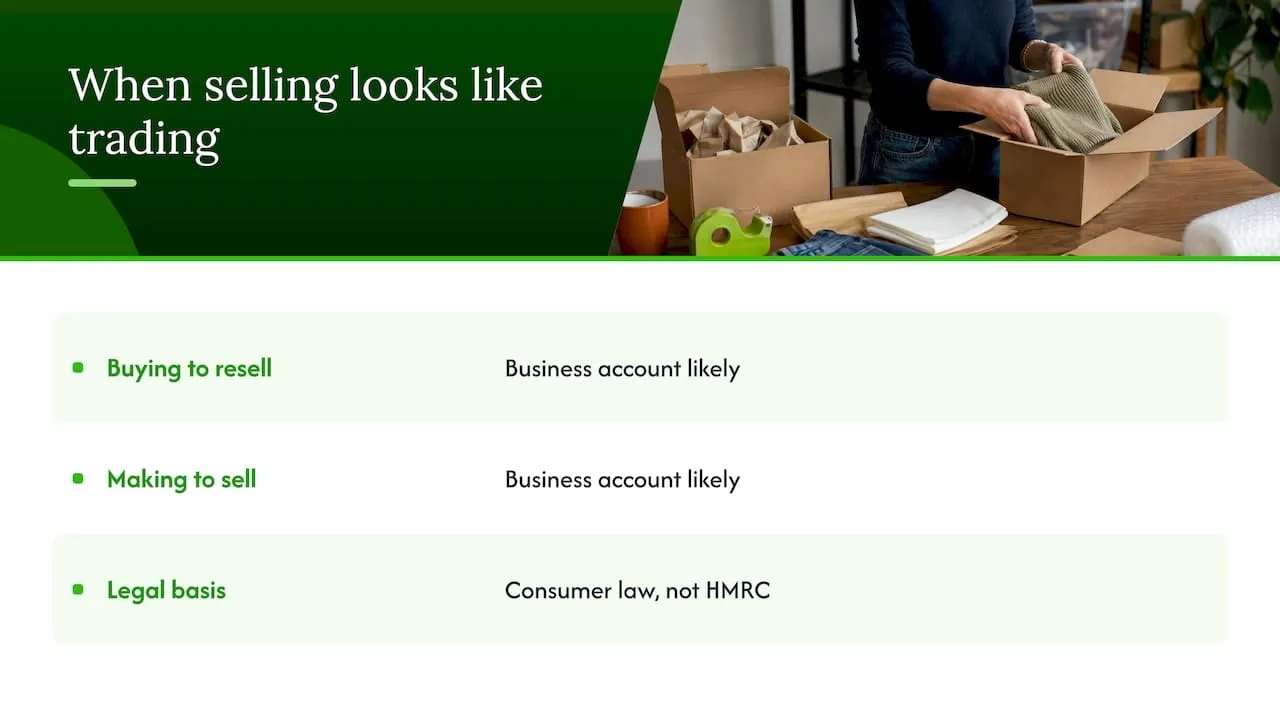
According to Worthwhile Accountancy (30 October 2026), both platforms ask you to move to a business account when your selling looks like trading, for example buying items to resell or making items to sell. The same article notes that this comes from consumer law, because buyers have stronger rights against businesses than against private sellers, rather than from a demand by HMRC. If you source stock to resell on Vinted and eBay, you are likely in business territory. For the Vinted side in detail, see our guide to Vinted Pro Seller in the UK, and for the eBay side our explainer on eBay fees and the £1,000 HMRC threshold.
Several accounts
Some sellers run a private account and a business account, or several accounts. eBay’s multiple accounts policy says all accounts a member uses are held to the same buying and selling policies, and restrictions on one account may be applied to linked ones. Read it before you split your selling. We discuss the practical side in multi account marketplace management.
A checklist before you connect your messages
Work through this once, then you will not need to think about it again.
- Confirm your account type on each marketplace matches how you sell.
- Use your own login details only and keep them private. Connect only accounts you are entitled to use.
- Read each platform’s contact rules, especially eBay’s rules on keeping transaction communication on eBay and on bulk messaging.
- Decide which inbox handles which marketplace. Vinted and Wallapop in the Ruit inbox, eBay in eBay Messages.
- Turn off duplicate notifications so each message reaches you once.
- Set an away response on eBay for holidays using Time Away.
- Switch on stock sync so sold items leave the other channels.
As for how connecting works, our page on how to connect your marketplace accounts to Ruit walks through it.
A reply routine that fits a working day
Here is a routine for a reseller who sells vintage clothing on Vinted and eBay, working around another job.
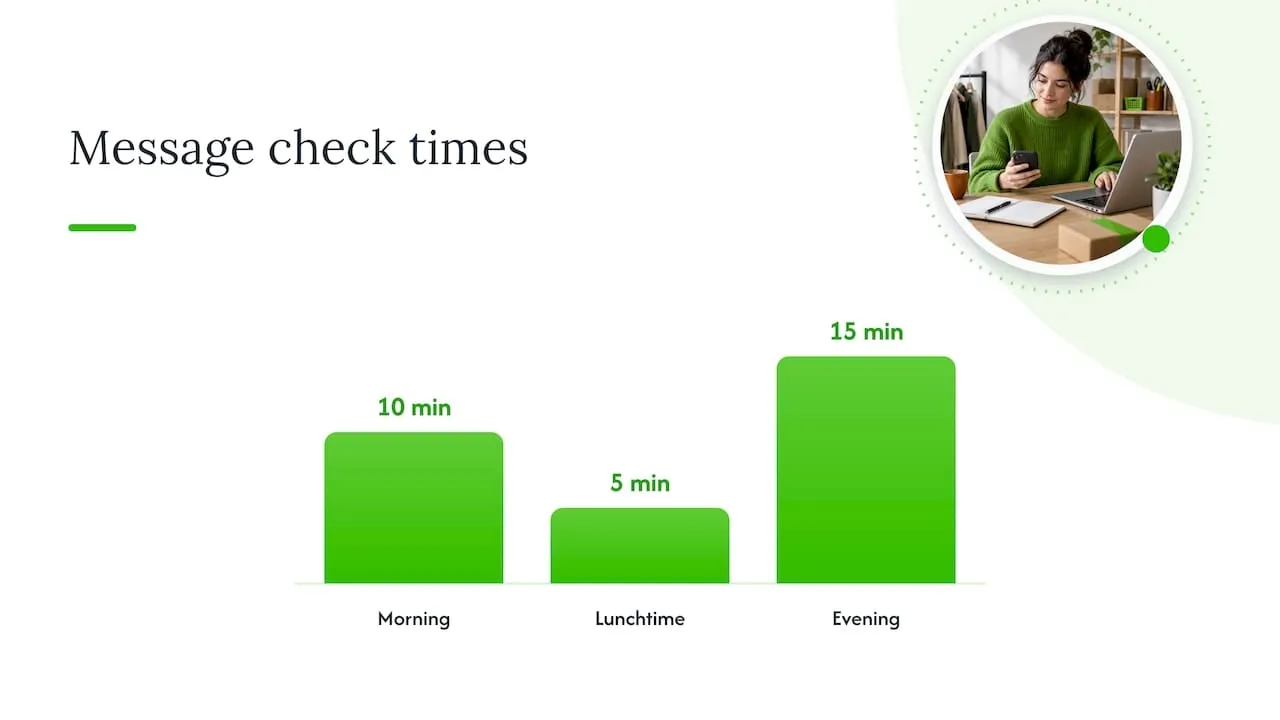
Morning, 10 minutes. Open the Ruit inbox and answer Vinted messages, newest offers first. Then open eBay Messages and clear anything waiting there. Handle sold items first, since a buyer who has paid needs postage details before anyone who is only asking a question.
Lunchtime, 5 minutes. Check for new offers. On Vinted, where the inbox has no deal-status filter, answer offers before general chat so nothing time sensitive goes cold.
Evening, 15 minutes. Reply to the day’s questions, then list new items. List once and publish across channels, with AI drafting the title and description, then edit the draft to match the real condition and flaws of the item. Accurate descriptions cut down the questions you get in the first place.
Weekly. Check which questions come up again and again, such as measurements, postage and condition. Put the answer in the listing description so buyers do not need to ask. Fewer messages is the best inbox feature of all.
This gives you two places to check, not four, and a clear rule about which is which.
When a marketplace is not in your inbox
No tool covers every marketplace, and in our case eBay messages remain on eBay. The honest way to run this is to accept two lists and make both fast:
- Give eBay Messages a fixed slot in your routine.
- Use the app’s threaded view by buyer or listing to catch up on long conversations quickly.
- Use Time Away when you cannot reply.
- Keep your own notes on any unusual agreement, such as combined postage, in the conversation itself, since that is where both sides can see it.
If you also sell through your own shop, our guides on connecting Shopify to eBay and WooCommerce to Vinted show how stock moves between a shop and the marketplaces. If your listings include branded goods, our eBay VeRO guide will help you avoid takedowns that interrupt your conversations with buyers.
Our perspective
We built Ruit around a simple belief: a seller’s time should go to sourcing and packing, not to switching between apps.
Messages are where sales are won on Vinted, because there is no basket and every deal starts as a chat. That is why we bring Vinted and Wallapop conversations into one inbox, and why we pair it with stock sync. A fast reply is only useful if the item is still there, and an item that has sold on eBay should not still be advertised on Vinted.
We would rather be exact about what we cover than promise everything. Our inbox is for Vinted and Wallapop messages, and eBay conversations stay in eBay. What you gain is a calm routine: list once, let sold items leave the other channels, relist on Vinted and Wallapop automatically, and answer your Vinted and Wallapop buyers from a single screen.
Luis
Try it on your own listings
If you sell on Vinted and eBay and want fewer tabs open, start by connecting your accounts, listing an item once and seeing it publish across your channels. You can see which sites we support in our directory of selling sites, and you can see Ruit’s plans when you are ready to choose one. Or go straight to Ruit and get started.
Frequently Asked Questions
What does a unified inbox mean for marketplace sellers?
It is one screen that lists buyer messages from several marketplaces, so you reply without opening each app. With Ruit, that covers Vinted and Wallapop messages. eBay messages stay in eBay Messages.
Can I read my eBay messages in the same inbox as Vinted?
Not in Ruit. Our inbox brings together Vinted and Wallapop messages, and eBay conversations stay in eBay Messages. eBay also expects transaction-related communication to stay on eBay, so reply there and use Time Away when you are not available.
Do I lose my message history if I use one inbox?
No, your history stays with each marketplace. Note that eBay UK keeps messages for one year before automatic deletion, so save any details you need for a dispute or a record.
Do private and business accounts work differently?
Yes, the account rules differ. eBay business accounts need a business name, type, address and VAT number, and Vinted Pro Sellers must be registered sole traders, non-profits or companies. Both platforms expect sellers who buy items to resell to use a business or Pro account.
How do I stop answering the same question twice?
Put the answer into your listing. Measurements, condition and postage details cut repeat questions, and AI can draft the first version of your description for you to correct. Then stock sync keeps you from fielding questions about items that have already sold.
Sources
- Why Vinted’s messaging UX is failing power users (Medium, 23 June 2025)
- New Messaging Experience (eBay UK Seller Centre, 2022)
- Time Away (eBay UK)
- Member-to-member contact policy (eBay UK)
- Our platform (Vinted UK)
- Creating an eBay account (eBay UK)
- Using multiple accounts policy (eBay UK)
- Told to set up as a business on Vinted or eBay? (Worthwhile Accountancy, 30 October 2026)