CSV Import Vinted: What UK Sellers Can Do in 2026


Table of Contents
- TL;DR
- CSV import for Vinted: what actually works
- Why a spreadsheet is still worth building
- The columns to include
- Photos: the part a CSV cannot do for you
- Listing rules that trip up bulk uploaders
- Why upload fails or a listing is rejected
- eBay is different: it does take CSV
- The catch with two marketplaces: selling an item twice
- Listing once instead of typing twice
- Which route suits which seller
- A worked example
- Perspective from Ruit
- Try listing once across your channels
- Frequently Asked Questions
- Sources
- Recommended
There is no CSV import on Vinted for UK sellers: the official upload flow is manual, one item at a time, and a spreadsheet cannot be dropped into your account. What you can do is prepare every listing in a spreadsheet, then publish from one place with a tool that lists once across Vinted, eBay and your other channels, so the data you typed is never typed twice.
This guide explains what Vinted actually supports, how to build a spreadsheet that makes bulk listing fast, what Vinted checks after you publish, and how eBay differs, because eBay does take CSV files.
TL;DR
- Vinted’s UK help pages describe a manual upload flow (photos, title, description, category, brand, condition, price, parcel size) and no native CSV import.
- A spreadsheet still pays off: it is the fastest way to prepare titles, prices, conditions and photo sets for a big batch.
- eBay UK accepts CSV or tab-delimited files through Seller Hub Reports, so a clean spreadsheet can serve both marketplaces.
- Vinted runs automated checks on new listings, usually within a minute, occasionally taking days.
- Ruit lets you list once and publish on Vinted, eBay, Wallapop, todocoleccion, Shopify, WooCommerce and PrestaShop, with stock kept in sync.
CSV import for Vinted: what actually works
Vinted’s UK upload guidance walks through the standard flow: add photos, a title and description, then category, brand, condition, price and parcel size. It does not describe a CSV import feature, so a file of listings has nowhere to go inside a normal seller account. That was the position in Vinted’s UK help pages when we checked in November 2026.
Vinted does publish developer documentation. Its API documentation describes creating items through the API, with fields for title, price, catalogue and package size, and says photo URLs must be publicly accessible, with at least one photo and no photo larger than 5 MB. That is a developer route, aimed at Vinted Pro integrations rather than a file you upload by hand. If you run a Vinted Pro account and sell in volume, it explains why tools that connect to Vinted behave the way they do. It is not a spreadsheet upload button.
So when a search for “csv import vinted” turns up pages about CSV, they usually fall into three groups:
| What the page offers | What it really does | Use for UK Vinted listing |
|---|---|---|
| Export of your own listings to a CSV | Copies data out of Vinted for records | Backup, bookkeeping, no new listings |
| Scrapers that pull listings, sellers or reviews into CSV | Collects public data from Vinted pages | Market research only, not selling |
| Importing a CSV into a separate listing tool | Loads data into that tool, which then publishes | Possible, but the file goes to the tool, not to Vinted |
The useful conclusion: a CSV is a good way to hold your stock data, and a poor way to talk to Vinted directly. Plan your workflow around that.
Why a spreadsheet is still worth building
Even without import, a spreadsheet solves the slowest part of bulk listing, which is deciding things. Sellers who list 50 or 200 items in a session lose time not on tapping through screens but on stopping to think about titles, condition wording and prices. If those decisions are already made in rows, the upload itself becomes mechanical.
Our own guide to bulk uploading on Vinted follows the same logic: prepare photos and details in a spreadsheet first, then follow Vinted’s field order when you enter them.
A spreadsheet also gives you:
- One source of truth. Cost price, date bought, source and sale price sit next to the listing text.
- Consistency. Titles follow one pattern across the whole batch.
- A record for later. When an item sells, relisting or moving it to eBay starts from data you already have.
The columns to include
Vinted does not publish a CSV template, so there is no official column order to match. Build the columns around what the upload form asks for. The table shows a sensible layout and the rule that applies to each field, based on Vinted’s UK help pages and API documentation.
| Column | What to put in it | Vinted rule or note |
|---|---|---|
| Item ID | Your own reference, such as a shelf or bin code | Not a Vinted field, but it saves hours when you pick and pack |
| Photo folder or file names | Names of up to 20 images per item | Vinted’s step-by-step upload guide allows up to 20 images |
| Title | Brand, item type, size, colour | Keep it searchable and honest |
| Description | Condition, measurements, flaws, quantity if relevant | Flaws must be shown in photos and described |
| Category | The full path you will select | Pick the closest category |
| Brand | As on the label | Choose from Vinted’s list |
| Size | As on the label, plus measurements in the description | Sizing varies by brand |
| Condition | The true condition | Vinted asks for the true condition |
| Price | In pounds | No selling fees for sellers on Vinted, per the selling basics page |
| Parcel size | Small, medium or large | Chosen at upload |
| Cost price | What you paid | For your records only |
| eBay price | If different from Vinted | Useful if you sell on both |
Two columns most sellers forget are measurements and flaws. Both reduce disputes, and both are easiest to capture in a spreadsheet while the item is in your hands.
Photos: the part a CSV cannot do for you
Photos are where bulk listing slows down, because images cannot live in a CSV cell. The practical routine:
- Photograph in batches of the same type, such as all jumpers on one day, in the same light and against the same background.
- Name files or folders by your item ID, for example
A014-1.jpg,A014-2.jpg. - Keep each file well under 5 MB. That limit comes from Vinted’s API documentation for photo uploads, and staying under it avoids trouble if you ever use an integration.
- Plan a flaw photo for every item that has a mark, snag or missing button.
Vinted’s upload guidance says sellers should show all flaws in photos and mention them clearly in the description, so returns for items “significantly not as described” can be avoided. Build that into the spreadsheet by adding a “flaws” column and refusing to mark a row as ready until it is filled in, even if the entry is “none”.
Listing rules that trip up bulk uploaders
Sellers working fast often hit the same rules. These come from Vinted’s UK help pages.
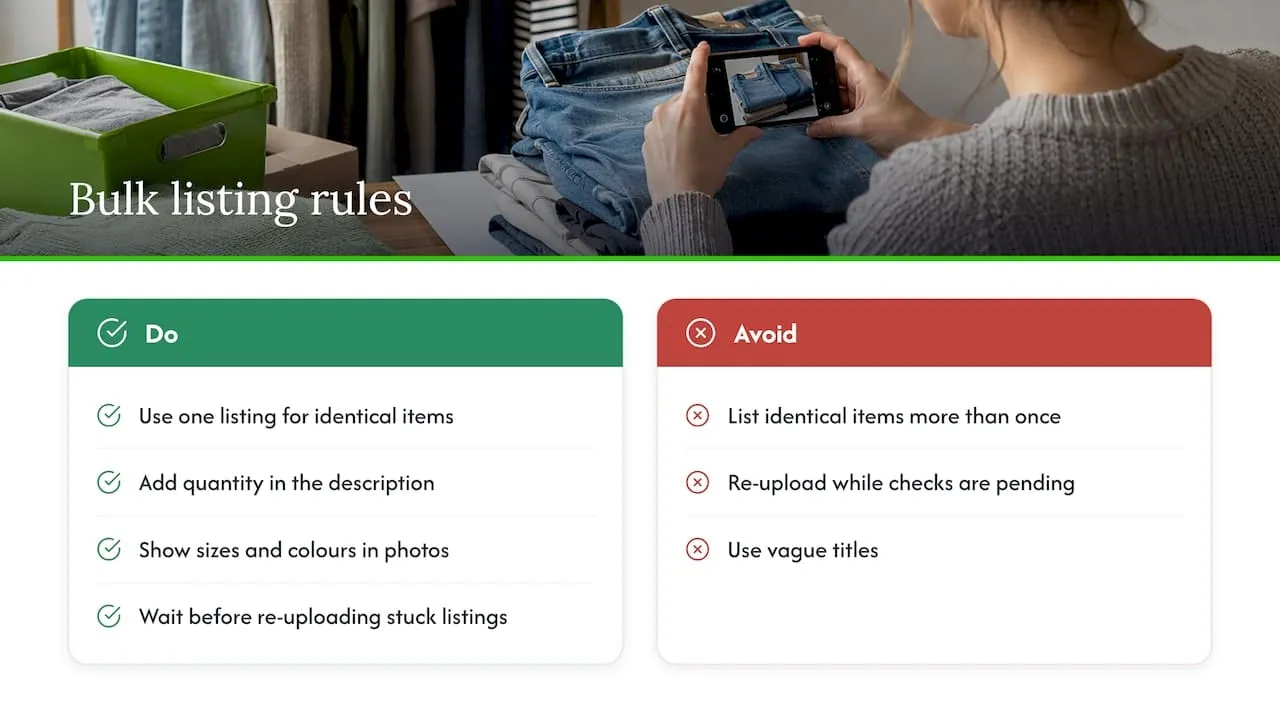
No duplicate listings. Identical items cannot be listed more than once. If you have several units of the same thing, create a single listing and give the quantity in the description, or show the different sizes and colours in the photos. This matters for resellers with stock such as job lots of the same T-shirt. One row per listing, not one row per unit.
Automated checks. After you publish, Vinted checks listings against its catalogue rules. According to the step-by-step upload page, this usually takes up to a minute but can occasionally take up to three or four days. If a listing seems stuck, wait before you re-create it, because re-uploading the same item is how duplicates happen.
Titles and descriptions. Vague titles lose views. If you want a pattern to copy, our Vinted title optimisation guide covers what to include, and the description generator in Ruit drafts titles and descriptions with AI so you start from a draft rather than a blank box.
Postage. Parcel size drives what buyers pay and which carriers appear. If an option goes missing, our explainer on Vinted postage options covers the usual causes.
Why upload fails or a listing is rejected
With no CSV, “upload failed” nearly always means one of these:
| Symptom | Likely cause | What to do |
|---|---|---|
| Listing does not appear straight away | Automated catalogue check still running | Wait. Vinted says it usually takes up to a minute |
| Listing stays pending for a long time | The check can occasionally take up to three or four days | Do not create a duplicate; wait for the result |
| Cannot publish | A required field is empty (photo, category, condition, price, parcel size) | Fill every field the form asks for |
| Listing removed or flagged | Identical item listed more than once, or catalogue rule broken | Merge into one listing with a quantity note |
| Photo will not attach | File too large or wrong format | Compress below 5 MB and retry |
When a spreadsheet row is complete in every column above, most of these problems disappear before you reach the upload screen.
eBay is different: it does take CSV
If you sell on eBay UK as well, a spreadsheet works harder. eBay’s bulk listing tools page explains that Seller Hub Reports, formerly known as eBay File Exchange, lets you upload and manage inventory in CSV or tab-delimited files. It rates inventory volume as high and tool complexity as medium. That means a business seller with a large catalogue can load listings in bulk on eBay, while the same stock on Vinted has to be entered through the app or website.
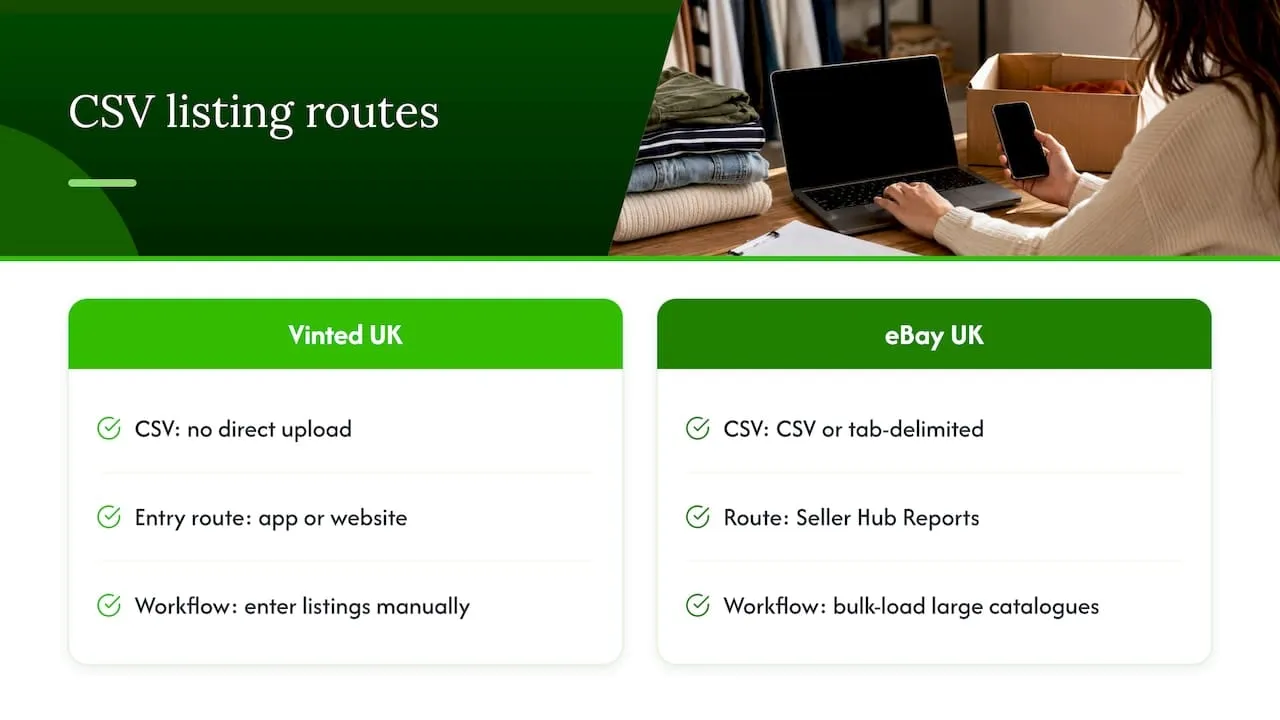
The sensible approach is one master spreadsheet with a Vinted price and an eBay price column, because fees and buyer expectations differ. Our guide to bulk uploading on eBay covers the eBay side for resellers.
The catch with two marketplaces: selling an item twice
Once an item is live on Vinted and eBay, a new problem appears. It sells on one, and the other listing stays up until you notice. For a one-off vintage piece, that means a cancelled order and an annoyed buyer.
Keeping a spreadsheet in step means updating a “sold” column every time, and removing the other listing by hand. That works at 20 items. At 200 it fails, usually on the day you are busiest.
Listing once instead of typing twice
This is where we built Ruit. You list an item once and publish it on Vinted and eBay at the same time, plus Wallapop, todocoleccion, Shopify, WooCommerce and PrestaShop. When the item sells on one channel, Ruit updates stock and removes the listing from the others, so you never sell the same item twice.
For a seller who would otherwise maintain a spreadsheet and three dashboards, that changes the routine:
- Draft the listing. Ruit’s AI drafts the title and description from your item details, and you edit the result.
- Publish to every channel you sell on. One entry, several marketplaces.
- Let stock sync handle the sold item. The other listings come down when it sells.
- Relist automatically. Ruit relists on Vinted, Wallapop and todocoleccion, which helps listings that have gone stale. See how relisting after a sale works, or relisting without rewriting the listing.
- Answer buyers in one place. Vinted and Wallapop messages arrive in one inbox, described on the messages and sales page.
If you sell from your own shop, the guides for Shopify to Vinted and WooCommerce to Vinted show how a store catalogue reaches Vinted without retyping it. If offers are a big part of how you sell, read about Vinted offers and pricing rules.
Which route suits which seller
| Seller | Volume | Best approach |
|---|---|---|
| Casual seller clearing a wardrobe | Under 30 items | Manual upload, using a simple notes sheet for titles and prices |
| Vinted-only reseller | 30 to 300 items | Spreadsheet to prepare, then list through Ruit so descriptions and relists are handled |
| Vinted and eBay reseller | Any volume beyond a few dozen | List once with Ruit; keep the spreadsheet for costs and records |
| Vinted Pro or small resale business | High and growing | List once, sync stock across channels, one inbox for messages |
| Shop owner on Shopify, WooCommerce or PrestaShop | Catalogue-based | Publish from the shop catalogue to marketplaces through Ruit |
A worked example
Say you buy a box of 40 branded jumpers and jackets. You photograph them over two evenings and enter each in your spreadsheet: ID, title, description with measurements and flaws, brand, size, condition, price and parcel size. That takes roughly the time you would otherwise spend deciding things mid-upload.
Without a listing tool, you now open Vinted and enter all 40 items by hand, then repeat the whole job on eBay if you want both, and later check both sites every time something sells. With Ruit, you enter each item once, publish to both, and when a jacket sells on eBay it comes down from Vinted automatically. The spreadsheet stays as your stock and cost record, and the double-entry and double-checking disappear.
Perspective from Ruit
Sellers ask us for CSV import on Vinted because they want one thing: to stop retyping. We understand that, and the honest answer is that Vinted’s UK upload flow is manual, so the spreadsheet cannot be the end of the story.
What matters is the thing the file was meant to save you. List once, publish everywhere you sell, and have sold items disappear from the other channels without you checking. That is the problem Ruit is built around, for Vinted and eBay sellers in the UK and Europe.
Our advice is to keep your spreadsheet for your own records, let AI draft the first version of each title and description, and spend your time on photos and sourcing, which is where a reseller’s margin comes from.
Luis
Try listing once across your channels
If you sell on Vinted and eBay and are tired of entering every item twice, Ruit lets you list once, keep stock in sync and relist automatically on Vinted. Start at Ruit and move your first batch across.
Frequently Asked Questions
Can I import a CSV file into Vinted in the UK?
No. Vinted’s UK help pages describe a manual upload flow and do not document a CSV import. You can prepare your listings in a spreadsheet and then publish them through the app or website, or use a tool that lists once across several marketplaces.
Does eBay UK accept CSV uploads?
Yes. eBay’s help page says Seller Hub Reports, formerly File Exchange, accepts CSV or tab-delimited files for uploading and managing inventory. It suits sellers with a high volume of listings.
How many photos can I add to a Vinted listing?
Vinted’s UK guidance allows up to 20 images per item. You should show every flaw in the photos and describe it in the text. If you use Vinted’s API, each photo must be under 5 MB.
Why is my Vinted listing not showing after I upload it?
Vinted runs automated checks on new listings against its catalogue rules. These usually take up to a minute but can occasionally take three or four days. Avoid uploading the same item again, as identical listings are not allowed.
Can I list the same item several times on Vinted?
No. Identical items cannot be listed more than once. If you have several units, make one listing and state the quantity in the description, or show the different sizes and colours in the photos.
Sources
- Uploading listings, Vinted UK help
- Uploading step by step, Vinted UK help
- Uploading step by step (images and condition), Vinted UK help
- Selling basics, Vinted UK help
- API documentation, Vinted Pro
- Bulk listing tools, eBay UK help