The FB Marketplace Limit, and What to Do When You Hit One


Table of Contents
- Table of Contents
- What People Mean When They Search FB Marketplace Limit
- The Official Monthly and Category Caps Meta Actually Publishes
- The Hidden Trust System Behind New Account Limits
- What Hitting a Limit Actually Looks Like in Practice
- How to Check Your Current FB Marketplace Limit Status
- Practical Steps to Avoid Limits and Recover From Them
- Why Smart Resellers Stop Treating Marketplace as Their Only Channel
- Frequently Asked Questions
The most popular advice about the FB Marketplace limit is also the least useful: “Facebook allows only a certain number of listings per day.” That answer treats several different controls as one public quota, even though sellers can be blocked for different reasons, in different places, and at different stages of publishing.
Marketplace restrictions usually fall into three layers. A regional monthly cap limits how many new listings you can create. A category quota applies tighter controls to areas such as vehicles or homes. A trust-based review system can delay, reduce, or remove distribution even when you haven’t reached a published quota.
Understanding which layer is affecting your account matters. Otherwise, you may delete active listings when the problem is a review hold, change categories when the issue is regional access, or keep retrying a failed upload and create more signals for moderation systems.
Table of Contents
- What People Mean When They Search FB Marketplace Limit
- The Official Monthly and Category Caps Meta Actually Publishes
- The Hidden Trust System Behind New Account Limits
- What Hitting a Limit Actually Looks Like in Practice
- How to Check Your Current FB Marketplace Limit Status
- Practical Steps to Avoid Limits and Recover From Them
- Why Smart Resellers Stop Treating Marketplace as Their Only Channel
- Frequently Asked Questions
What People Mean When They Search FB Marketplace Limit
There isn’t one universal FB Marketplace limit number that explains every seller’s experience. Meta launched Marketplace in October 2016 as a local buying-and-selling feature, first rolling it out in the United States, the United Kingdom, Australia, and New Zealand, with access restricted to people over 18 in the original launch report. That origin is important because Marketplace was built as a controlled local commerce feature, not as a wholesale inventory feed.
A professional reseller therefore needs to separate three questions:
- Regional monthly cap: How many new listings can this Marketplace region accept during its current quota cycle?
- Per-category quota: Is this product type subject to a tighter limit than the rest of the seller’s inventory?
- Account trust behavior: Is the account being reviewed, restricted, or given less visibility because of its history or activity?
These mechanisms can feel identical from the seller’s side. A listing may fail to publish, remain under review, or appear in the seller’s dashboard without reaching buyers. The visible symptom doesn’t always reveal the underlying cause.
Three layers, three operational problems
The regional cap is a hard capacity problem. Once the account has used its allowance for newly created listings, another upload may fail even if the product and account are otherwise acceptable.
The category quota is a concentration problem. A seller may still have room in the general Marketplace allowance but be unable to add another vehicle, property listing, or similar restricted item.
The trust layer is a publishing and visibility problem. It can affect review speed, approval, and distribution without presenting a clean counter on the screen.
Practical rule: Diagnose the failure before changing your listing workflow. A quota problem needs inventory planning. A trust problem needs cleaner, slower account activity.
That distinction is especially important for professional sellers. Marketplace’s early design favored local consumer transactions and safety controls, so account-level and policy-based restrictions are part of the product’s operating model, not necessarily a technical error.
The Official Monthly and Category Caps Meta Actually Publishes
Meta’s published help information gives sellers a concrete example of how regional and category controls can work. In some regions, Facebook documents 5 new listings per calendar month for Vehicles, 5 for Auto Parts and Accessories, 5 for Homes for Sale or Rent, and 20 total new listings per calendar month in its Marketplace help documentation.
Those numbers should be treated as a documented regional rule, not a promise that every country or account sees the same limits. Meta’s help page indicates that the limits don’t apply to every region, so a seller in one Marketplace geography may see a different experience from a colleague elsewhere.
Think of the quota as a bucket
The easiest mental model is a monthly bucket. Each newly created listing takes space from the relevant category bucket and may also count toward the overall bucket. The quota resets on the first day of each month, according to the same Meta help information.
For example, a seller operating in a region covered by those rules could reach the vehicle quota while still having room in the total allowance. Another seller could use listings across several categories and reach the overall ceiling before using every category allowance. The two situations look similar in the app, but the inventory decisions are different.
| Cap Type | Typical Published Range | What It Actually Restricts |
|---|---|---|
| Vehicles | 5 new listings per calendar month in documented regions | Fresh vehicle listings |
| Auto Parts and Accessories | 5 new listings per calendar month in documented regions | Fresh listings in that category |
| Homes for Sale or Rent | 5 new listings per calendar month in documented regions | Fresh housing listings |
| Total Marketplace listings | 20 new listings per calendar month in documented regions | The combined number of new listings |
The word new matters. Meta’s documentation describes a limit on newly created listings, not the number of items currently visible. Deleting a listing therefore shouldn’t be treated as a reliable way to restore used quota in regions where the published cap applies. The English-language version of Meta’s Marketplace help page also makes clear that the restriction is regional.
These published caps are the most visible ceiling, but they aren’t the only reason a seller may hit a wall. An account can encounter review friction or access restrictions before reaching a monthly number, particularly in commercial or policy-sensitive circumstances.
The Hidden Trust System Behind New Account Limits
A new Marketplace account doesn’t necessarily receive the same publishing treatment as an established seller. An independent 2026 technical review reports that fresh seller profiles are often limited to approximately 5 to 10 active listings, with each post held for review, and that higher-risk categories such as vehicles, rentals, property, and items priced above roughly $500 may require a higher trust threshold in its review of new-account restrictions.
This isn’t the same as Meta’s published regional monthly cap. It’s account behavior layered on top of the formal quota. Two sellers can submit a similar number of products and receive different outcomes because their account histories, content signals, and prior interactions differ.
What the probation pattern looks like
The review describes a probation-style pattern for newer or lower-trust accounts. Posts may enter review rather than publish immediately, and repeated posting or rule-sensitive inventory can increase friction. The same source reports that restrictions often relax after 2 to 4 weeks of clean activity and several approved sales.
Use that information as an operational pattern, not as a guaranteed schedule. Meta doesn’t publish a universal trust score or promise that every account will graduate on the same timetable.
Trust signals can include the overall credibility of the profile, prior listing approvals, policy history, and the consistency of seller behavior. A complete profile and verified contact details may support a cleaner workflow, but they can’t override a policy restriction or regional quota. Sellers who need to confirm account details can review a phone verification guide as part of their account setup process.
Cause and effect matters more than the label
A seller who uploads duplicate listings, changes titles repeatedly, or moves quickly between sensitive categories may create more review work for the platform. A seller who posts accurate information, waits for decisions, and completes legitimate transactions gives the account a more consistent operating history.
The useful question isn’t “How do I bypass the limit?” It’s “Which behavior is producing the restriction, and what evidence would show that the account is safe to publish?”
What Hitting a Limit Actually Looks Like in Practice
Maya sells vintage electronics part time. On a Wednesday afternoon, she photographs a batch of items and starts creating listings from the Marketplace app. Her first upload works. The next screen shows a soft yellow warning, then the app produces a generic “something went wrong” message when she tries to save another listing.
That sequence alone doesn’t identify the problem. Maya checks Your listings and sees that one item appears to have saved, but it doesn’t appear in public Marketplace search. A second item carries an under review status and remains there while she waits.
One workflow, several possible causes
The failed save may indicate that Maya has reached a regional or category ceiling. If the account is covered by a published monthly rule, the relevant restriction applies to newly created listings, not just the number currently visible.
The listing that exists in her dashboard but isn’t discoverable may have encountered a distribution or approval issue. It could be classified differently from the category Maya selected, or it could be subject to additional review. The stuck review status points more clearly toward account or content scrutiny than toward a simple exhausted quota.
Maya’s mistake would be to keep pressing Publish. Repeated retries don’t create more capacity, and reposting the same item with a slightly different title can make the activity look repetitive.
A simple symptom map
- Save fails immediately: Check the regional total and category allowance first.
- Listing remains under review: Inspect account status and content details before uploading again.
- Listing saves but attracts no public visibility: Confirm approval, category accuracy, location, and whether the item has been restricted.
- Only one product type fails: Suspect a category throttle before assuming the whole account is blocked.
Maya pauses, records the affected SKUs, and reviews her recent activity instead of deleting everything. That preserves an audit trail and helps her distinguish a hard capacity problem from a trust-based review hold.
How to Check Your Current FB Marketplace Limit Status
A FB Marketplace limit is not one number displayed in a single place. Your dashboard provides the clearest evidence because it shows how regional capacity, category restrictions, and account review behavior affect actual listings. Open Marketplace, select Your listings, and record the status of each recent item. Active, under review, not approved, and absent from public search point to different problems.
Use this diagnostic order
- Read the warning exactly. A listing-allowance message suggests a capacity issue. Policy, eligibility, or account-access language points toward enforcement or review.
- Count newly created listings in the applicable period. Where Meta’s documented rule applies, count the calendar month, which resets on the first day of the month according to Meta’s help documentation. Deleting an older listing may not restore used capacity.
- Separate categories. Track vehicles, auto parts, homes, and other concentrated product groups independently. A category throttle can stop one inventory type while other listings still work.
- Check Commerce tools where available. Commerce Manager may show account notifications, catalog problems, or publishing errors that Marketplace does not display clearly.
- Review Account Quality and Support Inbox. Look for standing restrictions, rejected listings, and requests for more information.
A soft warning calls for slower posting and closer inspection. A hard block means repeated retries are unlikely to change the result until the restriction changes or an appeal option appears.
Sellers managing several profiles can consult Ruit’s account documentation for account organization, while Facebook’s notices remain the authoritative record for Marketplace access. A channel-neutral workflow, described in this crosslisting guide, also helps preserve operational continuity when one channel pauses publishing.
Record the date, count new listings, split totals by category, inspect statuses, and review account notifications. Save screenshots and listing IDs when an item disappears. That evidence gives support a usable record instead of the vague report that Marketplace is broken.
Practical Steps to Avoid Limits and Recover From Them
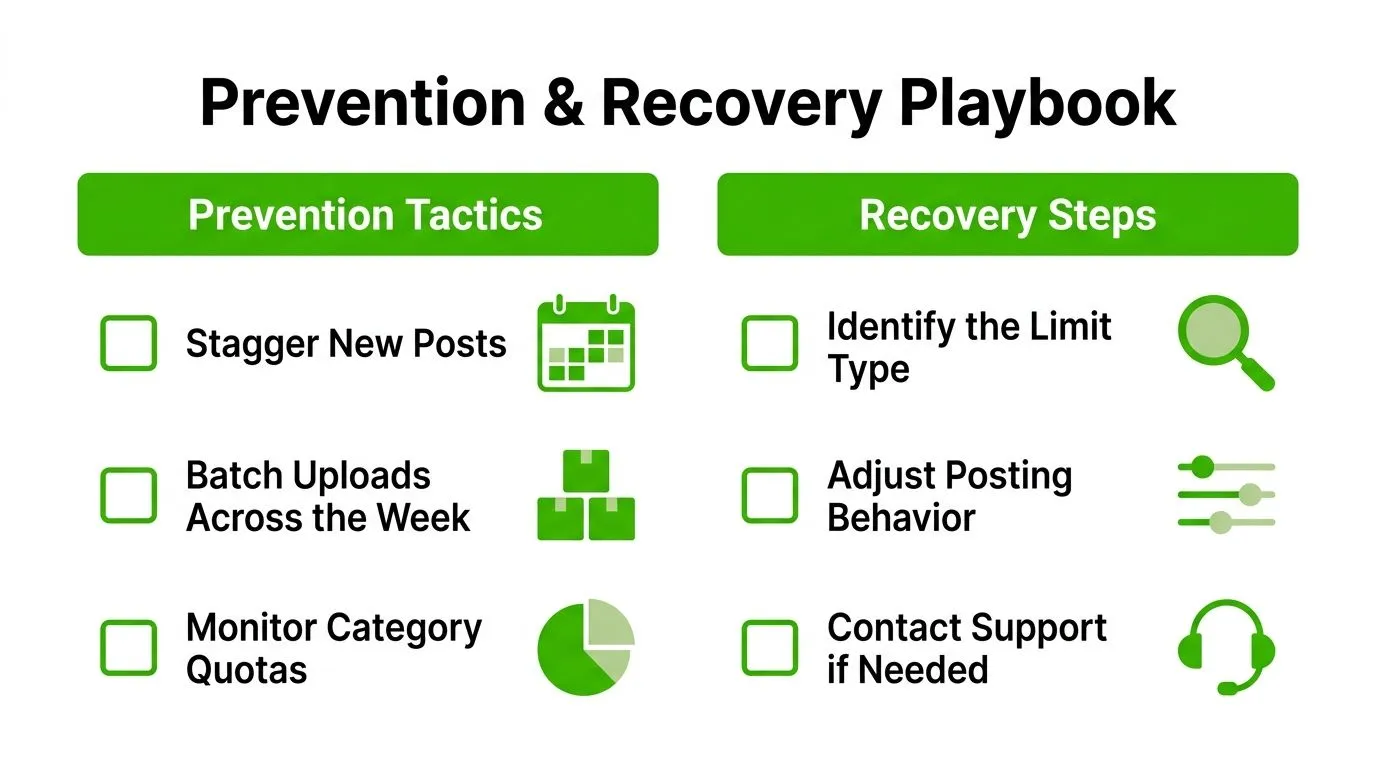
Prevention starts with treating Marketplace inventory as a scheduled flow rather than a dump. A professional seller should know which listings are ready, which category each belongs to, and which channel will carry the item if Marketplace rejects it.
Protect the monthly allowance
Stagger new posts instead of releasing every available product in one burst. A schedule helps you preserve capacity for higher-priority stock and makes it easier to identify which upload triggered a problem.
- Plan the month: Reserve the documented regional allowance for items with the strongest buyer demand.
- Stage the week: Prepare photos and descriptions in advance, then publish in controlled batches.
- Audit drafts: Remove obsolete drafts from your workflow, but don’t assume deleting a published listing returns used quota.
- Track categories: Keep separate counts for restricted verticals, especially vehicles, parts, and homes where the published regional caps are tighter.
Reduce category and review friction
Choose the most accurate category before publishing. Don’t place electronics in a broad category because it appears to have more room, and don’t relist an item under a new title to evade a restriction. Repeated or misleading relisting can create additional review signals.
For a multi-person operation, separate inventory by legitimate business workflow rather than creating dummy accounts. Each seller profile should represent a real, compliant operator. Keep product photos, condition notes, locations, and prices accurate so a reviewer can understand the offer without guessing.
Recover without making the account noisier
If listings are suddenly held or rejected, pause new publishing for 48 hours, audit recent items for policy flags, and resume gradually at 30 percent of prior volume before scaling back up. These figures come from the provided operational guidance, not from a universal Meta promise, so use them as a cautious workflow rather than a guaranteed recovery formula.
For a new account, begin with a small set of accurate, low-risk listings. Wait for approvals, answer buyers consistently, and avoid duplicate uploads during the early account history. If a review hold includes a Request Review option, use it once with clear supporting information instead of submitting repeated appeals.
The objective isn’t to trick the system. It’s to make the seller’s activity predictable, verifiable, and easy to moderate.
Why Smart Resellers Stop Treating Marketplace as Their Only Channel
A Marketplace restriction can become a business emergency when every sale depends on one feed. Meta’s commerce policies state that businesses and individuals acting commercially in the EEA, Philippines, and India may face restrictions including suspension of Marketplace access and listing removal under its Commerce Policies. That means a seller can lose distribution without having a simple posting counter to diagnose.
The structural answer is channel diversification. List suitable inventory on marketplaces such as eBay, Craigslist, OfferUp, or relevant niche platforms, while keeping one central record of stock, price, condition, and order status. Marketplace can remain useful, but it shouldn’t be the only place where a product exists.
Build a channel-neutral workflow
The difficult part isn’t creating another account. It’s keeping inventory synchronized when one item sells, a price changes, or a listing needs to be removed. Manual copying creates duplicate work and increases the chance that two buyers purchase the same item.
A channel-agnostic listing system can centralize the product record and distribute approved listings to connected channels. Ruit, for example, provides inventory management, scheduled and mass publishing, stock and price synchronization, automated delisting after a sale, unified messaging, and orders across supported marketplaces. It should be evaluated as an operational option, not as a way to bypass Facebook’s rules.
The key metric is not how many listings one platform accepts. Measure revenue, margin, response workload, and sell-through by channel. If Marketplace generates strong buyer interest but consumes disproportionate staff time or creates concentrated account risk, the right response may be to rebalance the catalog rather than force more volume through the same constraint.
A resilient reseller treats platform limits as capacity planning information. When one channel slows down, the rest of the operation keeps moving.
Frequently Asked Questions
Do Marketplace limits reset on a rolling 30-day window?
Not universally. Meta’s published rule for some regions uses a calendar-month allowance that resets on the first day of each month, rather than a rolling window as stated in its Marketplace help information. Your region and account notices determine which rule applies.
Does deleting a listing restore quota?
Don’t rely on it. The documented limit applies to newly created listings, so removing an item generally shouldn’t be treated as a guaranteed way to recover used capacity.
How long can a new-account review hold last?
The independent technical review describes restrictions often relaxing after 2 to 4 weeks of clean activity and several approved sales, but that isn’t a guaranteed timetable for every account in the same review.
Is a personal profile limit different from a Business Page limit?
Access and enforcement can vary by account type, region, commercial classification, and policy status. Don’t assume a Page automatically receives a higher Marketplace allowance.
What if there’s no warning banner but listings won’t publish?
Check individual listing statuses, Account Quality, Support Inbox, category classification, and recent policy notifications. A trust or approval issue may exist without a clear quota message.
If Marketplace limits are disrupting your inventory flow, Ruit can centralize stock, schedule publishing across supported channels, synchronize prices, and delist sold items automatically. Visit Ruit to see whether a multi-channel operating system fits your resale workflow before the next Marketplace restriction stalls your sales.