Seller tested multi market eBay listing titles: 80 character templates

Table of Contents
- Quick checklist: the 8 must-do title rules
- How eBay search treats titles and item specifics
- Title formula and worked examples you can copy
- Common mistakes, compliance traps and what to avoid
- How to test and revise titles: simple metrics and workflows
- Templates and quick copy-paste title starters
- Practitioner viewpoint: how we see titles go wrong, and how Ruit keeps them consistent
- Regional language or spelling considerations for international selling
- Writing titles that actually sell: a closing take
- Keeping titles consistent if you sell on more than one marketplace
- FAQ
- Sources
- Recommended
Write a clear eBay listing title that puts the buyer’s likely search terms first, keeps the wording accurate and uses every relevant word of the 80-character limit; for complementary tips, see our guide on listing description tips that actually sell your items. The core reason this works is that eBay’s search system matches buyer queries against your title first, then fills in detail from item specifics, so a readable, keyword-led title paired with complete specifics and clear photos gives your listing the best chance of being found and clicked.
TL;DR:
- Using the first four words in the title to clearly identify the item can significantly increase click-through rates, especially on mobile devices.
- Repeating keywords or including promotional phrases such as “rare” or “must see” does not improve search ranking and may reduce listing appeal.
- Prioritizing brand, model, and key attributes at the start of the title aligns with buyer search behavior and enhances relevance in eBay’s ranking system.
- Joining relevant item specifics with the title improves filtering accuracy and helps potential buyers find your listing more easily.
- Maintaining consistent language and sizing conventions across multiple marketplaces prevents misunderstandings and mismatched search results.
Quick checklist: the 8 must-do title rules
Before you write another title, run it against these eight rules. They cover what eBay’s Seller Centre recommends and what tends to go wrong in practice.
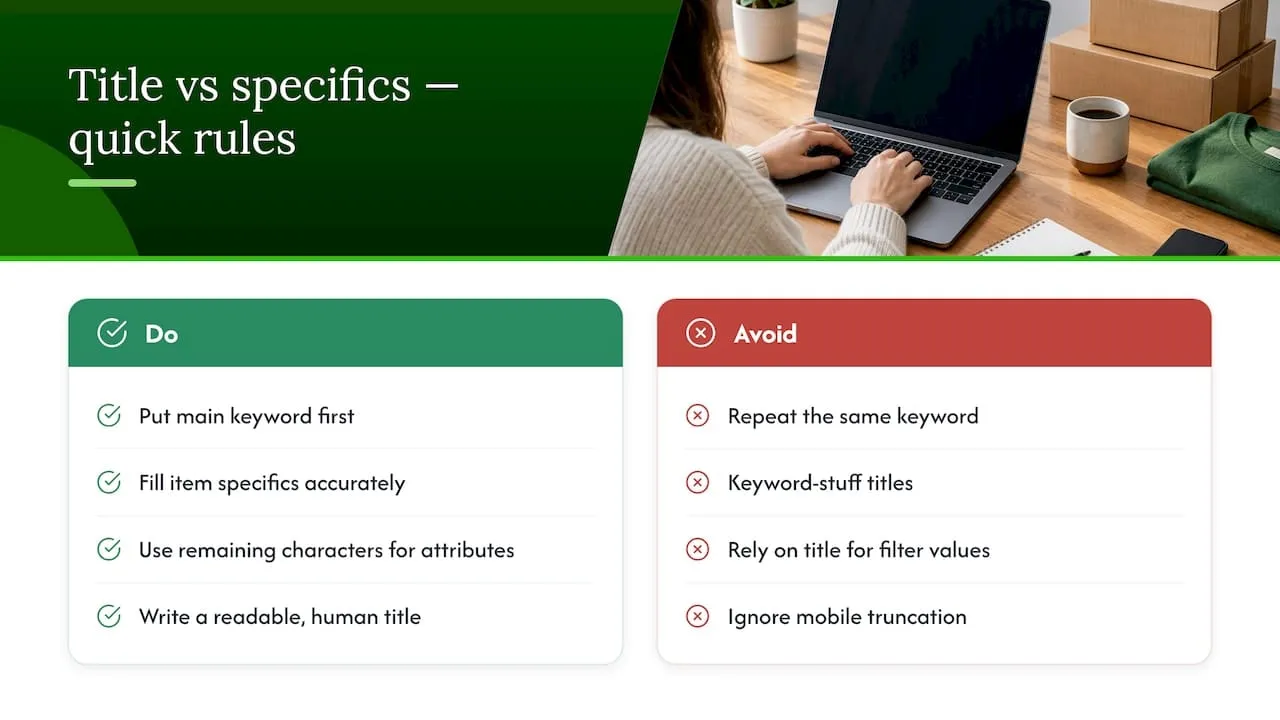
- Use as much of the 80-character limit as you can for genuinely relevant terms, but stop once you run out of real descriptors.
- Put your strongest two to four buyer keywords first, and lead with the brand name when the item has one.
- Add model numbers, size and colour whenever there’s room, since these are exactly what shoppers search for.
- Skip emojis, ALL CAPS and special characters such as asterisks or exclamation marks, along with promotional words like “WOW” or “LACK”.
- For non-manufacturer parts, use “compatible with” or “fits” rather than the brand name on its own.
- Complete item specifics and product identifiers alongside the title so eBay’s filters can place your listing correctly.
- Treat the subtitle as a paid extra and weigh the cost against the likely gain before buying it.
- Spellcheck before you publish and remove stray punctuation, since a single typo can break a search match entirely.
None of these rules work in isolation. A title stuffed with the right keywords but riddled with typos, or a tidy title with no item specifics behind it, both underperform a title that gets the basics right across the board.
How eBay search treats titles and item specifics
Best Match, eBay’s default sort order, ranks listings on relevance to the search query plus listing quality, price, popularity and your track record as a seller. The title is where relevance starts, but it’s not where the ranking ends.
There’s a useful distinction between indexing and ranking. Listings typically appear in eBay’s search index within 24 hours of going live, but being indexed just means the listing exists in the system. Where it sits in results depends on the broader Best Match signals, not just on whether your keyword is present.
This is why repeating a keyword two or three times in the title rarely helps. Best Match already treats a single clear mention as a match. What repetition does achieve is wasted characters you could have spent on a second attribute, plus a title that reads as spam to a human buyer. eBay’s own guidance is blunt about this: keyword stuffing is a weak optimisation strategy, and item specifics do more of the filtering work than extra words in the title ever will.
Item specifics also feed eBay’s internal search filters directly, the ones buyers use on the left-hand side of results to narrow by size, colour or condition. A title can only do so much; specifics are structured data, and structured data is what a filter actually reads.
Mobile behaviour adds another constraint. Most eBay browsing now happens on a small screen where only the first part of a title is visible before it’s truncated. eBay’s seasonal selling guidance makes the point that the earliest words in a title matter most for exactly this reason: they need to confirm what the item is before a thumb swipe past it.
Title formula and worked examples you can copy
A dependable formula for most categories looks like this:
[Brand] [Model or type] [Key attribute] [Size or colour] [Condition] [Model number]
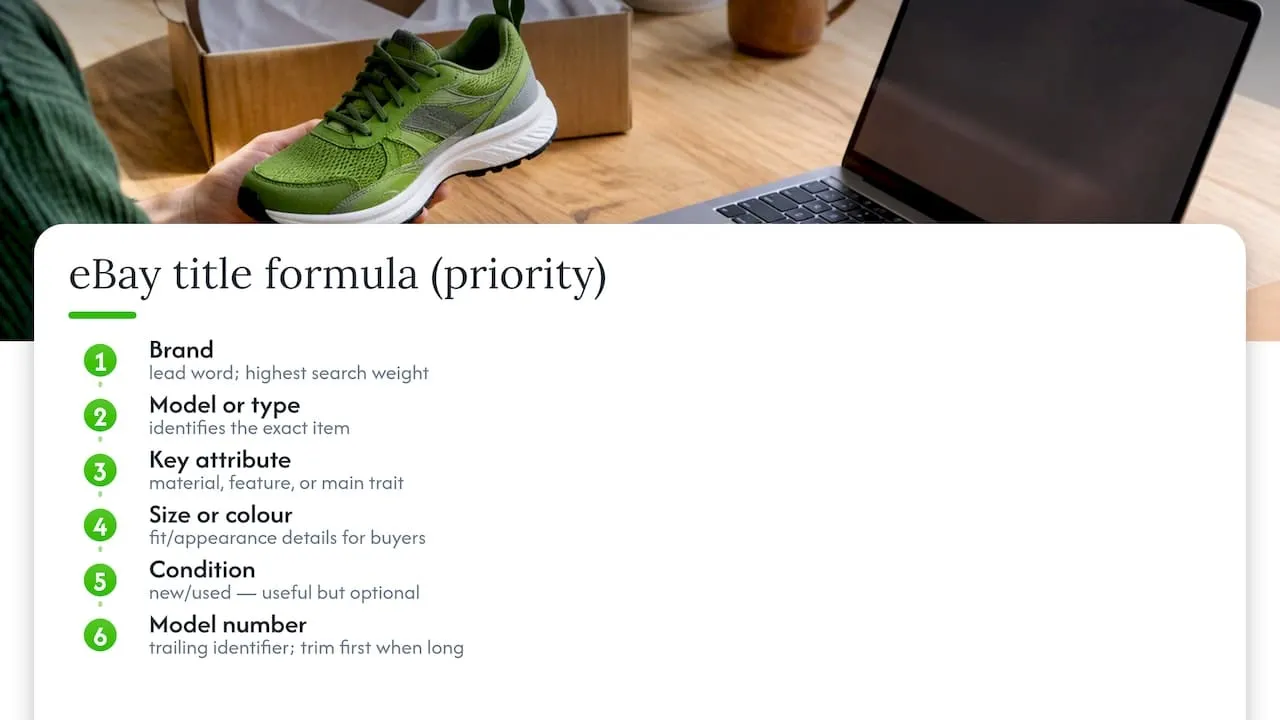
Not every field applies to every item, and that’s fine. The point is to work through the list in order of buyer importance, then stop when you run out of characters or run out of relevant detail, whichever comes first.
Here’s how that plays out across six categories, each kept within the 80-character limit:
Notice the parts example: it uses “Compatible With” rather than stating the Ford name as if the pads were an official Ford product, which keeps it inside eBay’s listing policy while still surfacing in Ford-related searches.
When a title runs long, trim from the end first; the brand, model and primary attribute at the start are what carry the search weight, while trailing details like exact dimensions or a secondary colour note can move into item specifics instead. A short variant such as “Nike Air Max 90 White UK 9” still works for a quick relist, but the longer version captures more of the specific searches a buyer might type, such as “leather” or “new”.
The first four words do the heaviest lifting in both cases. A buyer scanning a results page, especially on mobile, decides whether to click based on whether those first few words confirm the item they’re after.
Common mistakes, compliance traps and what to avoid
A handful of errors show up again and again in badly performing titles:
- Repeating the same keyword twice to “cover more searches”, which wastes characters and reads as spam.
- Listing two unrelated brand names in one title, such as naming a case brand and a phone brand together when only one is being sold.
- Promotional phrasing like “RARE!!”, “MUST SEE” or “BEST PRICE”, none of which match how buyers actually search.
- Special characters and symbols used purely for visual emphasis, such as asterisks, tildes or multiple exclamation marks.
Brand misuse is the one with real consequences. eBay’s listing policies state that using a brand name on a product that brand didn’t make can infringe trademark rights, and that compatible or aftermarket parts must be described with wording like “compatible with” or “fits” rather than the brand name standing alone. Getting this wrong can lead to a listing being pulled, not just a drop in visibility.
On cost: a subtitle is an optional paid upgrade, and eBay’s advanced listing tool guidance notes that upgrade fees are charged when you list, not when the item sells, and that they’re non-refundable. Check the current fee on your account before adding one, since it needs to be worth the extra exposure for that specific item.
Early words carry most of the weight. eBay’s own guidance on mobile and search behaviour points out that the first words in a title matter most for discovery, because that’s what shows before a title gets cut off on a phone screen.
How to test and revise titles: simple metrics and workflows
Treat title writing as something you revisit, not something you finish once. A few straightforward metrics tell you whether a change helped:
- Impressions, which show whether the listing is being surfaced at all for relevant searches.
- Click-through rate, which tells you if the title is appealing once it appears.
- Watch count, a signal that buyers are interested but not yet ready to commit.
- Conversion rate, the real measure of whether the title (and the rest of the listing) closes the sale.
When testing, change one variable at a time, such as swapping the keyword order or adding a model number, and give it at least 7 to 14 days to produce a stable read, as eBay’s own guidance on revising listings suggests for this kind of comparison. Editing a live listing’s title is usually better than relisting from scratch, since relisting can trigger upgrade fees again if you’d added a subtitle or other paid extra.
Searching completed and sold listings for your item type is a free way to see which phrasing other sellers used successfully, before you commit to your own wording.
Pro Tip: Keep a simple note of what you changed and when, so a dip in impressions a week later doesn’t get wrongly blamed on the wrong edit.
Templates and quick copy-paste title starters
These starters are built to the formula above and trimmed to leave room for your own specifics:
- Fashion: [Brand] [Item type] [Size] [Colour] [Condition], roughly 45 to 55 characters before extras.
- Footwear: [Brand] [Model] Trainers [Size] [Colour] [Condition], around 50 characters.
- Electronics: [Brand] [Model] [Storage/Spec] [Colour] [Condition], around 55 to 65 characters.
- Vintage/collectables: Vintage [Decade] [Item] [Material] [Pattern/Style], around 55 to 65 characters.
- Books: [Title] [Author] [Edition] [Format] [Year], around 50 to 65 characters.
- Toys: [Brand] [Set name] [Set number] [Condition note], around 50 to 60 characters.
- Parts/accessories: [Part] Compatible With [Vehicle/Device] [Years] [Quantity], around 55 to 65 characters.
- Home/kitchen: [Brand] [Item] [Material/Capacity] [Colour] [Condition], around 50 to 60 characters.
If a draft runs over 80 characters, cut secondary details like exact measurements or a minor colour note first, since those belong in item specifics anyway. For more category-specific versions, our eBay title examples and template bank covers a wider spread of product types.
Practitioner viewpoint: how we see titles go wrong, and how Ruit keeps them consistent
The same handful of mistakes turn up on repeat: titles that front-load a condition note instead of the brand, titles missing a size that’s sitting right there in the item specifics anyway, and titles copied from a previous listing without checking the model number still matches. The fix is rarely clever, it’s usually just reordering the first four words.
Where this gets harder is selling the same stock across more than one marketplace, since a title written for one platform’s quirks doesn’t always read well on another. With Ruit, you list an item once and it publishes to Vinted, eBay, Wallapop, todocoleccion, Shopify, WooCommerce and PrestaShop together. Stock syncs across all of them, and once an item sells on one channel, it’s removed from the rest automatically, so the same piece never gets sold twice. Listings also auto-relist on Vinted and Wallapop, and Vinted and Wallapop buyer messages land in one inbox instead of several.
A workable routine: draft the title with AI suggestions, paste it into eBay’s listing form, complete the item specifics eBay asks for, then watch impressions and clicks over the following week or two before deciding whether to adjust further.
Regional language or spelling considerations for international selling
If stock also reaches buyers outside your home market, spelling and wording choices in the title matter more than they might seem to. British English and American English disagree on several words that show up constantly in listings: “colour” versus “color”, “trousers” versus “pants”, “jumper” versus “sweater”. A title written in one spelling convention can simply miss searches typed in the other.
The practical approach is to match the spelling convention of the marketplace you’re listing on rather than your own habitual spelling. A UK eBay listing benefits from “colour” and “trousers” because that’s how UK buyers search, but if you’re also listing the same stock through a crosslisting workflow to a platform with a different regional audience, it’s worth checking whether the title needs adjusting rather than assuming one spelling covers both.
Brand and model names are the exception: these stay exactly as the manufacturer spells them regardless of which regional convention you’re otherwise following, since changing “colour” to “color” in a product description is a style choice, but respelling a brand name is a potential accuracy problem.
Sizing terms are worth a second look too. “UK 9” and “US 9” don’t describe the same shoe, and a title that states a size without a region marker can mislead a buyer searching in a different sizing system, even when item specifics clarify it further down the listing. Stating the system alongside the number, as in the worked examples earlier, removes that ambiguity at the point where it matters most, in the title itself.
Writing titles that actually sell: a closing take
Most of the advice on title writing treats the 80 characters as a puzzle to solve with keywords. It isn’t. It’s a sentence a tired person skims on a phone, so the first four words need to answer “is this the thing I want” before anything else gets read. Everything else, the model number, the colour, the extra spec, exists to confirm the click, not to win it.
Pair every title with complete item specifics and decent photos, test one change at a time, and don’t let a tidy-looking title distract from the item actually matching what it says. For more on keeping titles consistent across listings, see our guide to managing eBay inventory across channels.
- Luis
Keeping titles consistent if you sell on more than one marketplace
Writing a strong title once is manageable. Keeping that same quality consistent across several marketplaces, with stock levels that actually match reality, is where most sellers lose time. Ruit lets you list an item once and publish it to Vinted, eBay, Wallapop, todocoleccion, Shopify, WooCommerce and PrestaShop at the same time, with stock synced so a sold item disappears from every other channel automatically.
Listings can also auto-relist on some platforms without you having to repeat the work, buyer messages from some marketplaces arrive in a single inbox, and AI can draft the listing for you as a starting point to edit rather than a blank page to fill. Check current plans and pricing or see the full picture on the Ruit landing page to decide if it fits your workflow.
FAQ
What is the best title for an eBay listing?
The best title leads with the two to four keywords a buyer would actually type, such as brand, model and key attribute, written in plain language without promotional words. It should use as much of the 80-character limit as relevant detail allows, then rely on item specifics to fill in the rest.
How should I structure an eBay listing title?
A reliable structure is brand, then model or type, then the key attribute, then size or colour, then condition, then model number, dropping any field that doesn’t apply. eBay’s Seller Centre guidance recommends this order because it puts the most-searched terms first.
What’s the best approach to eBay titles for UK sellers?
UK sellers should use British spelling conventions such as “colour” and UK sizing labels, since that matches how UK buyers search. The same structural rules, brand and attributes first, item specifics completed, apply regardless of market.
Why are some sellers leaving eBay?
Seller sentiment around platforms shifts for many reasons, including fees, competition and changing marketplace policies, and no single cause explains every seller’s decision. Sellers who stay often focus on the fundamentals they can control, like accurate titles and complete item specifics, rather than factors outside their influence.
Do I need to tell HMRC about income from selling on eBay?
You may need to tell HMRC about income from online platforms depending on how much you sell and whether it counts as trading. Gov includes a checker to help you work out your own situation.
How soon does a new eBay title show up in search?
Listings typically appear in eBay’s search index within 24 hours of going live, according to eBay’s Best Match guidance. Where the listing ranks after that depends on relevance, listing quality, price and your seller record, not just on being indexed.