How to Schedule Listings on eBay UK in 2026


Table of Contents
- TL;DR
- How to schedule listings on eBay step by step
- Is scheduling worth it? What it does and does not do
- Choosing a start time
- Fees: what scheduling costs and where sellers get caught
- Scheduling when you also sell on Vinted
- Our view: schedule the work, not just the post
- Where Ruit fits
- Do not forget tax
- A simple weekly routine that works
- Common mistakes to avoid
- Sources
- Frequently Asked Questions
- How far ahead can I schedule listings on eBay UK?
- How do I cancel or change a scheduled listing on eBay?
- Does scheduling a listing cost extra on eBay?
- Why has my scheduled listing not appeared in search?
- Can I schedule Vinted and eBay listings from one place?
- Do I have to tell HMRC about what I sell on eBay?
- Recommended
You can schedule listings on eBay to go live at a set day and time, up to 21 days ahead, using the quick or advanced listing tool and the Pricing section. Once scheduled, they sit in the Scheduled items area of My eBay, where you can reschedule or delete them. The rest of this guide covers the steps, the timing that actually helps, the fee traps, and what to do when you also sell on Vinted.
TL;DR
- eBay UK lets you schedule a listing up to 3 weeks (21 days) ahead. Set it in the Pricing section when you create the listing.
- A scheduled listing can take up to 24 hours to show fully in search, so aim for a start time a little earlier than your target peak.
- Private sellers get 300 free listings a month, then pay 35p per extra listing. Scheduling does not change that count.
- Spreading listings across the week usually beats uploading everything in one evening, and it is far easier to manage when your stock is synced across channels.
- Selling a lot? Check the HMRC reporting thresholds before the tax year ends.
How to schedule listings on eBay step by step
The exact screens change from time to time, so treat the following as the route rather than a screenshot guide. eBay’s own help page on listing durations and timings is the reference to check if a button has moved.
- Start a new listing from Seller Hub or My eBay, using the quick or the advanced listing tool.
- Complete the listing in full. Photos, title, item specifics, condition, postage and price all need to be filled in. A half-finished listing can be saved as a draft, but it cannot be scheduled until it is complete.
- Open the Pricing section and choose the scheduling option. Pick the day and the time you want the listing to start.
- Confirm and submit. The listing is now queued rather than live.
- Check the queue. Go to Scheduled items in My eBay. From there you can reschedule an item or delete it if you change your mind.
That last step is the answer to a question many sellers ask: how do you cancel a scheduled listing? You remove it from the Scheduled items list, as long as it has not yet gone live. Once it has started, it is a normal live listing and the usual ending rules apply.
What the 21-day limit means in practice
Three weeks is plenty if you work in weekly batches, but it rules out scheduling a whole season at once. If you prepare a big collection in advance, such as winter coats in August, you will need to come back and add the later items as the window opens. Keep a simple note of the items you have prepared but cannot yet schedule.
“Where is my scheduled listing?”
This is one of the most common worries on seller forums. Two things usually explain it. First, the listing may not have started yet, so it will still be in Scheduled items. Second, eBay notes that a listing can take up to 24 hours to become fully visible after it starts. If you sell a time-sensitive item, do not schedule it for the last moment and assume it will be searchable instantly.
Is scheduling worth it? What it does and does not do
Scheduling is a workflow tool first. It lets you photograph, measure and write up twenty items on a quiet Sunday and then release them gradually, instead of sitting at the laptop at 7pm on a weeknight.
What it does well:
- Spreads your effort. You batch the dull work and let the calendar do the publishing.
- Spreads your supply. A steady trickle of fresh listings gives regular customers something new to look at several days a week.
- Puts auctions on a sensible clock. An auction ends at the same time of day it started, so choosing the start time also chooses the finish time.
What it does not do: it does not rank you higher by itself, and it does not make a poor listing sell. Sellers argue on forums about whether the algorithm counts the day you created a listing or the day it started. We would not build a strategy on that. Build it on what you can see: when your own buyers are active, and how your items perform at different times.
Choosing a start time
There is no single best time on eBay UK, and anyone who gives you one number is guessing. Buyers of school uniform behave differently from buyers of vintage denim or collectable coins. Use these principles instead and then test.
- For auctions, think about the ending. Many UK buyers browse in the evening, and weekends are popular, so a Sunday evening finish is a common choice. Because the end time mirrors the start time, a 7-day auction scheduled for Sunday at 7.30pm also ends on a Sunday at 7.30pm.
- For fixed-price listings, think about the first day. New listings are most visible when they are fresh, so it helps if they start when your likely buyers are online.
- Allow for the lag. Because a scheduled listing can take up to 24 hours to be fully indexed, schedule slightly before your target window rather than exactly on it.
- Stagger, do not dump. One or two items a day across the week is easier to sustain than thirty on one evening, and it gives you a clean read on what works.
- Keep a log. Note the day, time, format and result for twenty or thirty listings. Your own sell-through pattern beats any generic advice.
Picking the right duration
Start time and duration work together. For auctions, 3, 5, 7 and 10 days are the standard choices. A 1-day listing is aimed at things that are genuinely time-sensitive, such as food, tee-times or holiday packages, so it is a poor fit for a pile of second-hand clothes. Pick a longer auction so more buyers get a chance to see the item, and place its start so that the end lands on a convenient evening.
| Situation | Sensible approach |
|---|---|
| Clothing and accessories, fixed price | Schedule a few per day across the week, start in the morning or early evening |
| Auction with a decent starting price | 7-day duration, start on a Sunday evening so it finishes on one |
| Collectables with a niche audience | 7 or 10 days, so enthusiasts who check weekly see it |
| Time-sensitive items | Consider a 1-day listing, but only where it genuinely fits |
| Big batch ready at once | Spread across up to 21 days, a handful per day |
Fees: what scheduling costs and where sellers get caught
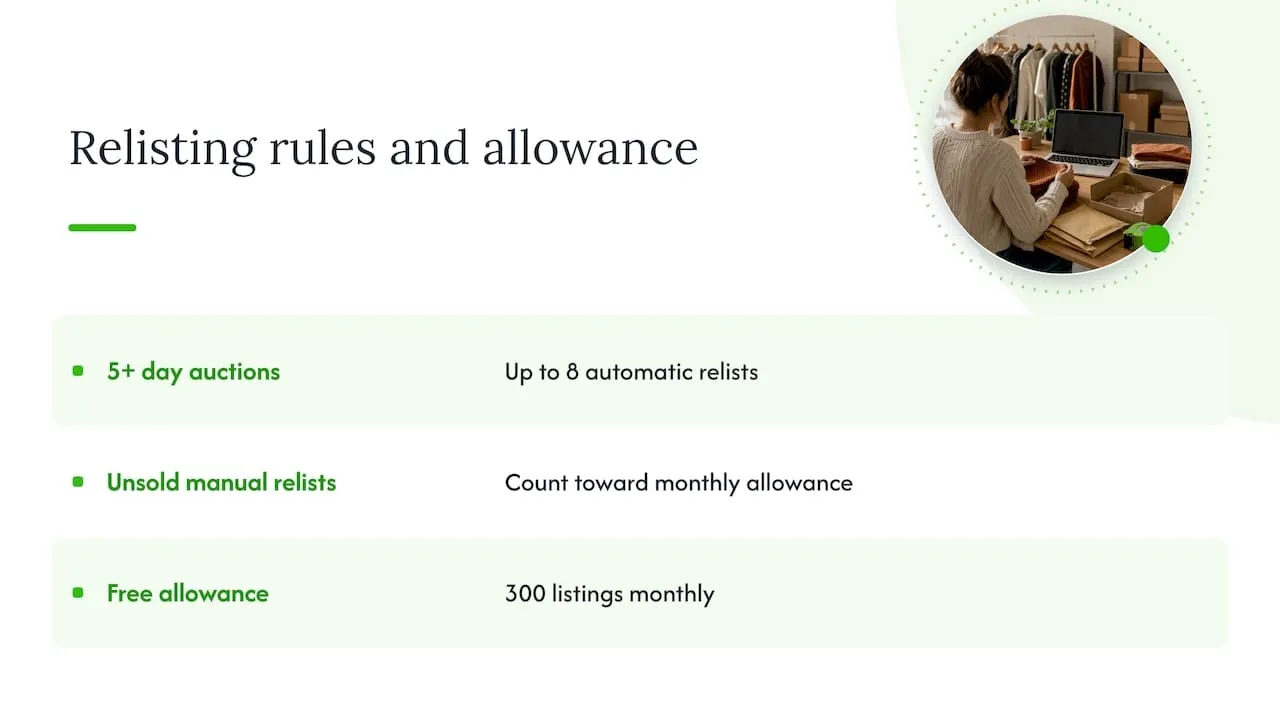
Scheduling itself is not a separate charge, but your listing allowance still applies. According to eBay’s page on fees for private sellers, last updated 30 September 2026, UK private sellers get 300 free listings a month and pay fees only for optional upgrades or overseas delivery. Check that page for the current position before you plan a large batch, as eBay changes fees from time to time.
| Item | Private seller, UK | Source |
|---|---|---|
| Free listings per month | 300 | eBay fees for private sellers |
| Each extra listing | 35p | eBay fees for private sellers |
| Subtitle upgrade | £2 | eBay fees for private sellers |
| Gallery Plus upgrade | £2.50 | eBay fees for private sellers |
Business sellers and eBay Shop subscribers have different allowances, which are set out on eBay’s free listings page. For a wider look at what selling costs, our guide to eBay fees in the UK walks through the numbers alongside the HMRC threshold.
The relisting trap
Many sellers assume every relist is free. It is not. eBay’s page on relisting items explains the automatic options, for example that auctions of 5 days or more can be relisted automatically up to 8 times if you select that option when you create the listing. A manual relist of an unsold item, however, counts against your free allowance, and once the allowance runs out it costs the standard per-listing fee. Check your relist settings in the Selling menu of My eBay so you are not surprised.
If you schedule a large batch of auctions, think about the worst case. Listings that do not sell and get relisted will eat into the 300 monthly allowance faster than you expect.
Scheduling when you also sell on Vinted
Most UK second-hand sellers do not live on one site. Clothes might go on Vinted first, then move to eBay if they stall, or go on both at once. That is where the “schedule listings” question gets more complicated, because each platform has its own tools, its own rules and its own audience.
On eBay you have a built-in scheduler, as described above. For Vinted, check what the app offers at the time you read this, as features change. Whatever each platform provides, the same planning problem remains: you want one calendar and one set of stock records, not two.
The real risk of staggered, multi-channel listing is not timing. It is the double sale. You schedule a jumper to start on eBay on Thursday, it sells on Vinted on Wednesday, and nobody remembers to cancel the eBay listing. Now you have to cancel on a buyer, which can cost you account health and goodwill.
Three habits prevent it:
- Keep a single master list of every item, with its SKU or a clear label, and where it is listed.
- When something sells anywhere, end or delete the other listings immediately, including any still waiting in Scheduled items.
- Do not schedule an item for a channel if you are not sure it is still in your hands.
Our guides on how to cross-list on eBay without double sales and managing eBay inventory across channels go through this in more detail. If you are new to the idea, what crosslisting is is a good starting point.
Selling on your own store too
If you also run a Shopify, WooCommerce or PrestaShop shop, the same sync problem applies, and your product pages carry their own discovery requirements. Product pages in your own shop benefit from clean structured data, and this explainer on schema markup types for merchant listings is a useful read for that side of the job. Our walkthrough on connecting Shopify to eBay covers the stock side.
Our view: schedule the work, not just the post
We build Ruit for people who sell second-hand goods across several marketplaces, and we talk to a lot of Vinted and eBay sellers. Here is what we think about scheduling.
The publish button is the smallest part of the job. The slow parts are photographing, writing titles and descriptions, and then keeping everything consistent afterwards. If you schedule an eBay listing but still retype the same item on Vinted and Wallapop by hand, you have saved ten seconds and kept the ten minutes.
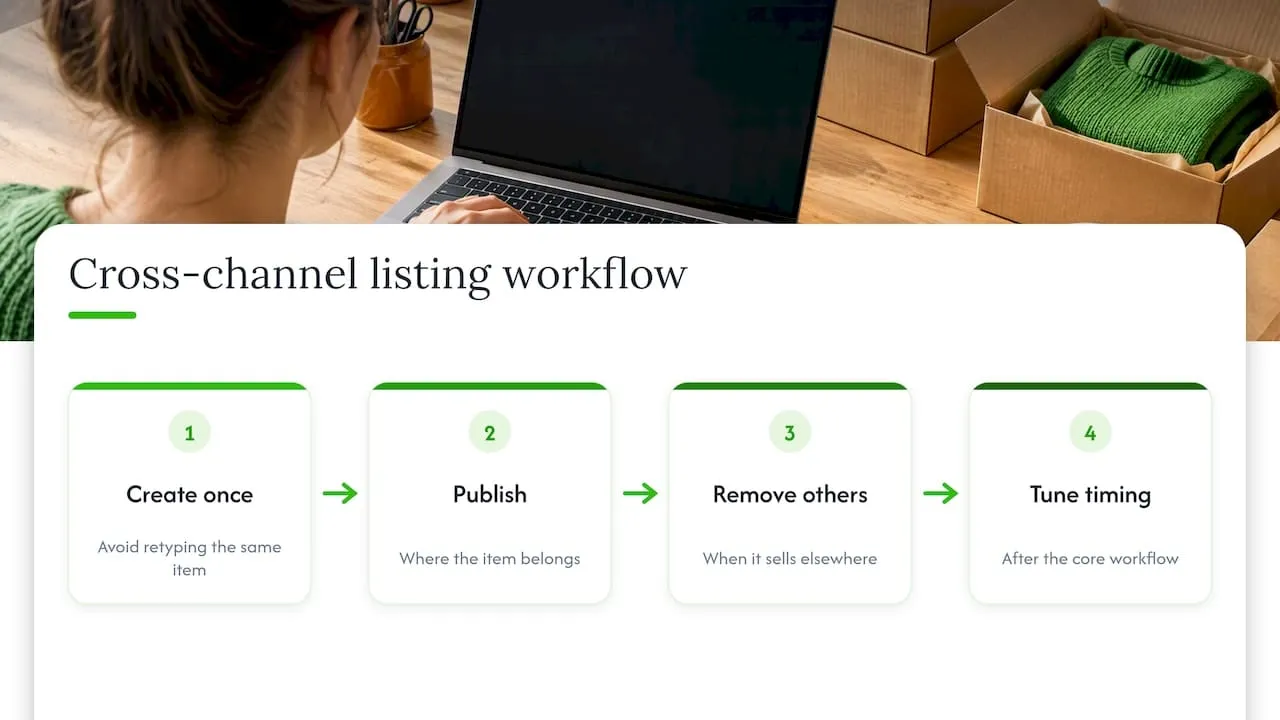
So we would reverse the order. First, create each item once. Second, publish it where it belongs. Third, make sure that when it sells, the other listings disappear without you remembering to do it. Timing comes after that, and it is worth tuning, but a perfect start time on a listing that later causes a double sale is a bad trade.
The other thing we would say is to be honest about volume. If you list ten items a month, a calendar and a spreadsheet are enough. Once you list dozens a week across two or more channels, the cost of manual stock tracking rises quickly, and that is the point at which a tool starts to pay for itself.
- Luis
Where Ruit fits
Ruit lets you list an item once and publish it on Vinted, eBay, Wallapop, todocoleccion, Shopify, WooCommerce and PrestaShop. When the item sells on one channel, stock is updated and the listing is removed from the others, so you do not sell it twice. It also relists automatically on Vinted and Wallapop, brings Vinted and Wallapop buyer messages into one inbox, and drafts titles and descriptions with AI. If you are tired of juggling the same item across tabs, take a look at Ruit.
If you are preparing a large number of eBay listings in one go, our guide to bulk uploading to eBay is a useful companion to the scheduling steps above.
Do not forget tax
Scheduling more listings means more sales, and more sales means more records. This part trips up a lot of UK sellers, so here is the short version, based on GOV.UK.
- Selling your own things is generally not taxable trading. HMRC says people do not need to tell it about income from selling personal possessions if they are not trading, as set out in the guidance on checking if you need to tell HMRC about online platform income.
- Buying or making things to sell for profit is different. There is a £1,000 trading allowance for each tax year, which runs from 6 April to 5 April. Income above it generally needs to be declared.
- Platforms report to HMRC. Under the rules explained on GOV.UK, digital platforms collect and send seller information to HMRC by the following January. The reporting threshold is 30 sales or about €2,000 in a calendar year.
- It is not a new tax. The government has stated that no tax rules have changed for online sellers, only the data platforms share (published 4 December 2024).
Whatever your situation, keep records of what you bought, what you sold and when. If you are unsure whether you count as trading, speak to an accountant or contact HMRC directly. Our article on eBay fees and the £1,000 HMRC threshold goes further.
A simple weekly routine that works
If you want something concrete to copy, this is a realistic pattern for a part-time seller with 20 to 30 items a week.
| Day | Task |
|---|---|
| Saturday | Photograph and measure the week’s items, write titles and descriptions |
| Sunday | Create the listings, set start times across the coming days, check the Scheduled items list |
| Midweek | Answer messages, end any listings for items sold elsewhere |
| Friday | Review what sold, what did not, and what start times it had |
After four weeks, look at your log. If most sales come from evening starts, move more listings there. If auctions that end on Sunday do better than midweek ones, shift your start times to match.
Common mistakes to avoid
- Scheduling items you have not checked. A stained collar noticed after scheduling means a returns headache. Inspect first.
- Forgetting the 21-day cap. If a listing will not schedule, check the date you picked.
- Ignoring the 24-hour lag. Do not schedule a time-critical item to start moments before you need it.
- Forgetting scheduled listings when something sells elsewhere. Check Scheduled items as well as live listings.
- Bunching everything on one day. It makes your shop look busy for a day and then empty for a week.
- Letting relists drain your allowance. Review your relist settings regularly.
Sources
- Listing durations and timings, eBay UK
- Fees for private sellers, eBay UK
- Free listings, eBay UK
- Relisting items, eBay UK
- Creating 1-day listings, eBay UK
- Check if you need to tell HMRC about your income from online platforms, GOV.UK
- Tax-free allowances on property and trading income, GOV.UK
- Selling goods or services on a digital platform, GOV.UK
- No tax changes for online sellers, GOV.UK
Frequently Asked Questions
How far ahead can I schedule listings on eBay UK?
You can schedule a listing up to 21 days (3 weeks) in advance, according to eBay’s help page on listing durations. Set the date and time in the Pricing section when you create the listing. If you want to plan further ahead, save the items as drafts and schedule them as the window opens.
How do I cancel or change a scheduled listing on eBay?
Go to the Scheduled items section in My eBay. From there you can reschedule the listing to a new time or delete it. This only works before the listing has started, so check the list regularly, especially if the item sells on another site.
Does scheduling a listing cost extra on eBay?
No separate scheduling fee is listed on eBay’s private seller fees page. Your normal listing allowance applies: UK private sellers get 300 free listings a month and pay 35p for each extra one, as of the page’s 30 September 2026 update. Optional upgrades such as a subtitle or Gallery Plus cost extra.
Why has my scheduled listing not appeared in search?
It may simply not have started yet, so check Scheduled items first. Once live, a listing can take up to 24 hours to be fully indexed, according to eBay. If it is still missing after that, check Seller Hub for errors and contact eBay support.
Can I schedule Vinted and eBay listings from one place?
The eBay scheduler only controls eBay. To manage one item across several marketplaces, you need to list it once and keep stock in sync so a sale on one channel removes it from the others. Ruit does this for Vinted, eBay, Wallapop, todocoleccion, Shopify, WooCommerce and PrestaShop. You can start from our homepage.
Do I have to tell HMRC about what I sell on eBay?
Not if you are selling your own personal possessions and are not trading. If you buy or make items to sell for profit, the £1,000 trading allowance per tax year applies and income above it needs to be declared. If you are unsure which applies, ask an accountant or HMRC.