How Do I Remove Listing from eBay Without Extra Fees


Table of Contents
A one-off vintage vase sells on another marketplace while its eBay auction is still live. Or you notice a pricing mistake just as bids arrive. You need the listing off eBay, but clicking End without checking the situation can create a fee, leave a buyer with an order you can’t fulfill, or turn a stock problem into an account problem.
The question “How do I remove a listing from eBay?” has more than one answer. You might end your own active listing, eBay might hide or remove it, or a rights owner might request its removal. Those are different situations, and they call for different actions.

If you sell across marketplaces, the cost of an ending can include more than a fee. A live listing that stays up after the item sells elsewhere can lead to an oversell, while ending an auction with bids can have financial consequences. For context on how listing decisions fit into selling expenses, review this guide to eBay fees in the UK.
Before acting, establish three things: the listing format, whether anyone has bid or paid, and who initiated the removal. That short pause tells you whether you should end the listing, change it, handle an existing order, or investigate a removal notice.
Table of Contents
- Why Ending an eBay Listing Is Not Always Safe
- Should You End Revise or Complete the Sale
- How to End an Active eBay Listing
- What Changes After a Sale or a Hidden Listing
- Tips to Relist Without Fees or Oversells
- Frequently Asked Questions
- Your Next Step After Removing the Listing
Why Ending an eBay Listing Is Not Always Safe
Ending a listing is the fastest click in Seller Hub and the easiest one to get wrong. The same button that stops an oversell on a one-off item can also create a fee or lock you into a sale you meant to avoid. Treat removal as a cost decision first and a click path second.
The gap between formats is where sellers get caught. A fixed-price listing with no sales can usually be ended cleanly. An auction with bids is a different situation: time remaining and reserve status decide whether ending is even possible. Close to the finish, a qualifying bid on a no-reserve auction, or any bid once the reserve is met, can leave you obligated to complete the sale. Ending early with bids can also trigger a final-value fee based on the highest bid, which is money spent to sell nothing. Weigh that against the other charges covered in this guide to eBay fees for UK sellers before you click.
Operational rule: Don’t treat “remove” as a single action. Identify who is ending the listing and whether a buyer has already committed to purchase.
Removal means three different things in practice:
- Seller-ended listing: You choose to end an active listing. The rules depend on its format and, for auctions, the bidding situation.
- eBay-hidden or removed listing: eBay acts because of a policy or legal issue, a rights-owner request, or another stated reason. Read the notice carefully before relisting.
- Post-sale order cancellation: The item has already sold. Cancelling the order leaves a record on your account and can affect seller performance.
That last distinction matters most with single-unit stock. Pulling an unsold listing off eBay after the item sells elsewhere prevents an oversell. Once an eBay order exists, the listing is no longer the problem: the order is, and it has to go through the proper cancellation process with whatever performance consequence that carries.
So here is the call I would make. If the item is gone and no order or qualifying bid exists, end the listing and move on. If money, bids, or a removal notice are involved, slow down. The expensive mistakes all happen in the second case, usually in the thirty seconds between spotting the problem and clicking End.
Should You End Revise or Complete the Sale
Choose the action that solves the actual problem, not the one that gets the listing off your screen fastest. If the price, title, or photo is wrong but the item is still available, revise it. If the item is unavailable and the listing is eligible to end, end it. If an auction has bids, assess the bidding rules before deciding whether to cancel bids or complete the sale.
Use this comparison before making a change:
Choose the Right Removal Action
| Situation | Safer action | Main risk |
|---|---|---|
| Fixed-price item is no longer available and hasn’t sold | End the active listing | Listing-related fees may not be refunded |
| Fixed-price item is available, but its title, price, or photo needs correction | Revise the listing | The item stays available while you make the change |
| Auction has no bids and is eligible to end | End it if you no longer want to sell | You lose the active listing |
| Auction has bids and you’re considering withdrawing it | Check time remaining and reserve status; consider cancelling bids only where allowed | Ending with bids can trigger a final-value fee based on the highest bid |
| Auction has a qualifying bid, no reserve or a met reserve, and fewer than 12 hours remain | Prepare to complete the sale | Trying to withdraw may not be an available option |
| A buyer has already purchased the item | Handle the order, not the listing | Cancelling an order can affect seller performance |
For auctions, 12 hours is the key checkpoint. With 12 or more hours remaining and no bids, an auction can generally be ended. If bids exist, the outcome depends on reserve status. With fewer than 12 hours left, an auction with no bids can still be ended, but one with a qualifying bid and a met reserve, or no reserve, ordinarily must be sold to the highest bidder.
Cancelling bids is narrower than ending the listing. It deals with the bids, and it doesn’t turn every auction into a listing you can freely withdraw. Check eBay’s requirements and the auction’s status before choosing that route. Don’t use bid cancellation to get around a sale you’re expected to complete.
For multi-channel sellers, the right decision may be to stop the risk before another buyer checks out. If you need to pause availability while resolving inventory, consider whether a listing pause workflow fits better than a rushed removal. But if an order already exists, treat it as an order problem. Ending the listing isn’t a substitute for fulfilling or properly handling a purchase.
How to End an Active eBay Listing
Once you’ve confirmed that the listing is yours to end and the rules allow it, use the standard desktop route. Don’t rush through the final confirmation on an auction: check the format, time remaining, bid count, and reserve status first.
Use Seller Hub
- Open Seller Hub and go to Active listings.
- Find the item you intend to end.
- Select the item, then choose End item from its dropdown menu.
- Review the prompt and confirm the action.
That’s the standard route for ending an eligible active listing. If you manage listings from My eBay, open the Active listings area, select the item, and choose End listing.
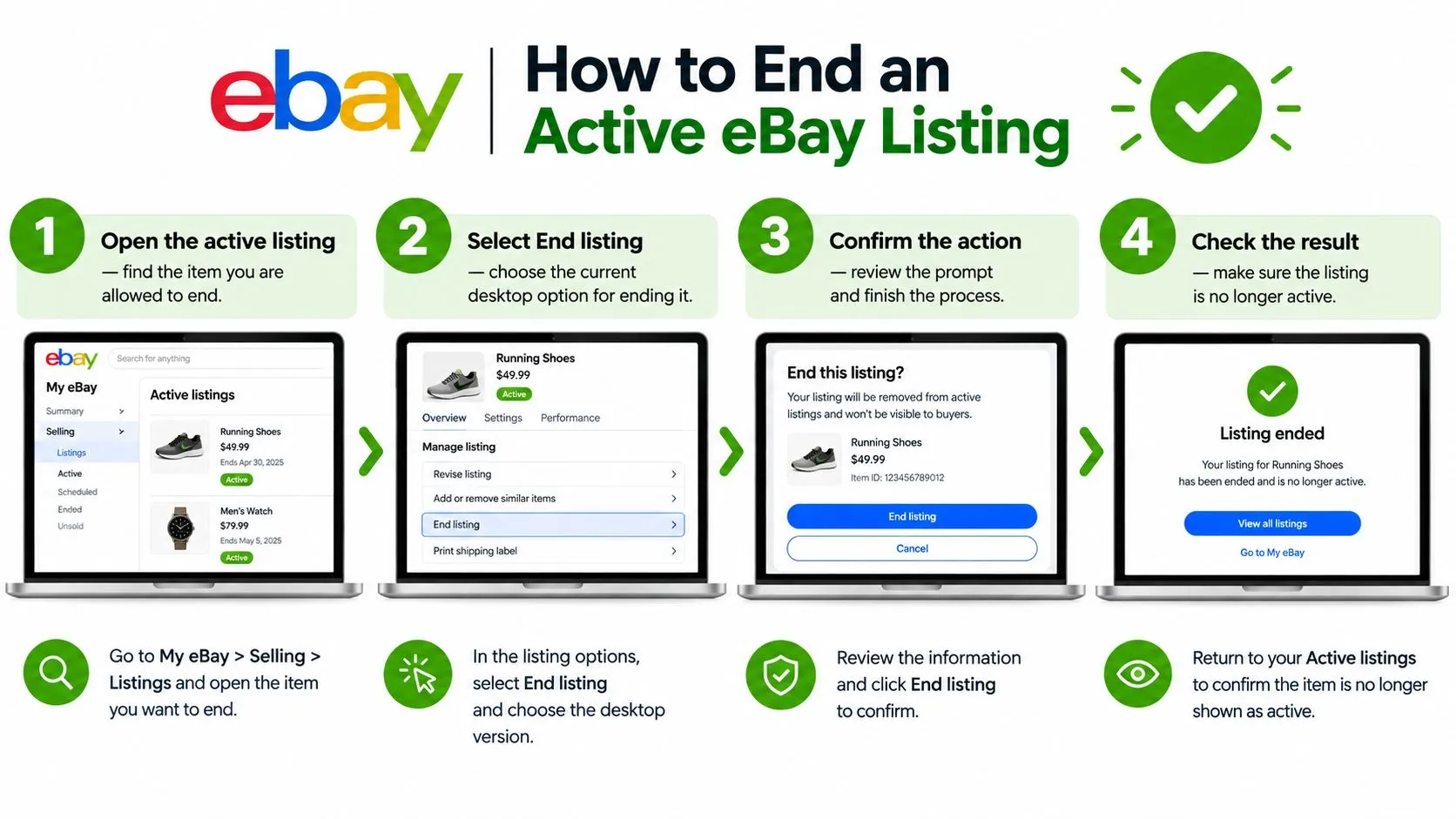
The end action is straightforward for a fixed-price listing: sellers can end it at any time. Auctions require a separate check before you confirm. If the auction has 12 or more hours remaining and no bids, it can generally be ended. If there are bids, whether it can be ended depends on the reserve status.
Stop at the auction check
When fewer than 12 hours remain, an auction with no bids can still be ended. But if it has a qualifying bid and the reserve has been met, or there’s no reserve, it ordinarily can’t be withdrawn. The seller generally has to sell to the highest bidder.
That’s the point to stop rather than force the action. If the auction is restricted, follow the sale path; if it’s eligible to end, confirm only after reviewing the prompt. The procedure doesn’t change the underlying responsibility to resolve any order that already exists.
This video provides another look at the listing-ending process:
What Changes After a Sale or a Hidden Listing
An unsold listing that you end, an order you cancel after a sale, and a listing eBay removes are three different work queues. Keep them separate in your records. Otherwise, a seller can mistake an enforcement notice for a routine ended listing, or try to solve an existing order by clicking an action that only applies to unsold inventory.
An unsold listing you ended
Ending a listing removes it from active selling, but it doesn’t guarantee a refund of listing-related fees. Don’t assume the item disappearing means the cost has been reversed. Review the listing’s status and any account information relevant to the fee.
An item that has sold
Once a buyer has purchased the item, stop treating the job as listing removal. You’re dealing with an existing order, and cancelling it can affect seller performance. Check the order and handle it through the order process rather than trying to make the listing disappear.
A listing eBay removed or hid
eBay may remove or hide listings for a policy violation, a legal requirement, a rights-owner request, or because a listing has been active for a year or more without a sale. Fee refunds depend on the circumstances, and eBay cautions sellers against relisting before they understand the reason. Repeated relisting can lead to suspension or legal action. See eBay’s guidance on removed and hidden listings.
The safe response is to investigate before trying to restore sales:
- Read the notice: Check the email registered to the account and your eBay Messages.
- Record the reason: Identify the specific policy issue or rights-holder complaint.
- Keep supporting records: Preserve proof of authenticity and other relevant documentation.
- Correct before returning: Fix the underlying listing issue instead of copying the same listing.
- Appeal where available: Follow the appeal option and note any deadline stated in the message.
A genuine item isn’t automatically protected from a rights-owner removal request. If intellectual-property rights are involved, relisting immediately can still produce another removal.
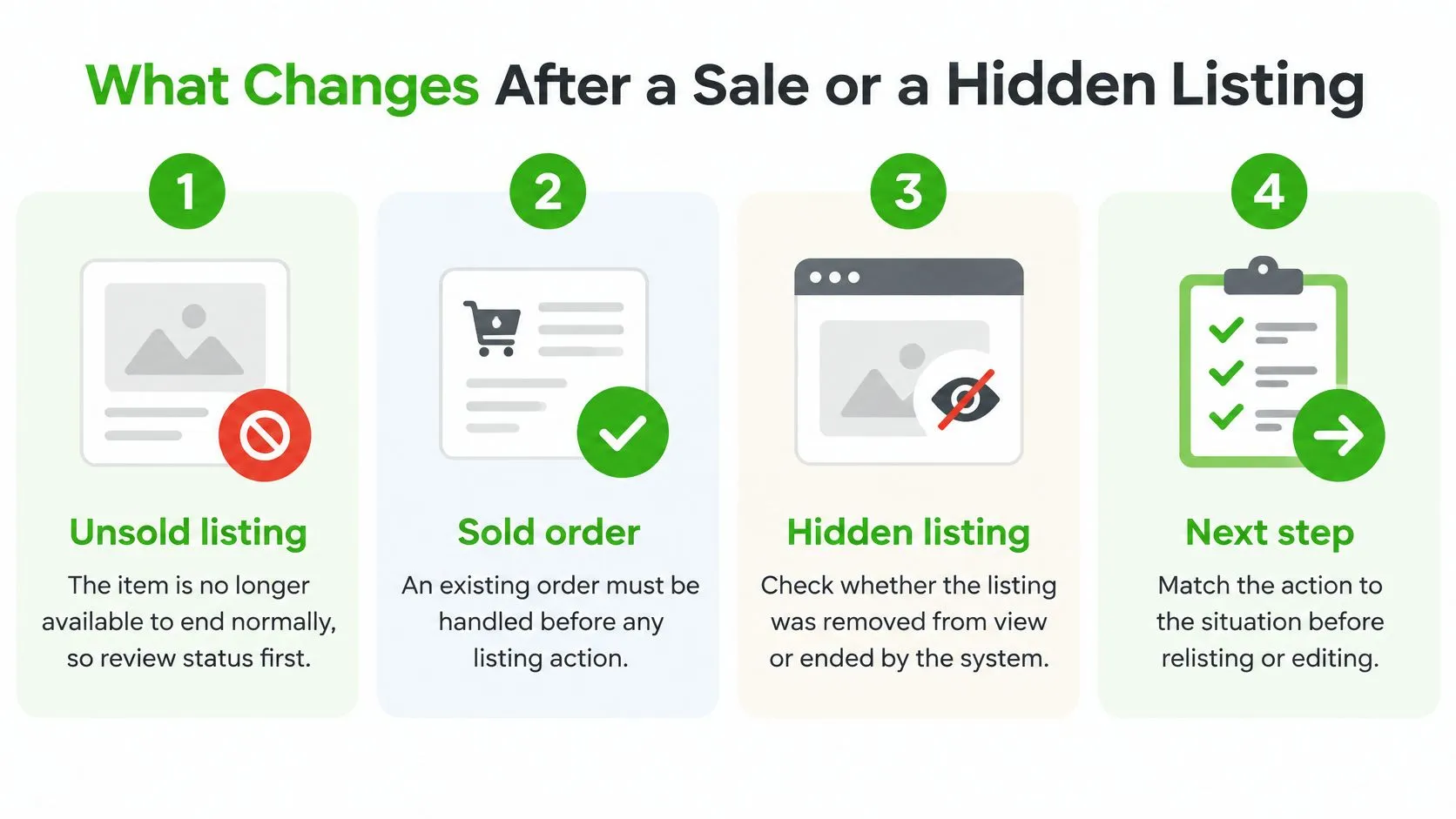
For professional resellers, make this a repeatable compliance process: track each listing’s status, capture the reason for removal, store supporting documents, record appeal deadlines, and control when the item returns to the market. The goal isn’t to put the listing back up as quickly as possible. It’s to bring it back without repeating the issue.
Tips to Relist Without Fees or Oversells
Every relist can count as a fresh listing. Depending on your monthly allowance, category, and format, putting the item back up may consume part of your free allotment or trigger an insertion fee, so decide whether the original listing can be revised before you recreate it. Revise when the listing is still live and you only need to fix the title, price, or photos. Relist only after the listing has fully ended.
Before you click relist, search Seller Hub for the item’s title or SKU. Ended listings can sit in the Unsold section or in a scheduled queue, and relisting from memory is how sellers end up with two live listings for one physical item. Update or delete the old entry first. A duplicate is an easy way to oversell a one-off product without a single sale happening.
The cleanest relist is the one you can explain: why it ended, what changed, and why the item is available again.
Cross-channel stock needs the same discipline. If a unique item sells on another marketplace while the eBay listing stays active, you face an order you cannot fulfill, followed by a cancellation the buyer did not cause. Hand-checking each channel works at small volumes. It fails once you manage many unique items, because the gap between a sale elsewhere and a manual delist on eBay is exactly where oversells happen. Automatic delisting closes that gap by pulling the eBay listing the moment stock hits zero.
Ruit is an operations platform for professional second-hand sellers in Europe. It publishes products across eBay and other channels, synchronizes stock and prices, automatically delists on other marketplaces when an item sells, and schedules relists. Sellers can manage listings from its web and mobile apps.
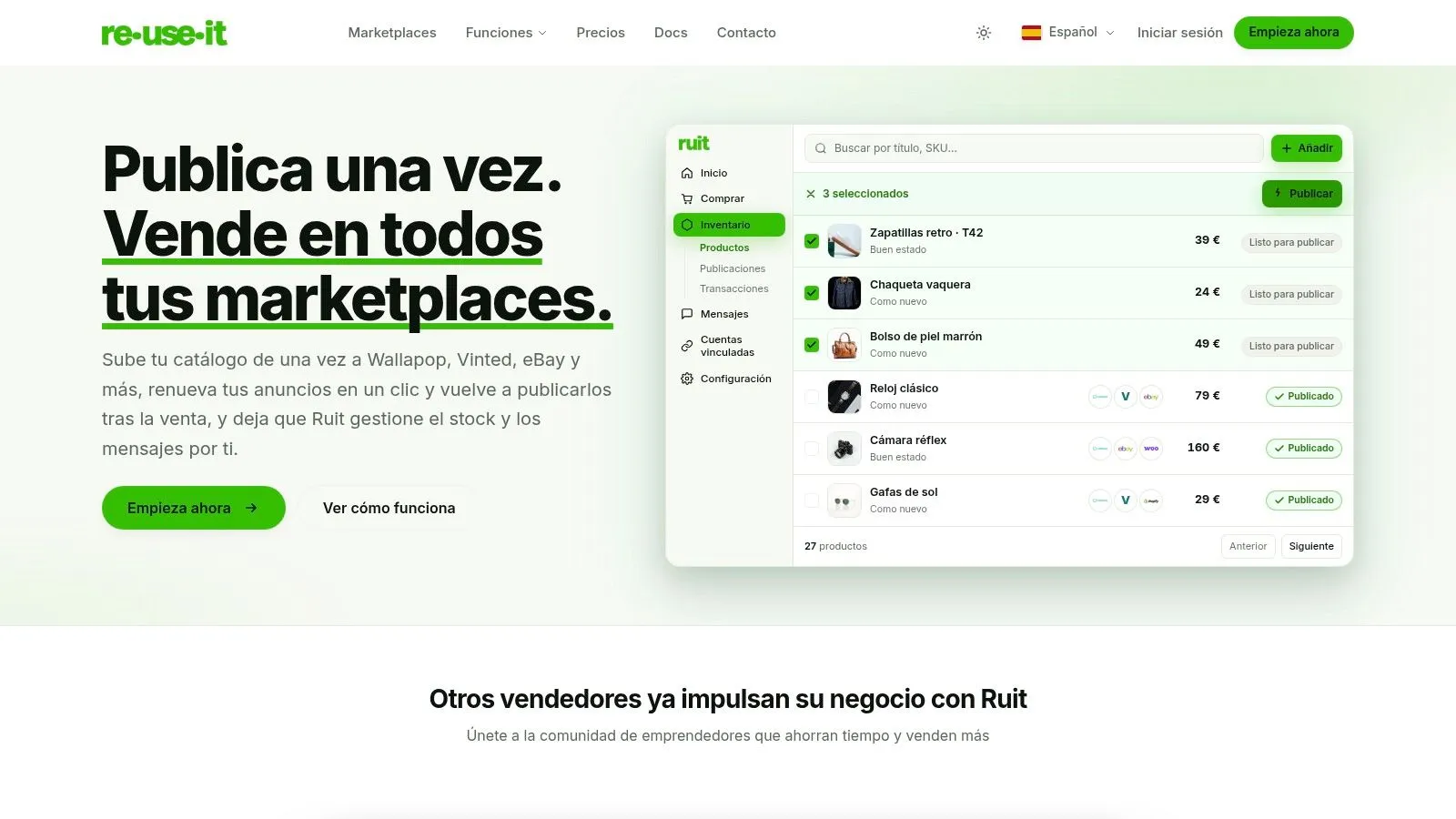
If you manage several sales channels, review how inventory sync software keeps each channel aligned. When you reprice the relist, include your real fulfilment cost rather than reusing the old figure. Australian sellers can compare carrier options with this shipping cost guidance for Australian online sellers before setting the new price.
Frequently Asked Questions
Can I end a fixed-price eBay listing at any time?
Yes. Sellers can end a fixed-price listing at any time from Seller Hub or My eBay. Ending it removes the item from active selling, but it doesn’t guarantee a refund of listing-related fees, and if a buyer has already purchased the item you’re dealing with an order, not a listing.
Can I end an eBay auction that already has bids?
It depends on the time remaining and the reserve status. With fewer than 12 hours left, an auction with a qualifying bid and a met reserve, or no reserve, ordinarily must be sold to the highest bidder. Ending early with bids can also trigger a final-value fee based on the highest bid.
Does ending an eBay listing refund the fees I paid?
Not necessarily. Ending a listing removes it from active selling, but it doesn’t guarantee a refund of listing-related fees. Review the listing’s status and your account information before assuming the cost has been reversed.
What should I do if eBay removed or hid my listing?
Read the notice in your registered email and eBay Messages, record the stated reason, keep supporting records and fix the underlying issue before the item returns to the market. Appeal where the option exists. Relisting before you understand the reason can produce another removal, and repeated relisting can lead to suspension.
Your Next Step After Removing the Listing
Pick the next action based on the listing’s actual status. If it’s still active and eligible to end, verify the format and auction details, then use Seller Hub or My eBay. If an auction is inside the restricted window with a qualifying bid, prepare to complete the sale instead of trying to force removal.
If eBay or a rights owner removed the listing, open the notice, save the stated reason and preserve relevant evidence. Don’t relist until you’ve corrected the issue or used an available appeal route. If a buyer has already placed an order, deal with the order directly rather than treating it as an unsold listing.
For sellers with the same unique stock listed in several places, the next step is to stop relying on manual delisting as the emergency fix. Centralizing stock and listing status can make a sale elsewhere trigger the right update on eBay, rather than leaving you to find and remove each listing after the sale. Make one operational change today: check the status of the item you’re dealing with, then address the cause that made removal necessary.
Ruit centralizes second-hand inventory and listings across sales channels, with stock synchronization, automatic delisting when an item sells, and scheduled relisting. If you sell on more than eBay, visit Ruit to see whether that workflow can replace manual listing updates.