Messages and sales
5 features available
- Unified messaging
- AI-suggested replies
- Rating and tracking from the chat
Messages and sales
A transaction is the money record of a product.
Not tied to a marketplace
Ruit records each sale it detects as it updates your stock.
It is the same step, so there is never a sale without its record or a duplicate record.
When you create a product, you log its purchase or sale.
The form asks whether you bought it and whether you have sold it or are going to. The price and the date are required, you add whatever costs you have, and Ruit works out the total and the projected profit.
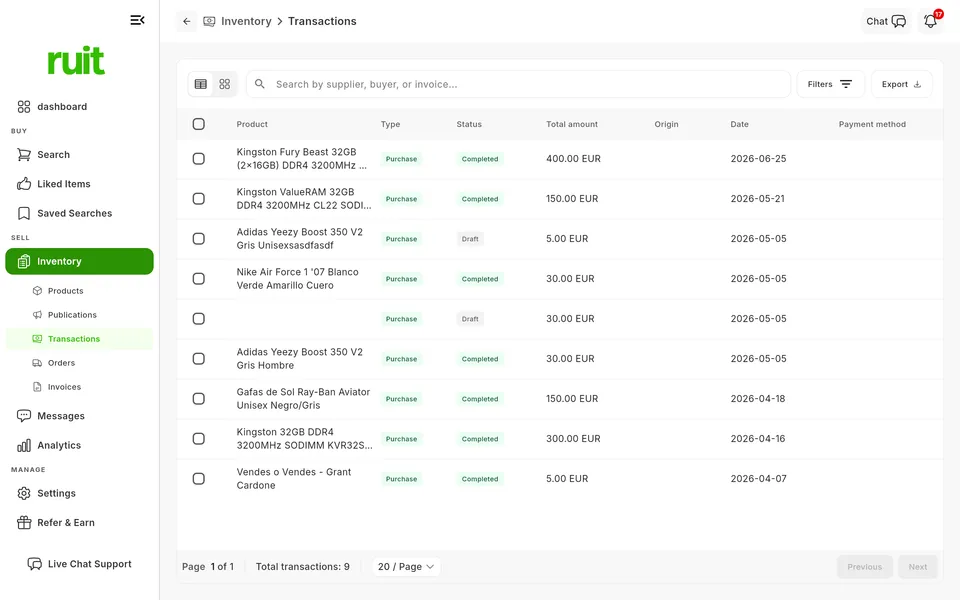
Under Inventory, Transactions gathers every record, with search and filters.
You search by supplier, buyer or invoice, filter by dates, type, status, marketplace, account and payment method, and from each row you jump to the product, its listings or its orders.
Available: Not tied to a marketplace
It works the same with any marketplace you connect, because it does not depend on any one of them.
The plans that include this feature. What each one costs is on the pricing page.
| Feature | Free | Starter | Plus | Pro | Business | Enterprise |
|---|---|---|---|---|---|---|
| Messages and sales | ||||||
| Transactions Gather the transactions from your sales and the ones you add by hand. | Not available | Available | Available | Available | Available | Available |
Transactions
Gather the transactions from your sales and the ones you add by hand.
Anything Ruit does not detect, add it when you create the product.
So the total matches reality.
Filter the period in Transactions and export the CSV, for example for your accountant.
Apart from the sales Ruit detects and completed Wallapop, Vinted, eBay, Shopify, WooCommerce, PrestaShop, Todocolección or IberLibro orders, you add the rest yourself. If you change the product's cost, Ruit carries it over to its purchase, or creates one if there was none.
When you sell on one marketplace, the product is removed from the others.
See the feature : Delist on sale5 features available
Create your account, connect your marketplaces and try these features with your inventory.