Inventory
Your eBay CSV upload starts in your Ruit inventory
There is no need to retype your spreadsheet. You upload it and AI matches its columns.
Not tied to a marketplace
Your catalog already exists, just in another format
Every spreadsheet has its own columns, separator and price format. Retyping the catalog holds back selling in more places.
-
Which files it accepts
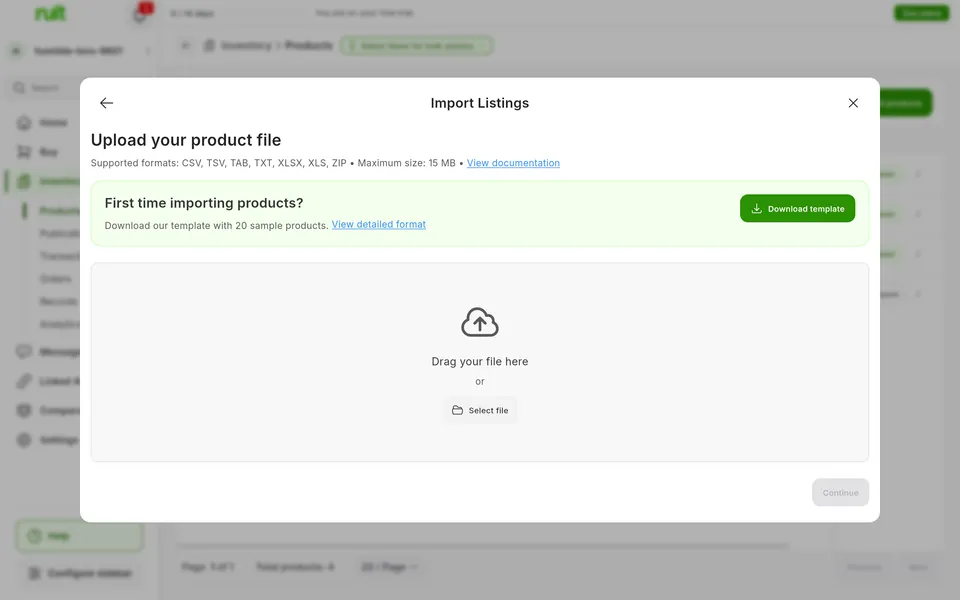
It accepts CSV, TSV, TXT, XLSX and XLS, or a ZIP holding one of them.
More detail
In text files Ruit detects the separator, and if it guesses wrong you pick it. The first time, you can download a CSV template with every column.
-
AI matches your columns
AI looks at the headers and a few sample rows, and matches each column to a field.
More detail
Your file does not need to use our column names. Less certain matches show their confidence percentage, and you can change any of them. If you reuse a format, save the mapping for next time.
-
Prices written your way
Ruit reads each price by its decimal separator, and does not guess when one is ambiguous.
More detail
So 12,50 € and 12.50 are the same price. An ambiguous one, like 1,250, flags the row as an error so you can fix it. A cell that is already a number in your Excel file is taken as it is.
-
Validation before anything changes
Before processing, Ruit tells you how many products are new and how many update one of yours.
More detail
It validates the whole file. Errors and warnings show on screen, and in a CSV report when there are many. If there are errors, you fix the file or tick Ignore validation errors.
-
The SKU prevents duplicates
A row with the SKU of one of your products updates it instead of duplicating it.
More detail
The SKU of any product in your organization counts. Without a SKU, every row creates a new product, so it is worth giving each product its own.
-
Photos, attributes and your own fields
Ruit downloads the photos from their URLs, and columns starting with attr_ fill in attributes.
More detail
Several photos fit in the same cell, separated by pipes. If one fails, the product is imported anyway and the error report says why. A column such as attr_material fills in that attribute, and your custom attributes show up as targets in the mapping step.
Where it works
Available: Not tied to a marketplace
It works the same with any marketplace you connect, because it does not depend on any one of them.
Which plan includes it
The plans that include this feature. What each one costs is on the pricing page.
| Feature | Free | Starter | Plus | Pro | Business | Enterprise |
|---|---|---|---|---|---|---|
| Inventory | ||||||
| Import from a file Load products into your inventory from a file. | Available | Available | Available | Available | Available | Available |
Inventory 1 available
-
Import from a file
Load products into your inventory from a file.
- Available: Free
- Available: Starter
- Available: Plus
- Available: Pro
- Available: Business
- Available: Enterprise
How to use it, step by step
- 1
Upload the file
In the inventory, click Add, then Import listings and the CSV/Excel card, and drag the file in.
- 2
Map the columns
Review the AI suggestion, fix whatever needs it and save the mapping if you will reuse it.
- 3
Validate and process
Check the summary, decide what to do about errors and click Process import.
Good to know
What you choose in Review conflicts is not applied, because the SKU decides, and each file has a maximum size. When updating, a missing column goes back to its default, but the product keeps its photos and tags.
How do I upload a CSV file to eBay?
Do I need an eBay CSV upload template?
Can I do a mass upload to Vinted?
Which columns does my file need?
How many rows can it have?
Related features
-
Catalog import
Bring into Ruit the listings you already have on a marketplace.
See the feature : Catalog import -
Custom attributes
Add your own fields to your products, on top of the standard ones.
See the feature : Custom attributes -
Bulk publishing
Publish many products at once on one or more marketplaces.
See the feature : Bulk publishing
More features in this group
Start with your own products
Create your account, connect your marketplaces and try these features with your inventory.